

Deno 2.8 is here. This is our biggest minor release to date and we’re excited to share it with you.
To upgrade to Deno 2.8, run the following in your terminal:
If Deno is not yet installed, run one of the following commands to install or learn how to install it here.
curl -fsSL https://deno.land/install.sh | sh


iwr https://deno.land/install.ps1 -useb | iex
New subcommands
deno audit fix
deno audit
(shipped in 2.6)
reports vulnerabilities in npm packages in your dependency tree. The new
deno audit fix subcommand goes one step further and automatically upgrades
affected packages to the nearest patched version that still satisfies your
version constraints (#32909,
#34273). The same behavior is
also available as a --fix flag on deno audit:
$ deno audit fix
╭ body-parser vulnerable to denial of service when url encoding is enabled
│ Severity:   high
│ Package:    body-parser
│ Vulnerable: <1.20.3
╰ Info:       https://github.com/advisories/GHSA-qwcr-r2fm-qrc7

╭ Express.js Open Redirect in malformed URLs
│ Severity:   moderate
│ Package:    express
│ Vulnerable: <4.19.2
╰ Info:       https://github.com/advisories/GHSA-rv95-896h-c2vc

Found 2 vulnerabilities
Severity: 0 low, 1 moderate, 1 high, 0 critical

Fixed 1 vulnerability:
  body-parser 1.19.0 -> 1.20.3

1 vulnerability could not be fixed automatically:
  express (major upgrade to 5.0.0)
Anything that needs a major-version bump is listed separately, so you can decide
whether to relax the constraint.
Learn more about deno audit fix.
deno bump-version
deno bump-version updates the version field in your deno.json or
package.json (#30562):
$ deno bump-version patch
$ deno bump-version minor
$ deno bump-version major
$ deno bump-version prerelease
In a workspace it does more. Run it at the workspace root and the same increment
is applied to every member package, with matching jsr: version constraints in
the root config and import map rewritten in place so cross-package references
stay in sync (#33689):
$ deno bump-version patch
Without an increment argument, workspace mode switches to deriving per-package
bumps from Conventional Commits between
a base ref and the current branch. It honors scoped commits, wildcard *
scopes, BREAKING / ! for major bumps, prerelease increments, and 0.x.y
semver semantics, and treats any manual version edits since the base ref as
authoritative.
$ deno bump-version --base=main --dry-run
--dry-run prints the planned changes without writing anything, and --start /
--base let you pin the comparison range when the default “current branch since
the latest tag” isn’t what you want.
Learn more about deno bump-version.
deno ci
CI scripts and Dockerfiles want one thing from an install: “give me exactly what
the lockfile says, and fail loudly if anything is off.” Until now that meant
remembering the right combination of flags on deno install. Deno 2.8 adds a
dedicated deno ci
subcommand (#34235):
It errors if deno.lock is missing, removes any existing node_modules
directory, and then runs the install with --frozen so the lockfile must match
the config file exactly. Drop it into your CI step or Dockerfile and you get
an obvious, greppable signal of “reproducible install” without having to think
about flags. --prod and --skip-types work the same way they do on
deno install.
deno pack
deno pack is closer to tsc + npm pack combined than to npm pack alone:
it builds a Deno or JSR project into an npm-publishable tarball in one shot
(#32139). Given a deno.json
like:
deno.json
{
  "name": "@scope/my-lib",
  "version": "1.0.0",
  "exports": "./mod.ts"
}
…running deno pack produces a scope-my-lib-1.0.0.tgz that’s ready for
npm publish. The tarball contains:
- A generated
package.jsonwithtype: "module", conditionalexports(types/import/default), and the extracted runtime dependencies. - Your TypeScript transpiled to JavaScript.
.d.tsdeclaration files extracted via the same fast-check pipelinedeno publishuses (pass--allow-slow-typesto skip).READMEandLICENSEfiles if present in the project root.
Along the way deno pack rewrites specifiers so the published package works
inside the npm ecosystem: jsr:@std/path becomes @jsr/std__path,
npm:express@4 becomes express, relative ./utils.ts imports become
./utils.js, and node: builtins are left alone. Deno.* API calls are left
as-is; packages that rely on Deno APIs will need to polyfill them separately if
targeting Node.
File selection is graph-based: only modules reachable from your declared
exports are bundled, not whatever sits in the directory. Tarballs are
deterministic (sorted entries, fixed timestamps and permissions), which matters
for reproducible builds and content-addressed registries.
$ deno pack
$ deno pack --dry-run
$ deno pack --set-version 2.0.0
$ deno pack --output my-package.tgz
$ deno pack --ignore=tests/
$ deno pack --allow-dirty
deno transpile
A new subcommand strips types from TypeScript, JSX, and TSX and writes plain JavaScript to disk. No bundling, no module rewriting, no config. Just the emit step.
greeter.ts
interface User {
  name: string;
  balance: number;
}

export function greet(user: User): string {
  return `Hello ${user.name}, you have $${user.balance.toFixed(2)}`;
}
$ deno transpile greeter.ts -o greeter.jsgreeter.js
export function greet(user) {
  return `Hello ${user.name}, you have $${user.balance.toFixed(2)}`;
}
deno transpile accepts multiple files, --outdir for batch output,
--source-map separate|inline, and --declaration to emit .d.ts alongside
the JS. Useful when you need to publish a JS-only artifact or pre-build TS for a
runtime that doesn’t speak it natively.
Learn more about deno transpile.
deno why
deno why <package> explains why a package is installed by walking from your
direct dependencies down to the package in question
(#32908). It’s the equivalent of
npm explain / pnpm why / yarn why. It works with both npm and JSR
dependencies (#34227).
Given a project that mixes both registries:
deno.json
{
  "imports": {
    "express": "npm:express@^4",
    "dax": "jsr:@david/dax@^0.43"
  }
}
deno why traces an npm transitive back to its npm entry point:
$ deno why qs
[email protected]
  npm:express@4 > [email protected]

[email protected]
  npm:express@4 > [email protected] > [email protected]
…and a JSR transitive back to its JSR entry point, with each path through the tree listed separately:
$ deno why @std/path
@std/[email protected]
  jsr:@david/[email protected] > @std/[email protected]
  jsr:@david/[email protected] > @david/[email protected] > @std/[email protected]
  jsr:@david/[email protected] > @std/[email protected] > @std/[email protected]
  jsr:@david/[email protected] > @david/[email protected] > @std/[email protected] > @std/[email protected]
Pin to a specific version with deno why [email protected] or
deno why @std/[email protected] when you only care about one branch of the tree.
Learn more about deno why.
Deno now defaults to npm:
Deno 2.8 drops the npm: prefix requirement at the CLI: deno add and
deno install now treat unprefixed names as npm packages by default
(#33246), so the command you type
matches what every Node developer already types out of muscle memory.
$ deno add express
error: express is missing a prefix. Did you mean `deno install npm:express`?


$ deno add express
Add npm:[email protected]

Dependencies:
+ npm:[email protected]
The npm: prefix still works (and is still required in import specifiers),
but you don’t have to type it at the CLI. JSR packages keep the jsr: prefix so
the two registries stay unambiguous.
With this change deno install becomes a drop-in for npm install, yarn, or
pnpm install in an existing Node project. It reads package.json, writes a
compatible node_modules layout, and
installs 3.66x faster than 2.7 on a cold cache; warm installs
are faster still thanks to Deno’s shared global cache across projects. Reach for
Deno as your package manager and keep running everything else on Node.
Learn more about deno install.
Node.js API compatibility
Node.js compatibility has been an important focus for us in the past couple
years. And we’re happy to announce that we made a huge leap forward in Deno 2.8:
pass rate against Node’s own test suite jumped from roughly 42% in Deno 2.7 to
76.4% in Deno 2.8 (3,405 of 4,457 tests passing); 500 commits landed since
Deno 2.7, touching nearly every node: module.
We keep close track of this percentage at node-test-viewer.deno.dev:
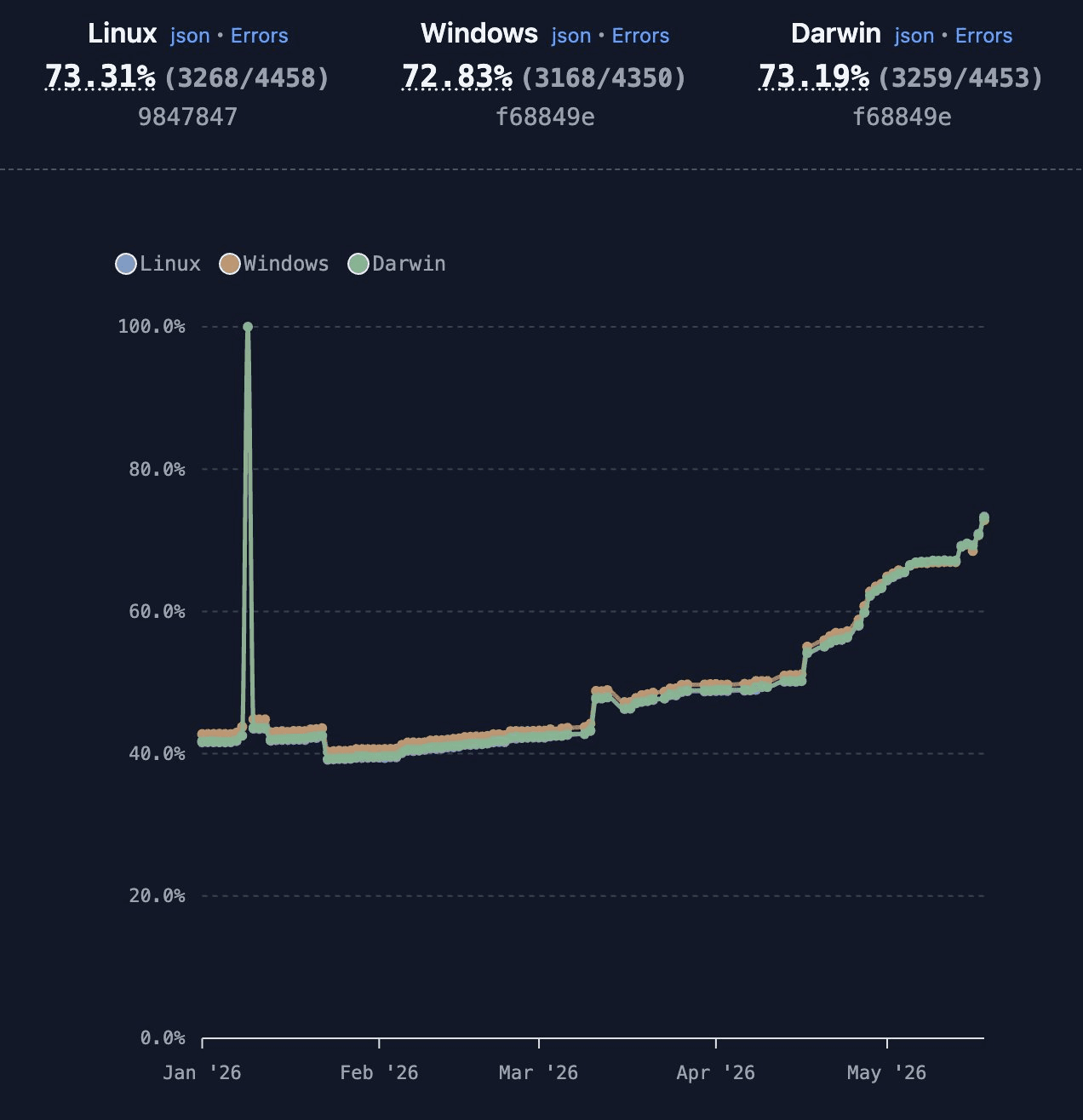
Head-to-head against Bun 1.3.14 on the same suite:
Node.js test suite pass rate (4,457 tests)
Deno v2.8
76.4% (3,405)
Bun 1.3.14
40.6% (1,810)
Excluding tests that bail out early: Deno 2.8 72.4% (3,229 / 4,457) vs Bun 1.3.14 36.4% (1,623 / 4,457).
Deno 2.8 also makes Node compatibility cheaper in real projects: many Node
built-in modules are now lazy-loaded, so programs that don’t touch them start
faster (importing one of those modules later pays a small deferred load cost).
Several node:* hot paths also picked up dedicated optimizations; see the
Performance section below for benchmark numbers.
Performance
Deno 2.8 ships meaningful speedups across the package manager, node:*
compatibility, HTTP serving, and the Web platform. Measured on Linux against
Deno 2.7.1:
Deno 2.7 (gray) vs 2.8 (blue)
Cold npm install
lower is better
3.66x faster
node:buffer base64
lower is better
3.07x faster
node:http throughput
higher is better
v2.7
8,339 req/s
v2.8
18,431 req/s
2.21x faster
node:crypto scrypt
lower is better
2.12x faster
node:http p99 latency
lower is better
v2.7
20.86 ms
v2.8
11.89 ms
1.75x faster
node:http chunked writes
higher is better
v2.7
6,635 req/s
v2.8
11,521 req/s
1.74x faster
Chunked writes p99
lower is better
v2.7
25.39 ms
v2.8
15.68 ms
1.62x faster
node:fs recursive cpSync
lower is better
1.49x faster
Worker MessagePort ping-pong
lower is better
v2.7
1,678 ms
v2.8
1,270 ms
1.32x faster
Bars share a scale per order of magnitude. Process benchmarks: 30 hyperfine samples. HTTP benchmarks: 10 samples of 30-second oha runs.
Cold npm installs. An entrypoint importing React, Vite, Babel parser, and
ESLint installs 3.66x faster in Deno 2.8, 3,319ms down to 906ms, on a
fresh DENO_DIR. Across 30 samples, the bootstrap 95% confidence interval for
the speedup was 3.53x to 3.75x. A few of the changes that fed into that
number:
- Abbreviated packuments
(#32364). The npm registry
exposes a smaller “abbreviated” metadata document
(
application/vnd.npm.install-v1+json) that includes only the fields a resolver needs; Deno now uses this smaller document for resolution and only fetches the full packument if it needs to. - Parallel npm resolution (#32416). The resolver used to walk parent nodes one at a time. Deno 2.8 fans out across parent nodes too, so independent branches of the dependency tree no longer wait on each other.
- Decompression off the async event loop (#32400). Large packument gzip decompression could stall other HTTP/2 streams sharing the same connection. Deno 2.8 routes registry-body decompression through a blocking thread pool, freeing the event loop for more concurrent requests.
- Tarball extraction split into CPU and I/O phases
(#32408). Tarball extract used
to be a single tight loop. It now splits into a CPU-bound decompression phase
and an I/O-bound filesystem write phase. Pairs with libdeflater + a
preallocated buffer (#32511)
(a faster gzip decoder than the stock
flate2) and fewer syscalls during tarball extraction (#32541).
node:http. Hello-world node:http more than doubles throughput (2.21x)
and cuts p99 latency by roughly 40%; chunked responses see comparable gains
(1.74x throughput, 1.62x tail latency).
base64 across the board. A single change, switching base64 encode/decode
to simdutf
(#32743), drives 3.07x faster
node:buffer base64 (2,594ms down to 844ms) and the same kind of speedup
for atob / btoa and every Web API path that touches base64.
Other node:* hot paths. scryptSync from node:crypto is now 2.12x
faster, Rust-backed recursive node:fs cpSync gets 1.49x faster, and
exchanging messages over MessagePort between Workers is now 1.32x faster.
Deno.serve. Native Deno.serve got a direct dispatch into the JS handler,
a fast path for fully-buffered response bodies, and lighter Vary handling
(#33845,
#33844,
#33892). A hello-world benchmark
sees 1.13x increase in throughput and 1.20x lower median p99 latency.
Other optimizations. A pile of smaller wins that show up everywhere:
TextEncoder/TextDecoderfast paths for ASCII / Latin-1 / short strings (#32735, #33674, #33675, #34055).- Linear-time
set/deleteonFormData,URLSearchParams, andHeaders(#33961), no more quadratic blowups on large header sets. URLPatternops drop serde overhead and GC pressure (#32766), so middleware that matches every request gets cheaper.- Zero-copy V8-to-Rust string conversion in op slow-paths
(#32688) and a SIMD ASCII fast
path for
op_decode(#33720), whichResponse.text(),File.text(), and FormData parsing all ride on. - V8 thread pool capped at 4 threads (#33697), trimming ~1 MB RSS on a typical desktop.
malloc_trimafter module loading (#32662) and on Worker termination (#32617), fixing 3–5x RSS bloat on Linux when loading large TypeScript codebases.
import defer
Deno now supports the TC39 import defer proposal: a module can be loaded and parsed without running its top-level code. The module is then only evaluated the first time you touch one of its exports (#32360).
This feature is useful for trimming startup time when a module is expensive to evaluate but rarely used on a given codepath.
deferred.js
console.log("deferred module evaluated");
export const value = 42;
main.js
import defer * as deferred from "./deferred.js";

console.log("before access");
console.log(`value: ${deferred.value}`);
console.log("after first access");
$ deno run main.js
before access
deferred module evaluated
value: 42
after first access
The deferred module evaluated line lands between before access and the
property read. Module evaluation is delayed until something actually needs it.
The same semantics are available with import.defer() for dynamic imports. A
common pattern: pre-load both branches of a decision, but only evaluate the one
you actually pick.
png-decoder.js
console.log("PNG decoder evaluated");
export function decode(bytes) {}
jpeg-decoder.js
console.log("JPEG decoder evaluated");
export function decode(bytes) {}
main.js
const png = await import.defer("./png-decoder.js");
const jpeg = await import.defer("./jpeg-decoder.js");

const format = Deno.args[0];
const decoder = format === "png" ? png : jpeg;

const bytes = Deno.readFileSync(`input.${format}`);
console.log(decoder.decode(bytes));
$ deno run -R main.js png
PNG decoder evaluated
Both modules are fetched and parsed up front, but only the selected one is evaluated.
import defer Works in .ts and .tsx files with no extra setup. deno check
and the LSP both understand the syntax:
main.ts
import defer * as deferred from "./deferred.ts";

const n: number = deferred.value;
Learn more about import defer.
TypeScript 6.0.3
The bundled TypeScript compiler is updated to 6.0.3 (#32944). 6.0 is a transition release the TypeScript team uses to land breaking changes and deprecations before the native-port 7.0 ships; see Microsoft’s Announcing TypeScript 6.0 post for the full list.
deno check, deno bundle, the LSP, and deno compile all use the new version
automatically. No flag, no config change.
lib.node included by default
deno check and the LSP now include lib.node in every type-check by default
(#33823). Before 2.8 you had to
add "node" to compilerOptions.lib in deno.json (or sprinkle
/// <reference types="node" /> across files) to get NodeJS.*, Buffer,
process, and the rest of Node’s ambient types to resolve. Now they’re just
there:
node_globals.ts
const buf: Buffer = Buffer.from("hello");
const t: NodeJS.Timeout = setTimeout(() => {}, 0);
console.log(process.versions.node);
lib.node is implemented on top of @types/node, and Deno pulls that package
from npm whose major version matches the Node release Deno reports in
process.versions.node. Today that’s the Node 24.x types, in line with the
version returned by:
node_version.ts
console.log(process.versions.node);
If you’d rather pin a different version of @types/node (for example because
your project standardizes on Node 22, or because you need a newer patch), just
declare it as a dependency and Deno will use yours instead of the bundled copy:
package.json
{
  "devDependencies": {
    "@types/node": "^22.10.0"
  }
}
deno.json
{
  "imports": {
    "@types/node": "npm:@types/node@^22.10.0"
  }
}
In practice the default behavior means npm packages with Node-typed APIs (i.e.
nearly all of them) type-check cleanly when imported via npm:, and library
authors writing for both runtimes can rely on NodeJS.Timeout, Buffer, and
friends without telling Deno consumers to configure their TypeScript.
The trade-off is that Node-only globals like process and Buffer are now in
scope at the type level even when you don’t want them, which can quietly
encourage code that won’t run in the browser. The
no-process-global and
no-node-globals lint rules
used to be on by default to catch this; in 2.8 they are off by default but still
available (#33247). Re-enable
them in deno.json if your project targets multiple runtimes:
deno.json
{
  "lint": {
    "rules": {
      "include": ["no-process-global", "no-node-globals"]
    }
  }
}
The runtime globals themselves are unchanged. This is purely a type-level addition. Learn more about including Node types.
Debugging
A major addition to debugging capabilities in 2.8 is that Chrome DevTools can
now inspect Deno’s network traffic. Run your program with --inspect-wait (or
--inspect / --inspect-brk), open chrome://inspect in Chromium, click
Inspect on the Deno target, and the DevTools Network tab now shows every
fetch(), node:http / node:https client request, and WebSocket your
program makes (including server-side WebSockets opened via
Deno.upgradeWebSocket()), with request and response headers, status codes,
bodies, and timing, exactly the way you’d see network traffic in a browser tab.
server.ts
const res = await fetch("https://api.github.com/repos/denoland/deno");
console.log(res.status, (await res.json()).stargazers_count);
$ deno run --inspect-wait --allow-net server.ts
Debugger listening on ws://127.0.0.1:9229/...
Visit chrome://inspect to connect to the debugger.
Deno is waiting for debugger to connect.
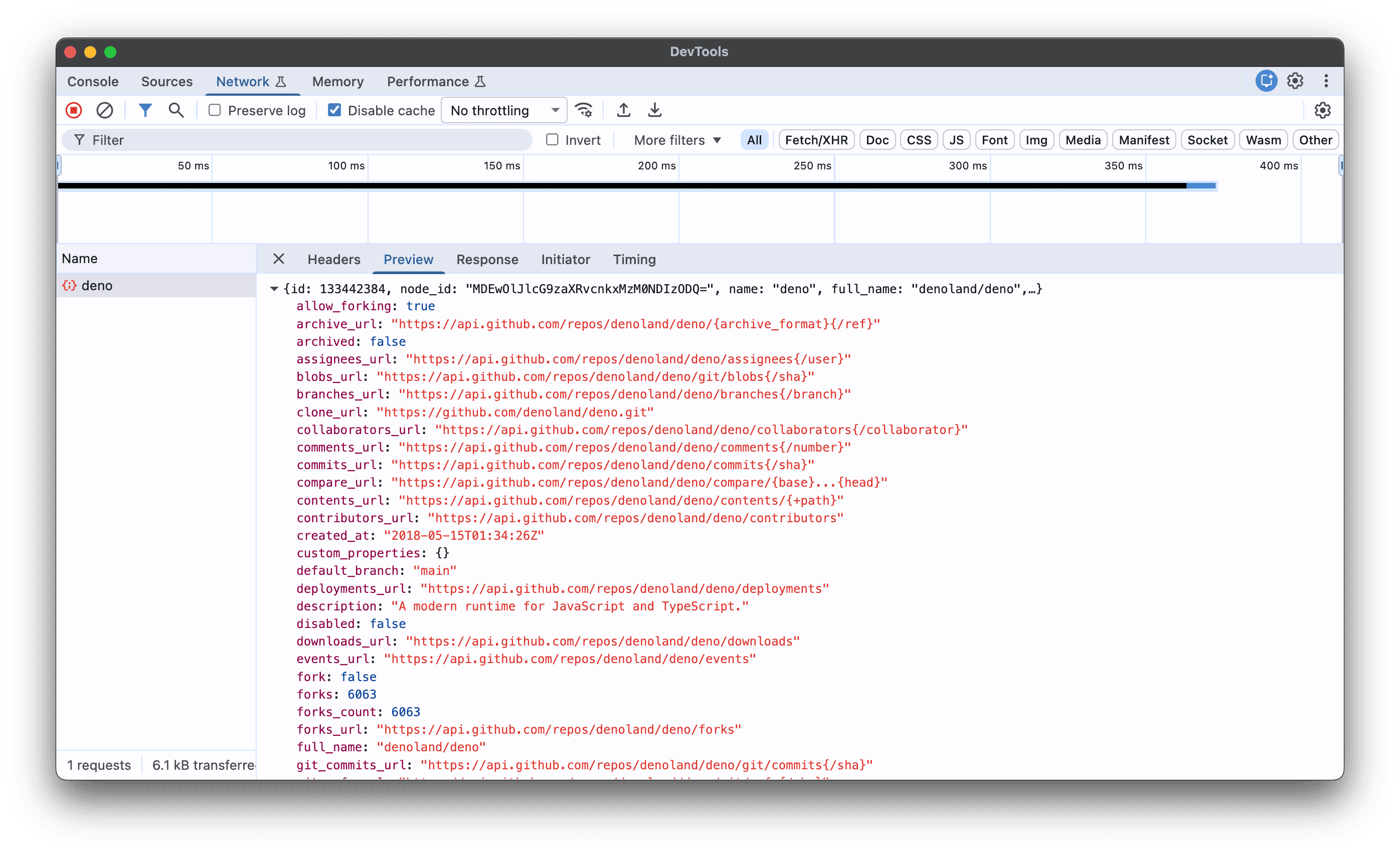
Under the hood this required implementing the
Network CDP domain
on the inspector side and wiring fetch(), node:http, and WebSocket into it
on the runtime side:
The same events also surface through node:inspector for programmatic clients
and through any other CDP frontend (VS Code’s JavaScript debugger, the
standalone chrome-devtools-frontend, etc.), so tooling that already speaks CDP
against Node can attach to Deno without changes.
Learn more about inspecting network traffic.
CPU profiling
Deno 2.8 ships a built-in CPU profiler that matches Node’s
--cpu-prof flag, plus a few
extras. Start the profiler with --cpu-prof and Deno writes a V8 CPU profile to
disk when the program exits
(#31909):
$ deno run --cpu-prof main.ts
$ ls
CPU.20260519.022823.34721.0.001.cpuprofile  main.ts
The .cpuprofile file opens directly in Chrome DevTools (Performance panel,
then Load profile) or any tool that speaks the V8 profile format (eg.
V8’s profview). For times when
you don’t want to load a profile into a UI, two new output formats land
alongside it:
--cpu-prof-flamegraphwrites a self-contained, interactive SVG you can open in any browser, no extra tooling required (#32572).--cpu-prof-mdwrites a human-readable Markdown report with the hottest functions, the call tree, and per-function details.
Combine them in a single run:
$ deno run --cpu-prof --cpu-prof-flamegraph --cpu-prof-md main.ts
$ ls
CPU.20260519.022823.34721.0.001.cpuprofile
CPU.20260519.022823.34721.0.001.svg
CPU.20260519.022823.34721.0.001.md
The Markdown report is the fastest way to triage a slow run from a terminal:
# CPU Profile

| -------: | ------: | -------: | --------: |
| 187.81ms |      74 |   1000us |        34 |

**Top 10:** `fib` 100.0%

## Hot Functions (Self Time)

| -----: | ------: | -----: | ------: | -------- | --------- |
| 100.0% | 72.00ms | 100.0% | 72.00ms | `fib`    | main.ts:1 |
The SVG flamegraph is interactive. Click any frame to zoom, hover to see exact timings:
Learn more about CPU profiling in Deno.
Package and workspace management
catalog: protocol
Monorepos that share dependency versions across packages used to require manual
coordination: every member’s package.json had to be updated in lockstep when a
shared dep was bumped. Deno 2.8 adopts pnpm’s
catalog: protocol, letting you declare versions
once in the workspace root and reference them by name from each member
(#32947).
Declare a default catalog in the workspace root:
deno.json
{
  "workspace": ["./packages/api", "./packages/web"],
  "catalog": {
    "hono": "^4.6.0",
    "zod": "^3.23.0"
  }
}
Then reference it from any member with the bare catalog: specifier:
packages/api/package.json
{
  "name": "api",
  "dependencies": {
    "hono": "catalog:",
    "zod": "catalog:"
  }
}
For projects that need multiple catalogs (e.g. one for production, one for build
tooling), use named catalogs under the plural catalogs field:
deno.json
{
  "workspace": ["./packages/api"],
  "catalogs": {
    "runtime": { "hono": "^4.6.0" },
    "tools": { "typescript": "^6.0.0" }
  }
}
packages/api/package.json
{
  "dependencies": { "hono": "catalog:runtime" },
  "devDependencies": { "typescript": "catalog:tools" }
}
catalog: also resolves correctly inside package.json overrides
(#33799) and inside workspaces
declared in the object form
(#33816), so the protocol works
the same way no matter where you reach for it.
Learn more about the catalog: protocol.
Cross-platform npm installs
A lot of popular npm packages ship platform-specific native binaries via
optionalDependencies: esbuild, sharp, rollup, the SWC family, and so on. Deno
reads the os and cpu fields declared on each optional dependency, compares
them to the host platform, and only fetches the binary you can actually run.
Installs stay small, fast, and free of untrusted binaries from platforms you
don’t ship to.
The trade-off shows up when you do want a different platform: building a Linux
ARM64 Docker image from a macOS dev laptop, prepping a CI artifact for Windows,
or pre-populating a cache for a deploy target. The new --os and --arch flags
on deno install tell the resolver to pretend it’s on a different host,
mirroring npm install --os --cpu
(#32785):
$ deno install --os=linux --arch=arm64
Supported --os values: aix, android, darwin, freebsd, linux,
openbsd, sunos, win32. Supported --arch values: arm, arm64, ia32,
mips, mipsel, ppc, ppc64, s390, s390x, x64.
Learn more about cross-platform installs.
--prod flag
Production deploys rarely need devDependencies or @types/* packages. Until
now deno install always pulled them in anyway, padding the install size and
adding npm packages you don’t actually ship. The new --prod flag skips both
(#33248):
Drop it into your Dockerfile or CI release step and your production image gets
only the dependencies it needs to run.
Learn more about --prod.
Hoisted node_modules
Deno’s default node_modules layout is isolated: each package gets its own
symlink-resolved tree, so it can only see the dependencies it explicitly
declared. That’s the right default for new projects, but some legacy npm tooling
assumes the flat, hoisted layout that npm install produces, where every
package lives at the top level of node_modules and can require() anything it
finds.
deno.json gets a new nodeModulesLinker field for those cases
(#32788):
deno.json
{
  "nodeModulesDir": "manual",
  "nodeModulesLinker": "hoisted"
}
Valid values are "isolated" (the default) and "hoisted". Use the latter when
porting an existing Node project that relies on the npm-style layout.
Learn more about isolated vs. hoisted node_modules.
.npmrc support
Several gaps in Deno’s .npmrc handling were closed this release.
min-release-age is the headline addition. The feature itself
shipped in 2.6:
Deno refuses to install a package version younger than the configured age, which
catches the vast majority of npm supply-chain attacks before they land in your
tree (malicious versions are typically detected and yanked within a few days of
publishing). In 2.8 you can also configure it from .npmrc, matching the npm
convention so existing tooling keeps working
(#33983):
.npmrc
min-release-age=72hThe remaining improvements unblock common authentication and configuration scenarios with private registries:
certfileandkeyfilefor mutual-TLS authentication (#32655)emailfield on_authentries, used by some legacy on-prem registries (#32616)NPM_CONFIG_REGISTRYcorrectly overrides the registry declared in.npmrc(#32394)
Learn more about .npmrc configuration.
file: and link: dependencies in npm packages
file: and link: specifiers point at a local path on the publisher’s machine
and only make sense during development. Plenty of published npm packages still
ship with one accidentally left in their package.json:
some-published-package/package.json
{
  "name": "some-package",
  "version": "1.2.3",
  "dependencies": {
    "lodash": "^4.17.0",
    "local-helpers": "file:../local-helpers"
  }
}
That stray file: entry used to break Deno with a cryptic error during
resolution:
$ deno install
error: Invalid version requirement. Unexpected character.
  [email protected] -> local-helpers
In 2.8, file: and link: specifiers are silently skipped while parsing
registry metadata, so packages that carry stray local-path deps install cleanly
(#32876). The actual code those
deps reference is bundled into the published tarball anyway, so nothing’s lost
by ignoring them.
Learn more about file: and link: dependencies.
--package-json flag
Projects migrating from Node often end up with both a package.json and a
deno.json. By default, deno add, deno install, deno remove, and
deno uninstall modify deno.json because that’s where Deno-native projects
keep their dependencies. The new --package-json flag forces those subcommands
to target package.json instead, useful when you want the npm-style manifest to
remain the source of truth for your team’s tooling
(#33199):
$ deno add --package-json express
$ deno install --package-json
$ deno remove --package-json lodash
Learn more about --package-json.
Bug fixes
Deno’s package management code is a moving target. Every release brings a lot of small correctness fixes, and 2.8 is no exception: 35 of them landed. A few worth calling out explicitly:
- Peer dependency resolution got two meaningful improvements: a fix for cases where a peer dep ended up installed in multiple conflicting versions and caused hangs (#32358), and memoization of peer-cache hit checks that previously blew up combinatorially on large workspaces (#32609).
- Aliased
package.jsondependencies ("my-name": "npm:foo@1") are now all linked intonode_modules, not just the canonical one (#33068). - Global installs regenerate their lockfile correctly when you pass
--force(#33970). deno update --lockfile-onlyno longer rewrites your config file alongside the lockfile, restoring the contract of the--lockfile-onlyname (#33746).
deno compile updates
deno compile keeps moving toward “point it at a project, get a binary back” as
the default workflow. Two new features cover most of that ground in 2.8, plus a
batch of fixes for binaries that re-launch themselves the way many npm published
CLIs do.
Framework detection
Running deno compile . (or deno compile ./myapp) now auto-detects the web
framework you’re using, runs deno task build to produce build output, and
generates the right entrypoint for it
(#33164). The supported list
covers most of the popular options: Next.js, Astro, Fresh, Remix, SvelteKit,
Nuxt, SolidStart, TanStack Start, and Vite SSR.
$ deno compile .
Compile file:///project/main.ts to file:///project/myapp
Detected Vite SSR project
Running deno task build...
...
Entrypoints use import.meta.dirname so paths resolve against the virtual
filesystem inside the compiled binary, which means a Next.js or Astro build
shipped as a single executable now works without a separate runtime wrapper.
Learn more about framework detection.
Other improvements
For projects with large npm dependency trees deno compile used to go silent
for tens of seconds. It now reports progress through each phase
(#33874): an animated progress
bar in an interactive terminal, or per-phase log lines in CI and piped output.
Operations that finish in under 120ms render nothing, so fast paths stay quiet.
A batch of fixes targets compiled npm CLIs that re-launch themselves (e.g.
@google/gemini-cli). child_process.spawn and child_process.fork skip the
Node-to-Deno CLI argument translation when running inside a standalone binary
(#32980), the duplicate exe path
is stripped from argv when a standalone binary relaunches itself
(#33016), and process.argv[1]
now resolves to Deno.execPath() in compiled binaries instead of the entrypoint
URL (#32990). The self-extracting
cache directory also moves to a hidden directory next to the executable
(#32329) so it no longer clutters
the binary’s parent directory.
A few smaller fixes round out the section: --env-file resolves
parent-directory paths again and a missing env file no longer aborts
deno compile (#32686); bundling
CSS treats same-document fragment URLs as external
(#33492); and Deno.bundle
reports a clearer error when called from inside a compiled binary
(#33503).
OpenTelemetry
Deno’s built-in OpenTelemetry integration gets two new exporters and a way to route permission audits straight into your OTel pipeline.
Console exporter
Set OTEL_EXPORTER_OTLP_PROTOCOL=console to print spans, logs, and metrics to
stderr in a human-readable format. No collector required. Handy when you’re
debugging instrumentation locally
(#32717).
$ OTEL_DENO=true OTEL_EXPORTER_OTLP_PROTOCOL=console deno run -A main.ts
SPAN outer span [00000000000000000000000000000001/0000000000000001] Internal 1ms
  scope: example-tracer
SPAN inner span [00000000000000000000000000000001/0000000000000002] Internal 0ms
  parent: 0000000000000001
  scope: example-tracer
  key: value
LOG [INFO] "hello from inner"
  scope: deno
  trace: 00000000000000000000000000000001/0000000000000002
gRPC OTLP exporter
The OTLP exporter now speaks gRPC alongside the existing HTTP/protobuf transport. Point it at your collector’s gRPC port and you’re done (#30365).
$ OTEL_DENO=true \
  OTEL_EXPORTER_OTLP_PROTOCOL=grpc \
  OTEL_EXPORTER_OTLP_ENDPOINT=https://otel.example.com:4317 \
  deno run -A main.ts
Permission audits as OTel logs
The permission audit log (introduced in 2.5) can now be fed straight into your
OTel exporter. Set DENO_AUDIT_PERMISSIONS=otel and every permission check
becomes an OTel log event correlated with the surrounding span, so you can alert
on unexpected file or network access across your fleet without scraping JSONL
files (#32501).
$ OTEL_DENO=true DENO_AUDIT_PERMISSIONS=otel deno run -A main.ts
Learn more about OpenTelemetry in Deno.
Other improvements
- Span attributes copied from HTTP requests onto per-route metrics (#32720)
- Array values supported in OTel attribute maps (#32748)
- Server spans for 4xx responses no longer marked as errors (#32722)
log.iostreamattribute added to console logs (#32723)exception.*attributes added to OTel log records (#32726)
Testing and coverage
Deno’s built-in test runner and coverage tool both pick up a few useful improvements this release.
Sanitizers off by default
The sanitizeOps and sanitizeResources options on Deno.test() now default
to false instead of true
(#33250). These sanitizers fail a
test when async ops or resources outlive it, and in practice they have been a
frequent source of confusing failures, especially for code that uses
setTimeout, node:http, or other APIs whose cleanup is loosely scoped. The
new default matches what most people expect: tests pass when their assertions
pass, and you opt back into the stricter behavior when you actually want it.
You can re-enable sanitizers for a single test:
leak_test.ts
Deno.test(
  "leaks a timer",
  { sanitizeOps: true, sanitizeResources: true },
  () => {
    setTimeout(() => {}, 1000);
  },
);
…for every test in a file via the new module-level API:
strict_test.ts
Deno.test.sanitizer({ ops: true, resources: true });

Deno.test("leaks a timer", () => {
  setTimeout(() => {}, 1000);
});
…or globally in deno.json:
{
  "test": {
    "sanitizeOps": true,
    "sanitizeResources": true
  }
}
Learn more about test sanitizers.
Per-test timeouts
Deno.test() now accepts a timeout option (in milliseconds) that fails a test
if it runs longer than expected, instead of hanging your CI run
(#33815):
slow_test.ts
Deno.test("slow operation", { timeout: 100 }, async () => {
  await new Promise((r) => setTimeout(r, 500));
});
$ deno test
slow operation ... FAILED (102ms)

 ERRORS

slow operation => ./server_test.ts:5:6
error: Test timed out after 100ms.
The timeout is per-test, so a slow test no longer drags down everything else in
the suite. Pair it with --parallel to keep total wall-clock time predictable.
Learn more about test timeouts.
Function coverage
deno coverage now reports per-function coverage alongside line and branch
coverage in both the text summary and the HTML report
(#32507). Useful when a file has
high line coverage but most of its API surface is untested:
$ deno test --coverage=cov
$ deno coverage cov
| File      | Branch % | Function % | Line % |
| --------- | -------- | ---------- | ------ |
| math.ts   |    100.0 |       66.7 |   66.7 |
| All files |    100.0 |       66.7 |   66.7 |
In this example two of three exported functions in math.ts are tested: line
and function coverage agree here, but the new column makes it obvious at a
glance which functions are missing tests. Line percentage alone can hide that
when a file has a few large untested functions.
Learn more about function coverage.
Other fixes
deno testdedupes test modules discovered through multiple workspace members so each test only runs once (#32380)deno test --watchrestarts the suite when an--env-fi
0 Comments
Log in to join the conversation.No comments yet. Be the first to share your thoughts.