

A TensorRT engine build can take seconds to many minutes. Large strongly typed models, deep tactic search, and a cold timing cache on a brand-new GPU SKU can leave developers, end users, or AI agents staring at a frozen terminal with no idea whether to wait, retry, or kill the process. Most NVIDIA TensorRT integrations report nothing during a build or provide no way to abort early. In a long-running agent workflow, this turns into wasted GPU-hours and stuck sessions.
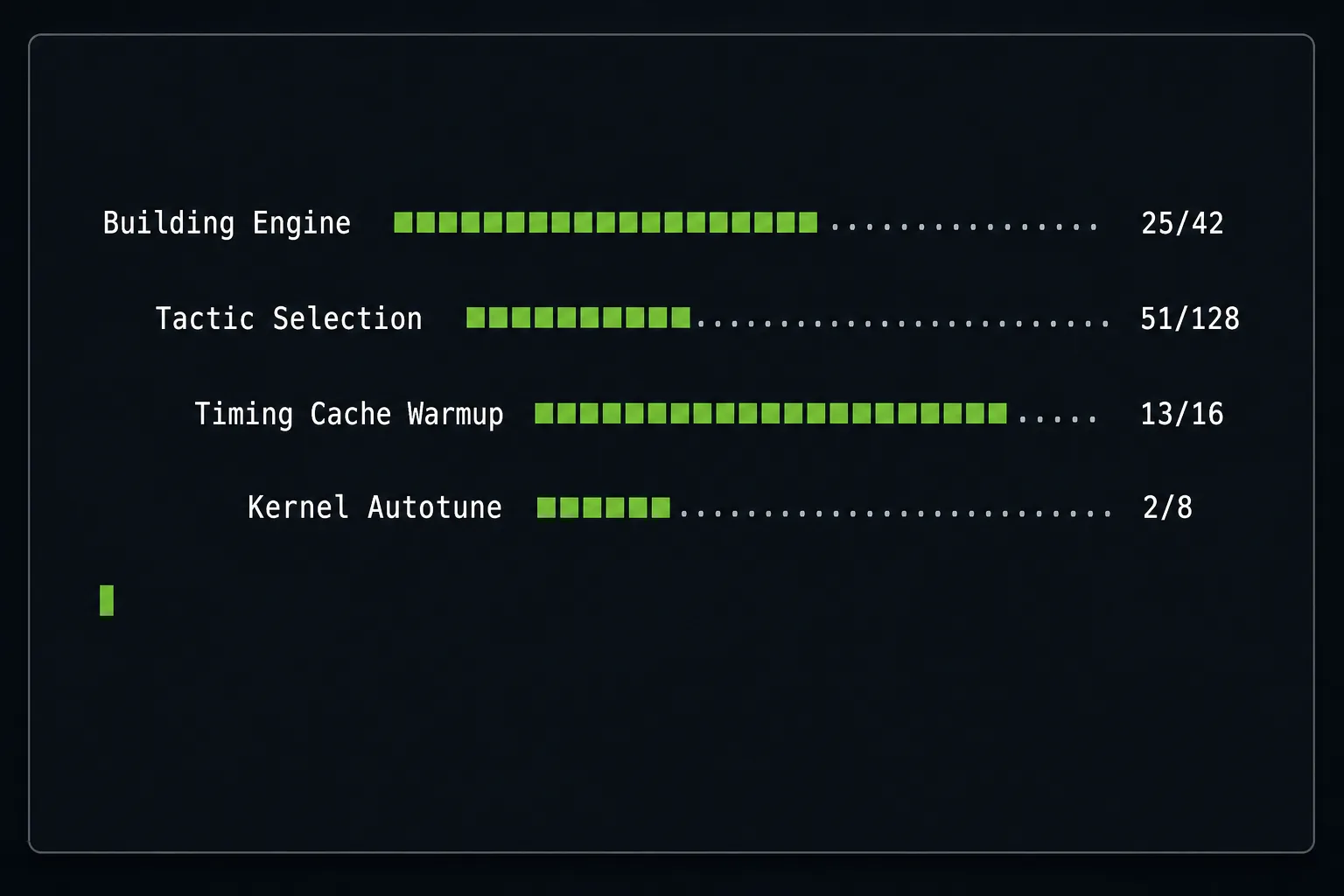
TensorRT provides IProgressMonitor, an API for fixing this issue, and it has been in NvInfer.h for several releases. This tutorial walks through a minimal drop-in implementation for Python and C++, adds a cancel path that responds to Ctrl-C or a programmatic stop signal from an outer event loop, and shows where to surface the resulting progress stream so an IDE, a service, or an agent runtime can use it.
Every code block in this post is lifted from or modeled on two NVIDIA-maintained OSS samples:
- Python:
samples/python/simple_progress_monitor/(ResNet-50, strongly typed network) - C++:
samples/sampleProgressMonitor/(MNIST)
What IProgressMonitor gives you
IProgressMonitor is an abstract base class that TensorRT calls during the engine build. You subclass it and override three methods. The shape is identical in Python and C++; only the spelling differs.
| Concept | Python method | C++ method | What you do |
|---|---|---|---|
| Phase entered | phase_start(phase_name, parent_phase, num_steps) | phaseStart(phaseName, parentPhase, nbSteps) | Reserve a progress row and record num_steps. |
| Step within phase complete | step_complete(phase_name, step) -> bool | stepComplete(phaseName, step) -> bool | Advance the bar. Return False/false to cancel the build. |
| Phase exited | phase_finish(phase_name) | phaseFinish(phaseName) | Tear down the row. |
IProgressMonitor interface mirrored across Python and C++. The three methods have identical semantics, and step_complete is the only callback whose return value changes the builder’s behaviorA phase whose parent_phase is non-null is nested inside another phase, so the monitor sees a tree of progress rather than a flat list. The implementation must be thread-safe because TensorRT can call the same monitor instance from multiple internal threads.
Wire the monitor to the builder by setting it on the IBuilderConfig. It is a single call in either language:
config.progress_monitor = MyMonitor()      # Python

config->setProgressMonitor(&myMonitor);     // C++
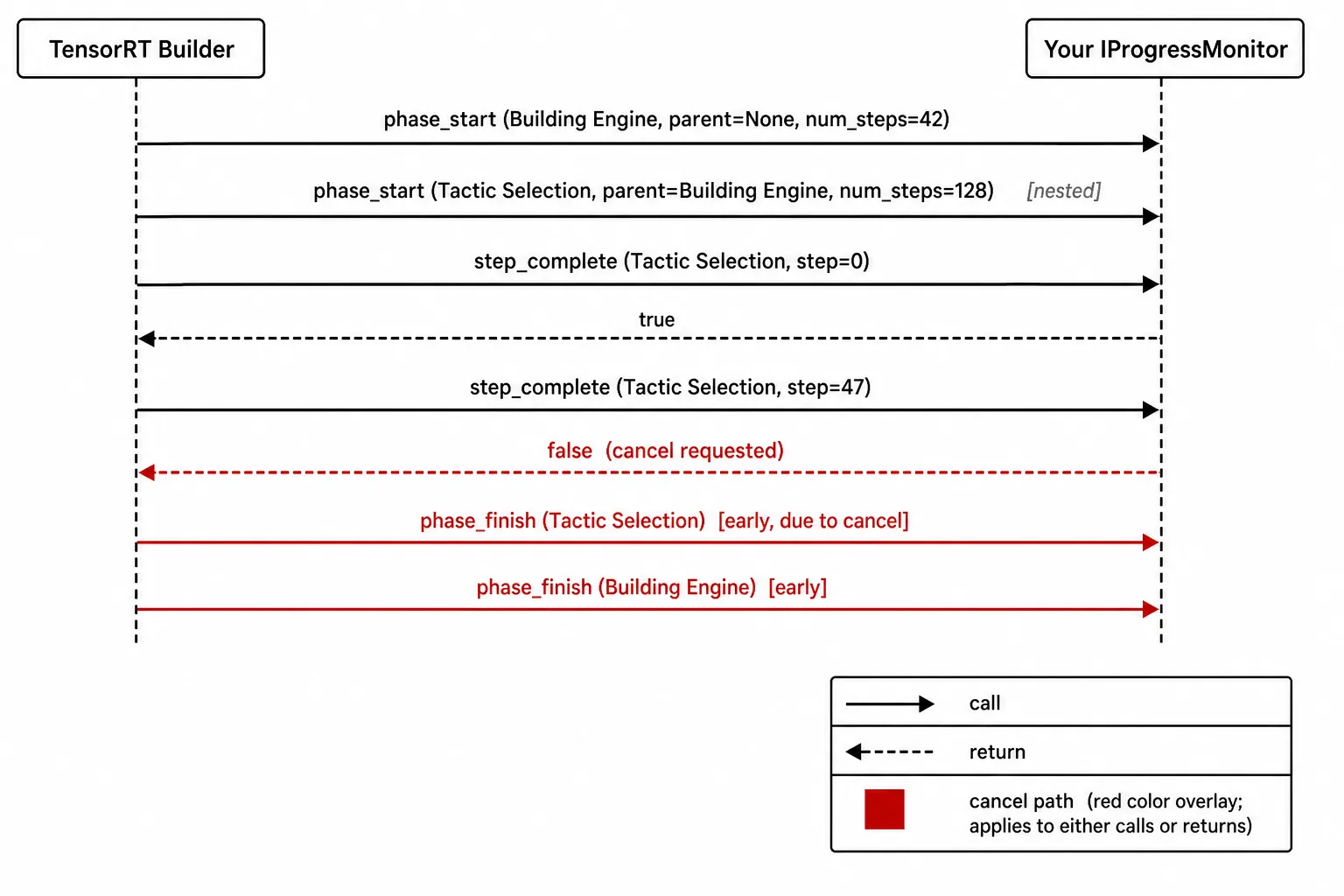
Read the diagram from top to bottom. The builder opens the Building Engine phase with phase_start, then opens Tactic Selection nested inside it with its parent_phase pointing back at Building Engine. As the build proceeds, the builder calls step_complete (the solid arrows) and your monitor returns a Boolean (the dashed arrows): true lets the build continue and false requests cancellation. In the run shown here, the monitor returns false at step 47, which is the red cancel path, and the builder stops issuing new steps and unwinds. It calls phase_finish early on Tactic Selection and then on Building Engine, closing every active phase in reverse order.
What this tutorial builds
This tutorial shows how to implement IProgressMonitor in Python and C++, add cancellation through step_complete, and route progress updates to a terminal, IDE, service, or agent runtime.
Prerequisites
- One NVIDIA GPU.
- TensorRT (current OSS release) and its Python bindings, or a build of the C++ samples.
- Python 3.10 or newer (Python path).
- The TensorRT sample data: ResNet-50 ONNX for Python and MNIST ONNX for C++. Both ship with the sample-data archive or are mounted under
/usr/src/tensorrt/datain the official NGC containers. - A terminal that supports ANSI virtual-terminal escapes. Any modern Linux shell qualifies; Windows Terminal works if VT is enabled.
1. Subclass IProgressMonitor in Python
The subclass is small. It only tracks which phases are active and how many steps each phase contains.
import tensorrt as trt
from dataclasses import dataclass, field
from threading import Lock

@dataclass
class _PhaseState:
    num_steps: int
    current_step: int = 0
    parent: str | None = None

class RichProgressMonitor(trt.IProgressMonitor):
    def __init__(self):
        super().__init__()
        self._lock = Lock()
        self._phases: dict[str, _PhaseState] = {}
        self._cancelled = False
	     self._rendered_lines = 0

    def phase_start(self, phase_name, parent_phase, num_steps):
        with self._lock:
        	self._phases[phase_name] = _PhaseState(
            	num_steps=num_steps, parent=parent_phase
        	)
        	self._render()

    def step_complete(self, phase_name, step) -> bool:
        with self._lock:
        	if phase_name in self._phases:
                self._phases[phase_name].current_step = step
        	self._render()
        	return not self._cancelled

    def phase_finish(self, phase_name):
        with self._lock:
        	self._phases.pop(phase_name, None)
        	self._render()
Two things to notice. First, the Lock is not optional. TensorRT will call into the monitor from multiple internal threads, and rendering from a thread that doesn’t own the state will tear the display. Second, step_complete is the only callback that can stop the build. phase_start returns None, so you cannot reject a phase before it begins. The earliest cancellation point is the first step_complete of that phase.
2. Render nested progress bars with virtual-terminal escapes
The renderer is the part that varies most by environment, so this section gives the shape and points to the upstream sample for the production-grade implementation. The pattern is:
def _render(self):
    # Order phases by nesting depth so children draw under parents.
    rows = sorted(
        self._phases.items(),
        key=lambda kv: (kv[1].parent or "", kv[0]),
    )
    # Move the cursor up by the number of lines the PREVIOUS render printed,
    # not the current row count — phases are added on nesting and removed on
    # phase_finish, so the two differ exactly when the tree changes shape.
    if self._rendered_lines:
        print(f"\x1b[{self._rendered_lines}A", end="")
    for name, st in rows:
        # step is a 0-based index in [0, num_steps); +1 turns it into a
        # completed count so the bar can actually reach 100%.
        done = min(st.current_step + 1, st.num_steps)
        pct = done / max(st.num_steps, 1)
        bar = "█" * int(40 * pct) + "·" * (40 - int(40 * pct))
        indent = "  " if st.parent else ""
        print(f"\x1b[2K{indent}{name:<28} [{bar}] {done}/{st.num_steps}")
    # Clear rows left behind when a phase finishes and the count shrinks.
    for _ in range(self._rendered_lines - len(rows)):
        print("\x1b[2K")
    self._rendered_lines = len(rows)
The upstream simple_progress_monitor.py renders the same shape with improved color and width handling. The escape sequence \x1b[NA moves the cursor up N lines, and \x1b[2K clears a line. The first render call writes blank rows; subsequent calls overwrite them in place.
When this monitor is attached, do not redirect stdout to a file or pipe. The escape codes will be written verbatim into the log and make it unreadable. For non-terminal sinks, replace _render() with a structured emitter.
3. Add a cancel path
Cancellation is a three-line addition once the monitor exists. Install a SIGINT handler that flips the flag, then let step_complete honor it.
import signal

def install_cancel(monitor: RichProgressMonitor):
    def handler(signum, frame):
        monitor._cancelled = True
        print("\nCancelling TensorRT build at next step boundary...")

    signal.signal(signal.SIGINT, handler)
Wire the monitor and run the builder:
builder = trt.Builder(TRT_LOGGER)
network = builder.create_network(
    1 << int(trt.NetworkDefinitionCreationFlag.STRONGLY_TYPED)
)

parser = trt.OnnxParser(network, TRT_LOGGER)

with open(onnx_path, "rb") as f:
    parser.parse(f.read())

config = builder.create_builder_config()

monitor = RichProgressMonitor()
config.progress_monitor = monitor

install_cancel(monitor)

serialized = builder.build_serialized_network(network, config)

if serialized is None:
    if monitor._cancelled:
        print("Build cancelled cleanly.")
    else:
        print("Build failed.")
build_serialized_network() returns None on cancellation. The builder unwinds at the next step boundary, usually quickly, but not instantaneously, especially inside a long tactic-search step.
Applications should surface cancellation latency to users. A simple “Cancelling…” message during the unwind window goes a long way.
The same flag can be set from any non-signal path, such as an IDE Stop button, an agent timeout, or a CI cancel webhook. Set monitor._cancelled = True, and the build aborts at the next step boundary.
4. The same pattern in C++
#include <NvInfer.h>
#include <atomic>
#include <mutex>
#include <unordered_map>

class RichProgressMonitor : public nvinfer1::IProgressMonitor {
public:
    void phaseStart(char const* phaseName,
                    char const* parentPhase,
                    int32_t nbSteps) noexcept override {
        std::lock_guard<std::mutex> g(mu_);
        phases_[phaseName] = {nbSteps, 0, parentPhase ? parentPhase : ""};
        render();
    }

    bool stepComplete(char const* phaseName,
                      int32_t step) noexcept override {
        std::lock_guard<std::mutex> g(mu_);
        auto it = phases_.find(phaseName);
        if (it != phases_.end())
            it->second.current = step;
        render();
        return !cancelled_.load();
    }

    void phaseFinish(char const* phaseName) noexcept override {
        std::lock_guard<std::mutex> g(mu_);
        phases_.erase(phaseName);
        render();
    }

    void requestCancel() noexcept {
        cancelled_.store(true);
    }

private:
    struct Phase {
        int32_t nbSteps;
        int32_t current;
        std::string parent;
    };

    std::mutex mu_;
    std::unordered_map<std::string, Phase> phases_;
    std::atomic<bool> cancelled_{false};

    void render() noexcept;
};
Attach it the same way:
auto config =
    std::unique_ptr<nvinfer1::IBuilderConfig>(
        builder->createBuilderConfig());

RichProgressMonitor monitor;

config->setProgressMonitor(&monitor);
std::atomic<bool> for the cancel flag matters because requestCancel() may be called from another thread or a signal handler. Everything else mirrors the Python version.
Where to wire it in real systems
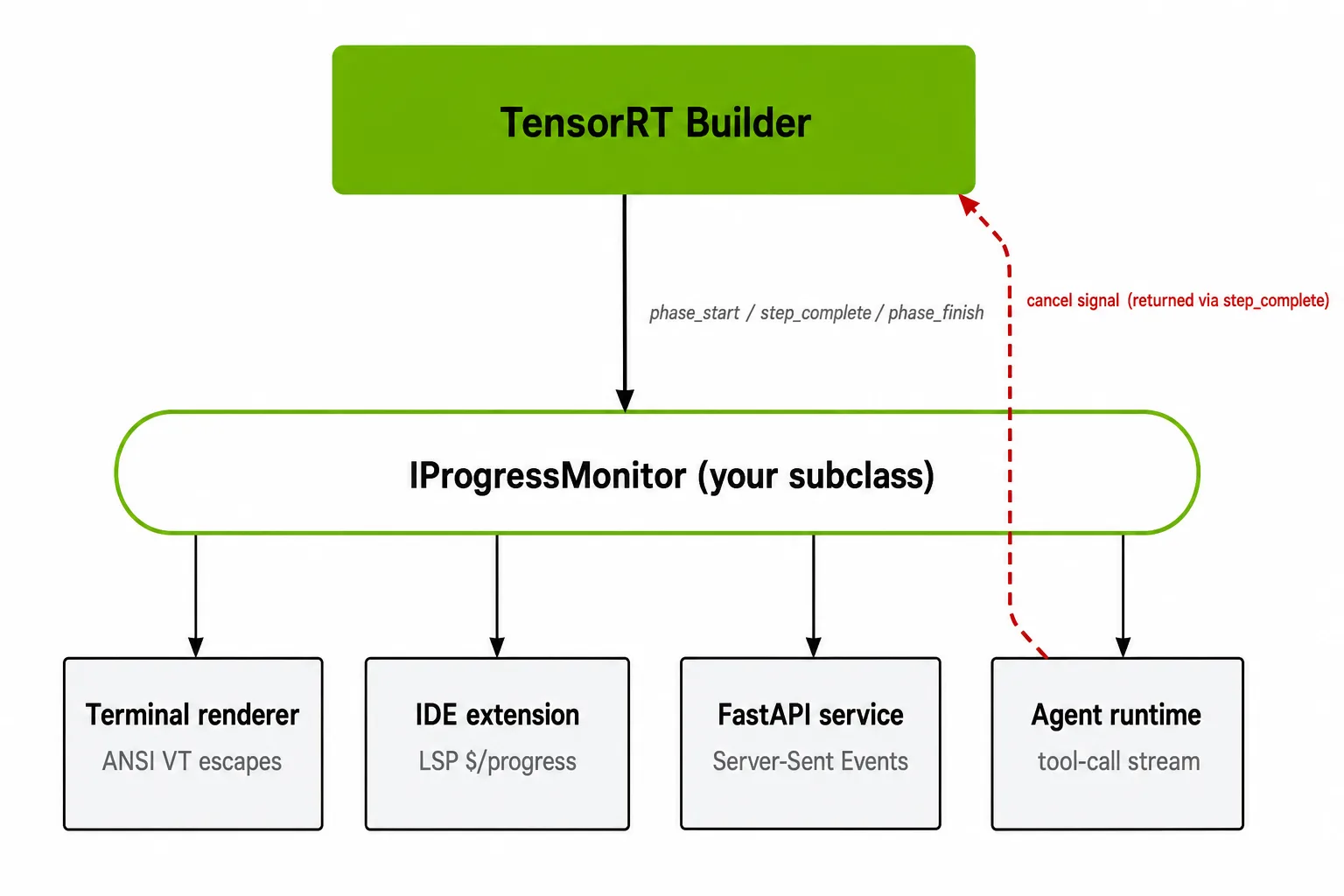
Figure 3. IProgressMonitor is the single integration point between the builder and an application’s surfaces
The cancel arrow is drawn from the agent runtime for concreteness, but the same mechanism applies to every sink. A Ctrl-C from the terminal, an IDE Stop button, an HTTP cancel webhook, or an agent timeout all flip the same monitor._cancelled flag, and the cancel takes effect at the next step_complete return.Where to wire it in real systems
The terminal is the easy case. The interesting integrations route progress somewhere else:
- IDE extension: Override
_render()to emit$/progressnotifications in the Language Server Protocol, or equivalentwindow/showProgressin protocol. Each phase becomes one progress token;step_complete()becomes a report message;phase_finish()becomes end. - FastAPI / HTTP service: Run the build on a background thread, and have
_render()push entries into anasyncio.Queuethat the request handler drains via Server-Sent Events. The client gets a live stream; the cancel hook is just aPOST /builds/{id}/cancelthat callsmonitor.requestCancel(). - Agent tool call: Emit one structured chunk per phase transition (
{"phase": ..., "step": ..., "total": ...}) into the tool-call stream. The agent runtime renders it in the user-visible trace, and the samerequestCancel()hook is what an agent timeout calls when the build exceeds the budget. This pattern also matters for agent runtimes. Long-running builds need to be observable and cancelable so agents can report progress, enforce time budgets, and stop cleanly.
In all three cases, IProgressMonitor is the right boundary. Anything above it (rendering, streaming, transport) is application-level; anything below it (tactic timing, kernel selection) is the builder’s business.
Edge cases to handle
These behaviors are common sources of integration bugs:
- Do not redirect
stdoutwhile the terminal renderer is attached. The escape sequences will pollute the log. For non-interactive sinks, swap the renderer for a structured emitter. phase_start()can’t cancel. It returnsNone. The earliest cancel point is the firststep_complete()of that phase. If the user cancels during a longphase_start(), the build will continue until the first step boundary.phase_finish()may fire before allnum_stepsare reported. This can happen during error recovery, builder-internal short-circuits, or whenstep_complete()returnsFalse. Treat it as the authoritative end-of-phase signal; do not assumecurrent_step == num_steps.- Cancel latency is bounded but not zero. The builder finishes the current step before checking the return value. Long tactic-search steps can push this into the seconds-to-tens-of-seconds range.
- Thread safety is required. The same monitor instance is called from multiple builder threads; uninstrumented
dictorunordered_mapaccess from_render()will eventually crash or tear.
Get started
The fastest way to run this end to end is:
git clone --depth 1 https://github.com/NVIDIA/TensorRT.git
cd TensorRT/samples/python/simple_progress_monitor
python3 simple_progress_monitor.py
This starts a live, animated build of a ResNet-50 engine. Replace simple_progress_monitor.py‘s monitor class with the version above or attach a cancel handler around the existing class. C++ equivalent is available in samples/sampleProgressMonitor/.
For larger systems, the right next step is replacing the terminal renderer with the transport the application already uses such as Language Server Protocol notifications, server-sent events, or structured tool-call chunks. IProgressMonitor becomes the point where TensorRT build progress is translated into the application’s progress model.
Learn more
Refer to the following resources for more information:
0 Comments
Log in to join the conversation.No comments yet. Be the first to share your thoughts.