


In my previous post, we learned that Node.js caches modules, so the same file isn't executed twice.
But have you ever wondered what actually happens the first time you call require()?
Let's break it down.
📦 Imagine a Real-Life Scenario
Think of require() like ordering food at a restaurant.
You (your code) place an order (require()).
The waiter (Node.js) doesn't cook the food. Instead, they:
- 🍽️ Find the right chef (locate the module)
- 📋 Check if the dish is already prepared (module cache)
- 👨🍳 Ask the chef to cook it if needed
- 🍛 Serve the food (return
module.exports) - 🧠 Remember it for the next customer (cache it)
That's exactly how require() works behind the scenes.
⚙️ Step-by-Step: What Happens Inside require()?
When you write:
const user = require("./user");
Enter fullscreen mode Exit fullscreen mode
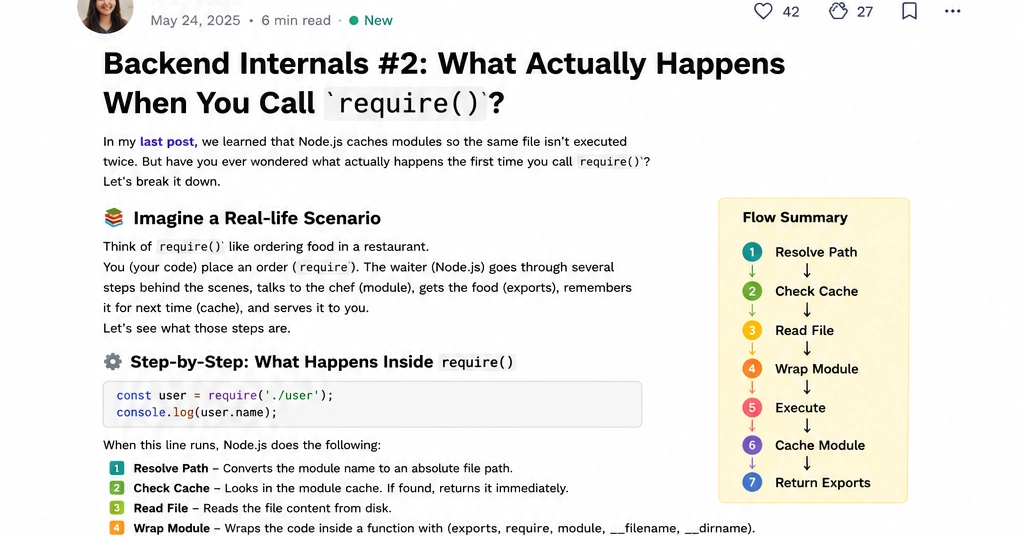
Node.js performs these steps:
- 🔍 Resolve Path – Finds the exact file to load.
- 📦 Check Cache – If already loaded, return it immediately.
- 📄 Read File – Reads the module from disk.
- 🧩 Wrap Module – Wraps your code inside a function.
- ▶️ Execute – Runs the module code.
- 💾 Cache Module – Stores the exported object in memory.
- 🔄 Return Exports – Returns
module.exportsto your code.
💻 Example
user.js
console.log("User Module Loaded");

module.exports = {
  name: "Krati"
};
Enter fullscreen mode Exit fullscreen mode
app.js
const user = require("./user");

console.log(user.name);
Enter fullscreen mode Exit fullscreen mode
Output
User Module Loaded
Krati
Enter fullscreen mode Exit fullscreen mode
If you call require("./user") again, "User Module Loaded" won't be printed because Node.js returns the cached module.
💡 Why Does This Matter?
Understanding this process helps you:
- ⚡ Write more efficient Node.js applications
- 🐞 Debug module-related issues
- 🤝 Understand shared module state
- 🎯 Answer common backend interview questions confidently
🎯 Quick Challenge
What happens first when require("./user") is called?
A. Execute the file
B. Check the module cache
C. Return module.exports
👇 Drop your answer in the comments before scrolling!
📌 Key Takeaway
require() does much more than just load a file.
It resolves the path, checks the cache, reads the file, wraps it, executes it, caches the exports, and finally returns them.
Understanding these internals makes you a better Node.js developer—not just someone who uses the framework, but someone who knows how it works.
💬 Question for you:
Which Node.js topic would you like me to explain next?
-
module.exportsvsexports - Module Wrapper Function
- Circular Dependencies
- CommonJS vs ES Modules
Your suggestion might become the next article in this Backend Internals series. 🚀
0 Comments
Log in to join the conversation.No comments yet. Be the first to share your thoughts.