


Disclosure: I build Schemity, a desktop ERD tool - this post is from our blog and uses it for the examples.
TL;DR: A 1:1 relationship in SQL is nothing but a foreign key with a unique constraint, so any tool that reads the key and ignores the constraint draws it as 1:N - a bug reported against MySQL Workbench in 2009 and against dbdiagram in 2025. Schemity derives cardinality from the constraint itself: toggle the foreign key's uniqueness and the relationship toggles between 1:1 and 1:N, and composite unique sets get named, colored U badges instead of one ambiguous marker.
A one-to-one relationship in SQL is not a special kind of line. It is a foreign key with a unique constraint - and any tool that reads the foreign key but ignores the constraint will draw your 1:1 as 1:N.
This is not a hypothetical failure. In March 2009, a user filed bug #43920 against MySQL Workbench 5.0.30: reverse engineering a script turned every 1:1 relationship into 1:N, which they called "a big problem if you use JPA and you generate the entities with some tool." The bug was closed as Not a Bug, with a developer explaining that Workbench's 1:1 relationship button "is just for the graphic not for the SQL" - the button changes the picture without emitting the unique constraint that would make the picture true. Users kept disputing that resolution in the comments from 2010 all the way to 2024.
Sixteen years after the original report, in May 2025, a dbdiagram user hit the same misreading from the other direction: they imported PostgreSQL SQL in which a column carried both a UNIQUE constraint and a FOREIGN KEY, and wrote, "By reading the SQL, I would expect the system to report the relation as 1:1 relation, but instead I see the system reporting it as a 1:n relation." Different tool, different decade, same bug - because both tools treat cardinality as something separate from the constraints that define it.
Why does my ERD show a one-to-one relationship as one-to-many?
Because your tool derives the relationship from the foreign key alone and never checks whether that key is unique. There are two versions of the failure, and the two reports above are one of each:
-
On the way in, the importer sees
FOREIGN KEYand draws a crow's foot. TheUNIQUEconstraint sitting on the same column may well be parsed and stored, but it never reaches the code that picks the line ends. The schema says 1:1; the diagram says 1:N. - On the way out, the editor stores "1:1" as a drawing attribute. You pick it from a dropdown, the line ends change, and the generated SQL contains no unique constraint at all. The diagram says 1:1; the schema says 1:N.
Either way, the diagram and the database now disagree about a fact as basic as "can a user have two profiles?" - and whichever artifact your teammate happens to read determines what they believe.
Uniqueness is the cardinality, not a decoration
Relational databases have no CARDINALITY keyword. The relationship type is never stored anywhere as a fact of its own - it is a consequence of which constraints exist:
| What the schema actually contains | What the diagram must draw |
|---|---|
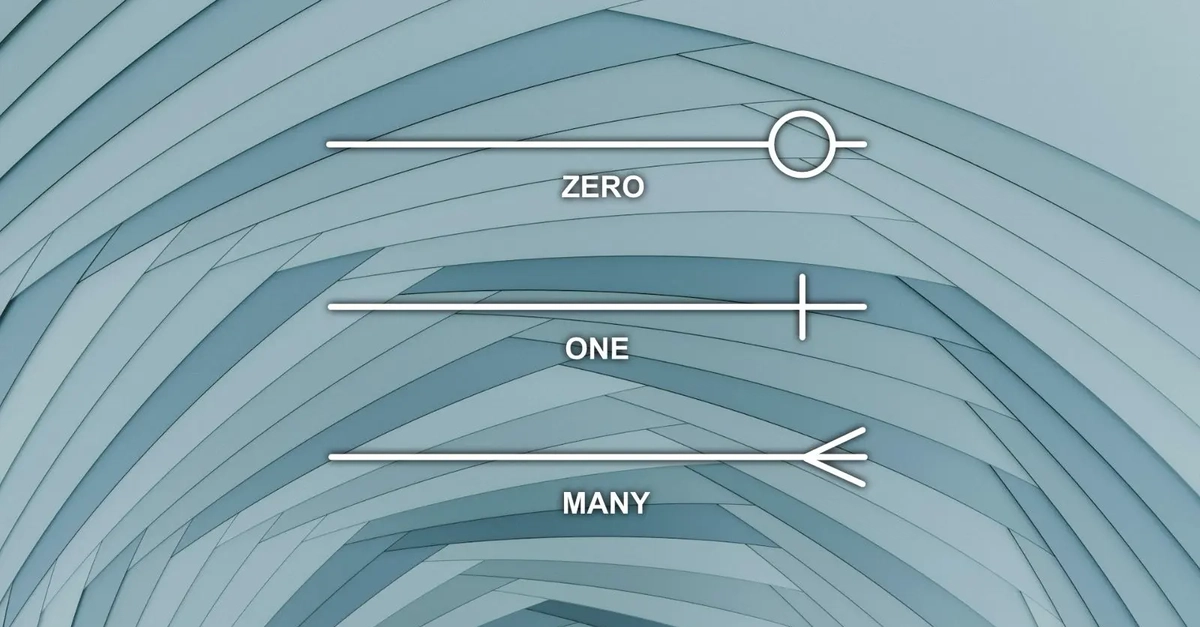
| Foreign key, no unique constraint | 1:N - crow's foot on the child side |
| Foreign key with a unique constraint or unique index | 1:1 - a single bar on both sides |
| Foreign key inside a composite unique constraint spanning other columns | Still 1:N - the combination is unique, the key alone is not |
| Two foreign keys in a junction table, unique together | N:N, resolved into two 1:N relationships |
The third row is the one that trips up even tools that do check uniqueness: UNIQUE (tenant_id, email) does not make tenant_id unique, so the relationship it participates in stays one-to-many. A tool cannot get this right by pattern-matching column names. It has to model unique constraints as first-class objects with member lists - which is exactly what most diagram tools skip.
This is the same lesson as reading crow's foot notation against the SQL it implies: the notation is a rendering of constraints, not an independent layer of truth. When a tool lets the rendering float free of the constraints, the rendering lies.
A relationship type you toggle, not repaint
Schemity makes the two facts one fact. A relationship between two entities is 1:1 precisely when its foreign key is unique - so you toggle between 1:1 and 1:N by toggling the foreign key's uniqueness, not by repainting line ends. There is no separate drawing attribute to fall out of sync, which means the Workbench failure mode - a 1:1 picture backed by 1:N SQL - cannot be drawn at all.
The same holds on the way in. When you reverse engineer a PostgreSQL, MySQL, or SQL Server schema into an ERD, unique constraints and unique indexes are read alongside the foreign keys, so a unique foreign key arrives as the 1:1 relationship it is. As a desktop ERD tool, Schemity does all of this locally - the schema you are reverse engineering never leaves your machine, which matters when the database you are documenting is the one you are not allowed to paste into a web app.
Composite unique constraints deserve names and colors, not one shared badge
Single-column uniqueness is the easy half. The harder half is the multi-column rule - "email is unique per tenant", "line numbers are unique within an order" - and it has been underserved in diagrams for a long time. Back in 2010, a Visual Paradigm Database Architect 5.2 user asked the forum how to see which columns belonged to a multi-column unique constraint; the patch that answered the request showed a single "U" on any column involved in any unique constraint. Better than nothing, but if a table carries two overlapping constraints, one undifferentiated marker cannot tell you which columns group together.
Schemity treats ERD composite unique constraints as first-class objects: each one has a member list, an optional name, and a color, and every involved field wears an underlined U badge in that color - so two different unique sets on the same table are distinguishable at a glance, and the composite unique constraint reads as the business rule it is. The entity footer keeps a running tally of fields, indexes, check constraints, and unique rules, so a table's rule density is visible before you open anything.
This is the constraint that carries most multi-tenant RBAC schema designs, where UNIQUE (tenant_id, email) is the difference between "email is a login" and "email is a login within one tenant." A diagram that cannot show which columns form the pair is hiding the tenancy rule itself.
The diagram should not be able to disagree with the schema
The Workbench developer was honest about the design: the 1:1 button was "just for the graphic." That is the root problem, and it is not specific to one tool - any ERD tool that stores cardinality as decoration will eventually show you a relationship the database does not enforce, the same way most tools hide the check constraints that encode your domain rules.
An offline ERD tool built for software engineers should work the way the database works: uniqueness is the cardinality, constraints are objects with identity, and the crow's foot at the end of a line is derived from facts, not chosen from a dropdown. When the diagram physically cannot say something the schema does not say, you stop having to ask which one is telling the truth.
0 Comments
Log in to join the conversation.No comments yet. Be the first to share your thoughts.