
chainsawriot
Posted on Jul 25, 2026 by Chung-hong Chan
I like writing. Really.
However, I have problem finishing my drafts. As you might be able to read in my OKRs, I mentioned multiple times that I have quite a lot of blog drafts that I haven’t completed. I don’t want to blame anyone and it’s completely my fault: I have problem focusing on a task. I have an attention problem. In the past, I could blame things like Twitter for distracting me from getting shit done. But now, I don’t use any of these social media services anymore. I am running out of excuses.
I wanted to change my writing routine and would like to see if it would make a difference. Then, I watched a video by Veronica (of Veronica Explains) on her (new) writing setup. She reused an old laptop and made it a dedicated writing machine, or “writerdeck.” In that writing machine, she only used command-line only Debian and neovim (her preferred text editor). Her blog post has details on her machine. I find the idea very interesting and wanted to give it a try.
First, I needed a spare laptop. 1 In fact, over the years my wife and I have accumulated a few unused but still functional laptops. I decided to take my wife’s previous ThinkPad T440 with Intel i5 and 8G of RAM. 2 It is a perfectly capable machine, only it is unbelievably slow for my wife’s relatively simple tasks such as watching YouTube. Modern web browsers are memory hog. And this is exactly the category of software a dedicated writing machine doesn’t need.
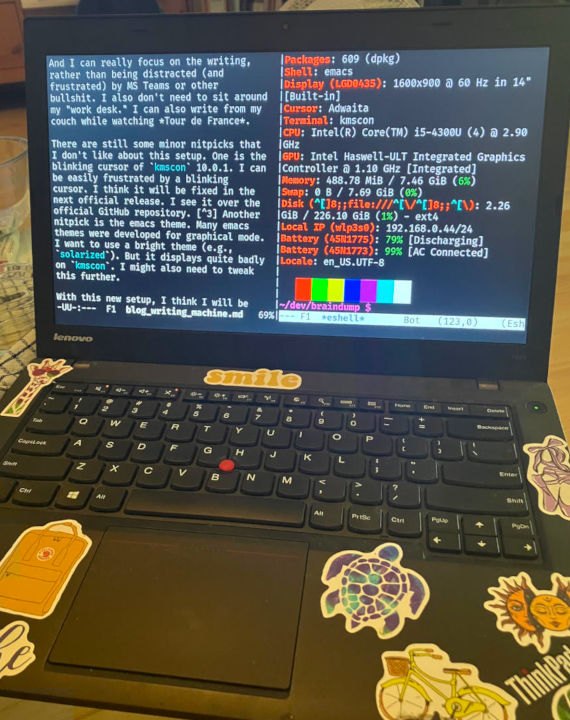
I followed Veronica’s blog post and installed Debian without any desktop environment and kmscon. My first diversion from Veronica is that I use emacs. I just quickly pulled my emacs configuration on my main machine from Git and removed all configurations about programming. emacs launches extremely fast 3 and should be so. You know, people bought 386 back in the late 80s to 90s to do similar things: launching DOS and write with Word Perfect or Word Star. 4 There is no way that an i5 machine cannot do that perfectly as it is perhaps 1000 times better than a 386.
With my own configuration, it also has all the emacs packages that I need for writing. And in fact, not that many: I only need deft to organize my files and Markdown mode (sorry I don’t use org mode). I feel quite at home writing there. I don’t want to waste a lot of time customizing. So I don’t even want to install vterm and simply use eshell, as I probably don’t need to do a lot of command line works. The machine now directly boots to emacs (just put emacs in .bashrc). More concretely, directly to deft (just add (deft) to my emacs configuration file).
Another diversion from Veronica is how I get the text files from the writing machine to other machines. I do not want to set up syncthing to sync text files across machines. I don’t even want to have ssh server on any of my computers. My overkill solution is to just have a Git repository and have a remote on Codeberg. magit is also useful here to further reduce the command line usage. It is only my lack of imagination for using Git. Maybe in the future I will have something like rsync.
Then, I write. It is really great! It’s extremely snappy and extremely minimal. And I can really focus on the writing, rather than being distracted (and frustrated) by the bullshit on MS Teams about my work. I also don’t need to sit around my “work desk.” I can also write from my couch while watching Tour de France.
There are still some minor nitpicks that I want to fix for this setup. One is the blinking cursor of kmscon 10.0.1. I can be easily frustrated by any blinking cursor. I think it will be fixed in the next official release. I see it over the official GitHub repository. 5 Another nitpick is the emacs theme. Many emacs themes were developed for the graphical mode. I want to use a bright theme (e.g., solarized). But it displays quite badly on kmscon. But the default dark theme is fine.
With this new setup, I think I will be able to finish my backlog of drafts and also some new academic writing tasks.
Powered by Jekyll and profdr theme
0 Comments
Log in to join the conversation.No comments yet. Be the first to share your thoughts.