
hey
👋 Hey again, this is the announcement of Freya v0.4, the latest release of my Rust 🦀 GUI library.
It has been around a year since v0.3 and this is by far the biggest and most stable release yet. Freya 0.4 comes with a big rewrite, the most notable change is that Freya no longer depends on Dioxus. Instead, it now has its own reactive and component model built from scratch.
For the full changelog you can check the v0.4 Release on GitHub.
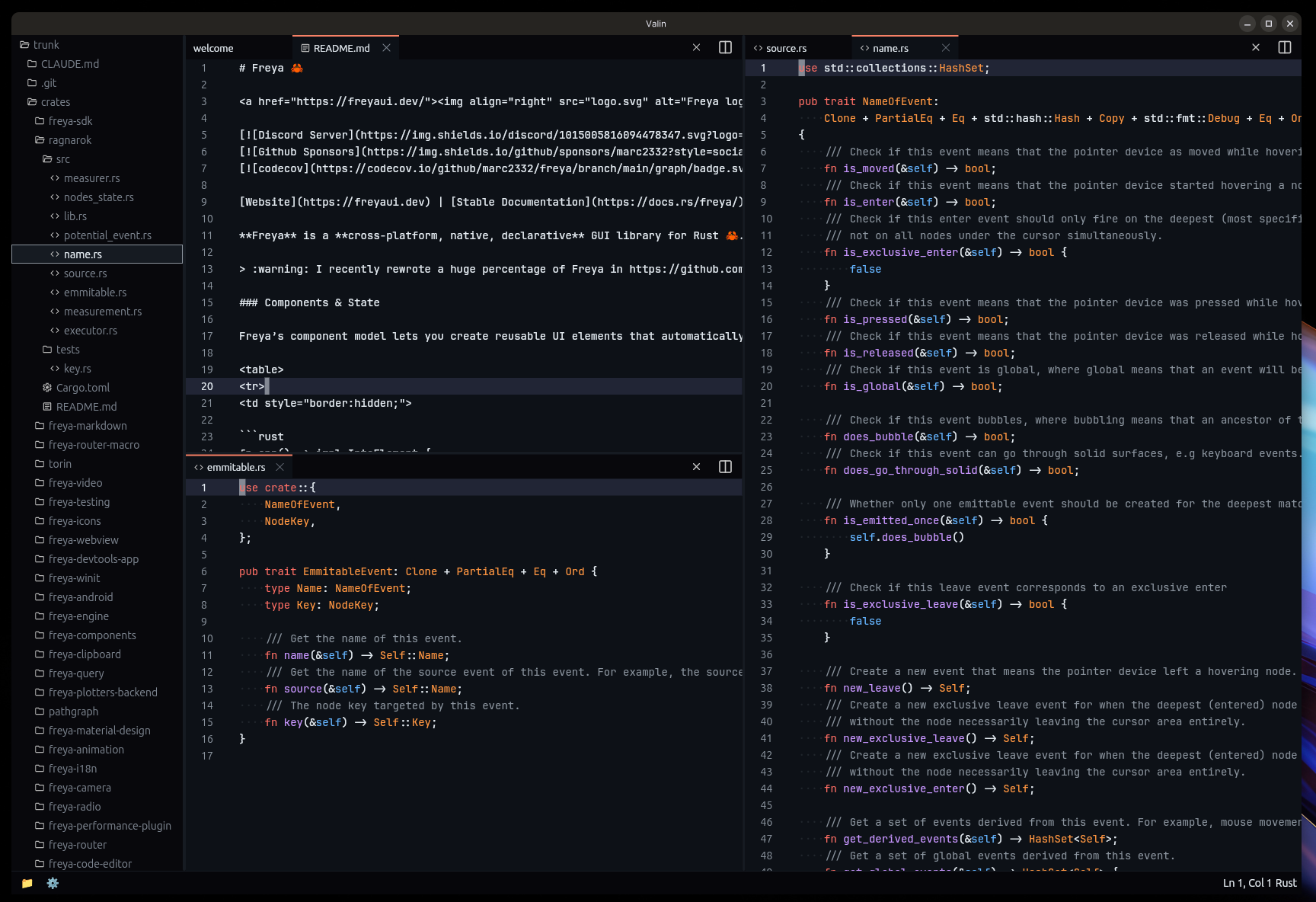
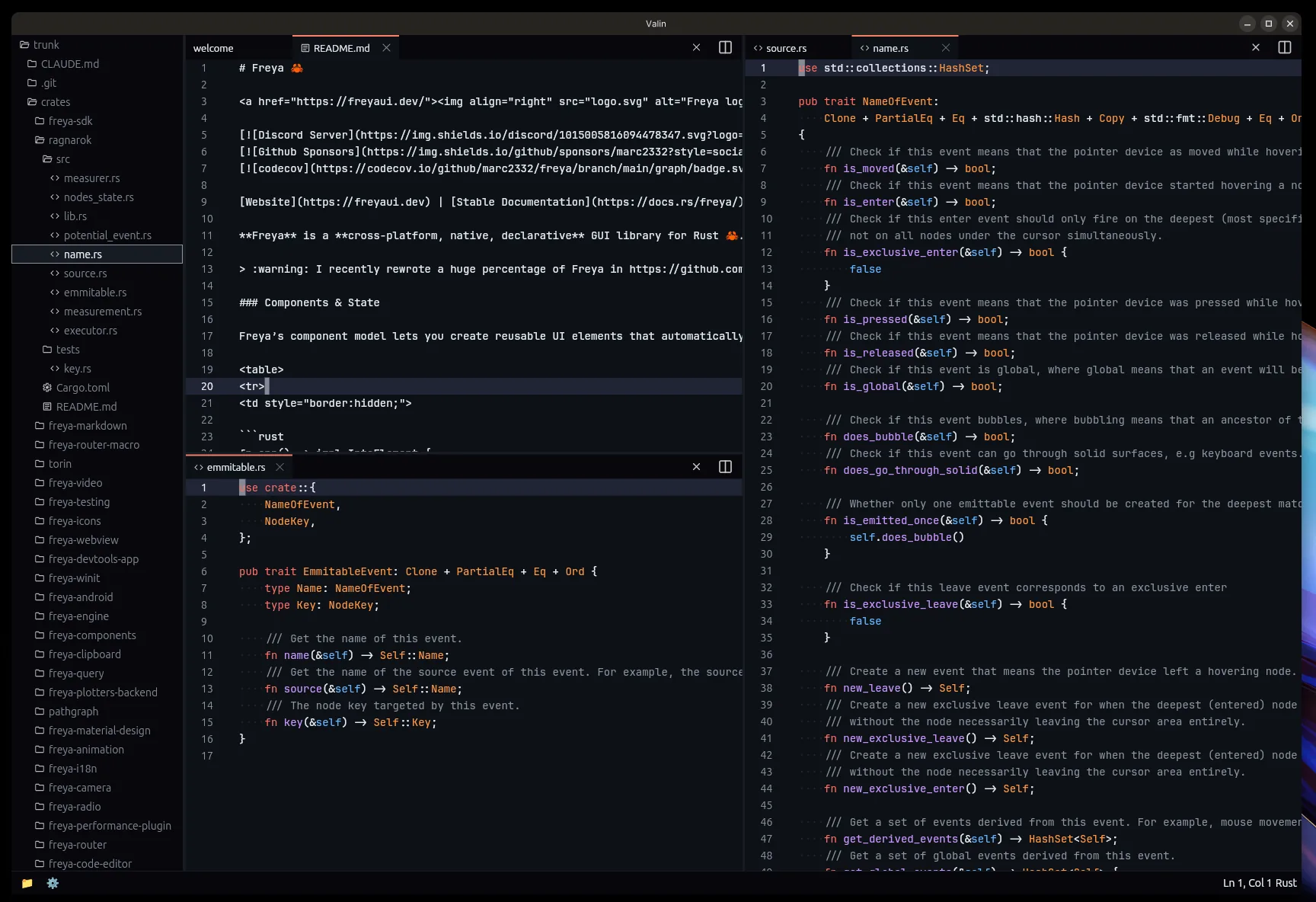
Valin, my code editor made using Freya:
Why the rewrite
Freya originally used Dioxus as its reactive and component engine. Dioxus served Freya really well during the early versions and I am grateful for the foundation it provided. But as Freya grew, the limitations started to show up.
Dioxus is primarily designed around web, things like the rsx!() macro, string-based attributes, and the way components and elements were defined made it harder to provide the kind of type safety, extensibility and simplicity I wanted. Also, depending on a large external framework meant that Freya would be affected by any upstream change and design decision, even if those were not aligned with Freya’s direction.
So I decided to rewrite almost everything in Freya from scratch. The new system is heavily inspired by Dioxus (and React), but tailored specifically for Freya’s needs. It still has hooks, callback event handlers, and a very similar state and async model. But now Freya owns the full stack and can evolve freely.
The start of the rewrite was done in this small PR. And since then I have been fixing bugs and adding new features.
In practice, this rewrite also means a nicer day-to-day: typos in attributes are caught by the compiler instead of at runtime, your IDE actually autocompletes things, and stack traces point at the line you wrote instead of an expanded macro.
A few crates that previously came from the Dioxus ecosystem (I made them all though) have been forked and adapted:
dioxus-radiobecamefreya-radiodioxus-querybecamefreya-querydioxus-i18nbecamefreya-i18ndioxus-clipboardbecamefreya-clipboard
And many crates were reorganized, split, or consolidated:
- New crates:
freya-icons,freya-animation,freya-edit,freya-performance-plugin,freya-query,freya-terminal,freya-webview,freya-code-editor,freya-android,freya-material-design,freya-markdown,freya-router,freya-router-macro,freya-sdk,freya-camera,freya-video,freya-plotters-backend,freya-devtools-app,pathgraph,ragnarok - Removed/redistributed:
freya-hooks,freya-native-core,freya-elements(merged intofreya-core)
The new API
The biggest user-facing change is the removal of the rsx!() macro. In its place, Freya now uses a sort of builder pattern with fully typed attributes.

Here is what a counter looked like in 0.3:
fn app() -> Element {
    let mut count = use_signal(|| 0);

    rsx!(
        rect {
            width: "fill",
            height: "50%",
            main_align: "center",
            cross_align: "center",
            color: "white",
            background: "rgb(15, 163, 242)",
            font_weight: "bold",
            font_size: "75",
            label { "{count}" }
        }
        rect {
            direction: "horizontal",
            width: "fill",
            height: "50%",
            main_align: "center",
            cross_align: "center",
            spacing: "8",
            Button {
                on_press: move |_| count += 1,
                label { "Increase" }
            }
            Button {
                on_press: move |_| count -= 1,
                label { "Decrease" }
            }
        }
    )
}
And here is the same counter in 0.4:
fn app() -> impl IntoElement {
    let mut count = use_state(|| 0);

    let counter = rect()
        .width(Size::fill())
        .height(Size::percent(50.))
        .center()
        .color((255, 255, 255))
        .background((15, 163, 242))
        .font_weight(FontWeight::BOLD)
        .font_size(75.)
        .child(count.read().to_string());

    let actions = rect()
        .horizontal()
        .width(Size::fill())
        .height(Size::percent(50.))
        .center()
        .spacing(8.0)
        .child(
            Button::new()
                .on_press(move |_| {
                    *count.write() += 1;
                })
                .child("Increase"),
        )
        .child(
            Button::new()
                .on_press(move |_| {
                    *count.write() -= 1;
                })
                .child("Decrease"),
        );

    rect().child(counter).child(actions)
}
A few things to notice:
- No macro. Just regular Rust method calls with full IDE support (autocomplete, go-to-definition, etc.)
- Attributes are fully typed. Instead of
width: "fill"you writewidth(Size::fill()). Instead offont_weight: "bold"you writefont_weight(FontWeight::BOLD). This means compile-time errors instead of runtime panics. use_signalis nowuse_state.- Components return
impl IntoElementinstead ofElement. - Strings and
&strautomatically convert to text labels, so"hello"is all you need for simple text, you can still uselabel()for more customization. - Helper methods like
.center(),.horizontal(), and.expanded()make common layout patterns shorter.
See counter.rs for the full example.
Elements
Elements in Freya 0.4 are regular Rust functions that return builders. Each builder has typed methods for every attribute it supports. Here is a quick overview of the core elements:
rect is still the general-purpose container. It supports layout, styling, text properties, events, transforms, and children:
rect()
    .width(Size::fill())
    .height(Size::px(200.))
    .padding(16.)
    .margin(8.)
    .spacing(12.)
    .background((240, 240, 240))
    .border(Border::new().fill((200, 200, 200)).width(1.0).alignment(BorderAlignment::Inner))
    .corner_radius(8.)
    .shadow((0., 2., 4., 0., (0, 0, 0, 25)))
    .opacity(0.9)
    .blur(2.0)
    .direction(Direction::Horizontal)
    .main_align(Alignment::SpaceBetween)
    .cross_align(Alignment::Center)
    .content(Content::Flex)
    .child("Hello!")
label is for simple text:
label()
    .text("Hello, World!")
    .font_size(18.)
    .font_weight(FontWeight::BOLD)
    .color(Color::WHITE)
    .max_lines(1)
    .text_overflow(TextOverflow::Ellipsis)
paragraph supports rich text with multiple spans and cursors:
paragraph()
    .cursor_color(Color::BLUE)
    .highlight_color((100, 149, 237, 100))
    .span(Span::new("Bold text").font_weight(FontWeight::BOLD))
    .span(Span::new(" and normal text"))
Paragraphs can even inline other elements in the middle of the text flow, like images, links or even interactive buttons:
paragraph()
    .span("Lorem ipsum dolor sit amet, consectetur adipiscing elit, sed ")
    .child(ImageViewer::new(logo).width(Size::px(32.)).height(Size::px(32.)))
    .span(" do eiusmod tempor incididunt ut labore ")
See feature_inlined_text_elements.rs for a complete example.
Elements in 0.4 are no longer hardcoded into the framework. Now anyone can implement the ElementExt trait to define a fully custom element with its own layout, rendering, and diffing behavior. This is the exact same API that powers all of Freya’s built-in elements (rect, paragraph, label, image) and also more specialized ones like GifViewer, WebView, etc. See feature_element.rs for a complete example.
Layout
Freya’s layout library (Torin) now allows containers to wrap their children into new rows or columns with Content::wrap(), optionally separating the wrapped lines with Content::wrap_spacing():
rect()
    .horizontal()
    .content(Content::wrap_spacing(10.))
    .spacing(10.)
    .width(Size::fill())
    .children(cards())
See layout_content_wrap.rs and layout_alignments.rs for complete examples.
Text editing
For building your own inputs and editors, Freya provides a low-level text editing API. use_editable manages the cursor, selection, and edit history over a paragraph(), and you drive it by forwarding pointer and keyboard events as EditableEvents. The built-in Input and CodeEditor are both built on top of it.
See text_editing.rs for a complete example.
Components
Components in Freya are any data type that implements the Component trait. In practice, you define a struct with your props, derive PartialEq (so the framework can diff them), and implement render:
#[derive(PartialEq)]
struct Card(Task);

impl Component for Card {
    fn render(&self) -> impl IntoElement {
        let animation = use_animation(|conf| {
            conf.on_creation(OnCreation::Run);
            AnimNum::new(0.8, 1.)
                .time(500)
                .function(Function::Expo)
                .ease(Ease::Out)
        });

        rect()
            .background((255, 255, 255))
            .border(Border::new().fill((200, 200, 200)).width(1.0).alignment(BorderAlignment::Inner))
            .corner_radius(4.0)
            .padding(12.0)
            .width(Size::px(200.))
            .height(Size::px(60.))
            .scale(animation.read().value())
            .shadow((0., 2., 4., 0., (0, 0, 0, 25)))
            .child(label().text(self.0.title.clone()))
    }
}
The render_key() method helps the framework with reconciliation when rendering lists of components. This is similar to the key prop in React:
impl Component for StoryItem {
    fn render(&self) -> impl IntoElement {
        // ...
    }

    fn render_key(&self) -> DiffKey {
        DiffKey::from(&self.id)
    }
}
For simple cases, you can still use plain functions that return impl IntoElement. And for the root component of your app, there is also an App trait:
struct MyApp {
    value: u8,
}

impl App for MyApp {
    fn render(&self) -> impl IntoElement {
        format!("Value is {}", self.value)
    }
}

fn main() {
    launch(LaunchConfig::new().with_window(WindowConfig::new_app(MyApp { value: 4 })))
}
See feature_struct_component.rs for a complete example.
State management
use_state
The core of state management is use_state. It creates reactive state that automatically notifies readers when modified:
let mut count = use_state(|| 0);

// Reading (subscribes the component to changes)
let value = count.read();
let value = count();  // Same as .read(), shorthand for Copy types

// Reading without subscribing
let value = count.peek();

// Writing (notifies readers)
*count.write() += 1;
count.set(42);
count.toggle();  // For booleans
count.set_if_modified(new_value);  // Only updates if value differs
count.with_mut(|mut value| *value += 1);  // Modify with closure
For multi-window apps, you can create global state that lives outside any component:
let count = State::create_global(0); // Do this in your main functionSee state_local.rs for a complete example.
use_memo
Memoize expensive computations that automatically rerun when their dependencies change:
let doubled = use_memo(move || count.read() * 2);use_side_effect
Run side effects when reactive values change:
use_side_effect(move || {
    println!("Count changed to: {}", count.read());
});
There is also use_side_effect_with_deps for explicit dependency tracking:
use_side_effect_with_deps(&some_prop, move |prop| {
    println!("Prop changed to: {:?}", prop);
});
See lifecycle_effect.rs for a complete example.
use_future
Manage async tasks with loading states:
let data = use_future(move || async move {
    fetch_data().await
});

let message = match &*data.state() {
    FutureState::Pending => "Not started".into_element(),
    FutureState::Loading => "Loading...".into_element(),
    FutureState::Fulfilled(result) => format!("Got: {result}").into_element(),
};
See lifecycle_future_task.rs for a complete example.
use_consume
Pass data down the component tree without prop drilling:
// Provider
use_provide_context(|| MyThemeConfig::default());

// Consumer (anywhere in the subtree)
let theme = use_consume::<MyThemeConfig>();

// Optional consumer
let maybe_theme = use_try_consume::<MyThemeConfig>();
See state_shared.rs for a complete example.
Dynamic rendering
Since there is no macro, dynamic rendering works through regular Rust patterns. You can use .maybe_child() for conditional children:
fn app() -> impl IntoElement {
    let mut show = use_state(|| false);

    rect().center().expanded().child(
        Attached::new(
            Button::new()
                .child("Toggle")
                .on_press(move |_| show.toggle()),
        )
        .maybe_child(show().then(|| rect().child(Button::new().child("Attached")))),
    )
}
And .children() accepts iterators for dynamic lists:
rect().children((0..5).map(|i| {
    label().key(i).text(format!("Item {i}")).into()
}))
The .map() method lets you conditionally modify an element based on a value:
Button::new()
    .child(story.title.clone())
    .map(url, |el, url| {
        el.on_press(move |_| {
            let _ = open::that(&url);
        })
    })
See component_attached.rs and lists.rs for full examples.
Virtualization
For long lists, VirtualScrollView only renders the items currently visible. You give it a builder closure for each index plus the total length() and the item_size().
fn app() -> impl IntoElement {
    VirtualScrollView::new(|i, _| {
        rect()
            .key(i)
            .height(Size::px(50.))
            .padding(4.)
            .child(
                rect()
                    .width(Size::fill())
                    .height(Size::fill())
                    .padding(4.)
                    .corner_radius(8.)
                    .color((255, 255, 255))
                    .background((0, 119, 182))
                    .child(format!("Item {i}")),
            )
            .into()
    })
    .length(300usize)
    .item_size(50.)
    .height(Size::percent(100.))
}
See the example in component_virtual_scrollview.rs.
Events
Freya comes with a bunch of types of events, pointer, mouse, touch, keyboard, wheel, file dragging and styling/layout resolution.
rect()
    .on_press(|e: Event<PressEventData>| {
        e.stop_propagation();
    })
    .on_mouse_down(|e: Event<MouseEventData>| {
        let _pos = e.element_location;
    })
    .on_key_down(|e: Event<KeyboardEventData>| {
        if e.key == Key::Named(NamedKey::Enter) {
            // ...
        }
    })
The same pattern is available for the rest of the events:
- Pointer:
.on_pointer_enter,.on_pointer_leave,.on_pointer_down, … (unified mouse + touch) - Mouse:
.on_mouse_up,.on_mouse_move, … - Wheel:
.on_wheel - Touch:
.on_touch_start,.on_touch_move,.on_touch_end - File drag and drop:
.on_file_drop,.on_global_file_hover,.on_global_file_hover_cancelled - Layout:
.on_sized(fires when an element’s layout values change) - Styled:
.on_styled(fires when an element’s style is computed)
There are also global event variants like .on_global_pointer_press() and .on_global_key_down() that fire regardless of which element has focus.
See event_propagation.rs for a complete example.
Multi-window support
Freya now supports multiple windows, and even with shared state. You can create global state that is accessible from any window and spawn new windows at runtime:
fn main() {
    let count = State::create_global(0);
    launch(LaunchConfig::new().with_window(WindowConfig::new(move || app(count))))
}

fn app(count: State<i32>) -> impl IntoElement {
    let on_open = move |_| {
        spawn(async move {
            Platform::get()
                .launch_window(WindowConfig::new(move || sub_app(count)))
                .await;
        });
    };

    rect()
        .expanded()
        .center()
        .child(Button::new().on_press(on_open).child("Open"))
}
sub_app is just another function returning impl IntoElement. All windows share the same count state, so incrementing from one window updates the others. See feature_multi_window.rs for the full example.
WindowConfig provides configuration for the most common settings you will need for windows:
WindowConfig::new(app)
    .with_size(800., 600.)
    .with_min_size(400., 300.)
    .with_max_size(1920., 1080.)
    .with_title("My App")
    .with_decorations(false)
    .with_transparency(true)
    .with_background(Color::TRANSPARENT)
    .with_resizable(true)
    .with_icon(LaunchConfig::window_icon(ICON))
    .with_on_close(|ctx, window_id| {
        // Decide whether to close or keep open
        CloseDecision::Close
    })
See window_customization.rs for a complete example.
There are also APIs for driving the event loop from async code. LaunchConfig::with_future runs a future alongside the app, and proxy.post_callback gives it access to the winit event loop, so you can enumerate monitors, spawn windows from background tasks, and more:
launch(LaunchConfig::new().with_future(|proxy| async move {
    let monitors: Vec<MonitorHandle> = proxy
        .post_callback(|ctx| ctx.active_event_loop.available_monitors().collect())
        .await
        .unwrap();

    // Open one window per monitor
}))
See feature_multi_monitor.rs, feature_background_tasks.rs and feature_custom_event_loop.rs.
System tray
Freya now supports system tray icons with menus. You can run your app entirely from the tray, or combine tray functionality with regular windows:
fn main() {
    let tray_icon = || {
        let tray_menu = Menu::new();
        let _ = tray_menu.append(&MenuItem::with_id("open", "Open", true, None));
        let _ = tray_menu.append(&MenuItem::with_id(
            "toggle-visibility", "Toggle Visibility", true, None,
        ));
        let _ = tray_menu.append(&MenuItem::with_id("exit", "Exit", true, None));
        TrayIconBuilder::new()
            .with_menu(Box::new(tray_menu))
            .with_tooltip("Freya Tray")
            .with_icon(LaunchConfig::tray_icon(ICON))
            .build()
            .unwrap()
    };

    let tray_handler = |ev, mut ctx: RendererContext| match ev {
        TrayEvent::Menu(MenuEvent { id }) if id == "open" => {
            ctx.launch_window(WindowConfig::new(app).with_size(500., 450.));
        }
        // ... handle the other menu items (toggle visibility, exit, ...)
        _ => {}
    };

    launch(LaunchConfig::new().with_tray(tray_icon, tray_handler))
}
See feature_tray.rs for the full example with all the menu items handled.
Router
The freya-router crate provides client-side routing with nested layouts, route parameters, and programmatic navigation. Routes are defined with a derive macro:
#[derive(Routable, Clone, PartialEq)]
pub enum Route {
    #[layout(AppLayout)]
        #[route("/")]
        Home,
        #[route("/about")]
        About,
        #[nest("/users/:user_id")]
            #[layout(UserLayout)]
                #[route("/")]
                UserDetail { user_id: String },
                #[route("/posts")]
                UserPosts { user_id: String },
}
Each route variant maps to a component with the same name. Layout components wrap their children and render an Outlet for the active route:
#[derive(PartialEq)]
struct AppLayout;
impl Component for AppLayout {
fn render(&self) -> impl IntoElement {
rect()
.native_router()
.content(Content::flex())
.child(
rect()
.horizontal()
.height(Size::px(50.))
.background((230, 230, 230))
.padding(12.)
.spacing(12.)
.cross_align(Alignment::center())
.child(
ActivableRoute::new(
Route::Home,
Link::new(Route::Home).child(Button::new().flat().child("Home")),
)
.exact(true),
)
.child(
ActivableRoute::new(
Route::About,
Link::new(Route::About).child(Button::new().flat().child("About")),
)
.exact(true),
)
.child(rect().width(Size::flex(1.)))
.child(
Button::new()
.flat()
.on_press(|_| RouterContext::get().go_back())
.child("Go Back"),
),
)
.child(rect().expanded().padding(12.).child(Outlet::<Route>
Read the original source
#Release
 Lobsters
Publisher
0 Comments
Log in to join the conversation.No comments yet. Be the first to share your thoughts.