


Supercharge your tools with AI-powered features inside many JetBrains products
Introducing JetBrains Context: Repository Intelligence for Coding Agents


Today, we’re launching JetBrains Context, a new repository intelligence layer that helps coding agents work more efficiently and produce higher-quality results on complex codebases. As part of the JetBrains AI for Teams and Organizations rollout, JetBrains Context is now available in early access at no additional cost with your JetBrains AI subscription. It integrates with Claude Code, Codex CLI, and Junie CLI, and can be used from JetBrains IDEs, Air, VS Code, and other supported editors.
JetBrains has always focused on making developers more efficient, even when working with the most complex codebases. Historically, that meant providing intelligent features like autocomplete, code analysis, and navigation. Today, we’re extending that same productivity to AI agents by giving them the repository intelligence they need to write, validate, and review code effectively.
In enterprise-scale codebases, context is essential. It’s the difference between mediocre results that require painstaking review and rework and efficient agentic coding that understands your codebase, APIs, dependencies, implementation patterns, and engineering conventions.
Just like developers, agents don’t need much hand-holding on small-scale proof-of-concept projects, but they need extra context: the unwritten institutional knowledge and insight that allows them to work effectively with large codebases.
The new reality for agents
Our investment in context echoes a growing need among developers to upskill their agents. Whereas developers used to be satisfied with just about any AI-driven output, now the “honeymoon phase” is ending and things are getting more complicated. The expectations placed on developers are increasing, and the scope of AI usage is growing as developers strive to meet the new requirements. The demand for AI ROI translates to shortened timelines for teams and emerging AI quotas. This means we can no longer spend limitless tokens to brute-force problems with top model crunching. The demands of reality are quickly catching up to the agents’ newfound superpowers.
What was once a mere inconvenience is slowly turning into a bottleneck. Most problem-solving and feature development tasks require agents to perform extensive code exploration to understand the current state or get a reference for the planned changes. In practice this means running searches, spinning up exploration agents, and reading files – activities that often eat up time and tokens. Even with today’s most capable models, limited context and repository visibility can prevent agents from finding the right code, locating good implementation examples, or identifying existing patterns worth reusing. The result is simple: The less time agents spend exploring repositories, the more time they can spend on the task at hand. That’s exactly the problem JetBrains Context was designed to address.
What JetBrains Context is
JetBrains Context is a repository intelligence layer for coding agents such as Claude Agent, OpenAI Codex, and JetBrains Junie. It incrementally builds a semantic index of your repositories and provides semantic retrieval, helping agents access relevant repository knowledge instead of repeatedly searching and reading files. Instead of relying solely on keyword searches and repeated file exploration, it can ask any question directly or look up related terms or concepts. To make that work, we rely on two main components: a backend that incrementally indexes the repo and semantic search tools that allow agents to query that data.
One important capability we’re excited to be rolling out is multi-repo search. Instead of being limited to the current repository, agents can discover relevant code across your organization’s codebase, including repositories that aren’t checked out locally. This helps them validate APIs and dependencies, understand the impact of changes, or locate reusable code in remote projects. The net effect is maintaining a higher bar of code quality, avoiding unnecessary work, and increasing architecture conformity across the codebase.
The proof is in the pudding (or, should we say, the testing)
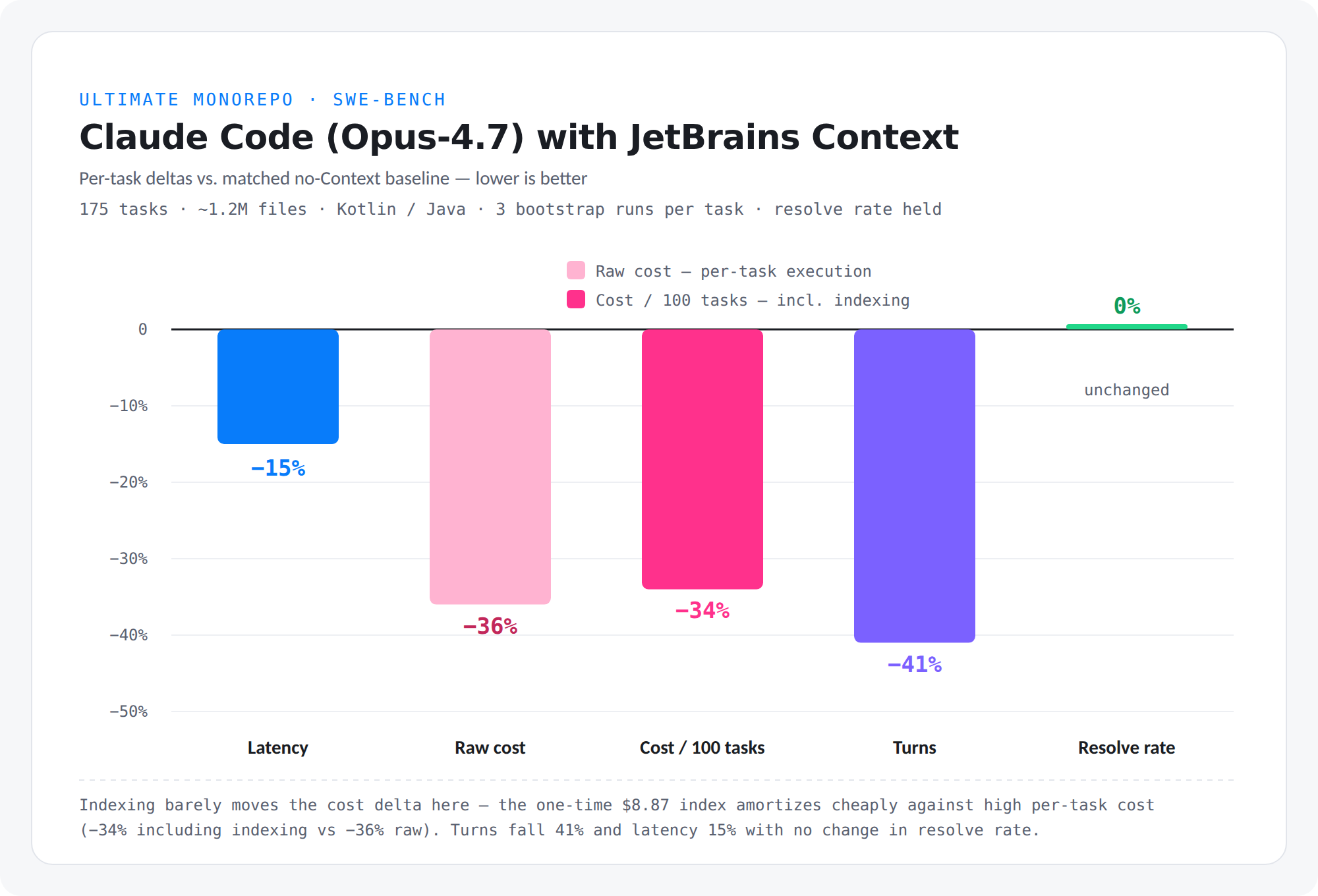
We validated JetBrains Context on 205 open-source SWE-bench tasks, 175 production-monorepo tasks, and 1,953 code-localization tasks. Across these benchmarks, JetBrains Context reduced agent turns by up to 68%, latency by up to 59%, and execution cost by up to 48%.
Measuring AI systems consistently isn’t easy. Modern coding agents are inherently probabilistic, so we designed our evaluation around established industry benchmarks and production-scale repositories. Through evaluations, we managed to improve this technology to the point where we can confidently say it makes a huge difference in time, cost, and code quality for large codebases.
JetBrains Context early access is already included with your subscription!
Follow the instructions on our landing page to get started:
- Install the CLI with a simple
GETrequest. - Authenticate using the CLI
jbcontext logincommand. Your credentials will work as-is. A JetBrains AI license is needed, but no quota will be consumed by JetBrains Context. - Navigate to your project folder and set up JetBrains Context for your preferred coding agent using the
jbcontext setup-agentcommand. You might also do it globally in the user scope. - JetBrains Context will pre-index your code automatically by agent hooks, or you can do it explicitly by calling the
jbcontext indexcommand. Your source code is not stored on JetBrains Context servers.
From now on, as you go about your normal coding, you’ll see the agent is equipped with new repository intelligence capabilities that make it much more productive.
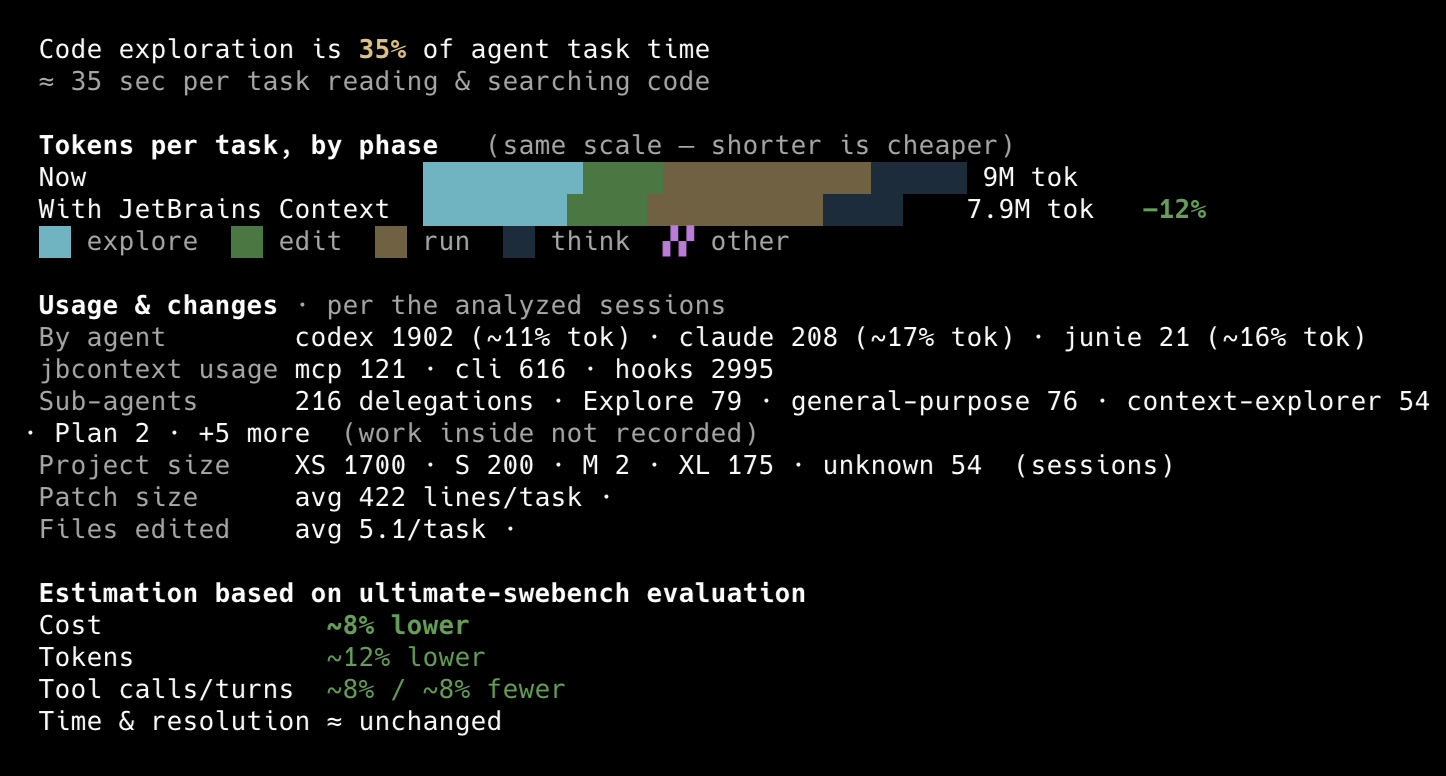
After trying JetBrains Context out, if you’re unsure about whether it’s helping you or not, you can check out our new built-in analytics! Just hit jbcontext analyze to see cost and time savings based on your real time data.
We’d love to hear what you think. Share your feedback, ask questions, or tell us about your experience in the comments below. You can also use the jbcontext send-feedback command directly from the CLI.
Subscribe to JetBrains AI Blog updates
0 Comments
Log in to join the conversation.No comments yet. Be the first to share your thoughts.