

An agentic development environment
What’s new: Air gets more agents, local models, and Java/Kotlin code intelligence

The new release of JetBrains Air brings support for GitHub Copilot, OpenCode, Pi, Cline, and other ACP-compatible agents. It also adds IntelliJ-powered navigation and diagnostics for Java and Kotlin and runs Windows tasks in Docker containers.
Try Air for Mac, Linux and Windows
Bring your own agents and harnesses
Air gives coding agents separate workspaces where they can run tasks in parallel. You can then review each agent’s changes before they reach your codebase. Until now, this workflow was limited to the agents bundled with Air, including Claude, Codex, Gemini CLI, and Junie. You can now connect other supported agents and use them throughout the same task and review workflow.
This is made possible by the Agent Client Protocol (ACP), an open protocol developed by JetBrains and Zed. ACP gives coding agents and development environments a shared way to communicate. When an agent supports ACP, Air can connect it to its workspace without requiring a separate integration built specifically for that agent.
With this change, the two most requested workflow improvements have become a reality.
Use your company’s approved coding agent in Air
Many companies standardize on one AI coding tool and do not allow alternatives. Previously, if your company had only approved GitHub Copilot, that meant you could not use Air because Air could not connect to the Copilot access your company provided.
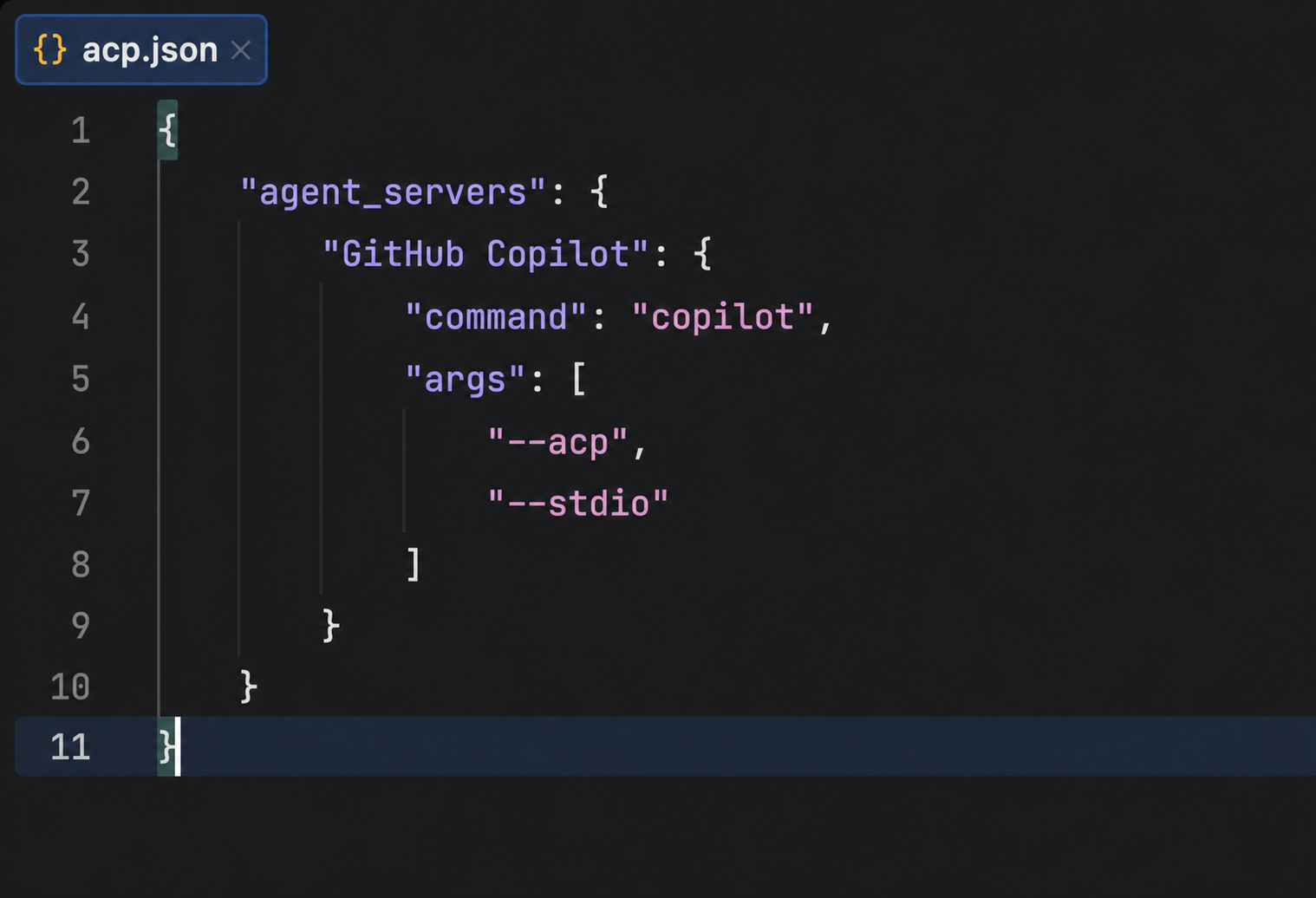
Air can now connect to the GitHub Copilot CLI through its ACP server mode. This lets you use your company-managed Copilot access in Air: The Copilot CLI runs the coding agent and provides access to the available models, while Air adds parallel workspaces and its review workflow.
The same applies to other ACP-compatible coding agents Air supports. You can use the tool your company has already approved without asking it to adopt another AI provider.
Ready to connect your own agent? Follow our setup guide for GitHub Copilot, OpenCode, or Cline with a local Ollama model. It includes working acp.json configurations.
Use the agent harness you prefer
A model is only one part of a coding agent. The harness is the software around it: It gathers context, calls tools, manages the task, and turns the model’s responses into code changes. Different harnesses approach this workflow differently and support different model providers.
Air can now connect to supported ACP agents such as OpenCode and Pi. You choose the harness and configure it with a model or provider it supports. For example, you could use OpenCode with your preferred cloud provider or Pi with a local model.
The available models and agent-specific features depend on the harness and what it exposes through ACP.
Work with local models
Local-model support was one of our most requested additions. You can now use a model running on your computer through a local model runner such as Ollama or LM Studio. An ACP-compatible coding agent connects to the local model, and Air connects to that agent.
This lets you develop with a model that runs offline and choose the one that best fits your codebase, task, or environment.
Navigate Java and Kotlin projects and catch errors
Air now supports Java and Kotlin language intelligence, including mixed Java/Kotlin projects, powered by the IntelliJ IDEA code engine (in Beta).
While creating a task, you can jump to definitions, find usages, search for symbols, and follow code paths directly in Air. This helps you understand the code the agent will touch and give it more precise context.
After the agent finishes, Air highlights errors and warnings in the affected Java and Kotlin code. You can inspect problems before accepting the changes, without opening your IDE or waiting for the code to fail during compilation.
Docker tasks now run on Windows
Air can now run agent tasks in Docker containers on Windows, matching the existing macOS support. Use Docker tasks when you want dependencies and agent commands to run in an isolated container instead of directly on your machine. Docker Desktop is required.
Download Air for x64 / Download Air for ARM64
More control during agent runs
Review proposed changes before granting permission. When an agent asks to modify a file, click the file name to open the complete edit in the Proposed Change tab. You can inspect what the agent intends to change instead of relying on a short snippet in the chat.
See how much context Claude has used for a given task. Air now shows context-window usage and token counts for Claude Agent. This helps you recognize when a long task is approaching its context limit and decide whether to finish the task or start a new one.
Adjust the effort level for demanding tasks. Claude Fable, Opus, and Sonnet 5 now support an “xhigh” effort level for when a task needs more reasoning.
Keep your Mac awake during long tasks. Enable the new macOS setting to prevent your computer from sleeping while an agent is working, and ensure your task continues while you step away.
Try the new release
Download the latest Air release at air.dev/download or update through JetBrains Toolbox. Try it with your existing agents and models, then tell us how it works for you.
Subscribe to Air blog updates
0 Comments
Log in to join the conversation.No comments yet. Be the first to share your thoughts.