

Originally published at https://blog.pathvector.dev/protocol-lab-mss-37/ — part of the free Protocol Lab series.
This post is part of Protocol Lab, a free, hands-on series for learning networking protocols by building and breaking them in a container lab. All the lab material — topologies, configs, and scripts — lives in the repo: github.com/pathvector-studio/protocol-lab.
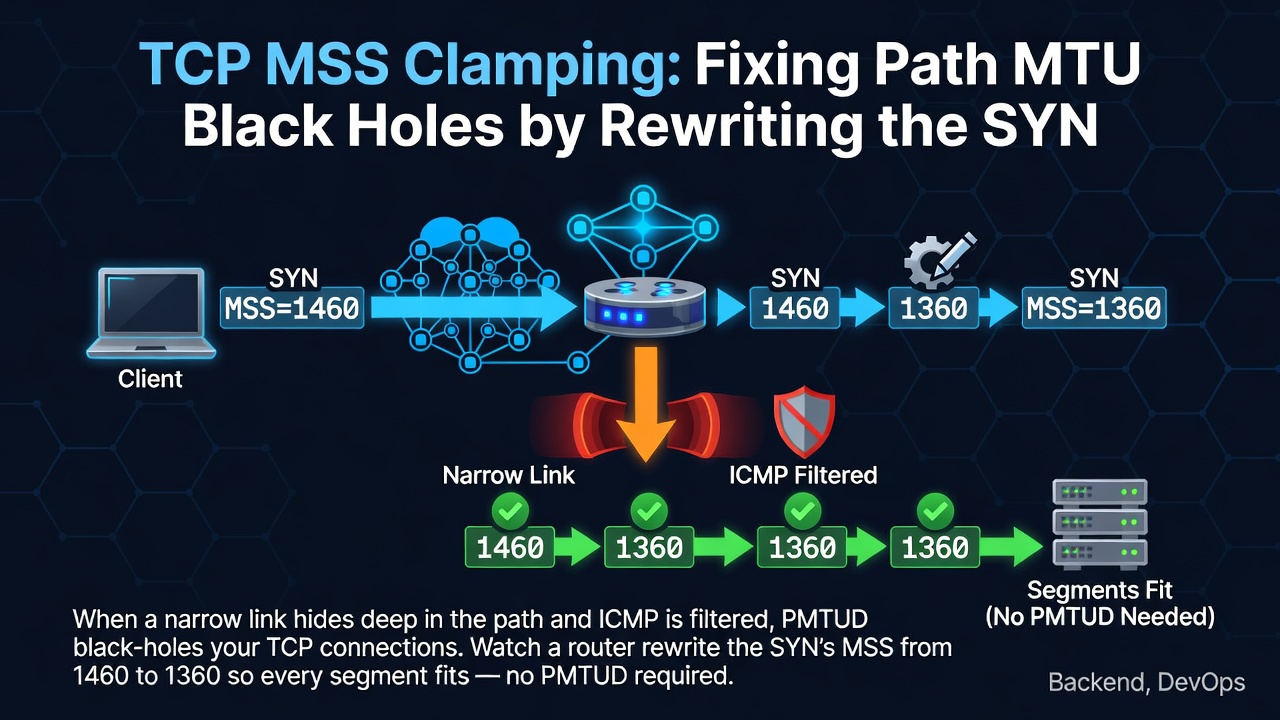
Lab #25 では、Path MTU Discovery が ICMP 経由でより小さいリンクを検出する様子と、その ICMP がフィルタリングされたときにブラックホール化する様子を確認しました。このラボは、その運用上の対策である MSS clamping です。経路上のルータが通過する TCP SYN の MSS を書き換え、両エンドポイントが最初から最も狭いリンクに適合するセグメントを送信するように合意させます — PMTUD の動作に依存する必要はありません。
Reading guide: rfc-notes/mss-clamping.md
Prerequisite: Lab 25: MTU and Path MTU Discovery
Expected time: 35–50 minutes.
The Goal
クライアント側のリンクは MTU 1500、r–server 間のリンクは MTU 1400 です:
- Without clamping、クライアントの SYN は MSS 1460(自リンク 1500 − 40)を通知します。フルサイズのセグメントは 1400 リンクには大きすぎるため、PMTUD に依存します。
-
With clamping、
rが SYN の MSS を 1360(1400 − 40)に書き換えるため、両端は常に狭いリンクに収まるセグメントを送信します。
終了時には、次の表を説明できるようになります:
| SYN MSS seen at the server | why | |
|---|---|---|
| without clamping | 1460 | client's local MTU 1500 − 40 |
| with clamping | 1360 |
r clamps to the 1400-MTU link (− 40) |
What You Will Learn
- TCP の MSS オプションとは何か、エンドポイントがローカル MTU からどのように導出するのか。
- なぜ SYN の MSS が経路の奥にあるより小さいリンクを「見ない」のか。
- PMTUD が ICMP フィルタリング時にどのように ブラックホール になるか(Lab 25 の復習)。
- 経路上のルータがどのように MSS clamping を行い、SYN の MSS を経路に適合させるか。
- 有効 MTU を縮小するトンネル(WireGuard/VXLAN/GRE)においてこれが重要である理由。
This lab does not cover:
- Full PMTUD internals (Lab 25 covers those).
- IPv6 MSS specifics (MSS = MTU − 60 with the larger minimum).
- Per-route MTU pinning or PLPMTUD (RFC 8899).
Where to Read in the RFCs
| Reference | What to focus on |
|---|---|
| RFC 9293 §3.7.1 | The MSS option and how segment size is decided |
The Big Picture
r はクライアントとサーバの間に位置し、r–server 間のリンクのみが MTU 1400 です。
 client ---- eth1/eth1 ---- r ---- eth2/eth1 ---- server
 MTU 1500                       MTU 1400 (narrow)   MTU 1400
   SYN: mss 1460  --->  r clamps --->  mss 1360 at server
Enter fullscreen mode Exit fullscreen mode
r の FORWARD チェイン(mangle テーブル)で、SYN の MSS を PMTU にクランプします。
flowchart LR
  C["client (MTU 1500)<br/>SYN mss 1460"] --> R["r<br/>TCPMSS --clamp-mss-to-pmtu"]
  R -->|"SYN rewritten<br/>mss 1360"| S["server (MTU 1400)"]
Enter fullscreen mode Exit fullscreen mode
10.0.0.0/8 is a local, closed range.
Note: Everything here uses local/documentation address space (RFC 1918 / RFC 5737), so nothing in this lab touches the real internet.
What You Need
Recommended environment:
- Linux / WSL2 / a Linux VM
- Docker
- containerlab
Images used:
-
nicolaka/netshoot:latest— bundlesiptables,tcpdump,curl, andpython3.
No additional images are required.
Running the Lab
The quick path, which deploys, verifies, and tears down for you:
./scripts/labctl.sh run mss-37
Enter fullscreen mode Exit fullscreen mode
Or step through it manually:
1. Move into the working directory
cd protocol-lab/examples/mss-37
Enter fullscreen mode Exit fullscreen mode
2. Deploy and start an HTTP server
sudo containerlab deploy -t mss-37.clab.yml
docker exec -d clab-mss-37-server python3 -m http.server 80
docker exec clab-mss-37-r ip -br link show eth2   # mtu 1400
Enter fullscreen mode Exit fullscreen mode
3. Watch the SYN's MSS without clamping
docker exec -d clab-mss-37-server sh -c 'tcpdump -i eth1 -n -c1 "tcp[tcpflags] & tcp-syn != 0 and tcp[tcpflags] & tcp-ack == 0" > /tmp/syn.txt 2>&1'
docker exec clab-mss-37-client curl -s --max-time 4 http://10.0.8.2/ >/dev/null
docker exec clab-mss-37-server grep -oE 'mss [0-9]+' /tmp/syn.txt
Enter fullscreen mode Exit fullscreen mode
You should see mss 1460 — the client's local 1500 − 40.
4. Enable MSS clamping on r
docker exec clab-mss-37-r iptables -t mangle -A FORWARD -p tcp --tcp-flags SYN,RST SYN -j TCPMSS --clamp-mss-to-pmtu
Enter fullscreen mode Exit fullscreen mode
5. Watch the SYN's MSS again
docker exec -d clab-mss-37-server sh -c 'tcpdump -i eth1 -n -c1 "tcp[tcpflags] & tcp-syn != 0 and tcp[tcpflags] & tcp-ack == 0" > /tmp/syn2.txt 2>&1'
docker exec clab-mss-37-client curl -s --max-time 4 http://10.0.8.2/ >/dev/null
docker exec clab-mss-37-server grep -oE 'mss [0-9]+' /tmp/syn2.txt
Enter fullscreen mode Exit fullscreen mode
Now it's mss 1360 — r clamped it to 1400 − 40.
Expected Output
-
r's eth2:mtu 1400. - Without clamping: the server sees the SYN carrying
mss 1460. - With clamping: the server sees
mss 1360. - The mangle FORWARD chain shows a
TCPMSS clamp to PMTUrule.
Why It Works
MSS clamping is "tell both endpoints a safe segment size at the start, instead of relying on PMTUD."
- MSS. The maximum payload TCP will accept in one segment. It is advertised only in the SYN, and the value is local MTU − 40 (IPv4): MTU 1500 → 1460. The sender caps its segments at the peer's advertised MSS.
- The blind spot. Each endpoint only knows its own interface MTU. Even if a narrower link sits deeper in the path (here, the 1400-MTU r–server link), the SYN's MSS doesn't reflect it.
- PMTUD and blackholes (Lab 25). When an oversized segment with DF set hits the narrow link, the router returns an ICMP "fragmentation needed" and the sender shrinks. But if that ICMP is filtered, the sender never learns; large segments keep getting dropped and the connection hangs — a blackhole.
-
Clamping. A router on the path rewrites the MSS option in passing SYNs down to the outgoing link's MTU − 40 (if the advertised value is larger). In this lab,
rlowers 1460 → 1360. Both ends then send at 1360 or below, so segments always fit the 1400 link — no blackhole even when PMTUD is broken. Rewriting only the SYN is sufficient, because MSS is negotiated only in the SYN.
The key insight: a router on the path injects the path's minimum MTU — invisible to the endpoints — into the SYN's MSS, so both ends send fitting segments from the very first byte. It's a staple in real deployments where tunnels shrink the effective MTU.
Common Pitfalls
- Confusing MSS with MTU. MTU is the whole IP packet; MSS is the TCP payload. In IPv4, MSS = MTU − 40.
- Thinking MSS is renegotiated. It's negotiated only in the SYN, not per data segment — which is exactly why rewriting the SYN's MSS option is all it takes.
- Assuming PMTUD is enough. ICMP filtering can blackhole it. Clamping is the insurance.
- Assuming you can just lower the endpoint's MTU. The narrow link deep in the path is invisible from the endpoint. It's the router on the path that has to do the rewrite.
- Expecting it to help UDP. MSS is a TCP concept; UDP is a different problem.
-
The clamp value.
--clamp-mss-to-pmtuderives from the outgoing MTU; use--set-mssfor a fixed value.
Cleanup
sudo containerlab destroy -t mss-37.clab.yml --cleanup
Enter fullscreen mode Exit fullscreen mode
If you used labctl.sh run mss-37, the script runs destroy for you at the end.
Check Your Understanding
- What is TCP MSS? How does it differ from MTU (what's the IPv4 relationship)?
- When is the MSS negotiated? Can it change outside the SYN?
- Why can't the SYN's MSS reflect a narrower link deeper in the path?
- When does PMTUD blackhole?
- What does MSS clamping rewrite, and where? Why does 1460 become 1360 in this lab?
- Why is clamping so valued with tunnels (WireGuard/VXLAN/GRE)?
References
- RFC 9293: Transmission Control Protocol
- RFC 1191: Path MTU Discovery
- RFC 2923: TCP Problems with Path MTU Discovery
- RFC 5737: IPv4 Address Blocks Reserved for Documentation
Verified Run Log (2026-07-07)
This lab has been confirmed reproducible on real hardware.
Environment:
- Ubuntu 26.04 LTS (kernel 7.0.0-27-generic, x86_64)
- Docker 29.1.3
- containerlab 0.77.0
- client / r / server:
nicolaka/netshoot:latest(iptables,tcpdump,curl,python3)
Running PATH="/tmp/pl-shim:$PATH" ./scripts/labctl.sh run mss-37 performed deploy → verify → destroy, and verification.json returned "status": "verified".
Without clamping → the SYN carries MSS 1460
Capturing the client's SYN on the server's eth1:
Flags [S], seq ..., options [mss 1460, ...]
Enter fullscreen mode Exit fullscreen mode
That's MSS 1460, derived from the client's link MTU of 1500 — too big for the r–server link (MTU 1400), leaving the connection dependent on PMTUD.
With clamping on r → the SYN carries MSS 1360
mangle FORWARD: TCPMSS tcp flags:0x06/0x02 TCPMSS clamp to PMTU
Enter fullscreen mode Exit fullscreen mode
After adding iptables -t mangle -A FORWARD -p tcp --tcp-flags SYN,RST SYN -j TCPMSS --clamp-mss-to-pmtu, the same client SYN captured at the server shows:
mss 1360
Enter fullscreen mode Exit fullscreen mode
r rewrote the SYN's MSS option from 1460 → 1360 (1400 − 40) to match its outgoing link (eth2, MTU 1400). From then on both ends send segments of 1360 bytes or less, so everything fits the narrow link — no blackhole, even if ICMP is filtered.
| SYN MSS seen at the server | |
|---|---|
| without clamping | 1460 |
| with clamping | 1360 |
Cleanup
containerlab destroy -t mss-37.clab.yml --cleanup
Enter fullscreen mode Exit fullscreen mode
That's MSS clamping: one iptables rule on the path router, and every TCP connection agrees on a safe segment size before the first byte of data — no working PMTUD required.
Explore the full Protocol Lab series here: github.com/pathvector-studio/protocol-lab. If these labs are useful to you, please ⭐ star the repo on GitHub — it genuinely helps others find the project.
Next up, we'll keep digging into how real networks stay reliable when the textbook mechanisms fail.
0 Comments
Log in to join the conversation.No comments yet. Be the first to share your thoughts.