
I was showing ChefExtract to some friends when it started returning error 404 for specific operations linked to AI.
After some embarrassment, I went home to figure out the problem: The model I used for those specific operations had been deprecated.
And just like that, my app was failing.
But I learned my lesson: relying entirely on one API creates a single point of failure (not rocket science).
The easiest fallback mechanism would be to rely on a backup model. But these increase maintenance, and it doesn’t scale well. A better fix relies on AI gateways.

What is an AI gateway?
An AI gateway is a middleware layer that sits between your application and the LLM providers. Instead of your code calling OpenAI or Anthropic directly, it calls the gateway, and the gateway forwards the request.
Concretely, a gateway buys you four things:
- One API for many providers. Write your code once, switch between GPT, Claude, Gemini, or a local model without rewriting anything.
- Automatic failover. If your primary provider fails or deprecates your model (as it happened to me), requests reroute to a backup. Users never see a 404.
- Cost control and caching. Budgets, rate limits, and cached responses for repeated queries, enforced in one place instead of scattered across your codebase. This is especially useful when relying on models from different providers.
- Observability. Every request is logged, timed, and priced, so “why is our AI bill so high?” becomes a query instead of an investigation. Once again, this is especially useful when dealing with multiple models from different providers.
This is exactly what my app needed. Failover alone would have turned my deprecated-model incident into a non-event.
Enter Bifrost
There are many AI gateways, but eventually I explored one called Bifrost because it is open source and you can see how it operates under the hood.

Bifrost is an open-source AI gateway built by Maxim AI and written in Go.
Bifrost bridges your app to more than 20 providers: OpenAI, Anthropic, AWS Bedrock, Google Vertex, Azure, Groq, Mistral, and even local models via Ollama. This is more than enough to handle failovers.
Also, another good thing is that getting started is a one-liner:
npx -y @maximhq/bifrost
Enter fullscreen mode Exit fullscreen mode
That launches the gateway with a web UI at localhost:8080. Then you change one line in your existing code:
# Before
base_url = "https://api.openai.com"
# After
base_url = "http://localhost:8080/openai"
Enter fullscreen mode Exit fullscreen mode
That’s it. Your code keeps working, and you’ve just gained failover, load balancing, and observability without touching your business logic.
Core features
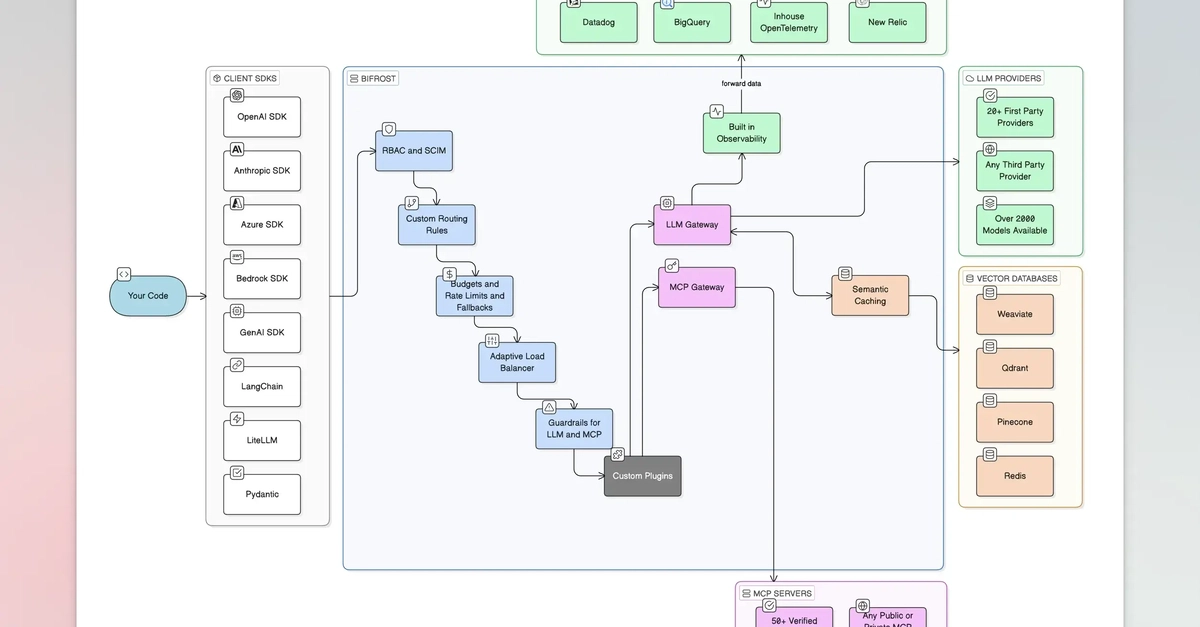
For my needs, Bifrost AI gateway is the real deal here. These are the main features and how I use them:
- Drop-in replacement. Bifrost speaks the OpenAI, Anthropic, and Gemini API formats, so the existing SDKs work unchanged. This was important for me not to change the code too much.
- Automatic fallbacks. This is the main reason to adopt an AI Gateway. Define a chain like gemini-3.6-flash then gpt-5.6-sol, and more as backup if you want. Bifrost switches providers automatically when one fails. This is the feature that would have saved my app.
- Load balancing across keys. Distribute traffic over multiple API keys, so no single key hits its rate limit. I am not pretending this would be used by everyone. But in a few cases, I’m distributing traffic to stay within the free tier. This is real money I’m not spending.
- Semantic caching. Similar questions get cached answers, cutting both latency and cost for repetitive workloads. Big model providers offer these off the shelf so I am not sure how much this helps. But most likely, it doesn’t harm more than a few microseconds of latency.
- Built-in observability. Native Prometheus metrics and OpenTelemetry tracing, plus a dashboard that shows every request in real time. I think most personal projects don’t care about this. However, as soon as they grow, this kind of observability can be very helpful.
- MCP gateway. Bifrost acts as both an MCP client and server, so it can connect AI models to external tools and expose those tools to clients like Claude Desktop and Cursor with allow-lists controlling who can use what. For a solo developer or a small team, this is already a complete package.
Built-in observability and the MCP Gateway can be more useful for enterprise users. And this is what sets Bifrost apart.
If the project grows, then Bifrost scales very well.
Scalability
For many, scalability is boring and a secondary thought until a client asks you to provide audit logs, RBAC and provision users through SSO.

Scalability isn’t just about requests per second. It is organizational scale: what happens when AI access goes from three engineers experimenting to two hundred people across twelve teams, and someone in finance asks why the AI spend has no owner.
Bifrost has an Enterprise option just for that. What I find elegant is how they compose into a single pipeline.
- Access Profiles. Reusable policy templates allow providers, model whitelist, budget, rate limits, even permitted MCP tools attached to a role. Every user in that role inherits those settings.
- User Provisioning (OIDC + SCIM). Most startups don’t think about this until a customer won’t sign a contract unless they get authentication through SSO. Bifrost supports SSO via OIDC and real-time provisioning via SCIM 2.0, mapping Okta, Microsoft Entra, or Google Workspace groups into Bifrost roles and teams.
- Role-Based Access Control. Three system roles ship out of the box — Admin, Developer, Viewer + custom roles with view/create/update/delete toggles. As soon as you get enterprise customers, this is the way to go.
- Audit Logs. Every administrative action is recorded. This is the boring part that delays contracts. Is your startup SOC 2, GDPR, HIPAA compliant? Audit logs don’t make you compliant by themselves, but you won’t get through those audits without them.
Obviously, this is in the paid Enterprise tier, not the open-source core. But I’d rather use A free version that allows me to scale as I need, rather than one that doesn’t.
The takeaway
In my opinion, Bifrost might be overkill if you’re a solo dev using a single LLM provider and a single model. However, as soon as you start connecting different models from different providers, you should consider it to get fallback mechanisms, one unified API and caching off the shelf.
AI gateways are becoming what load balancers became twenty years ago: boring, invisible, and mandatory plumbing.
My 404 incident was small, a deprecated model and some embarrassment. But it’s the same failure mode, in miniature, that takes down production systems at scale.
A gateway turns that entire category of problem into configuration.
Bifrost makes a strong case on both fronts: a fast, free, open-source core for developers, and serious governance machinery for the organizations that come after them.
Overall, if your app talks to more than one model, changing one base URL is a very cheap insurance policy.
0 Comments
Log in to join the conversation.No comments yet. Be the first to share your thoughts.