


So I was messing around with a little side project, a chatbot that answers questions about the World Cup. Fun, low stakes, nobody's paycheck depends on it.
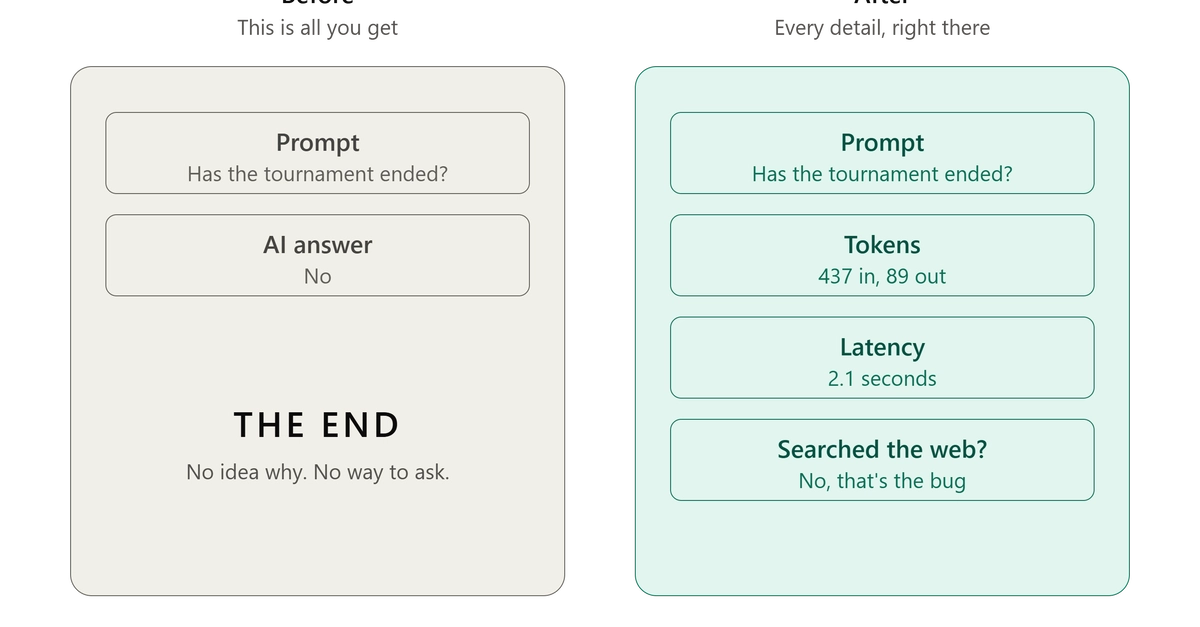
Someone asked it "has the tournament ended yet?"
It said no. Confidently. Wrong. It had actually ended weeks earlier.
Fine, models get things wrong sometimes, that's not exactly breaking news. What actually got me was the next question: why? Did it even try to check? Did it just guess from something it remembered? I genuinely had no way to find out. The model doesn't keep a diary. It answers, and that's it, the reasoning just evaporates.
And that's true whether you're building a hobby project or something with real users. No logs, no "here's exactly what I looked at before I answered," nothing. You're stuck debugging a black box with screenshots and vibes.
The one-sentence version, if you're not deep into this yet
I'm sure a chunk of you already know exactly where this is going: OpenTelemetry. If that's you, feel free to skip ahead.
But if you're more in the "yeah I've heard the name, never actually looked into it" camp, here's the short version: it's basically a black box flight recorder for your AI calls. Every time your code asks a model something, it quietly writes down what was asked, what came back, how long it took, and what it cost.
How to actually set this up, no infra background needed
- Grab a small library built for whatever model provider you're using, it wraps your existing code automatically, you don't rewrite your calls
- Point it at somewhere to send the data, just a URL and a key
- Ask your bot something like you normally would
from openinference.instrumentation.anthropic import AnthropicInstrumentor

AnthropicInstrumentor().instrument(tracer_provider=provider)

# Nothing else changes below. This call is now traced automatically.
response = client.messages.create(model=model_name, messages=messages)
Enter fullscreen mode Exit fullscreen mode
A full record shows up right after: the prompt, the answer, the timing, the cost. First time you see it, it's a genuinely satisfying "oh, THAT'S what happened" moment.
What you need: whatever API key you already use for your model, and somewhere to send the data to, several solid free options exist.
Time to get this working: under 30 minutes, most of it is pasting two lines into code you've already written.
The landscape, so you know what's out there
Some existing tools in this space, worth knowing the names even if you don't need all of them: LangSmith, Langfuse, Helicone, PromptLayer, Braintrust, and Arize Phoenix (free and open source if you want to self-host).
If you just want to poke around and get a feel for this without committing to anything, Enprompta is a solid, beginner-friendly place to start.
There's even a small public sample project set up specifically for trying this out hands-on:
2026 World Cup Assistant
A lightweight assistant that answers questions about the 2026 FIFA World Cup (USA / Canada / Mexico, June 11 – July 19, 2026). It calls Claude with the built-in web-search tool, so answers can reflect live results and fixtures.
Comes in two forms — a web app and a command-line tool — sharing one prompt and one dependency.
The app is intentionally left uninstrumented; adding instrumentation is a student exercise.
Instrument it with Enprompta
Want to see exactly what instrumentation adds? Open the quickstart notebook in Colab — it clones this app, wires OpenTelemetry tracing, a versioned prompt, and evals around the single LLM call site, then streams the traces to your Enprompta project.

Take the course: Evaluating AI Agents
Once you've traced it, learn to evaluate it. This app is the running example in Enprompta's free course on agent evaluation — you'll score it across…
Clone it, wire up tracing, and go find your own version of "wait, why did it say that."
0 Comments
Log in to join the conversation.No comments yet. Be the first to share your thoughts.