
If you maintain more than one npm package in a single repository, you've probably felt the pain of release day. Bumping versions manually, publishing in the right order, hoping you didn't forget a step. Multiply that by four packages and it becomes a real problem.
This article is about solving that problem. I'll walk through a deployment pipeline I built for a multi-package TypeScript monorepo — covering version management, automated publishing, containerized verification, and documentation deployment. The patterns are generic enough to apply to any monorepo that ships multiple packages.
I'll use Nava Icon as a concrete example throughout, but the architecture works for any multi-package setup.
What "Deployment" Means for a Library
Most deployment articles talk about shipping apps to servers. For library authors, deployment means something different:
- Version management — Bumping semver across packages correctly
- npm publishing — Getting packages to the registry with proper access
- Container builds — Creating reproducible verification environments
- Documentation — Keeping docs in sync with the latest release
- Release automation — Reducing the entire flow to a single human action
The goal: a developer makes a change, and the system handles everything else.
The Architecture
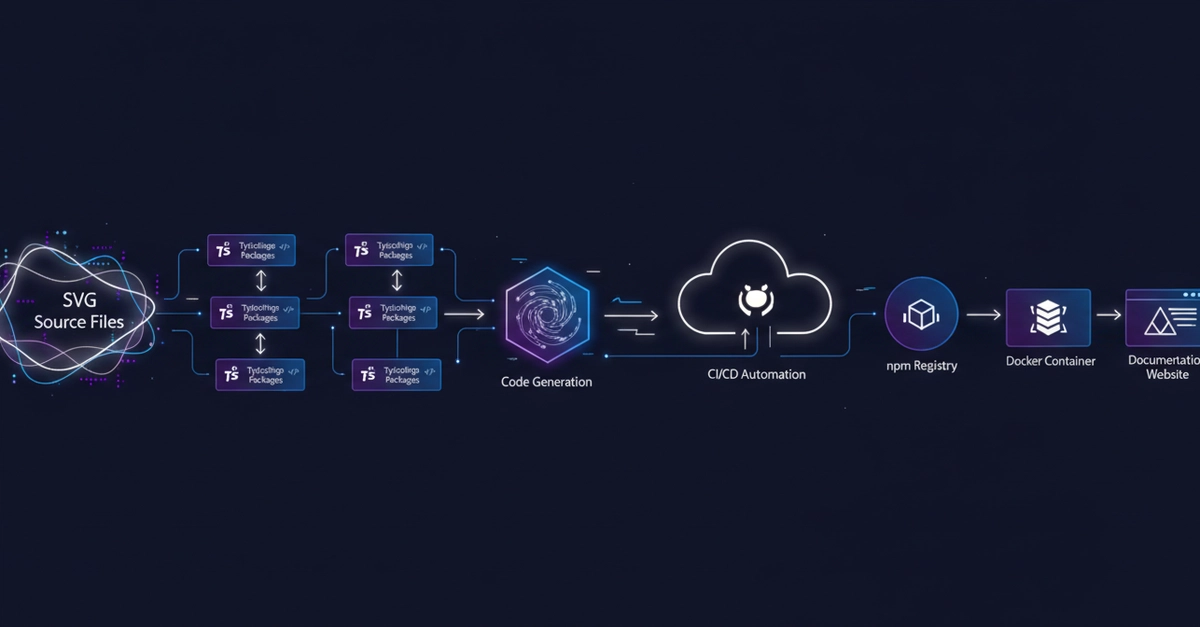
Here's what a production-ready deployment pipeline looks like for a multi-package monorepo:
Code Change
     |
     v
 CI Verification (lint, typecheck, build)
     |
     v
 Docker Validation (reproducible build check)
     |
     v
 Version Bump (automated via Changesets)
     |
     v
 npm Publish (all changed packages)
     |
     v
 Container Image (GHCR)
     |
     v
 Documentation (GitHub Pages)
Enter fullscreen mode Exit fullscreen mode
Every step is automated. The only human action is approving a production deployment.
1. Version Management
Versioning is the hardest part of multi-package deployment. If Package A depends on Package B, and you bump Package B, Package A needs to update its dependency. Do this wrong and you get version mismatches, broken installs, or packages that reference unpublished versions.
The Tool: Changesets
I use Changesets for version management. Here's why it fits multi-package monorepos:
How it works:
# Developer runs this once
pnpm changeset
# Selects: which packages, bump type, description
# Creates: .changeset/lazy-load-icons.md

# The file looks like:
---
"@whydrf/nava-icon-react": minor
"@whydrf/nava-icon-vue": minor
---

Lazy-load dynamic Icon component via per-icon import() chunks
Enter fullscreen mode Exit fullscreen mode
The changeset file is committed with the code. It tells the system what to bump and why.
What Changesets does on CI:
| State | Action |
|---|---|
| Changeset files exist | Creates/updates a version PR with bumped package.json versions and changelogs |
| No changeset files (version PR was merged) | Publishes all bumped packages to npm |
Why not semantic-release?
semantic-release is fully automated but all-or-nothing — it decides everything from commit messages. For multi-package monorepos where you sometimes want to bump only specific packages, Changesets gives you that control.
Configuration:
{
  "commit": false,
  "access": "public",
  "baseBranch": "main",
  "updateInternalDependencies": "patch",
  "ignore": ["@nava-icon/docs", "@whydrf/nava-icon-core"]
}
Enter fullscreen mode Exit fullscreen mode
The ignore list excludes packages that shouldn't be published. The updateInternalDependencies: "patch" ensures that when an internal dependency bumps, its consumers automatically get a patch bump too.
2. CI Verification Pipeline
Before anything gets published, every change goes through verification. The pipeline lives in .github/workflows/ci.yml:
Trigger Strategy
on:
  pull_request:
    branches: [develop, stage, main]
    paths:
      - "assets/**"
      - "packages/**"
      - "scripts/**"
      - ".github/workflows/ci.yml"

  push:
    branches: [main]
    paths:
      - "assets/**"
      - "packages/**"
      - "scripts/**"
Enter fullscreen mode Exit fullscreen mode
Path filtering is a deployment optimization. If someone updates a README, you don't need to rebuild 950 icon components. Only changes to source code, packages, or the CI config itself trigger the pipeline.
Concurrency Control
concurrency:
  group: ci-${{ github.event.pull_request.base.ref || github.ref }}
  cancel-in-progress: true
Enter fullscreen mode Exit fullscreen mode
If a developer pushes twice in quick succession, the first CI run is cancelled. This saves compute and gives faster feedback.
The Verify Job
verify:
  runs-on: ubuntu-latest
  steps:
    - uses: actions/checkout@v4
    - uses: pnpm/action-setup@v4
    - uses: actions/setup-node@v4
      with:
        node-version: 24
        cache: pnpm
    - run: pnpm install --frozen-lockfile
    - run: pnpm generate
    - run: pnpm lint
    - run: pnpm typecheck
    - run: pnpm build
Enter fullscreen mode Exit fullscreen mode
Every PR gets: dependency install → code generation → lint → typecheck → build. If any step fails, the PR can't be merged.
Environment Gating
The pipeline uses GitHub Actions environments to control what runs where:
| Environment | Branch | Purpose |
|---|---|---|
DEV |
develop |
Development validation |
STAGING |
stage |
Staging validation |
PRODUCTION |
main |
Release to npm |
The PRODUCTION environment can require manual approval — a human checkpoint before anything gets published.
3. Docker Verification
Docker isn't used for deployment here. It's used for verification — ensuring the project builds correctly in a clean, reproducible environment.
Why Docker for Verification?
Local development environments differ. Different Node versions, different OS behaviors, cached dependencies. Docker eliminates this variable:
FROM node:24-alpine AS base
RUN corepack enable

FROM base AS deps
COPY package.json pnpm-lock.yaml pnpm-workspace.yaml turbo.json ./
RUN pnpm install --frozen-lockfile

FROM base AS builder
COPY --from=deps /app/node_modules ./node_modules
COPY . .
RUN pnpm generate
RUN pnpm build

FROM base AS verifier
COPY --from=builder /app .
RUN pnpm lint
Enter fullscreen mode Exit fullscreen mode
Layer Caching Strategy
The multi-stage build is designed for Docker layer caching:
-
depslayer — Only copies manifest files, runspnpm install. Changes rarely, so this layer is cached. -
builderlayer — Copies dependencies fromdeps, runs generation and build. Rebuilds on code changes. -
verifierlayer — Copies everything frombuilder, runs lint. Used for CI verification.
Code changes don't invalidate the dependency cache. This makes rebuilds fast.
Local Docker Workflow
pnpm docker:build          # Build the image
pnpm docker:verify         # Run lint in container
pnpm docker:shell          # Interactive shell for debugging
pnpm docker:compose:verify # Full verification via docker-compose
Enter fullscreen mode Exit fullscreen mode
Developers can verify the Docker build locally before pushing. This catches Dockerfile issues early.
4. Automated npm Publishing
This is where the deployment pipeline gets interesting. The flow is:
Release PR Flow
Developer commits changeset file
        |
        v
    Push to main
        |
        v
    changesets/action creates version PR
    (bumps package.json versions, updates CHANGELOGs)
        |
        v
    auto-merge workflow enables squash merge
        |
        v
    CI runs on version PR
        |
        v
    PR merged automatically
        |
        v
    Push to main (from merge)
        |
        v
    changesets/action detects no pending changesets
    → runs `changeset publish`
        |
        v
    Packages published to npm
    GitHub Releases created
Enter fullscreen mode Exit fullscreen mode
The Auto-Merge Step
# .github/workflows/auto-merge-changeset.yml
auto-merge:
  if: github.head_ref == 'changeset-release/main'
  steps:
    - run: gh pr merge ${{ github.event.pull_request.number }} --auto --squash
Enter fullscreen mode Exit fullscreen mode
When the Changesets action creates the version PR, this workflow enables auto-merge. Once CI passes, GitHub merges it without human intervention. The next CI run then publishes.
Publishing Configuration
publish:
  if: github.event_name == 'push' && github.ref_name == 'main'
  environment: PRODUCTION
  permissions:
    contents: write
    pull-requests: write
  steps:
    - uses: changesets/action@v1
      with:
        publish: pnpm publish:ci
        createGithubReleases: true
      env:
        NODE_AUTH_TOKEN: ${{ secrets.NPM_TOKEN }}
Enter fullscreen mode Exit fullscreen mode
The publish:ci script runs changeset publish, which:
- Reads the version bumps from the merged changeset PR
- Publishes each changed package to npm
- Creates GitHub Releases for each package
5. Container Image Publishing
After npm packages are published, a Docker image is built and pushed to GitHub Container Registry:
docker-publish:
  needs: publish
  steps:
    - uses: docker/login-action@v3
      with:
        registry: ghcr.io
        password: ${{ secrets.GITHUB_TOKEN }}

    - uses: docker/metadata-action@v5
      with:
        images: ghcr.io/${{ github.repository_owner }}/nava-icons
        tags: |
          type=raw,value=latest
          type=sha

    - uses: docker/build-push-action@v6
      with:
        push: true
        tags: ${{ steps.meta.outputs.tags }}
        cache-from: type=gha
        cache-to: type=gha,mode=max
Enter fullscreen mode Exit fullscreen mode
Every release gets two tags: latest and a SHA-based tag. The SHA tag lets you pin to a specific release if needed.
Why Push Docker Images for a Library?
Three reasons:
- Reproducible verification — Anyone can pull the image and verify the build
- CI cache — Subsequent builds can use the cached image
- Future deployment — If you add a playground or demo app, the image is ready
6. Documentation Deployment
The docs site is a Next.js app with static export. It deploys to GitHub Pages:
# .github/workflows/deploy-doc.yml
on:
  push:
    branches: [main]
    paths: ["docs/**"]
Enter fullscreen mode Exit fullscreen mode
The pipeline builds the docs, uploads the artifact, and deploys to GitHub Pages. Only docs/ changes trigger this — icon or package changes don't redeploy docs unless the docs themselves change.
This separation matters for deployment efficiency. Documentation deployment is independent of package deployment.
7. Deployment Timeline
Here's what a typical release looks like end-to-end:
T+0:00   Developer commits changeset, pushes to main
T+2:00   Version PR created by changesets/action
T+2:00   Auto-merge enabled
T+5:00   CI passes, version PR merged
T+5:00   Push to main triggers publish job
T+10:00  Packages published to npm
T+10:00  GitHub Releases created
T+12:00  Docker image pushed to GHCR
T+12:00  Documentation redeployed (if docs changed)
Enter fullscreen mode Exit fullscreen mode
Total time from push to published: ~10 minutes.
Human involvement: zero (after the initial push).
8. Security in Deployment
A deployment pipeline that publishes to npm needs security controls:
| Control | Implementation |
|---|---|
| Token management |
NPM_TOKEN stored as a GitHub secret, never logged or exposed |
| Minimal permissions | Each job declares only the permissions it needs |
| Frozen lockfile |
pnpm install --frozen-lockfile prevents dependency tampering |
| Environment protection |
PRODUCTION environment can require manual approval |
| Path-based triggers | CI only runs on relevant file changes |
| Permission scoping |
contents: read by default, write only where needed |
What I'd Add for Higher Security
- npm provenance — Sign packages with GitHub OIDC to prove they came from your CI
- SLSA build provenance — Generate attestations for build artifacts
- Dependency scanning — Automated vulnerability checks on dependencies
- Branch protection — Require reviews for changes to CI configuration
9. Deployment Patterns Worth Stealing
These patterns work for any multi-package monorepo, not just icon libraries:
Pattern 1: Path-Based Triggers
paths:
  - "packages/**"
  - ".github/workflows/ci.yml"
Enter fullscreen mode Exit fullscreen mode
Don't rebuild everything when documentation changes. Trigger CI only on relevant paths.
Pattern 2: Concurrency Groups
concurrency:
  group: ci-${{ github.event.pull_request.base.ref || github.ref }}
  cancel-in-progress: true
Enter fullscreen mode Exit fullscreen mode
Cancel in-progress runs when new commits push. Save compute, get faster feedback.
Pattern 3: Environment Gating
Use GitHub Actions environments to separate staging from production. Add manual approval gates for production releases.
Pattern 4: Automated Version PRs
Let a tool (Changesets, Lerna, etc.) create the version PR. Human reviews it, CI validates it, auto-merge handles the rest.
Pattern 5: Docker for Verification, Not Deployment
Use Docker to ensure builds work in a clean environment. Don't confuse verification (does it build?) with deployment (does it run?).
Pattern 6: Separate Documentation Deployment
Docs deployment should be independent of package deployment. Different triggers, different pipelines, different failure modes.
10. What I'd Improve
The pipeline works, but there's always room for improvement:
| Improvement | Why It Matters |
|---|---|
| npm provenance | Proves packages came from your CI, prevents supply chain attacks |
| Bundle size tracking | Catch regressions before they ship to users |
| Integration tests | Verify published packages install and work correctly |
| Automated dependency updates | Keep dependencies current without manual effort |
| Release notifications | Slack/Discord alerts when packages are published |
| Canary releases | Test changes before a full release |
Conclusion
The important part of building a deployment pipeline isn't choosing between pnpm, Turborepo, or Changesets. It's designing a system where every artifact has a predictable path from source to distribution.
For multi-package monorepos, that path looks like:
- Code changes → CI verification (lint, typecheck, build)
- Version changes → Automated version PR
- Merged PR → npm publish + container build
- Published → Documentation update
The key principles:
- Automate everything that can be automated. Manual steps are where errors happen.
- Use path-based triggers. Don't rebuild what hasn't changed.
- Gate production releases. A human should approve before anything goes live.
- Use Docker for verification. Reproducible builds matter.
- Separate concerns. Docs deployment ≠ package deployment ≠ container builds.
The goal is a system where a developer can push a change and trust that the right packages get published to the right places in the right order — every time.
Deployment pipeline built with GitHub Actions, Changesets, Docker, and Turborepo. Source code: github.com/nava-icon/nava-icon
0 Comments
Log in to join the conversation.No comments yet. Be the first to share your thoughts.