
Hyperbole Implicit Buttons: Build your Hyperverse
Table of Contents
- 1. TLDR
- 2. About  emacs hyperbole implicitButtons
- 3. The Pitch  hyperbole implicitButtons
- 4. Recognizers and Actions  hyperbole hypertext
- 5. A Tour of the Built-ins  hyperbole implicitButtons
- 6. What Will This Keypress Do?  emacs hyperbole
- 7. The Cascade  hyperbole implicitButtons
- 8. Buttons by Hand  hyperbole implicitButtons
- 9. Create Your Own Button Types  hyperbole elisp
- 10. Try It  hyperbole
- 11. Further Reading
1. TLDR

Your Emacs is full of markup-free hyperlinks embedded in your text, but
you're missing a way to utilize them. Think about a file path in a
README, a URL in an email, a commit 55a1f0 in a git log, or a function
call. All of these have a logical referent (a location or action), and
you likely have a good idea of what they should point to. GNU
Hyperbole's implicit buttons are pattern recognizers that identify
different hyperlink buttons in many Emacs contexts. Hyperbole's Action
Key (a single keybinding) then activates such buttons when it is
pressed. This post walks through the built-in recognizers, shows how to
ask Emacs "what will happen if I press the Action Key here?" (C-h
A), explains the cascade of Hyperbole's pattern recognizers that picks
the winning action, and demonstrates how to craft your own button types
with a one-liner (defal), a regular expression (defil), or the full
power of Lisp (defib).
2. About  emacs hyperbole implicitButtons
This is the second post in my series on Hyperbole. The first post introduced HyWiki, the zero-markup personal wiki, and showed that Hyperbole has almost no adoption burden.
That post introduced implicit buttons in passing, because a HyWikiWord is an implicit button. In this post I want to pay closer attention to the concept, the capability, and the extension API, because the implicit button is the mechanism that turns your information into a navigable, actionable hyperverse.
3. The Pitch  hyperbole implicitButtons
The text that Emacs displays and edits is already full of hyperlinks that need to be brought to life. The mechanism to recognize and act on these hyperlinks is exactly what GNU Hyperbole provides. Without Hyperbole, these hyperlinks are inert. You probably have a good mental model of what these links might be and what they point to, but you lack a consistent, push-button reflex to act upon them.
Hyperbole's Implicit Buttons ship with a very large number of recognizers for different types of hyperlinks that are already there in your text, and allow you to act on them in place, without adding any markup or reformatting the buffer. This freedom from markup is what expands the reach of implicit buttons and makes them effective in read-only buffers as well.
By design, Hyperbole is easy to adopt even if you're integrating thousands of files into a well-used file system. With a few lines of Elisp to install and configure Hyperbole, virtually everything you can open with Emacs gets automatically hyperlinked; over 40 built-in implicit button types (and an unbounded number of custom ones) propagate transparently throughout your system.
In other words, Hyperbole brings your text to life!
4. Recognizers and Actions  hyperbole hypertext
An explicit hyperlink requires markup and time to establish its link
to its referent. For example, an <a href> or an [[Org Link]]
requires something wrapped in delimiters so that some software knows
it is actionable. By contrast, an implicit button is recognized
solely from the text provided by the author via natural patterns such as
URLs, pathnames, key bindings, etc. Implicit buttons are ordinary
pieces of text that already carry their own meaning. Hyperbole author
Bob Weiner sums these up as "pattern recognizers across large text
corpuses".
(A quick note on terminology: Hyperbole also has its own explicit buttons, which I will cover in a future post, but this post is entirely about implicit buttons, which need no such creation step.)
Each implicit button type (ibtype) pairs two things, a recognizer and an action type that are triggered with the press of the Action Key:
- A recognizer is a predicate that inspects the text around point and decides whether it matches the pattern.
- Upon recognition, an action type is combined with parameters, including any text matched by the recognizer, to form an action that is fired.
John Wiegley, a longtime maintainer of GNU Emacs, frames the division this way1:
Hyperbole lifts some of the cognitive burden from Emacs users by defining an extensible, large set of "recognizers" for various types of informational references, and "actions" for doing things with that information, such as visiting referenced documents, or web pages, or dictionary definitions.
— John Wiegley
I like to think about implicit buttons as a means of navigating the organic connective tissue that ties together everything my Emacs presides over. A key point for me is that the connections across this arbitrarily large space of information are already there, as expressed, without markup. That's what I mean by organic. Hyperbole is a facility for navigating across the edges of this natural, implicit network.
Put another way: my mail, my shell output, my code, my notes, and my org agenda all reference one another frequently. Implicit buttons make these latent references traversable.
There is a deeper point here that I want to emphasize. Most hypertext systems make you author the relationships between your pieces of information: wrap text in delimiters, maintain both ends of a link, curate a database of connections. Hyperbole inverts that. Because recognition happens when you press the Action Key, not when you write the text, the relationships across your Emacs are an emergent property of writing things down the way you naturally would. Rather than authoring some formal structural link, you merely have to mention something (a file name, a WikiWord, etc.) or let some other process mention it (a git commit hash, a Python stack trace, etc.), and the connection to its referent already exists. Hyperbole infers the relationship rather than asking you to hardcode it. To me, this is the most powerful outcome of the implicit button primitive.
5. A Tour of the Built-ins  hyperbole implicitButtons
Hyperbole ships with more than forty ibtypes. Here are some of the most
useful to me, all activated by the same Action Key (M-RET by default).
NOTE: This table is scrollable! Click on it to enable scrolling.
| If point is on… | the Action Key will… |
|---|---|
WikiWord |
jump to (or create) its HyWiki page |
~/.emacs.d/init.el |
open the file |
hbut.el:L2035:C10 |
open the file at line 2035, column 10 |
github@rswgnu or gh@rswgnu |
browse the Hyperbole creator's GitHub profile |
https://gnu.org |
browse the URL |
| [email protected] | email me! |
hibtypes.el |
edit Elisp file in load-path |
(hkey-either) |
(in emacs-lisp-mode) jump to definition |
rm(1) |
display the rm man page |
"(hyperbole)Implicit Button Types" |
open that node or cross-ref of an Info manual |
| a Python traceback line | jump to the offending source line |
| an ERT (Emacs Regression Test) name | run the test |
| an Org link, in any mode | follow it as Org would |
commit 55a1f0 in git log output |
display that commit's diff |
"FAST-DEMO#Implicit Buttons" |
jump to that section of Hyperbole's fast demo |
RFC-822 |
download and display the RFC |
{C-x C-f} |
execute the key series, as if typed |
<fill-paragraph> |
run the Elisp expression (Action Button) |
There are also implicit buttons for grep and ripgrep matches, function calls, compiler error messages, debugger stack frames, patch hunks, ctags/etags identifiers, Markdown internal links, and many more.
Notice how many of these live in program output rather than in documents. In this way, a shell buffer full of build errors becomes a clickable index into your codebase, a git log becomes a browsable history, etc. By recognizing the patterns that already exist in this output, Hyperbole brings this otherwise inert text to life and makes it interactive.
To be fair, Emacs already ships with commands that traverse many of
the references in this table: org-open-at-point for Org links,
find-file-at-point for pathnames, browse-url for URLs,
xref-find-definitions for identifiers, man for man pages. What
Hyperbole adds is not raw capability but unification. Without it,
you must recognize, in real time, what kind of thing sits under point
and then recall the mode-specific keybinding that follows it. With it,
that classification burden moves out of your head and into Hyperbole's
recognizers. A single button-press reflex covers every kind of
reference that ships with Hyperbole, and if there's a reference type
that's missing, you can add one trivially with Hyperbole's extension
system. This eliminates a surprising amount of cognitive burden. You
no longer have to do the two-thought dance of recognizing the type of
thing and remembering the key to press to act on it. All you need to
do is hit the Action Key.
The HyWikiWord, the subject of the previous post, is itself just an
ibtype (hywiki-word) using the same implicit button machinery. I want
to emphasize this because it is precisely why HyWiki works everywhere
with zero markup. HyWiki inherits the reach of the implicit button
system because it is built on that powerful primitive.
6. What Will This Keypress Do?  emacs hyperbole
Most hypertext and knowledge management systems either limit you to basic links or can't show you what action a hyperbutton will perform prior to activating it. Hyperbole is different. You can always see what an Action Key press will do in a particular context prior to pressing it.
How do we know what an implicit button will do before we press it? Luckily for us, Hyperbole is designed in the same spirit as Emacs itself, and can answer this question with introspection.
C-h Aforhkey-help(the Action Key with a universal prefix argument) displays exactly what the Action Key would do at point: the button's type, its parsed attributes, and documentation for the action about to run.
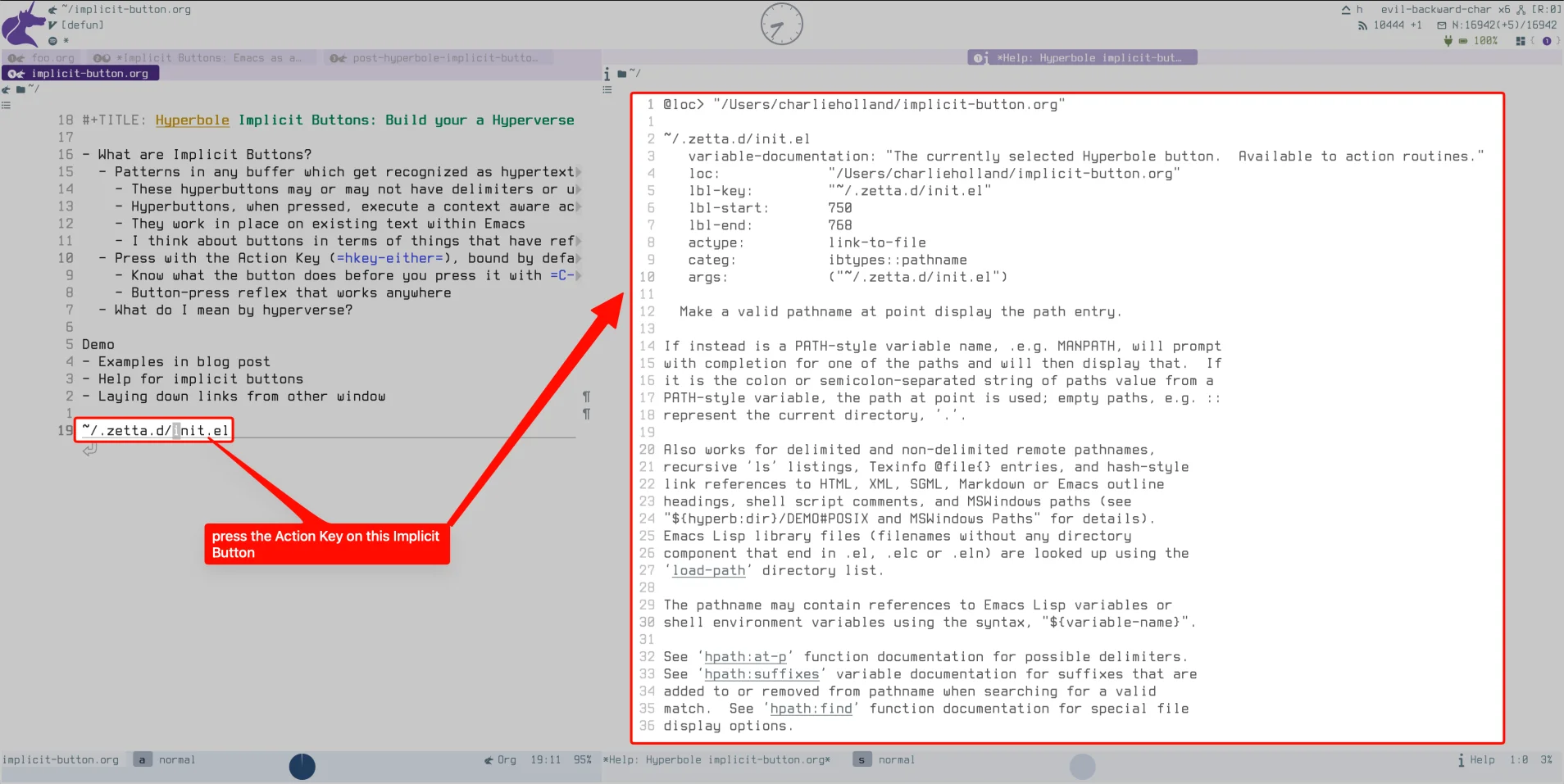
Figure 1: C-h A on a pathname: the help buffer names the ibtype, shows the parsed label and attributes, and documents the action that M-RET would perform
It turns learning Hyperbole into a self-guided exercise. Whenever I
notice something that looks meaningful as an implicit button, I press
C-h A on it, and the implicit button explains itself. No manual
required (though the manual is excellent). This feature is really
important to me. Emacs behaves this way as well (see my post on how
Emacs teaches itself). This is not the only instance of helpful
guidance in Hyperbole: much of its functionality is discoverable
via context menus (run M-x hyperbole and you will see an intuitive
menu that helps you discover your way through all of Hyperbole's
features).
7. The Cascade  hyperbole implicitButtons
To anticipate another common question: how does one keybinding handle forty-plus patterns? After all, I tell people that Hyperbole does the 'right thing' when you press an implicit button with the Action Key. How does it decide what that 'right thing' is?
This is accomplished through an ordered cascade of contexts where the first match wins.
When you press M-RET, Hyperbole first consults an ordered list of
contexts (stored in hkey-alist). A few special situations are
checked before buttons, such as completion popups and minibuffer
prompts, and the mode-specific handlers for Dired, Info, and friends are
checked after them. Then the second stage begins, where Hyperbole
buttons and associated contexts are checked. Each ibtype's recognizer
predicate is run against the text at point, one by one down a
priority-ordered list (reverse order of definition), until one matches.
The matching type marks the button's label and runs its action.
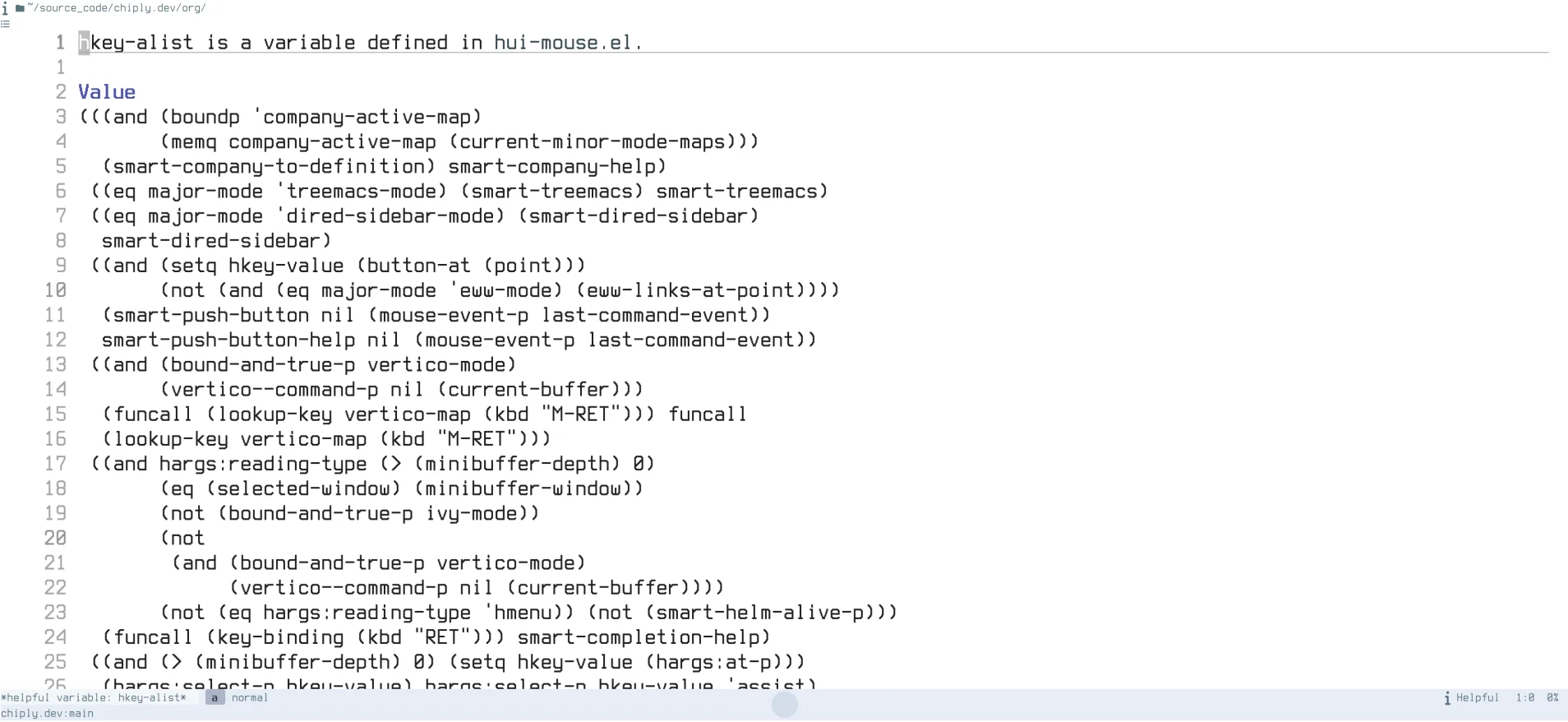
Figure 2: The help buffer for hkey-alist, the variable that determines the implicit button type and action
Priority order is what resolves ambiguity and keeps overlapping patterns
sane. The rule is that later definitions are checked first.
hbut.el:L2035:C10 is both a valid pathname and a valid
pathname-with-position, but the more specific pathname-line-and-column
type is defined after plain pathname, so it takes precedence and you
land on the exact line and column.
This priority rule may seem counterintuitive, but it actually facilitates extensibility: any ibtype you define is newer than every built-in, so your recognizers will outrank the built-in ones.
8. Buttons by Hand  hyperbole implicitButtons
Recognizers in the cascade do most of the work, but you can also place implicit buttons deliberately. You simply type out any text that will be recognized as an implicit button type, and you will find yourself doing this more and more as you become better acquainted with Hyperbole.
A method I love to use: whenever exactly two windows are open,
pressing C-h h i l instantly drops an unnamed implicit link button
in the selected window that points at wherever point sits in the other
window. I reach for that command constantly while browsing the
filesystem. It lets me leave an embedded bookmark, a live
cross-reference, in whatever document I happen to be writing.
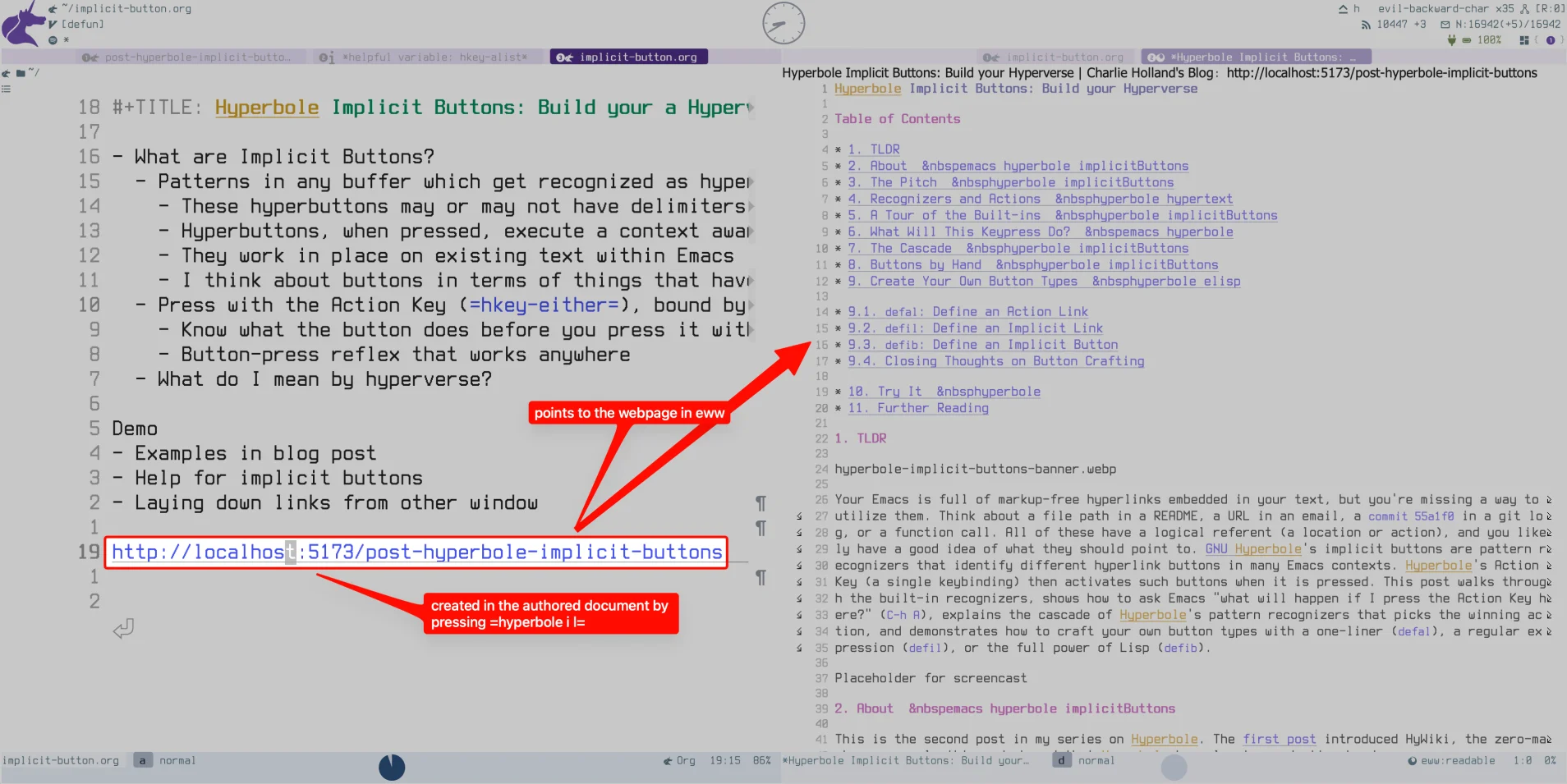
Figure 3: Dropping an implicit link button in a narrative document pointing to the location of point in other-window
9. Create Your Own Button Types  hyperbole elisp
You will get tons of mileage out of the built-in implicit button types and actions. If you are a power user and want to start defining your own types through Hyperbole's extension system, this section is for you.
Hyperbole exposes button-type creation as a ladder of three macros, in
increasing power. The first two, defal and defil, help you define
implicit buttons that contain delimiters. The third, and the one I use
most, helps you define implicit buttons for any arbitrary text.
Those delimiters deserve a note, because I've mentioned that implicit
buttons need no markup. defal and defil do reintroduce a little
(the brackets you wrap around each button) in exchange for letting you
coin your own vocabulary. They remain implicit all the same, because
what makes a button implicit is that there is no hidden stored data
associated with it; all button attributes are computed by Hyperbole at
button activation time from the text of the button and its associated
type definition. The action is derived from the text by its type every
time you press the Action Key, never saved per-button the way an
explicit button's attributes are.
If these macro names feel recondite, they are actually easy to remember once you know what they mean. I explain the mnemonics below.
9.1. defal: Define an Action Link
defal: one line. With Hyperbole active, evaluating this expression
defines an action link type, activated as <type text>, where the
text substitutes into a template:
(defal gh-issue "https://github.com/rswgnu/hyperbole/issues/%s")
Now <gh-issue 517> in any buffer is a button that browses that issue
via your preferred web browser (using the browse-url package).
When defining action link types, the argument after the type name may be a URL, a file path (with optional line and column), or a brace-delimited key series.
9.2. defil: Define an Implicit Link
defil: a regular expression. Define an implicit link type from
delimiters plus a regexp, for patterns living in free text:
(defil jira "[" "]" "PROJ-[0-9]+"
       "https://mycompany.atlassian.net/browse/\\&")
After this is defined, every [PROJ-1234] in any buffer is now a live
link into your issue tracker, with \\& (or numbered groups like \\1)
splicing the matched text into the target.
9.3. defib: Define an Implicit Button
defib: full Lisp. When the pattern or the action needs logic, you
can write the recognizer yourself with the full power of Elisp. The
body must call ibut:label-set to mark the button's text, and then
hact to fire an action (which may be a Hyperbole-defined action type
or a regular Elisp function):
(defib cve ()
  "When point is within a CVE identifier, display its NVD entry."
  (let ((case-fold-search nil))
    (save-excursion
      (skip-chars-backward "CVE0-9-")
      (when (looking-at "CVE-[0-9]\\{4\\}-[0-9]\\{4,\\}")
        ;; call =ibut:label-set=
        (ibut:label-set (match-string-no-properties 0)
                        (match-beginning 0) (match-end 0))
        ;; call =hact=
        (hact 'www-url
              (concat "https://nvd.nist.gov/vuln/detail/"
                      (match-string-no-properties 0)))))))
Once you evaluate that, every CVE-2024-3094 across your mail, feeds,
and source comments becomes a reference to a vulnerability record.
9.4. Closing Thoughts on Button Crafting
The set of buttons that you can create with Hyperbole is bounded only by your imagination. Ramin Honary observes that "you have the power to define implicit button types and actions for yourself", and provides useful examples: project names that rearrange your windows, dates that open your calendar, person names that pull up contact info, hashtags that trigger searches2. John Wiegley explains why this matters1:
We depend on human readers to infer the meaning of references from context all the time. If we say our algorithm implements a red-black tree, we assume they'll go to Wikipedia or a CS text book if they don't know what red-black trees are. It's quite easy to add new, contextually-sensitive recognizers, and actions, so that you can teach Emacs to become more aware of how you use it to manage information.
— John Wiegley
While Hyperbole ships with useful button types, keep in mind that any
notation you already use, in commit messages, tickets, lab notes, or
code review, can become a button with a simple defib macro.
10. Try It  hyperbole
The install snippet from the first post is all the setup you need. Then
paste a few lines into *scratch* and press M-RET on each:
~/.emacs.d/init.el
https://www.gnu.org/software/hyperbole/
{C-h h d d}
"(hyperbole)Implicit Buttons"
That third line, a key series button, opens Hyperbole's interactive DEMO, which is itself a buffer full of implicit buttons to explore. The system demonstrates itself with itself, which is about as Emacsian as it gets. As I like to say, Emacs can teach you more about Emacs than I ever could, and the same is true of Hyperbole.
0 Comments
Log in to join the conversation.No comments yet. Be the first to share your thoughts.