
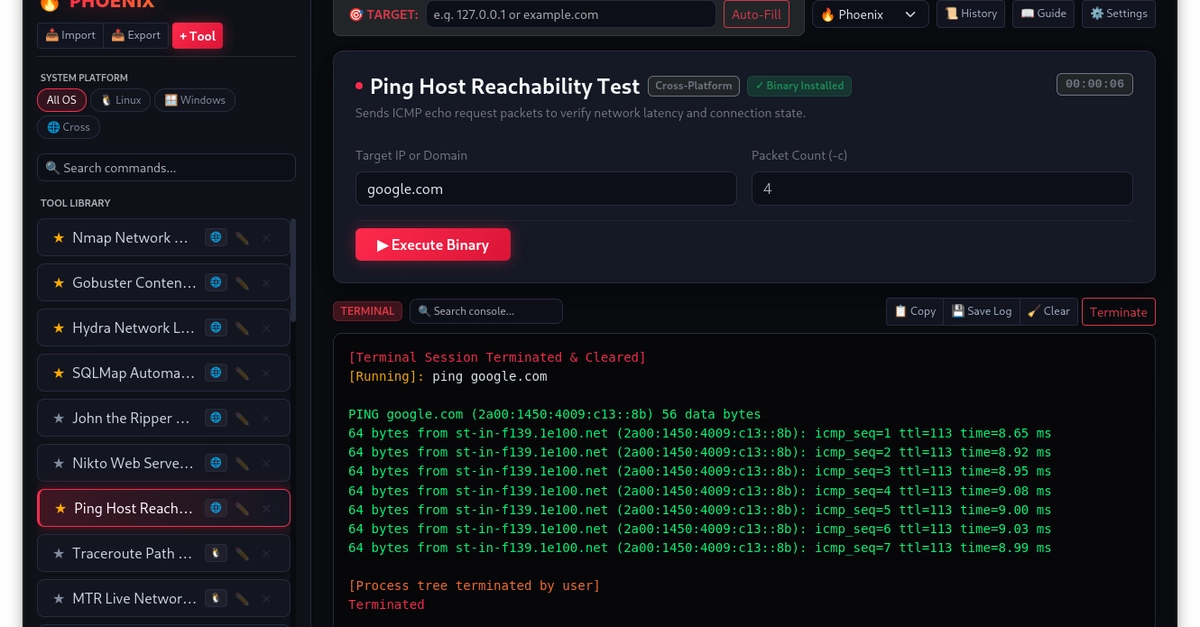


If you spend a lot of time in Linux terminals running tools like nmap, systemctl, journalctl, or network diagnostics, you know the drill. You either end up digging through your bash history or re-reading man pages just to remember the exact syntax for a diagnostic scan you ran three days ago.
Existing GUI wrappers are usually locked to a single tool. I wanted something flexible that could wrap around any local binary, parse terminal output cleanly, and let me tweak command flags on the fly through an interactive workbench.

So I built Phoenix Tools, a lightweight system workbench for Debian, Ubuntu, and Kali Linux.
What it does
The core idea was to make local system binaries easier to configure, run, and monitor without obscuring what is happening under the hood.
Instead of writing custom code for every tool, Phoenix Tools lets you define interactive forms for arguments, target IPs, and flags. When you hit run, it spawns the process, streams the raw output back into a live console, and lets you filter through terminal logs on the fly using real-time keyword matching and ANSI color rendering.
I also added a visual tool builder straight into the app. You can create a new tool form, pick your target executable, map out the arguments, and save it directly to your local config. If you want to share a set of tools with someone else or move them to another machine, you can just export your profile as a JSON file.
And because terminal aesthetics actually matter when you are staring at output logs all day, I included three built-in visual themes: Phoenix, Cyberpunk, and Matrix.
How it works under the hood
The app is built on Electron using Node.js child process streams so execution stays non-blocking while handling heavy output. Process management was a major focus, especially making sure background child process trees terminate cleanly without leaving orphaned processes running in your OS when you stop a job.
Everything is packaged up using electron-builder for native .deb and AppImage deployment, and the project is fully open source under GPL-3.0.
How to try it
If you are running Kali, Ubuntu, or Debian, you can grab the latest
.deb release straight from your terminal:
wget https://github.com/soap3k/PhoenixTools/releases/download/v1.0.0/phoenix-tools_1.0.0_amd64.deb
sudo dpkg -i phoenix-tools_1.0.0_amd64.deb
sudo apt install -f
Enter fullscreen mode Exit fullscreen mode
Or if you prefer to build it from source and tinker with the code:
git clone https://github.com/soap3k/PhoenixTools.git
cd PhoenixTools
npm install
npm start
Enter fullscreen mode Exit fullscreen mode
Check out the code over on GitHub and feel free to drop any feedback or feature requests in the repo issues.
0 Comments
Log in to join the conversation.No comments yet. Be the first to share your thoughts.