
You push code, Render deploys it. Zero downtime, health checks, built-in rollbacks, no fuss. For most teams, that workflow is perfect.
But what if you have multiple services that need to deploy together? What if you want to test new code with real traffic before going all-in?
Using SuperPlane, an open-source workflow engine for DevOps automation, we connected Render with Cloudflare, Dash0, and GitHub Actions to build a fully automated blue/green canary pipeline. New versions deploy to an idle environment, receive a percentage of live traffic, run through verification checks, and either promote automatically or roll back without manual intervention.
Here’s how it works.
Two identical environments. One is live, one is idle. New code goes to the idle environment. You verify it works. Then you switch traffic over.
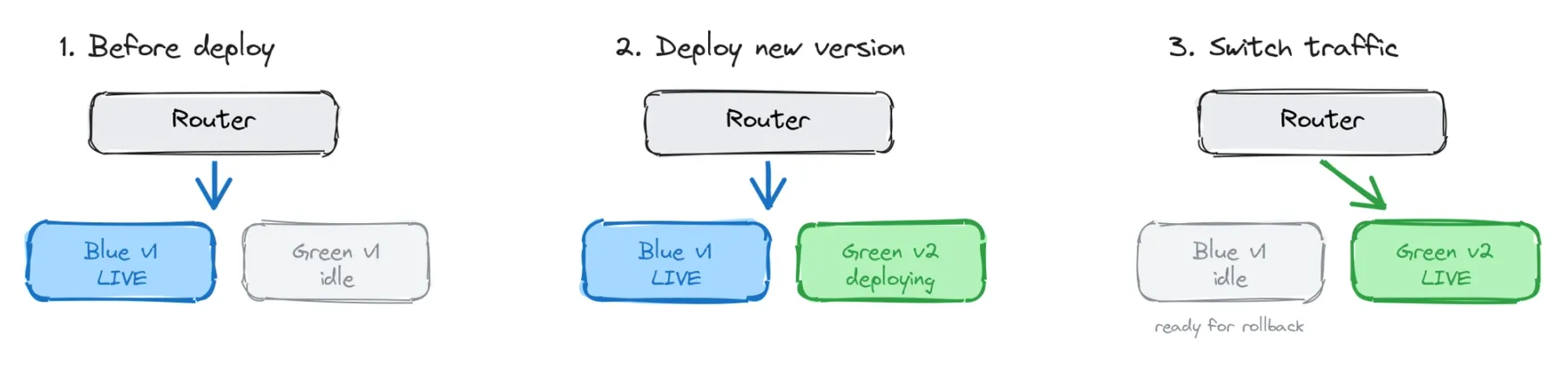
The old version stays running. If the new code is broken, you switch back. No rebuild, no redeploy. Instant recovery.
Render’s zero-downtime deployment model already implements the core blue/green property at the single-service level: a new instance boots alongside the old one, traffic shifts once the new instance is healthy, and the old instance shuts down gracefully.
What this pipeline adds is canary traffic shaping and coordinated cutover across multiple services.
Even with blue/green, switching traffic is usually all-or-nothing. Canary deployments add a middle step: send 5% of traffic to the new version first. If error rates stay low, gradually ramp traffic up to 100%. If something breaks, route it back before most users notice.
Deploy and verify, not deploy and hope.
Our application runs on Render: an API, a web frontend, and a background worker. We duplicated each service to create blue and green environments. Six Render services total.
Then we connected four tools to orchestrate them:
- Render: hosts and deploys all six services
- Cloudflare: routes traffic between blue and green with configurable weights
- Dash0: monitors synthetic checks and real-time PromQL error rates
- GitHub Actions: runs smoke tests against the newly deployed environment
This setup doesn’t eliminate complexity. It centralizes it.
Instead of scattered scripts and manual runbooks, deployment logic lives in a single visual pipeline where every step, decision, retry, and rollback path is visible and auditable.
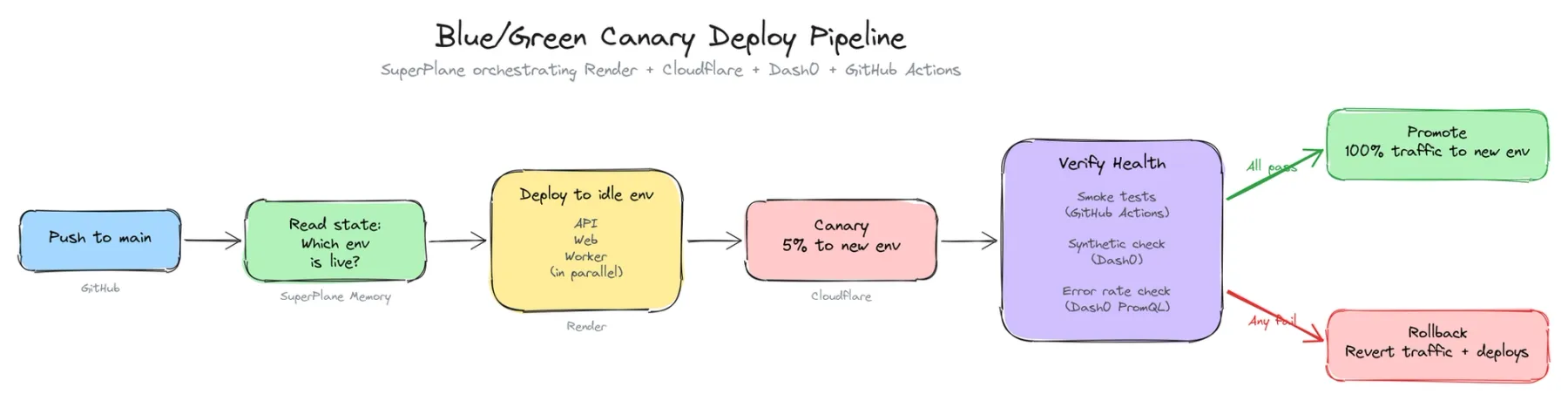
Push to main. SuperPlane checks which environment is live, deploys to the other one, shifts 30% of traffic, runs verification checks, and either promotes to 100% or rolls back automatically.
No one touches a button.
Here’s the canary verification phase mid-run. Smoke tests, Dash0 synthetic checks, and error-rate queries execute in parallel while 30% of traffic hits the new environment.
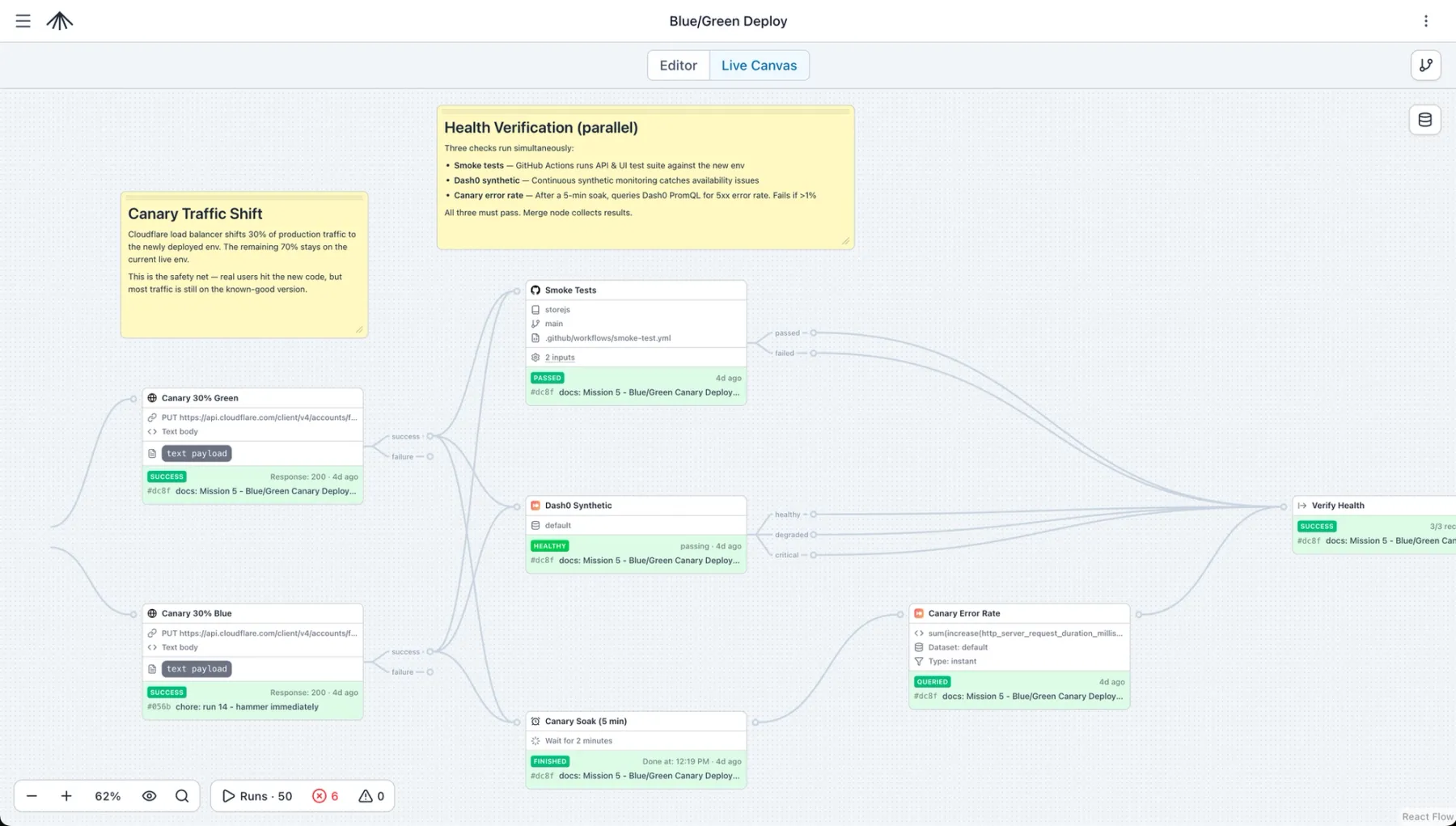
And here’s the decision point: all checks passed, so the pipeline promotes the new environment to 100% traffic and saves the updated deployment state.
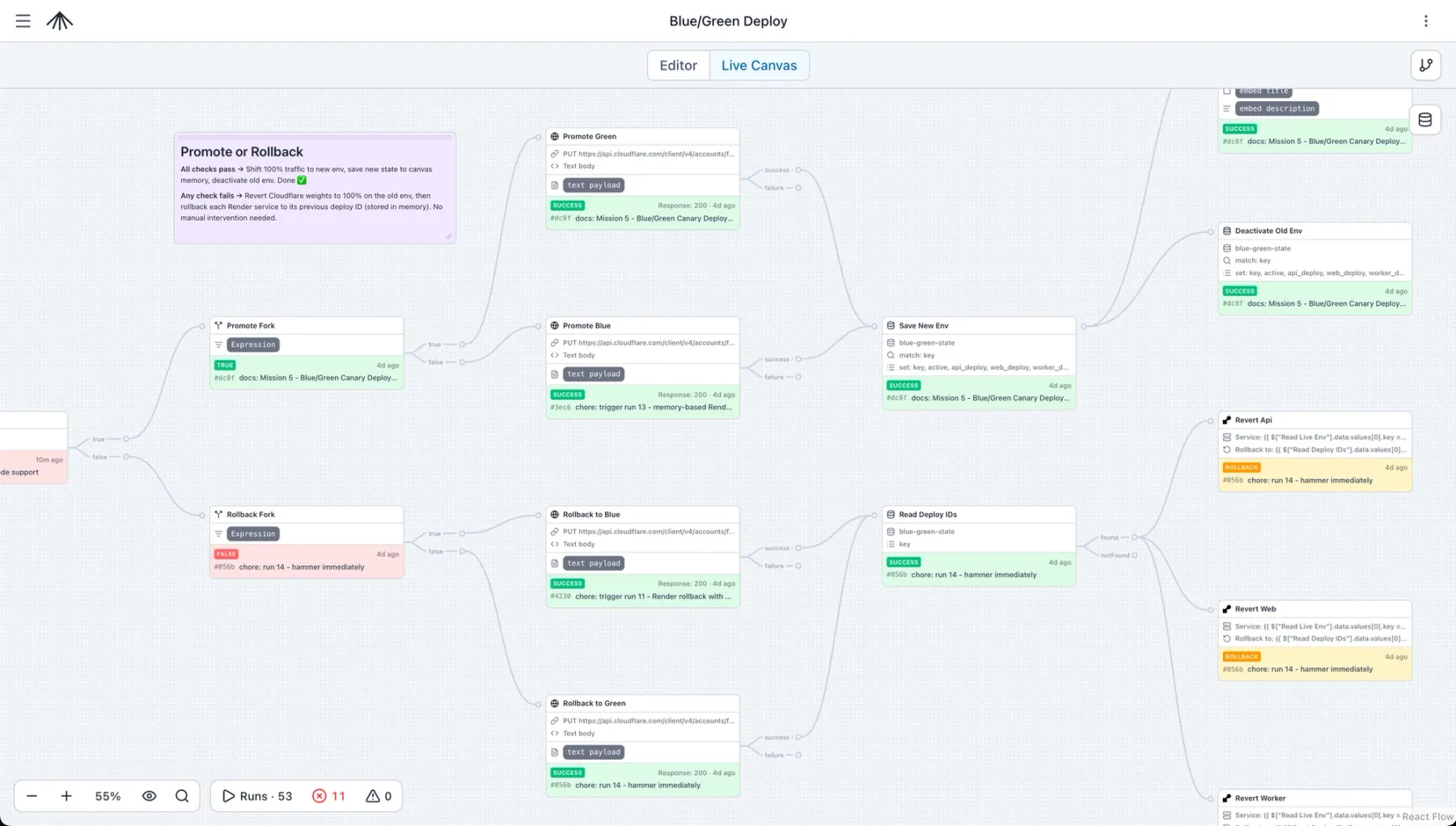
The rollback path (bottom) shows a previous run where verification failed. SuperPlane automatically reverted each service and restored the previous Cloudflare traffic weights. Both success and rollback paths remain visible in the same workflow canvas.
Render’s built-in zero-downtime deployments already support many blue/green deployment properties for individual services. SuperPlane extends that model with orchestration across services, progressive traffic shifting, and automated rollback logic.
This pipeline coordinates deployments across multiple services and multiple external systems.
SuperPlane integrates natively with Render, Cloudflare, Dash0, and GitHub, passing deployment data between steps without custom glue code.
More importantly, it manages sequencing:
- Deploy service B v2
- Verify health
- Deploy service A v2
- Verify again
- Shift traffic
If something fails midway through the rollout, the workflow rolls back the entire deployment state, not just the failing service.
After shifting traffic, the pipeline waits before querying Dash0 for real production error rates.
That soak period is configurable, ranging from minutes in staging to hours in production.
CI systems can technically implement this with sleep loops, but they are not designed for workflows that pause, resume, branch, and react to external signals over long periods of time.
Verification tasks run concurrently:
- Smoke tests
- Synthetic monitoring
- Error-rate analysis
The workflow waits for every check to complete before making a deployment decision. One failure triggers rollback automatically.
The deployment path branches dynamically based on runtime state.
- If blue is live, deploy green
- If green is live, deploy blue
- If verification succeeds, promote traffic
- If verification fails, roll back
Each branch evaluates real deployment data from previous steps and routes execution accordingly.
Smoke tests validate the scenarios you anticipated.
Observability catches the ones you didn’t.
During testing, we saw smoke tests pass while production traffic still triggered failure modes that weren’t covered by test cases. Dash0 detected elevated 5xx rates during the canary phase, the error threshold crossed 1%, and SuperPlane rolled the deployment back automatically.
Render already provides API-driven and dashboard-based rollbacks.
In this workflow, SuperPlane automates the rollback decision itself. When verification fails, it:
- Calls the Render rollback APIs for each service
- Restores Cloudflare traffic weights
- Returns the system to the last healthy deployment state
No manual intervention required.
We focused primarily on deployment orchestration and traffic switching, but blue/green deployments come with additional trade-offs.
Both environments share the same database, so schema migrations need to remain backward-compatible during rollout windows.
Running two copies of every service increases infrastructure cost. One common optimization is scaling the idle environment down after promotion and scaling it back up before the next deployment.
Can you build blue/green canary deployments on Render? Yes.
Render provides the building blocks:
- Fast zero-downtime deployments
- Health checks and deploy status tracking
- API-driven and one-click rollbacks
SuperPlane connects those primitives with Cloudflare, Dash0, and GitHub Actions into a workflow that deploys, verifies against real traffic, and rolls back automatically.
We packaged the entire workflow as a reusable template you can import and run.
- Sign up at app.superplane.com (free tier available)
- Open Browse Templates
- Select the Blue/Green Deploy template
- Connect your integrations (Render, Cloudflare, Dash0, and GitHub)
- Configure the workflow components for your services and environments
SuperPlane is fully open source.
Follow the installation guide to run it on your own infrastructure, then import the same workflow template.
This pipeline uses Render, Cloudflare, Dash0, and GitHub Actions, but the architecture is flexible.
You can swap components to match your own stack:
- Different hosting providers
- Different CDNs or traffic routers
- Different observability platforms
The workflow structure remains the same.
The template also includes inline annotations explaining each phase so you can adapt the deployment strategy to your own environment.
SuperPlane is open source, and Render’s APIs make it easy to build advanced deployment workflows on top of the platform.
If you build something with it, share it with us on Superplane's Discord.
0 Comments
Log in to join the conversation.No comments yet. Be the first to share your thoughts.