
Greetings from the Unity Graphics team!
In this post, we will cover the latest improvements to the functionality and performance of the DirectX 12 (DX12) graphics backend. As of Unity 6.1, DirectX 12 is now set as the default graphics API for new projects.
DX12 provides a modern, lower level and thinner abstraction for graphics acceleration. It was designed to better utilize multi core CPUs, by allowing applications to efficiently multi-thread the recording and submission of graphics commands to the GPU.
We also recommend you watch the latest Unite Graphics Performance session, where we cover some of the latest improvements to DX12.
This content is hosted by a third party provider that does not allow video views without acceptance of Targeting Cookies. Please set your cookie preferences for Targeting Cookies to yes if you wish to view videos from these providers.
Accelerate CPU performance with Split Graphics Jobs
The new Split Jobs threading mode for DX12 improves on the older “Native Jobs” threading mode, by reducing synchronization between the main thread and graphics jobs thread.
This is especially beneficial for CPU-bound games, which render large and complex environments, submitting many draw calls.
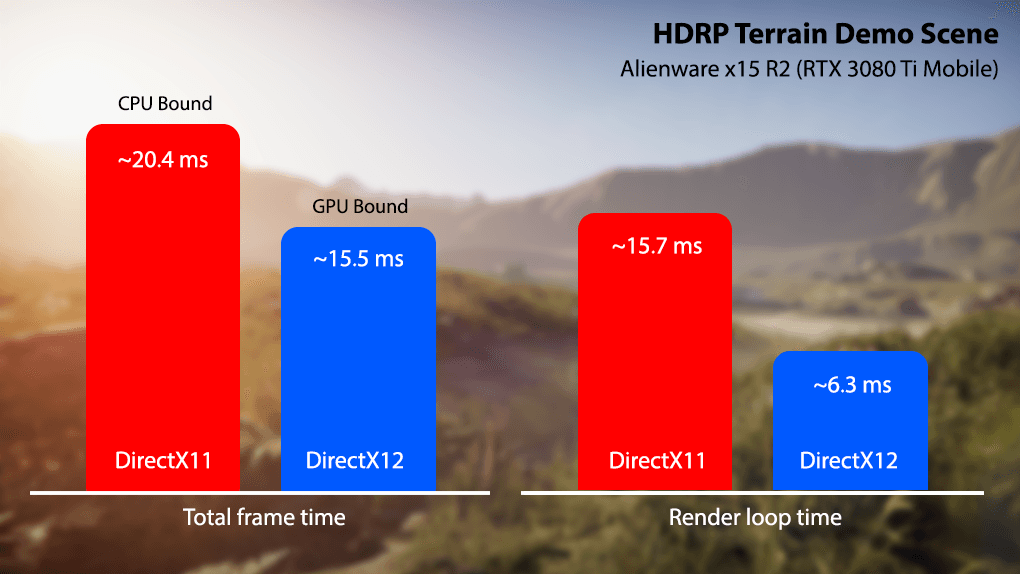
As of Unity 6, Split Graphics Jobs are also supported in the Unity Editor for DX12, to improve the Scene and Game View rendering performance. You can now toggle Graphics Jobs from the Editor’s “Preferences” -> “Job Settings” panel.
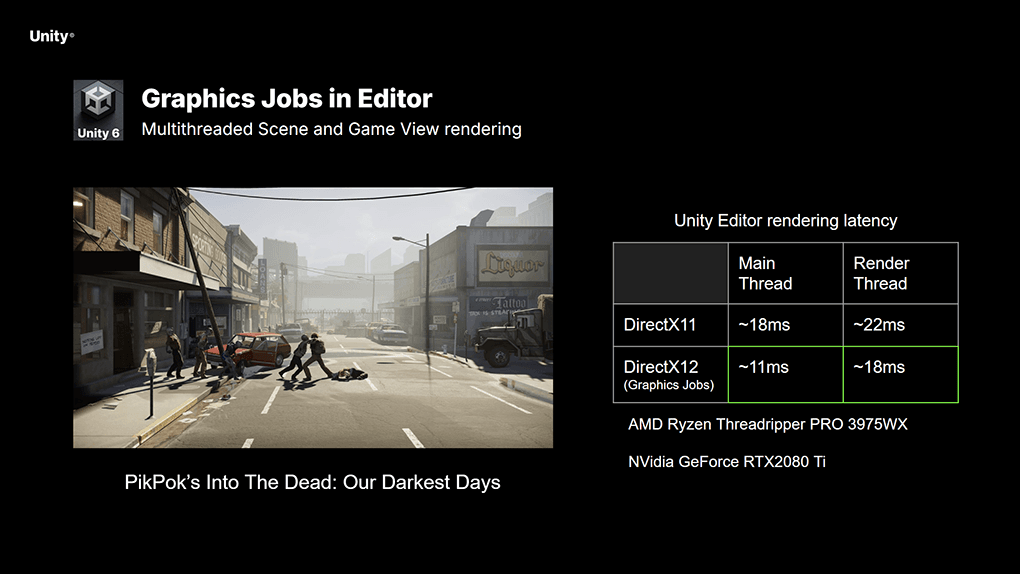
Reducing CPU overhead in PikPok’s Into the Dead: Our Darkest Days
NOTE: DX12 multithreading comes with additional graphics memory cost, due to the allocation of additional resources per thread. This imposes a tradeoff between CPU performance and memory usage, and can increase memory usage compared to the single-threaded DX11.
Beyond CPU performance, DX12 exposes the latest GPU capabilities to game developers, unlocking new ways to improve both fidelity and performance.
Prevent rendering stutters with PSO Tracing
With DX12, we can explicitly state the needed graphics states well ahead of rendering time, by creating and caching Pipeline State Objects (PSOs). This workflow eliminates application stutters/hitches, resulting in smoother rendering and game play.
To enable this, Unity 6 introduces support for the new GraphicsStateCollection API. In the below example, we are using the API to precook PSOs before loading the scene. This results in a stutter-less flythrough of the Garden demo.
For more information on PSO tracing, check the official Unity Discussions post.
This content is hosted by a third party provider that does not allow video views without acceptance of Targeting Cookies. Please set your cookie preferences for Targeting Cookies to yes if you wish to view videos from these providers.
PSO Tracing and Precooking - URP 3D Sample
Balance shading performance and quality with Variable Rate Shading
DX12 also introduces support for Variable Rate Shading (VRS), to control the shading rate of pixel shaders and draw calls. Using the new VRS API in Unity 6.1, we can generate a shading rate image (SRI) from texture, or procedurally using shaders. Once created, we can apply the SRI using the CommandBuffer API, or using Scriptable Render Passes.
In the example below, we are applying a lower shading rate to screen areas affected by motion blur. This reduces the pixel shading overhead, without noticeable degradation to visual fidelity.
To learn more about Variable Rate Shading, check the official Unity Discussions post.
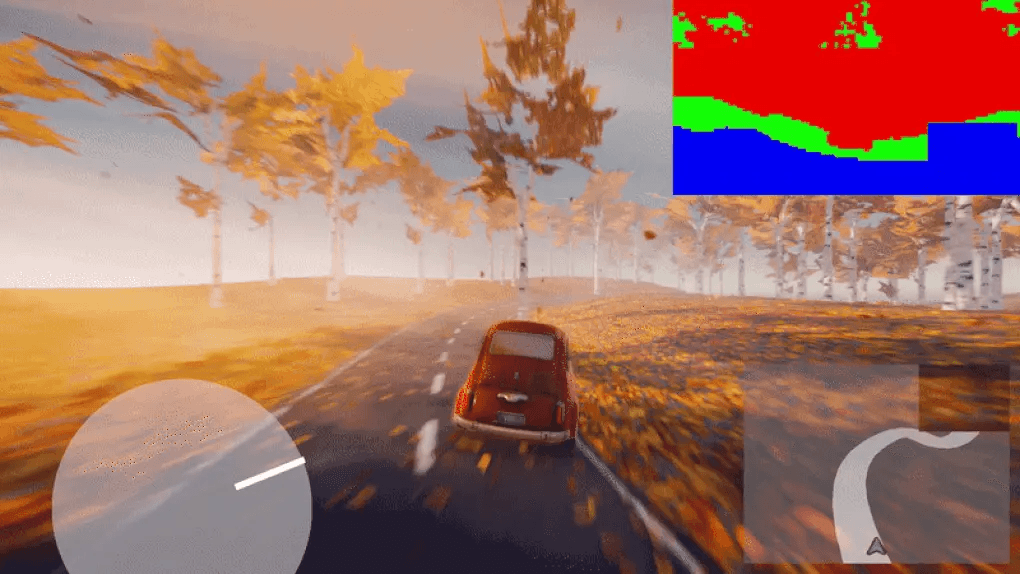
Improve GPU utilization with Async Compute
Another capability introduced by DX12 is Asynchronous Compute dispatch. This allows to overlap Compute Shader execution with heavy rasterization workloads, to improve GPU parallelism.. Raster-heavy passes (such as Shadowmaps) are often bound by geometry processing, and may not fully utilize the GPUs shader cores. By dispatching compute kernels asynchronously, we can increase GPU utilization and reduce frame times.

Overlapping async compute with shadow map rasterization
For more information on DX12 exclusive features, please refer to the official documentation.
Push fidelity to the max with DirectX Ray Tracing
Unity’s High Definition Render Pipeline (HDRP) utilizes DirectX 12 Raytracing (DXR), to achieve unparalleled visual fidelity and realism. This is demonstrated by the “Enemies” real time demo, which uses HDRP and DXR to achieve stunning visuals.
This content is hosted by a third party provider that does not allow video views without acceptance of Targeting Cookies. Please set your cookie preferences for Targeting Cookies to yes if you wish to view videos from these providers.
Enemies – real-time cinematic teaser | Unity
Unity 6 provides production-ready support for Ray Tracing, along with DXR 1.1 feature level compatibility. This brings many improvements to ray tracing functionality and performance.
Solid Angle Culling allows to improve ray tracing performance, by discarding objects that are too small or distant. You can enable angle culling via the HDRP ray tracing setting (Culling Mode), to significantly reduce CPU processing time
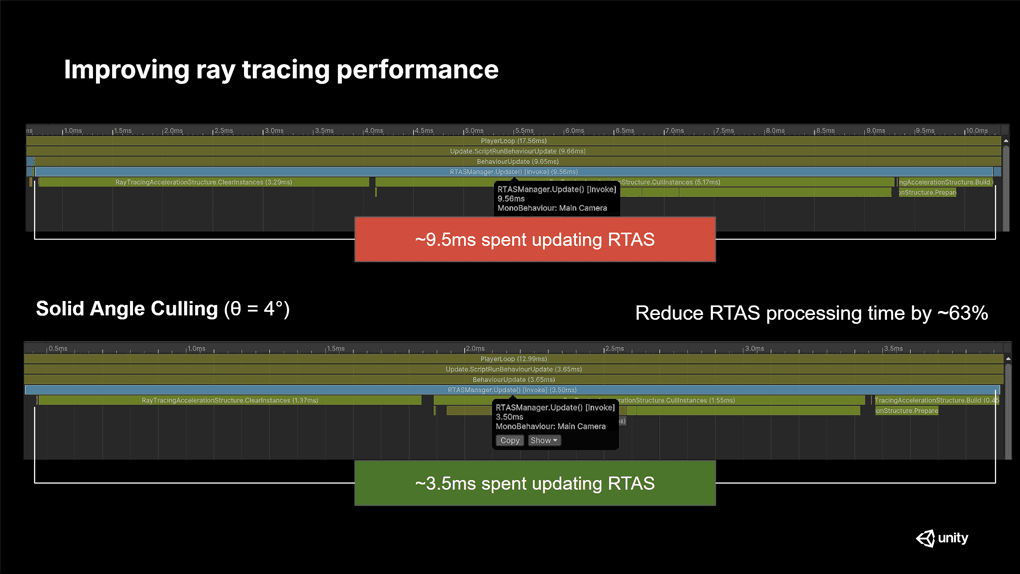
Reducing Ray Tracing CPU overhead with Solid Angle Culling
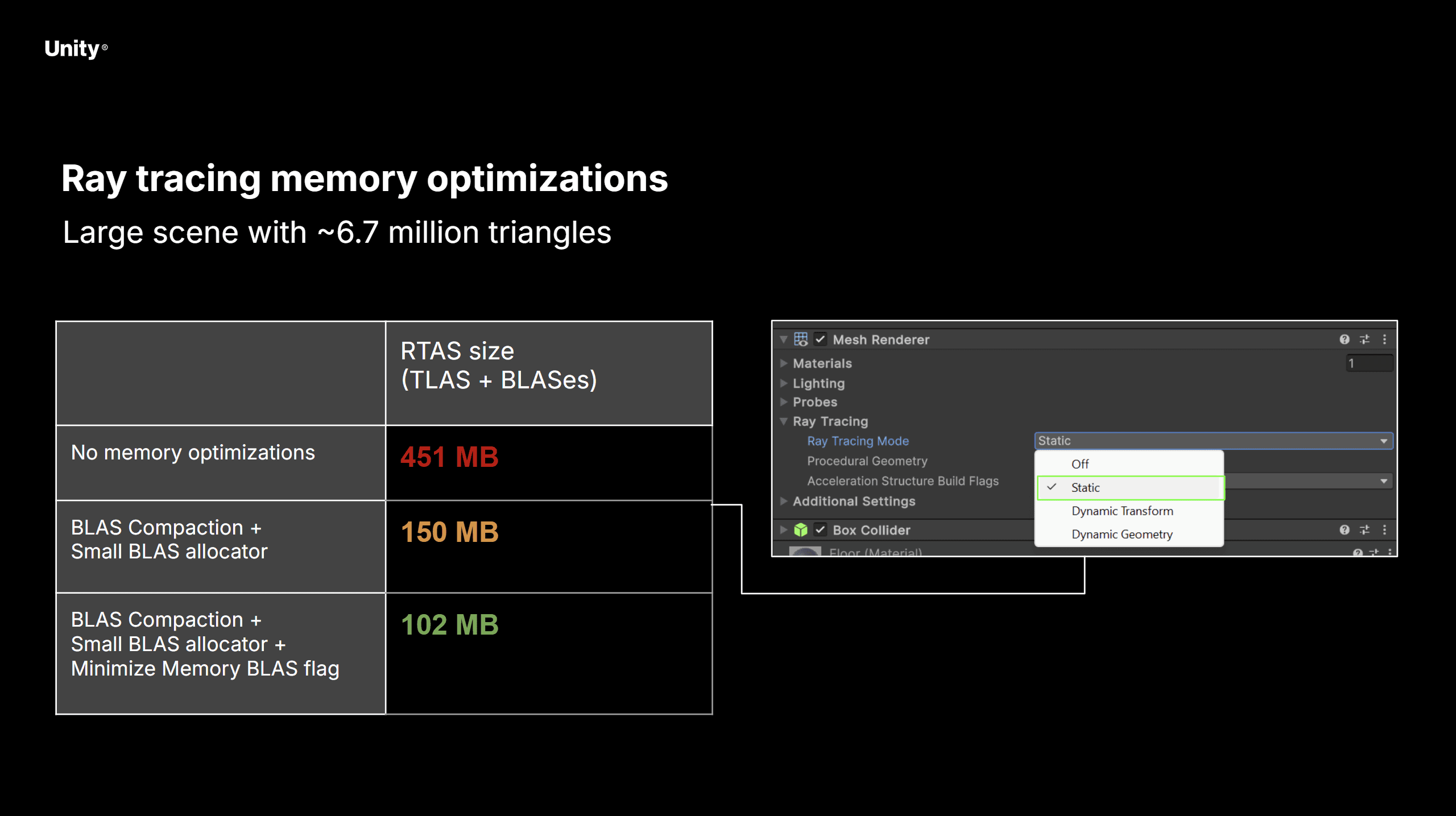
Ray tracing memory optimizations
Reduce memory bandwidth usage with DirectX12 Render Pass
With the introduction of Windows-on-ARM support, DX12 also improves mobile (tile-based) GPU efficiency, via the new Render Pass API.
The DX12 Render Pass is utilized by the Render Graph system in Unity 6, which automatically tracks and merges compatible render passes. In the example below, Render Graph is able to merge the geometry render passes, and load the GBuffer textures directly from on-chip tile memory.
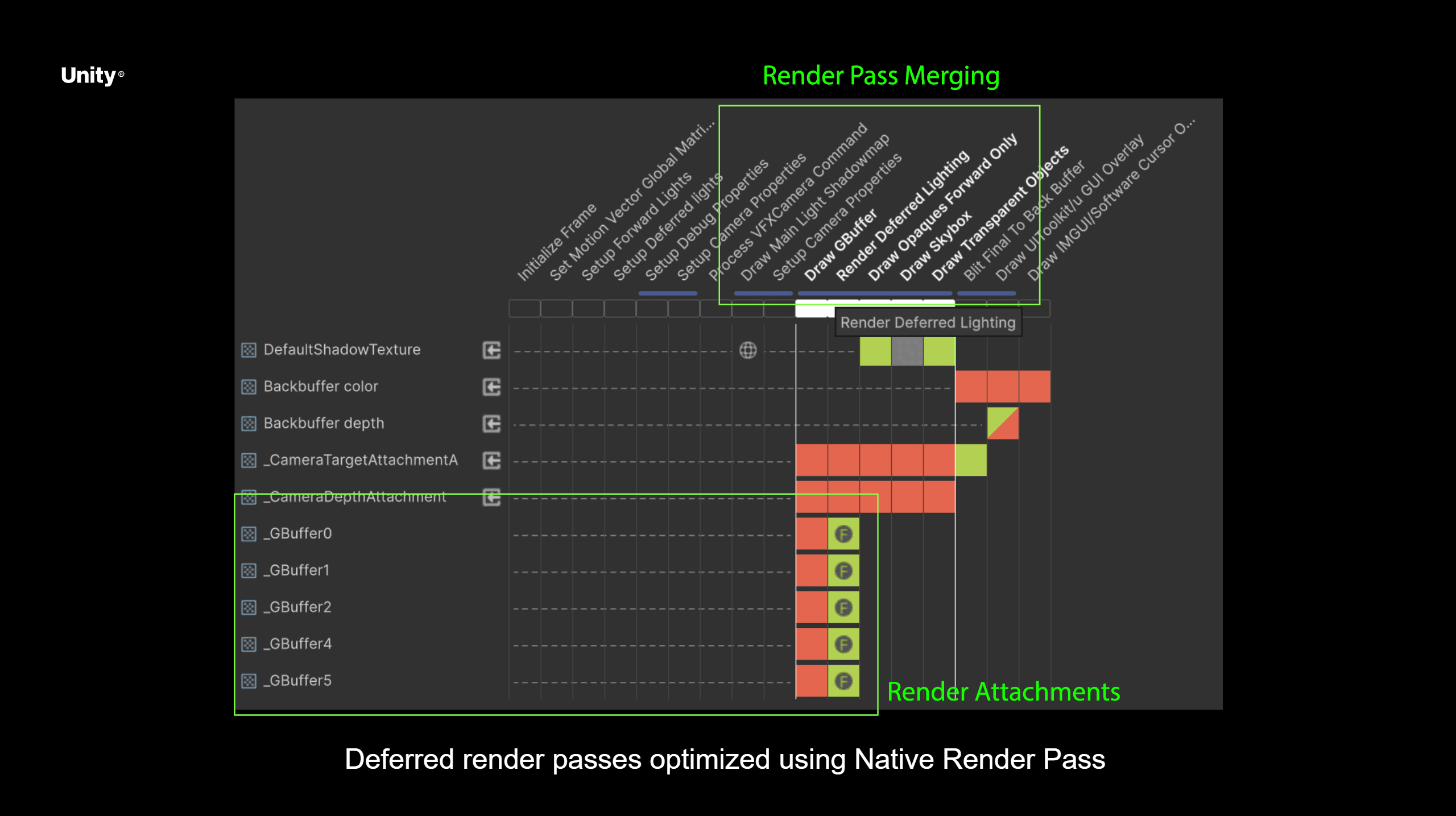
On tile deferred rendering - Render Graph Viewer
This can significantly reduce bandwidth and energy usage, along with thermals, allowing mobile devices to run for longer and at a stable framerate. To learn more about on-tile rendering in URP, see the Render Graph documentation.
Accelerate Neural Network Inference with DirectML
In addition to graphics improvements, DX12 can also improve the performance of Neural Network inference through the Sentis API. When using DX12 and the Sentis GPU backend, we observe up to 50% reduction in inference time when executing larger Convolutional Neural Networks.
To learn more about DX12 acceleration for Sentis, check the official Unity Discussions post.
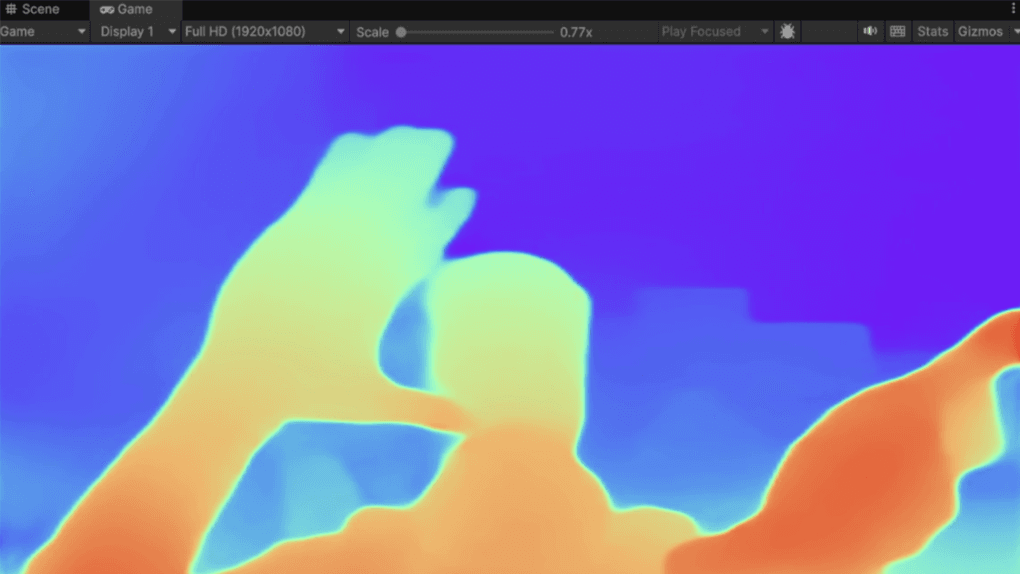
Sentis - Depth Estimation Sample
0 Comments
Log in to join the conversation.No comments yet. Be the first to share your thoughts.