
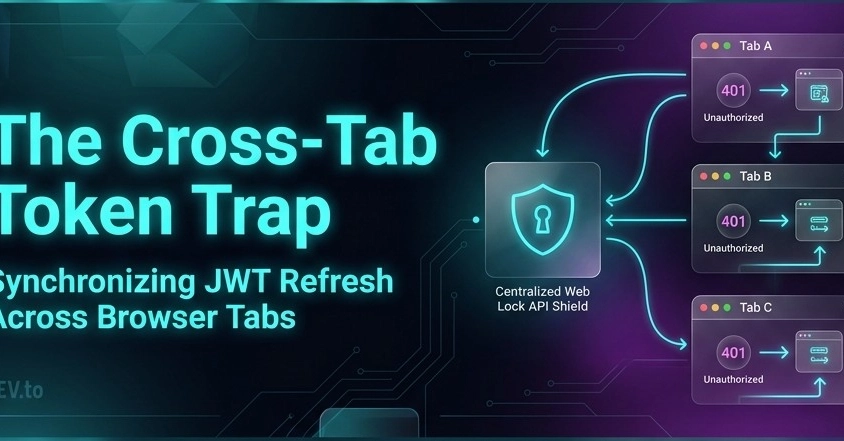
How multiple open browser tabs can accidentally DDOS your auth server, and how to fix it with the Web Locks API.
Picture this: You’ve just shipped a state-of-the-art Axios response interceptor. You implemented a mutex lock (isRefreshing) and a promise queue (failedQueue) to handle concurrent 401 errors. You tested it within a single tab, and it worked like a charm. You gave yourself a high-five and closed your laptop.
Then, a power user logs in.
Like most humans on the internet, they don't use just one browser tab. They open Tab 1 for User Management, Tab 2 for Analytics, Tab 3 for Settings, and Tab 4 for Support Tickets.
Fifteen minutes pass. Their short-lived JWT access token expires.
The user switches back to Tab 1. In the background, all 4 open tabs wake up, detect the expired token, and fire off four independent POST /auth/refresh-token/ requests at the exact same millisecond.
Tab 1 refreshes the token first, but Tab 2's request arrives a millisecond later, invalidates Tab 1's new token, and Tab 3 nukes the session entirely.
Suddenly, all 4 tabs dump the user back to the login screen.
Welcome to the Cross-Tab Token Trap.
1. The Problem: The Multi-Tab Stampede
In modern single-page applications (SPAs), each browser tab operates in its own isolated JavaScript runtime environment. Memory is not shared.
When an access token expires:
-
isRefreshing = truein Tab A only stops requests inside Tab A. - Tab B has no idea Tab A is currently refreshing a token.
- Tab C lives in complete ignorance of Tabs A and B.
Tab A (Memory Space 1) ---> isRefreshing = true ---> POST /auth/refresh-token/ (Token Set 1)
Tab B (Memory Space 2) ---> isRefreshing = true ---> POST /auth/refresh-token/ (Token Set 2 -> Revokes Set 1!)
Tab C (Memory Space 3) ---> isRefreshing = true ---> POST /auth/refresh-token/ (Token Set 3 -> Revokes Set 2!)
Enter fullscreen mode Exit fullscreen mode
If your backend enforces Single-Use Refresh Token Rotation (where using a refresh token revokes all previous ones), multi-tab usage causes immediate session destruction.
😂 Reality Check:
You spent two days building an in-memory queue for single-tab concurrency, only to realize your users treat browser tabs like browser bookmarks.
2. The Investigation: "Works in My Tab" Syndrome
Here is how the discovery unfolded during QA:
⏱️ Timeline of a Cross-Tab Mystery
- 02:00 PM — "Token refresh logic is bulletproof! Unit tests pass!"
- 02:15 PM — QA reports: "I got logged out while using the dashboard."
- 02:20 PM — Developer response: "Works on my machine!"
- 02:45 PM — QA reveals: "Oh, I had 5 tabs open at once."
- 03:00 PM — Developer opens Chrome DevTools across 3 separate windows.
-
03:05 PM — Discovered that 3 separate
POST /auth/refresh-token/requests were firing simultaneously from 3 different tab IDs!
The realization hit hard: In-memory boolean flags cannot cross tab boundaries.
3. The Root Cause: Memory Isolation
JavaScript variables like let isRefreshing = false live inside a single tab's context. When Tab A sets isRefreshing = true, Tab B’s memory remains untouched.
To fix this, we need Cross-Tab Concurrency Control.
We needed a way for Tab B to say:
"Hey browser, is any other tab currently refreshing our auth token? If so, I’ll wait. And once they finish, I’ll just grab the new token they saved in
localStorageinstead of calling the server again!"
Enter the Web Locks API (navigator.locks).
4. The Technical Solution: The Web Locks API
The Web Locks API is a native browser feature supported in all modern browsers (Chrome 69+, Firefox 96+, Safari 15.4+, Edge).
It allows web pages running in the same origin to request an exclusive lock across tabs.
How Web Locks Solve Cross-Tab Refresh:
-
Exclusive Lock Request: When a 401 error occurs, a tab requests an exclusive lock named
'auth_token_refresh_lock'. - Automatic Synchronization: If Tab A gets the lock, Tab B and Tab C are paused by the browser until Tab A releases the lock.
-
Double-Check Pattern: When Tab B finally gets the lock, it checks a
tokenRefreshedAttimestamp inlocalStorage. If Tab A refreshed the token less than 5 seconds ago, Tab B skips the API call entirely and simply reuses Tab A's new token!
Tab A (401) ----> ACQUIRES LOCK 'auth_token_refresh_lock' ----> Fires POST /auth/refresh-token/ ----> Saves token & timestamp to localStorage ----> RELEASES LOCK
                                                                                                                                                 |
Tab B (401) ----> WAITS FOR LOCK ---------------------------------------------------------------------------------------------------------------+----> ACQUIRES LOCK ----> Checks timestamp ----> Token updated recently! ----> Skips API Call & Retries Request
Enter fullscreen mode Exit fullscreen mode
5. The Implementation: Production-Ready Code
Here is how to update your axiosInstance.js to support cross-tab synchronization.
Step 1: Web Lock Helper Function
First, create a helper function that wraps navigator.locks.request with a fallback for legacy browser support:
// src/httpRequest/axiosInstance.js

// Cross-tab lock wrapper using Web Locks API
const runWithCrossTabLock = async (lockName, callback) => {
  if ("locks" in navigator) {
    // Request exclusive lock across all open browser tabs under the same domain
    return navigator.locks.request(lockName, async () => {
      return await callback();
    });
  } else {
    // Fallback for older browsers lacking Web Locks support
    return await callback();
  }
};

// Helper: Check if another tab refreshed the token within the last 5 seconds
const checkIfTokenRefreshedRecently = () => {
  const lastRefreshedAt = localStorage.getItem("tokenRefreshedAt");
  if (!lastRefreshedAt) return false;

  const timeDifference = Date.now() - parseInt(lastRefreshedAt, 10);
  return timeDifference < 5000; // Returns true if refreshed < 5s ago
};
Enter fullscreen mode Exit fullscreen mode
Step 2: Response Interceptor with Cross-Tab Lock
Now, update your response interceptor to utilize cross-tab synchronization:
axiosInstance.interceptors.response.use(
  (response) => response.data,
  async (error) => {
    const originalRequest = error.config;

    // Process 401 Unauthorized errors
    if (error.response?.status === 401 && originalRequest && !originalRequest._retry) {
      const refreshToken = localStorage.getItem("refreshToken");
      const isRefreshRequest = originalRequest.url?.includes(apiRoutes.refreshToken);

      // If no refresh token exists or if the refresh endpoint itself failed, logout
      if (!refreshToken || isRefreshRequest) {
        handleLogout().catch(console.error);
        return Promise.reject(error);
      }

      originalRequest._retry = true;

      // 🔒 CROSS-TAB MUTEX LOCK:
      // Only ONE tab across the entire browser can execute this block at a time.
      return runWithCrossTabLock("auth_token_refresh_lock", async () => {
        const currentAccessToken = localStorage.getItem("accessToken");

        // 1. DOUBLE-CHECK PATTERN:
        // Did another tab refresh the token while we were waiting for the lock?
        if (checkIfTokenRefreshedRecently() && currentAccessToken) {
          // YES! Skip network request, update header, and retry
          originalRequest.headers.Authorization = `Bearer ${currentAccessToken}`;
          return axiosInstance(originalRequest);
        }

        // 2. WE ARE THE FIRST TAB TO GET THE LOCK:
        // Perform the actual network refresh call
        try {
          const route = `${BASE_URL}${apiRoutes.refreshToken}`;
          const response = await axios.post(route, { refresh: refreshToken });
          const { access, refresh } = response.data;

          // Save new tokens and record timestamp for other tabs
          if (access) {
            localStorage.setItem("accessToken", access);
            localStorage.setItem("tokenRefreshedAt", Date.now().toString());
          }
          if (refresh) {
            localStorage.setItem("refreshToken", refresh);
          }

          // Retry original request with new token
          originalRequest.headers.Authorization = `Bearer ${access}`;
          return axiosInstance(originalRequest);
        } catch (refreshError) {
          handleLogout().catch(console.error);
          return Promise.reject(refreshError);
        }
      });
    }

    return Promise.reject(error);
  }
);
Enter fullscreen mode Exit fullscreen mode
6. Before vs. After
| Scenario | In-Memory Interceptor (Before) | Web Locks Interceptor (After) |
|---|---|---|
| 5 Tabs Open simultaneously | 5 parallel POST /auth/refresh-token/ network requests |
1 single POST /auth/refresh-token/ network request |
| Token Rotation Behavior | Revokes tokens across tabs, forcing full logout | Tab 1 refreshes token; Tabs 2–5 reuse the new token seamlessly |
| Network Overhead | High API redundancy on multi-tab power users | Zero redundant network calls across tabs |
| Tab Crash Safety | N/A | If Tab 1 closes mid-refresh, browser automatically unlocks Tab 2 |
7. Things I Learned
💡 Lesson #1: Web Locks are Tab-Crash Safe
Unlike customlocalStoragemutex flags (which stay stuck if a tab closes mid-execution),navigator.locksautomatically releases the lock if a tab closes or crashes unexpectedly.⚠️ Gotcha #2: Always Double-Check After Acquiring a Lock
Acquiring a lock is only half the battle. You MUST inspect shared state (localStoragetimestamp) immediately after acquiring the lock to see if the work was already completed by a previous lock holder!🚀 Improvement #3: Combine with
BroadcastChannelfor Instantly Synced Logouts
Usenew BroadcastChannel('auth_channel')to post a message when a user explicitly logs out in Tab A, so Tab B instantly redirects without waiting for a 401 error!
8. Conclusion
Handling authentication in single-page applications is rarely just about single HTTP calls. Once users open multiple tabs, your frontend becomes a distributed system running on the user's machine.
By combining Axios Interceptors with the Web Locks API, we eliminated cross-tab token refresh race conditions completely—without adding external libraries or complex backend hacks.
Now, your users can open 50 tabs at once, and your application will handle token updates silently like a charm! 🚀
0 Comments
Log in to join the conversation.No comments yet. Be the first to share your thoughts.