
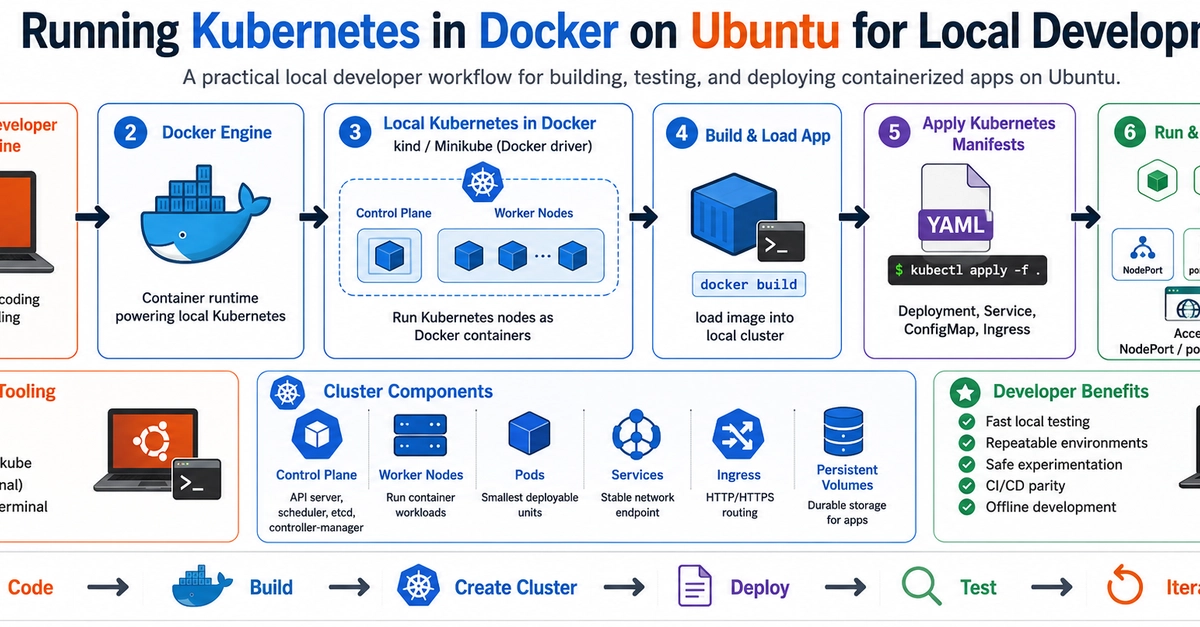


There's a delightfully literal answer to "Kubernetes with Docker": kind — Kubernetes IN Docker. Each node is a Docker container running a full Kubernetes node image. On an Ubuntu workstation it gives you a real, throwaway, multi-node cluster in about 30 seconds. It's my default for local dev and for CI.
Prerequisites on Ubuntu
You need Docker Engine and kubectl. If you don't have Docker yet:
sudo apt-get update && sudo apt-get install -y docker.io
sudo usermod -aG docker $USER && newgrp docker   # run docker without sudo
Enter fullscreen mode Exit fullscreen mode
Install kind (single static binary):
curl -fsSLo ./kind https://kind.sigs.k8s.io/dl/latest/kind-linux-amd64
chmod +x ./kind && sudo mv ./kind /usr/local/bin/kind
kind version
Enter fullscreen mode Exit fullscreen mode
A one-command cluster
kind create cluster --name dev
kubectl cluster-info --context kind-dev
docker ps    # you'll see a dev-control-plane container — that's your node
Enter fullscreen mode Exit fullscreen mode
kind wrote a kubeconfig context for you. Tear the whole thing down just as fast:
kind delete cluster --name dev
Enter fullscreen mode Exit fullscreen mode
A realistic multi-node cluster
Most bugs only show up with more than one node (scheduling, affinity, PodDisruptionBudgets). Define it in a config file:
# kind-cluster.yaml
kind: Cluster
apiVersion: kind.x-k8s.io/v1alpha4
nodes:
  - role: control-plane
    kubeadmConfigPatches:
      - |
        kind: InitConfiguration
        nodeRegistration:
          kubeletExtraArgs:
            node-labels: "ingress-ready=true"
    extraPortMappings:
      - containerPort: 80
        hostPort: 8080
        protocol: TCP
  - role: worker
  - role: worker
Enter fullscreen mode Exit fullscreen mode
kind create cluster --name dev --config kind-cluster.yaml
kubectl get nodes
Enter fullscreen mode Exit fullscreen mode
The extraPortMappings bit is the trick people miss: it forwards a port from your Ubuntu host into the control-plane container, so an ingress controller inside the cluster is reachable at http://localhost:8080.
Loading a locally-built image (no registry needed)
This is kind's best feature for the Docker workflow. Build with Docker, push straight into the cluster's nodes — no registry round-trip:
docker build -t myapp:dev .
kind load docker-image myapp:dev --name dev

kubectl create deployment myapp --image=myapp:dev
kubectl set image deployment/myapp myapp=myapp:dev   # after a rebuild + reload
Enter fullscreen mode Exit fullscreen mode
Set
imagePullPolicy: IfNotPresent(orNever) in your manifest for locally-loaded images, or the kubelet will try to pullmyapp:devfrom a registry and fail withImagePullBackOff.
Ubuntu-specific gotchas
-
cgroup / inotify limits. Big clusters on
kindcan exhaust inotify watches. If pods crashloop with "too many open files," raise them:
  sudo sysctl fs.inotify.max_user_watches=524288
  sudo sysctl fs.inotify.max_user_instances=512
Enter fullscreen mode Exit fullscreen mode
-
Rootless Docker works but needs cgroup v2 delegation configured; if
kind createhangs, test with rootful Docker first. -
It's ephemeral by design. A
kindnode is a container — restart Docker and the cluster state is gone unless you useextraMountsfor persistence. That's a feature for testing, a footgun if you treated it like a server.
When a kind pod won't start, it's the same Kubernetes failures as anywhere — ImagePullBackOff from the pull-policy trap above, or CrashLoopBackOff from the app itself. Fixes here: ImagePullBackOff and CrashLoopBackOff.
Next: minikube with the Docker driver — a heavier but more full-featured local option.
0 Comments
Log in to join the conversation.No comments yet. Be the first to share your thoughts.