
An AI sandbox is an isolated environment where code from an AI coding agent runs without direct access to your machine or your production systems. If the agent runs a destructive command or a mistaken script, the damage stays contained inside the sandbox. Developers use AI sandboxing to let agents execute code freely while keeping the host and its credentials out of reach.
Table of contents
- Why use an AI sandbox?
- What is an AI sandbox?
- What AI sandboxing buys you
- How AI sandboxes work
- Where this fits in your workflow
- Choosing an approach
- Conclusion
Why use an AI sandbox?
Your AI coding agent is about to run a command you haven’t fully read. It has already written the code and explained its plan, and now it wants to execute. You skim the command, it looks fine, you approve.
That is the exact moment things go wrong. One developer running Claude Code watched a cleanup command delete far more than it should have, taking their home directory with it (GitHub issue #10077). In another widely reported case, an AI agent on Replit ran destructive commands nobody had authorized during an explicitly declared code freeze, deleting a production database.
Both failures came from an agent doing exactly what agents do: running real commands against a real system, faster than any human can review them. An AI sandbox is the boundary that catches that mistake before it becomes a disaster.
What is an AI sandbox?
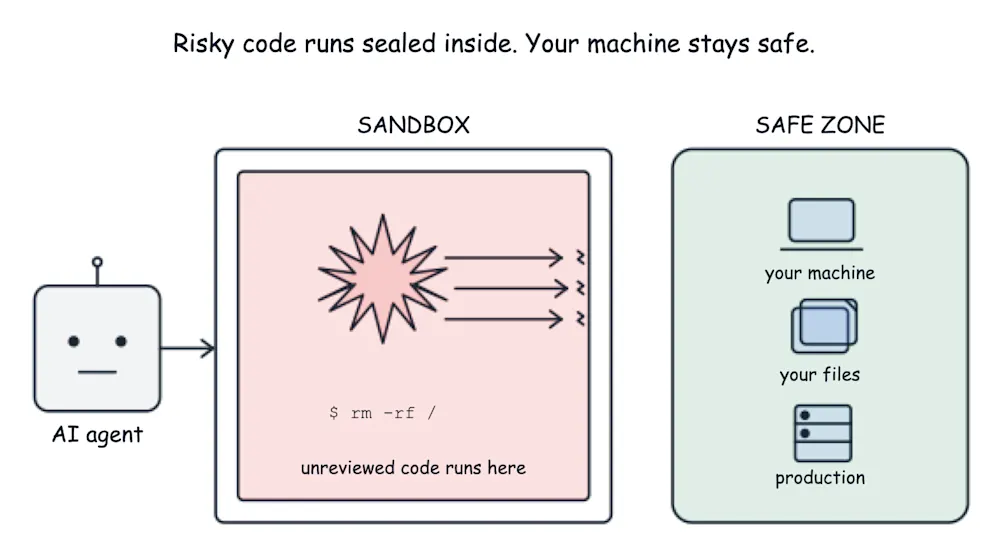
An AI sandbox is a contained execution environment. Your agent gets a working space with a filesystem, a shell, and whatever tools it needs to run code, but that space is walled off from the machine underneath it. Commands run for real inside the wall. They just can’t reach through it to your host, your other projects, or the credentials sitting in your environment.
That is the AI code sandbox most developers are after: a place to let an agent execute freely without betting your laptop on it. A sandbox for AI agents is built around a single assumption, that the code inside might do something you didn’t intend, so the environment is designed to make that survivable.
What AI sandboxing buys you
Stories of agents deleting folders and databases travel because they’re dramatic, but the cost most developers actually feel is often more subtle. To stay safe without a sandbox, an agent has to stop and ask permission before nearly every action it takes. That approval fatigue is a real tax on your day, and it trains you to click yes on autopilot, which is exactly how the dramatic failures slip through in the first place.
When an agent runs inside a proper sandbox, it can act without confirmation (even for risky commands) because the blast radius is already contained. Anthropic reports an 84% reduction in permission prompts in its own use of Claude Code once sandboxed. Cursor reports a 40% drop in developer interruptions from the same approach. Fewer interruptions mean the safety no longer depends on you reading every line at 5 p.m.
How AI sandboxes work
AI sandboxes work by isolating the code an agent executes from the underlying host machine. Common approaches to isolating agent activity include standard containers, user-space kernels, VM-based isolation, and in-process isolates.
Under the hood, every sandbox makes the same tradeoff: speed against isolation strength. A boundary that starts in microseconds tends to share more with the host underneath it, while a boundary that gives the code its own kernel takes longer to spin up. Where a given tool lands on that spectrum tells you how much it is really protecting you.
Here is how the common mechanisms compare:
| Mechanism | Startup time | Isolation strength |
|---|---|---|
| Standard containers | Milliseconds | Weakest (shares the host kernel) |
| gVisor | Milliseconds (overhead varies by workload) | Medium (a user-space kernel intercepts syscalls before they reach the host) |
| Firecracker microVMs | Under ~125ms | Strong (dedicated guest kernel) |
| Kata Containers | ~150–300ms+ (varies by backend) | Strong (VM isolation with container orchestration) |
| V8 isolates | Under 5ms | Weak (in-process; isolates share one OS process) |
Standard containers start fast and run almost everywhere already, though they lean on the host kernel, so a container escape reaches the machine. A user-space kernel layer or a lightweight VM buys much stronger separation for a modest startup cost. Process-level isolation is the quickest option going and protects the least, because the boundary lives inside a shared operating-system process rather than around a separate kernel.
This is also what separates an AI sandbox from a plain Docker container. A standard container runs as a process on the host’s shared kernel, isolated by Linux namespaces, so a container escape can reach the underlying machine. A sandbox built for AI code usually adds a stronger layer on top, such as a lightweight virtual machine with its own guest kernel, so the boundary holds even when code breaks out of the container itself.
None of this makes escape impossible. Strong isolation reduces the risk substantially, and it stops short of an absolute guarantee. Security researchers have shown capable models finding unanticipated paths around misconfigured or weakly isolated environments, which is why a kernel or VM-level boundary earns its keep over a simple command blocklist that only matches text. Where the sandbox fits while you work, and where the pipeline picks up, is the next question.
Where this fits in your workflow
Development with an AI coding agent runs in two loops. The inner loop is the tight cycle on your own machine: write, run, see what happens, adjust. The outer loop is everything that happens after you push, when your code meets the shared pipeline that decides whether it is fit to merge and ship.
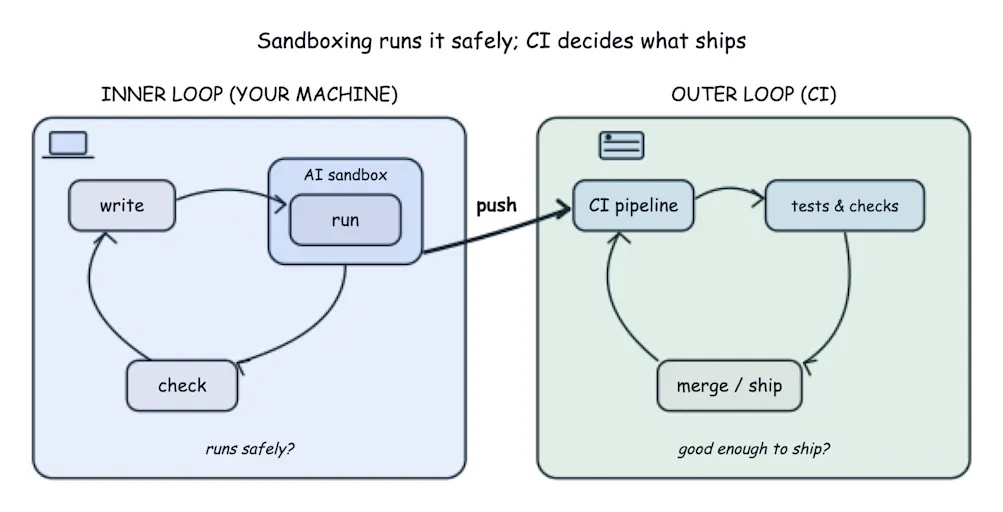
An AI agent sandbox lives in the inner loop. Sandboxing is an inner-loop concern. It only answers whether the code can safely run. Deciding whether it’s good enough to ship is the responsibility of the outer loop and human reviewers.
That outer loop is where CI/CD does its work. Continuous integration (CI) ensures the agent’s code integrates with the rest of your team’s work. It runs comprehensive end-to-end testing, performs security and compliance checks, and validates if your code is ready to ship.
CI provides a valuable source of feedback for agents. CircleCI’s CLI and remote MCP server enable agents to quickly pull information from failed pipelines into their context window. This allows them to continue iterating within their sandbox, developing and testing new code and solutions and validating their changes against your real CI pipeline.
This matters more as agents generate more code. CircleCI’s 2026 State of Software Delivery report found daily build activity up 59% year over year, with main-branch success rates dipping to a five-year low. More generated code means more changes hitting the pipeline, and a pipeline that runs on every one keeps that volume from leaving your main branch red for days.
Choosing an approach
The good news for anyone about to shop for a tool is that you may not need to. Claude Code and Cursor both ship native isolation for agent-run code now, and most coding tools sandbox by default or offer it as a built-in option. The practical first move is auditing what you already have rather than adding a vendor. Three things matter more than which tool you picked:
- Scope is the biggest lever. Giving an agent a throwaway side project carries a different risk than pointing it at the repo that holds your production credentials, so grant it the least reach the work needs.
- Prefer ephemeral over persistent. An environment that is thrown away after each run leaves far less for a bad command to damage than one that carries state across sessions.
- Look past the label. Kernel or VM-level isolation holds up where a command blocklist that only matches text can be reasoned around, so it pays to know which one “sandboxed” actually means here.
The same judgment scales to a whole team, where the question changes shape. Can every developer get safe-by-default execution without someone having to remember to switch it on for each new project?
When one developer configures a sandbox for AI agents well, that is a personal preference. Standardization is when the same guarantee gets wired into the team’s golden path, so it holds by default for everyone without anyone opting in under deadline pressure. That is the instinct behind platform standardization: make the safe way the automatic way, so a growing volume of agent-generated code meets the same checks on the way to production every time.
Conclusion
An AI sandbox gives your coding agent room to run and test code while keeping a bad command from reaching anything that matters, and that protection is increasingly built into the tools you already use.
Once the agent hands you a change, your CI pipeline runs the security checks and end-to-end tests that decide whether it is correct and ready to ship, applying the same bar to AI-generated code as to anything else you release. To see what that looks like on the outer loop, sign up for a free CircleCI account and put your next AI-assisted change through a pipeline you can trust.
0 Comments
Log in to join the conversation.No comments yet. Be the first to share your thoughts.