
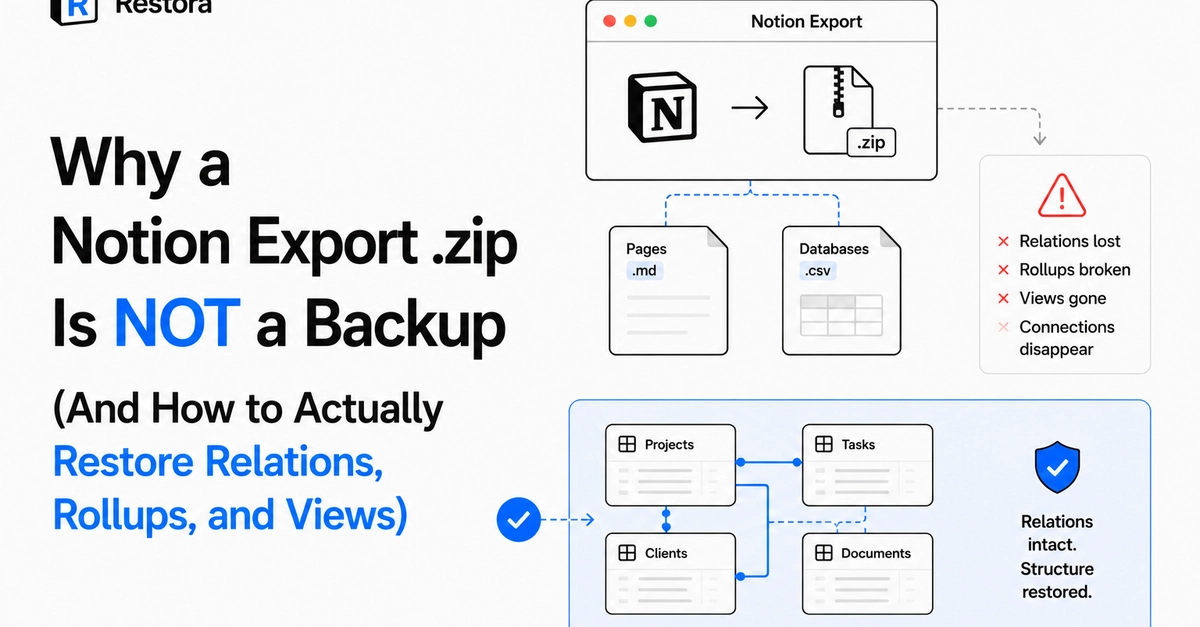


If you've ever exported your Notion workspace expecting a real backup, here's the uncomfortable truth: you have a copy of your text, not a working system.
What a Notion export actually gives you
Settings → Export → Markdown & CSV gives you a zip file. Inside: one Markdown file per page, one CSV per database. That's it. It looks like a backup because you have "all your data" in files on your computer. But try to actually restore from it and the cracks show immediately.
Why relations don't survive
A relation property in Notion stores an array of page IDs it points to. When you export to CSV, that relation gets flattened to the displayed text of the related page — not the actual link. Re-importing that CSV doesn't recreate a relation; it creates a plain text column that happens to contain some words that used to be a link.
If your workspace has Tasks linked to Projects, linked to Clients, linked to Invoices — every one of those connections is gone the moment you export. You get four separate spreadsheets with no relationship between them.
Why rollups and views don't survive either
Rollups compute a value based on a relation and an aggregation function (sum, count, etc.). Export gives you the last computed value as static text — not the formula, not the relation it depends on. If the underlying data changes, that number in your export is now just wrong and frozen.
Views (your filtered/sorted/grouped table, board, or calendar layouts) aren't part of the export at all. You get raw rows. Any filtering, grouping, or sort order you built has to be manually recreated from scratch.
The 30-day problem that makes this worse
Deleted database rows sit in Notion's trash for exactly 30 days before permanent deletion. Version history doesn't help here — it tracks edits to pages that still exist, not pages that were deleted. So the common assumption "I have version history, I'm covered" is false for the specific failure mode that actually happens: someone deletes a database or a bulk-edit goes wrong, and by the time it's noticed, the 30-day window may already be closing or closed.
What actually solves this
To restore relations properly, a tool needs to work through Notion's API directly (not the file export), capturing the real relation targets, rollup configurations, and view definitions as structured data — then rebuild the database and re-point every relation to the newly created pages on restore. That's meaningfully more work than a flat export, which is likely why several established Notion backup tools state outright on their own websites that a complete restore "isn't possible."
The takeaway
If your Notion workspace has any relational structure — tasks linked to projects, a CRM, anything with rollups — treat "I have an export" as false security. It protects your text. It does not protect your system. Test whether your current backup approach can actually restore before you're relying on it in a real emergency.
I write more about this at restora.cc, where I build backup/restore tooling for Notion specifically around this relational-restore problem.
0 Comments
Log in to join the conversation.No comments yet. Be the first to share your thoughts.