
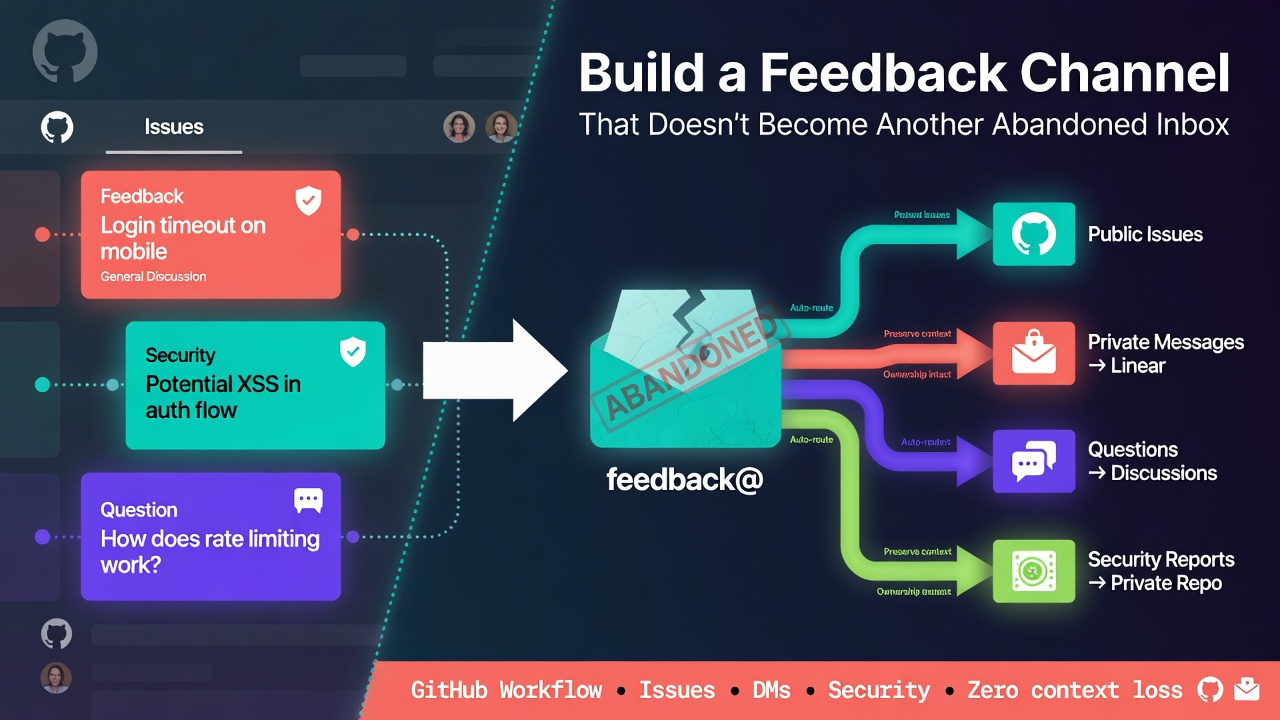
启动一个反馈渠道很容易:添加一个邮箱地址、启用 GitHub Issues 或链接一个表单即可。
困难的部分从第一条消息到达后开始。
如果没有明确的工作流,维护者最终需要检查多个互不关联的收件箱。报告者不知道该在何处提问,私信无法被其他贡献者搜索,而 issue 则会处于一种模糊状态,直到每个人都假设别人已经处理了它们。
解决方案不是再增加一个通知目的地,而是一个小型的路由和分流系统:一个可见的入口点、清晰的所有权,以及有限的一组状态。
本教程围绕 GitHub 构建该系统,但同样的模型也适用于 GitLab、工单跟踪系统或共享支持队列。
从路由契约开始
在配置工具之前,请先决定每种消息应归属于何处。
一个实用的路由表可能如下所示:
| 消息类型 | 目标 | 可见性 |
|---|---|---|
| 可复现的 bug | GitHub Issue | 公开 |
| 功能提案 | GitHub Issue 或 Discussion | 公开 |
| 使用问题 | GitHub Discussion | 公开 |
| 安全漏洞 | 安全政策说明 | 私有 |
| 账户、账单或个人数据 | 联系渠道 | 私有 |
| 可转化为可操作反馈的一般反馈 | 联系渠道,随后在获得许可后提升为 issue | 先私有 |
这种分离很重要。公共渠道使可复用的知识可被搜索,而私有渠道则为不应发布在 issue 中的信息提供了逃生通道。
在 SUPPORT.md 中记录该契约:
# Support

## Bugs and feature requests

Open a GitHub issue. Search existing issues first and include a minimal reproduction when reporting a bug.

## Questions

Use GitHub Discussions for setup help and open-ended questions.

## Private messages

Use our private contact page for account details, personal information, or feedback you do not want to post publicly.

## Security vulnerabilities

Do not open a public issue. Follow the instructions in SECURITY.md.

## Review cadence

New issues are reviewed on Tuesdays and Fridays. This is a review target, not a guaranteed resolution time.
Enter fullscreen mode Exit fullscreen mode
将此文件链接到 README 中,这样贡献者无需浏览仓库即可找到它。
## Help and feedback

- [Report a bug](https://github.com/OWNER/REPOSITORY/issues/new/choose)
- [Ask a question](https://github.com/OWNER/REPOSITORY/discussions)
- [Send a private message](https://example.com/contact)
- [Read the support policy](SUPPORT.md)
- [Report a security issue](SECURITY.md)
Enter fullscreen mode Exit fullscreen mode
替换所有占位符,并在未登录状态下测试链接。仅对维护者有效的路由不是可用的入口点。
将 issue 选择器变为前门
GitHub 的 issue 模板配置可以在用户创建 issue 之前引导他们前往正确的目的地。
创建 .github/ISSUE_TEMPLATE/config.yml:
blank_issues_enabled: false
contact_links:
  - name: Ask a question
    url: https://github.com/OWNER/REPOSITORY/discussions
    about: Get help with setup, configuration, and usage.
  - name: Send a private message
    url: https://example.com/contact
    about: Share account details, personal information, or private feedback.
  - name: Report a security vulnerability
    url: https://github.com/OWNER/REPOSITORY/security/policy
    about: Follow the private security reporting instructions.
Enter fullscreen mode Exit fullscreen mode
禁用空白 issue 仅在提供的模板覆盖常见路径时才有意义。否则,它会将结构转化为障碍。
接下来,添加 .github/ISSUE_TEMPLATE/bug.yml:
name: Bug report
description: Report a reproducible problem
title: '[Bug]: '
labels:
  - 'status: needs-triage'
body:
  - type: markdown
    attributes:
      value: |
        Thanks for reporting a problem. Remove secrets and personal data before submitting.

  - type: textarea
    id: description
    attributes:
      label: What happened?
      description: Describe the actual and expected behavior.
    validations:
      required: true

  - type: textarea
    id: reproduction
    attributes:
      label: Minimal reproduction
      description: Provide steps, a small repository, or a code sample.
    validations:
      required: true

  - type: input
    id: version
    attributes:
      label: Version
      placeholder: 'v2.4.1'
    validations:
      required: true

  - type: textarea
    id: environment
    attributes:
      label: Environment
      description: Include the operating system, runtime, browser, and relevant dependencies.

  - type: checkboxes
    id: checks
    attributes:
      label: Submission checks
      options:
        - label: I searched existing issues.
          required: true
        - label: I removed secrets and personal data.
          required: true
Enter fullscreen mode Exit fullscreen mode
该表单要求提供复现 bug 所需的证据,但不会要求报告者诊断原因。诊断仍然是维护者的工作。
使用有意精简的状态机
标签应该回答“接下来要做什么”,而不是描述 issue 的每一个可能属性。
从以下状态开始:
-
status: needs-triage— 尚未做出路由决策。 -
status: needs-info— 报告者必须提供特定信息。 -
status: accepted— 问题或提案有效,但可能尚未被排期。 -
status: duplicate— 另一个 issue 是规范线程。 -
status: out-of-scope— 请求不符合项目的边界。
每个开放的 issue 应恰好有一个状态标签。技术、组件和优先级标签可以单独添加,但不应取代工作流状态。
分流过程随后成为一个可重复的清单:
- 打开
status: needs-triage队列。 - 如果发布了任何机密或个人信息,立即移除。
- 检查重复项。
- 确认该报告是否属于此仓库。
- 在适当时尝试复现。
- 应用一个状态标签。
- 在评论中写明下一步操作。
- 仅在有人真正承担责任时分配所有者。
例如,一个有用的 needs-info 回复应具体:
Thanks for the report. We need the smallest configuration that reproduces this and the exact runtime version. Please add those details within 14 days; otherwise, we will close the issue and reopen it when the information is available.
Enter fullscreen mode Exit fullscreen mode
这比单纯写“需要更多细节”更具可操作性。
选择节奏而非假装提供即时支持
支持工作流需要一个指定的所有者和审查计划。它不一定需要持续监控。
对于小型项目,每周两次计划分流可能就足够了。在私有团队文档中记录当前维护者或轮换情况,并在 SUPPORT.md 中仅公布审查节奏。
在每次分流中,至少检查:
is:issue is:open label:"status: needs-triage"
is:issue is:open label:"status: needs-info" updated:<2026-07-10
is:issue is:open no:assignee label:"status: accepted"
Enter fullscreen mode Exit fullscreen mode
将第二个查询中的硬编码日期替换为你响应窗口的截止日期。保存的 GitHub 搜索或项目视图可以使这些队列更易于再次访问。
衡量工作流的健康状况而非消息量:
- 最旧的未分流项的年龄
- 没有工作流状态的项的数量
- 没有所有者的已接受 issue 的数量
- 等待路由决策的私信数量
这些是运营信号,而非性能目标。它们告诉你流程在哪里停止了。
防止私有渠道变成第二个积压
私有渠道应是一个接收路由,而不是普通产品工作的永久记录系统。
对每条私信应用此规则:
- 私下回复,如果它包含账户详情、个人数据或其他敏感主题。
- 重定向到现有的公开线程,如果答案已被记录。
- 提升为公开 issue,如果它识别出普遍有用的工作且发送者同意。
- 明确关闭,如果不会采取任何行动。
在提升反馈时,重写它而非复制原始消息。移除识别细节并描述可观察的问题:
## Problem
Users configuring the client without a default region receive an unclear error.

## Expected outcome
The configuration validator should identify the missing field and point to the relevant documentation.

## Source
Private feedback, shared publicly with permission and anonymized.
Enter fullscreen mode Exit fullscreen mode
公开 issue 成为规范线程。未来的更新应归于此处,而非分散在收件箱和 GitHub 之间。
常见失败模式
每条路由都说“联系我们”
这会将 bug、问题、安全报告和私人细节发送到同一个队列。在用户撰写消息之前,先向他们展示路由选择。
自动化制造了支持的假象
即时机器人响应并不意味着人类已审查报告。如果你自动化了确认,请说明实际的审查节奏,并避免暗示工作已被排期。
标签累积但未改变决策
如果一个 issue 有 12 个描述性标签但没有下一步操作,则分类法没有帮助。要求一个工作流状态,并限制可选标签的数量。
私有反馈从未返回项目
有用的报告可能会消失在直接消息中。在每次私有渠道分流中加入“提升、重定向、回复或关闭”。
维护者无声地变得不可用
如果每个人都假设别人在关注它,共享收件箱仍然会失败。分配一个当前所有者或轮换,即使团队只有两个人。
安全报告使用通用联系路由
将漏洞说明保留在 SECURITY.md 中,并在适合项目时启用 GitHub 的私有漏洞报告。不要要求报告者通过普通的公开表单发送利用细节。
托管联系页实现
如果你不想构建和运营私有接收页面,Knocket 是一个实现示例:创建一个可分享的联系页,将其 URL 放入 README 和上述 contact_links 配置中,并将 GitHub 作为公共工作的规范位置。访客无需账户即可开始对话;消息也可以路由到 Telegram,其中引用的回复可以发送回访客。
无论联系页提供商如何,工作流规则保持不变:任命一个所有者,按计划审查队列,保护敏感信息,并经许可将合适的反馈提升为公开 issue。
维护清单
每月一次,验证系统本身:
- 在私有浏览器窗口中打开每个 README 和 issue 选择器链接。
- 确认
SUPPORT.md描述了当前的审查节奏。 - 检查安全路由是否与通用联系方式不同。
- 审查未分流和未分配的队列。
- 移除过时的标签和模板。
- 抽样私有对话以确认每个都收到了路由决策。
- 更新命名的内部所有者或轮换。
一个好的反馈渠道不是由人们可以联系你的方式数量定义的,而是由每条消息是否都得到了决策定义的。
讨论
你的项目如何区分公开 issue 和私有反馈?你是否使用维护者轮换、计划分流会话或其他机制来防止报告变成被遗忘的收件箱?
披露:我在 Knocket 工作,因此请将其视为一个实现示例而非中立推荐。
0 Comments
Log in to join the conversation.No comments yet. Be the first to share your thoughts.