
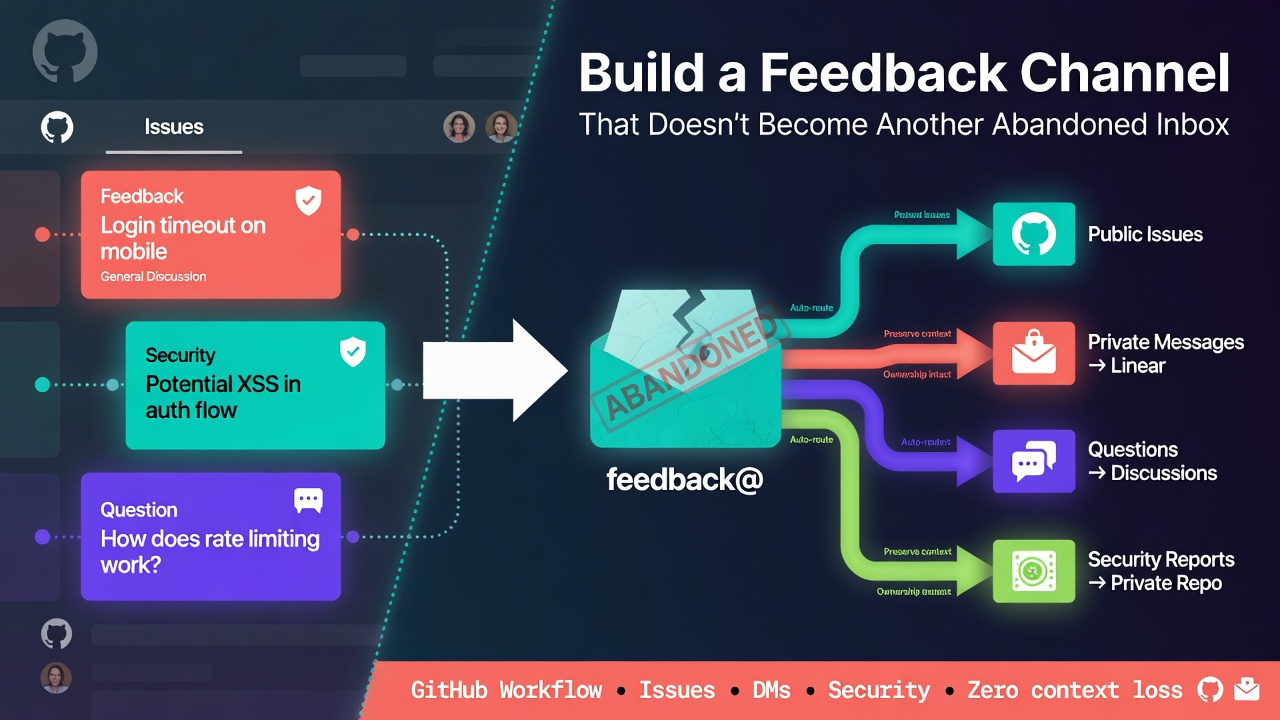
建立回饋管道很容易:新增一個電子郵件地址、啟用 GitHub Issues,或連結表單。
困難的部分從第一則訊息抵達之後才開始。
若沒有明確的工作流程,維護者最終會檢查多個互不相連的收件匣。回報者不知道該在哪裡提問,私人訊息無法被其他貢獻者搜尋,而議題會處於曖昧狀態,直到每個人都假設別人已經處理。
解決方案不是再多一個通知目的地,而是一個小型的路由與分類系統:單一可見的入口、清楚的擁有權,以及有限的狀態集。
本教學以 GitHub 為基礎建立該系統,但相同的模式也適用於 GitLab、票務追蹤器或共享支援佇列。
從路由合約開始
在設定工具之前,請先決定每一種訊息該歸屬何處。
實用的路由表可能如下所示:
| 訊息類型 | 目的地 | 可見性 |
|---|---|---|
| 可重現的錯誤 | GitHub Issue | 公開 |
| 功能提案 | GitHub Issue 或 Discussion | 公開 |
| 使用問題 | GitHub Discussion | 公開 |
| 安全性漏洞 | 安全性政策說明 | 私人 |
| 帳戶、帳單或個人資料 | 聯絡管道 | 私人 |
| 可轉為可執行事項的一般回饋 | 聯絡管道,再經同意後提升為 issue | 先私人 |
這種區分很重要。公開管道可讓可重複使用的知識被搜尋,而私人管道則為不適合張貼在 issue 中的資訊提供逃生門。
將合約記錄在 SUPPORT.md:
# Support

## Bugs and feature requests

Open a GitHub issue. Search existing issues first and include a minimal reproduction when reporting a bug.

## Questions

Use GitHub Discussions for setup help and open-ended questions.

## Private messages

Use our private contact page for account details, personal information, or feedback you do not want to post publicly.

## Security vulnerabilities

Do not open a public issue. Follow the instructions in SECURITY.md.

## Review cadence

New issues are reviewed on Tuesdays and Fridays. This is a review target, not a guaranteed resolution time.
Enter fullscreen mode Exit fullscreen mode
從 README 連結此檔案,讓貢獻者不必瀏覽儲存庫就能發現它。
## Help and feedback

- [Report a bug](https://github.com/OWNER/REPOSITORY/issues/new/choose)
- [Ask a question](https://github.com/OWNER/REPOSITORY/discussions)
- [Send a private message](https://example.com/contact)
- [Read the support policy](SUPPORT.md)
- [Report a security issue](SECURITY.md)
Enter fullscreen mode Exit fullscreen mode
替換所有預留位置,並在登出狀態下測試連結。只有維護者能使用的路由並非可用的入口。
將 issue 選擇器變成前門
GitHub 的 issue 模板設定可以在使用者建立 issue 之前引導他們前往正確的目的地。
建立 .github/ISSUE_TEMPLATE/config.yml:
blank_issues_enabled: false
contact_links:
  - name: Ask a question
    url: https://github.com/OWNER/REPOSITORY/discussions
    about: Get help with setup, configuration, and usage.
  - name: Send a private message
    url: https://example.com/contact
    about: Share account details, personal information, or private feedback.
  - name: Report a security vulnerability
    url: https://github.com/OWNER/REPOSITORY/security/policy
    about: Follow the private security reporting instructions.
Enter fullscreen mode Exit fullscreen mode
停用空白 issue 僅在提供的模板涵蓋常見路徑時才有幫助。否則,結構反而會成為障礙。
接著新增 .github/ISSUE_TEMPLATE/bug.yml:
name: Bug report
description: Report a reproducible problem
title: '[Bug]: '
labels:
  - 'status: needs-triage'
body:
  - type: markdown
    attributes:
      value: |
        Thanks for reporting a problem. Remove secrets and personal data before submitting.

  - type: textarea
    id: description
    attributes:
      label: What happened?
      description: Describe the actual and expected behavior.
    validations:
      required: true

  - type: textarea
    id: reproduction
    attributes:
      label: Minimal reproduction
      description: Provide steps, a small repository, or a code sample.
    validations:
      required: true

  - type: textarea
    id: environment
    attributes:
      label: Environment
      description: Include the operating system, runtime, browser, and relevant dependencies.

  - type: checkboxes
    id: checks
    attributes:
      label: Submission checks
      options:
        - label: I searched existing issues.
          required: true
        - label: I removed secrets and personal data.
          required: true
Enter fullscreen mode Exit fullscreen mode
表單會詢問重現錯誤所需的證據,但不會要求回報者診斷原因。診斷仍然是維護者的工作。
使用刻意精簡的狀態機
標籤應該回答「接下來要做什麼」,而不是描述 issue 的每一種可能屬性。
從這些狀態開始:
-
status: needs-triage— 尚未做出路由決定。 -
status: needs-info— 回報者必須提供特定資訊。 -
status: accepted— 問題或提案有效,但可能尚未排程。 -
status: duplicate— 另一個 issue 是主要討論串。 -
status: out-of-scope— 該請求不符合專案範圍。
每個開放中的 issue 應恰好有一個狀態標籤。技術、元件與優先順序標籤可以另外新增,但不應取代工作流程狀態。
分類作業接著會變成可重複的清單:
- 開啟
status: needs-triage佇列。 - 若有張貼機密或個人資訊,立即移除。
- 檢查重複的 issue。
- 確認該回報屬於此儲存庫。
- 視情況嘗試重現。
- 套用單一狀態標籤。
- 在評論中寫下下一步行動。
- 僅在有人真正接受責任時指派擁有者。
例如,一則有用的 needs-info 回應應具體:
Thanks for the report. We need the smallest configuration that reproduces this and the exact runtime version. Please add those details within 14 days; otherwise, we will close the issue and reopen it when the information is available.
Enter fullscreen mode Exit fullscreen mode
這比單純寫「需要更多細節」更有可執行性。
選擇節奏而非假裝提供即時支援
支援工作流程需要一名指定的擁有者與審查排程,不一定需要持續監控。
對於小型專案,每週兩次排定的分類作業可能就足夠。將目前維護者或輪值表放在私人團隊文件中,並僅在 SUPPORT.md 公布審查節奏。
每次作業至少檢查:
is:issue is:open label:"status: needs-triage"
is:issue is:open label:"status: needs-info" updated:<2026-07-10
is:issue is:open no:assignee label:"status: accepted"
Enter fullscreen mode Exit fullscreen mode
請以你的回應時間窗截止日期替換第二個查詢中的硬式編碼日期。已儲存的 GitHub 搜尋或專案檢視可讓這些佇列更容易重複檢視。
衡量工作流程的健康度,而非訊息數量:
- 最舊未分類項目的年齡
- 沒有工作流程狀態的項目數量
- 沒有擁有者的已接受 issue 數量
- 等待路由決定的私人訊息
這些是操作訊號,而非績效目標。它們告訴你流程在哪裡停止移動。
避免私人管道變成第二個待辦清單
私人管道應該是收件路由,而非一般產品工作的永久記錄系統。
對每一則私人訊息套用此規則:
- 私人回覆,若包含帳戶細節、個人資料或其他敏感主題。
- 重新導向至現有公開討論串,若答案已記錄在文件中。
- 提升為公開 issue,若它指出具有普遍用途的工作,且寄件者同意。
- 明確關閉,若不會採取任何行動。
提升回饋時,請改寫而非複製原始訊息。移除識別細節並描述可觀察的問題:
## Problem
Users configuring the client without a default region receive an unclear error.

## Expected outcome
The configuration validator should identify the missing field and point to the relevant documentation.

## Source
Private feedback, shared publicly with permission and anonymized.
Enter fullscreen mode Exit fullscreen mode
公開 issue 會成為主要討論串。未來的更新應屬於該處,而非分散在收件匣與 GitHub 之間。
常見失敗模式
每條路由都說「聯絡我們」
這會將錯誤、問題、安全通報與私人細節送進同一個佇列。在使用者撰寫訊息之前,先提供路由選擇。
自動化製造支援的假象
即時機器人回應並不代表人類已審查過報告。若自動化致謝,請說明實際的審查節奏,並避免暗示工作已排程。
標籤累積但未改變決策
若一個 issue 有 12 個描述性標籤卻沒有下一步行動,則分類法沒有幫助。要求一個工作流程狀態,並將選用標籤限制在最小範圍。
私人回饋從未回到專案
有用的報告可能消失在直接訊息中。將「提升、重新導向、回覆或關閉」加入每一次私人管道分類作業。
維護者悄然變得無法聯繫
若每個人都假設別人在看,共享收件匣仍然會失敗。即使團隊只有兩個人,也要指派目前擁有者或輪值表。
安全通報使用一般聯絡路由
將漏洞說明放在 SECURITY.md,並在適合專案時啟用 GitHub 的私人漏洞回報功能。不要要求回報者透過一般公開表單傳送利用細節。
託管聯絡頁面實作
若你不想自行建置與操作私人收件頁面,Knocket 是一個實作範例:建立可分享的聯絡頁面,將其 URL 放入 README 與上述 contact_links 設定,並保留 GitHub 作為公開工作的主要位置。訪客無需帳戶即可開始對話;訊息也可路由至 Telegram,引用的回覆可傳回訪客。
無論聯絡頁提供者為何,工作流程規則保持不變:指派擁有者、依排程檢視佇列、保護敏感資訊,並經同意後將適當的回饋提升為公開 issue。
維護清單
每月一次,驗證系統本身:
- 在私人瀏覽器視窗中開啟每個 README 與 issue 選擇器連結。
- 確認
SUPPORT.md描述目前的審查節奏。 - 檢查安全路由與一般聯絡管道是否區分清楚。
- 檢視未分類與未指派的佇列。
- 移除過時的標籤與模板。
- 抽樣私人對話,確認每一則都已收到路由決定。
- 更新指定的內部擁有者或輪值表。
良好的回饋管道並非取決於人們能以多少方式聯絡你,而是每一則訊息是否都能獲得決定。
討論
你的專案如何區分公開 issue 與私人回饋?你是否使用維護者輪值、排定的分類會議,或其他機制來防止報告變成被遺棄的收件匣?
Disclosure: I work on Knocket, so treat it as one implementation example rather than a neutral recommendation.
0 Comments
Log in to join the conversation.No comments yet. Be the first to share your thoughts.