
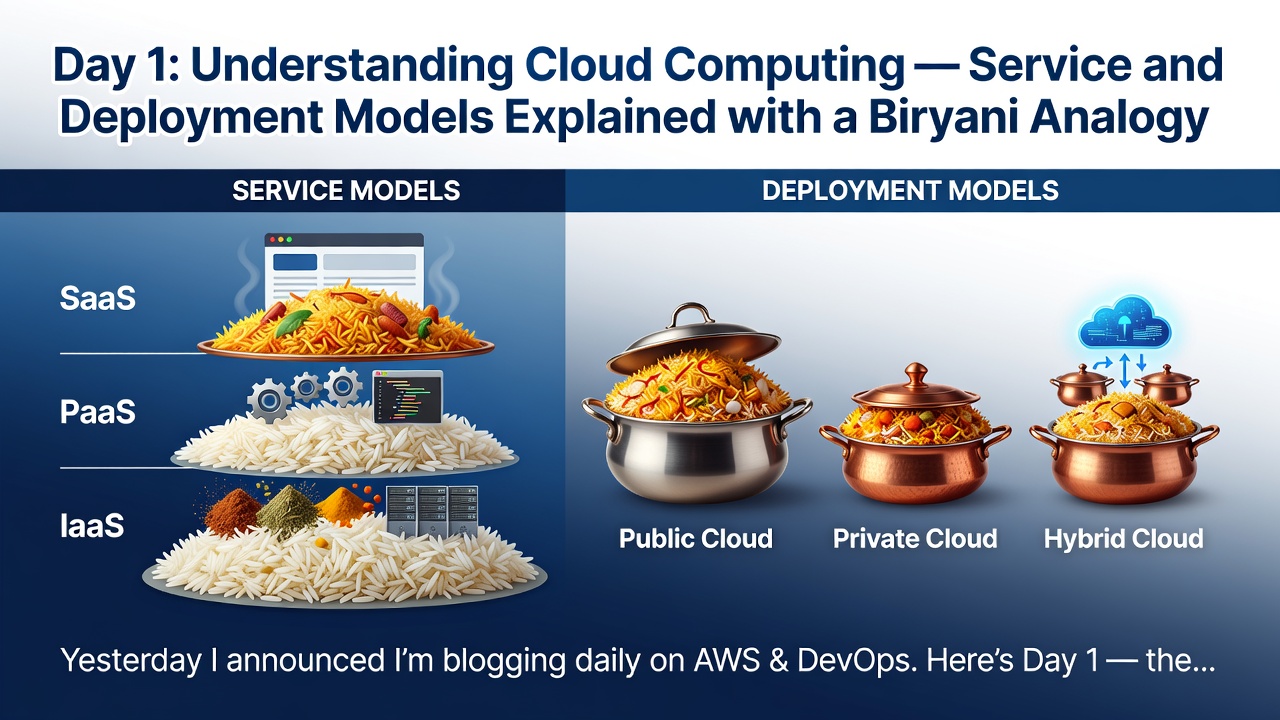


Yesterday I announced I'm blogging daily on AWS & DevOps. Here's Day 1 — the fundamentals everything else builds on.
## What is Cloud Computing?
- Instead of setting up and maintaining infrastructure on-premises, you now access computing resources remotely over the internet — this is Cloud Computing.
"Cloud" refers to a network that provides resources over the internet, accessible whenever needed. It evolved from grid computing, virtualization, and distributed computing. All you need to use it is a web browser.
As per NIST, cloud computing is a model for enabling convenient, on-demand network access to a shared pool of configurable computing resources (networks, servers, storage, applications, services) that can be rapidly provisioned and released with minimal management effort.
Key characteristics: uses virtualization, enables on-demand access, and offers "pay-as-you-use" pricing.
Traditional companies had to spend heavily on infrastructure, hardware, and operations. With cloud computing, providers manage all of this — handling troubleshooting, recording activity, and sending analytics data to users.
Service Models — IaaS, PaaS, SaaS
IaaS :
- Providers offer databases, servers, storage, and networking as a service, and you pay per use.
- Examples: AWS, Azure, GCP.
PaaS :
- Gives you an on-demand environment for developing, testing, and delivering apps, with ready dev tools already set up.
- Examples: Heroku, Google App Engine.
SaaS :
- Delivers ready-to-use software over the internet, usually via subscription, with the provider managing everything underneath. - Examples: Gmail, Microsoft 365, Google Drive.
The layered view:
- moving from On-Premise to IaaS to PaaS to SaaS, each model hands you a bigger pre-managed slice.
- On-premise means you manage everything yourself.
- IaaS shifts virtualization, servers, storage, and networking to the vendor.
- PaaS additionally hands over OS, middleware, and runtime.
- SaaS means the vendor manages everything — you just use the app.
The biryani analogy:
- IaaS is buying raw ingredients and cooking the biryani yourself.
- PaaS is eating at a restaurant — it's already cooked, you just show up and eat.
- SaaS is ordering through Swiggy or Zomato — it arrives fully ready, zero effort.
Deployment Models — Public, Private, Hybrid, Community
Public Cloud :
- Available to everyone over the internet, free or pay-per-use. -- Cheap and easy to set up since the provider covers hardware and bandwidth costs.
- Pros: cost-effective, scalable, flexible.
- Cons: lower security, less customizable.
Private Cloud :
- Dedicated to one organization, behind a firewall, for a limited set of people.
- Pros: good for sensitive data, controlled security.
- Cons: costly, limited remote access.
Hybrid Cloud :
- A mix of public and private, giving agility for developing and testing new apps.
- Pros: scalable, cost-effective.
- Cons: more maintenance, higher setup cost.
Community Cloud :
- A shared solution for businesses with common concerns like security and compliance.
- Pros: flexible, compliance-friendly, controlled configuration. - Cons: shared storage/bandwidth limits, harder shared responsibility.
The biryani analogy:
- Public cloud is like eating at a public food court — open to anyone, no control over standards.
- Private cloud is like cooking in your own kitchen — full control, but you bear all the cost.
- Hybrid cloud is cooking at home daily but ordering out for big events.
- Community cloud is a shared kitchen for one apartment or complex - a defined group sharing space and rules together.
Coming up on Day 2: Client-server architecture and virtualization — two more networking/infra fundamentals before we head into AWS.
0 Comments
Log in to join the conversation.No comments yet. Be the first to share your thoughts.