
Eliminate Stored Credentials in Your CI/CD Pipelines
TL;DR: Docker now supports OpenID Connect (OIDC) for GitHub Actions. Your workflows can authenticate with short-lived, per-run tokens instead of stored PATs or OATs. No secrets to rotate, no credentials to leak.
GitHub OIDC connections are available to organizations with Docker Team, Docker Business, or Docker Hardened Images (DHI) subscriptions, as well as organizations enrolled in the Docker Sponsored Open Source Program (DSOS).
Table of contents
- The problem with stored credentials
- Who should use this
- How OIDC connections work
- Getting started
- What doesn’t change
- Learn more
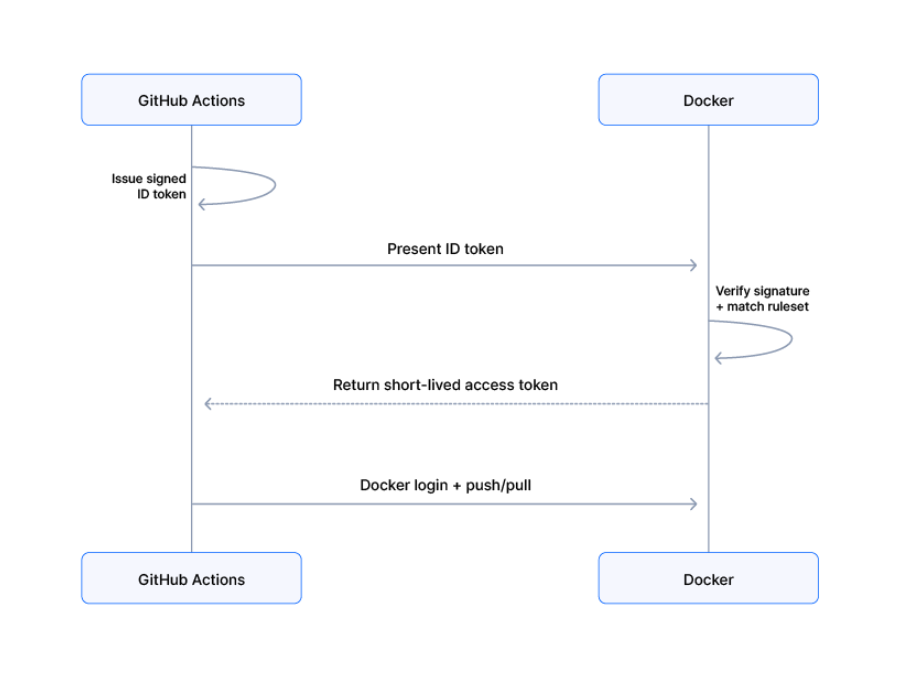
OIDC token exchange flow between GitHub Actions and Docker
The problem with stored credentials
Every GitHub Actions workflow that pushes or pulls images from Docker Hub authenticates with a personal access token (PAT) or organization access token (OAT) stored as a GitHub secret. These credentials are long-lived. Someone has to remember to rotate them. A leaked token grants access to your registry — pulling private images, pushing malicious ones — and that access persists until someone discovers and revokes it. Rotation is manual and does not scale. As pipelines multiply, so do the credentials that need tracking, and stale tokens are a common audit finding.
Who should use this
- GitHub issues a signed identity token (a JWT) that encodes the repository, branch, environment, and other metadata about the workflow run.
- The workflow calls docker/login-action, which presents this token to Docker.
- Docker verifies the token’s signature against GitHub’s public key registry and checks it against rulesets configured in the Admin Console.
- If the token matches a ruleset, Docker returns a short-lived access token scoped to the resources defined in that ruleset.
- docker/login-action uses this token to authenticate to Docker Hub. From there, docker pull, docker push, and docker build commands work as usual.
The entire exchange happens without any stored secrets, API keys, or access tokens. The short-lived Docker access token expires in minutes and cannot be reused.
This is the same pattern that AWS and GCP already use for cloud resource access (AWS OIDC for GitHub Actions, GCP Workload Identity Federation). Docker is applying it to container registry access.
Getting started
Setup is a one-time connection in Docker Home plus a small update to your workflow YAML.
Step 1: Create a connection
Sign in to Docker Home, select your organization, and navigate to OIDC connections. Select Create OIDC connection and configure the rulesets that control which repositories, branches, and workflows can access which Docker Hub resources. You can create up to five rulesets per connection. When a workflow triggers an OIDC exchange, Docker checks the token against every ruleset defined in your connection. If a ruleset’s conditions are satisfied, Docker grants access based on the parameters set by that ruleset.
Rulesets use OIDC subject claims to match incoming tokens. You can pin to specific repos and branches as a recommended security best practice:
- repo:my-org/my-repo:ref:refs/heads/main — only the main branch of a specific repo
- repo:my-org/my-repo:ref:refs/heads/release-* — all release branches
- repo:my-org/my-repo:* – all branches of this repo
- repo:my-org/* — any repo in the organization (not recommended)
Copy the connection ID when you are done.
Note: GitHub repositories created after July 15, 2026 use immutable identifiers for default subject claims. For example: repo:octocat@123456/my-repo@456789:ref:refs/heads/main. See the GitHub changelog for more details.
Step 2: Update your workflow
Update your GitHub Actions workflow. Replace <YOUR_CONNECTION_ID> with the ID from the previous step and <YOUR_ORG_NAME> with your Docker organization name:
permissions:
  contents: read
  id-token: write

steps:
    - name: Docker login
      uses: docker/login-action@v4 # v4.5.0+
      with:
        username: <YOUR_ORG_NAME>
      env:
        DOCKERHUB_OIDC_CONNECTIONID: <YOUR_CONNECTION_ID>
The id-token: write permission lets the workflow request a GitHub OIDC token. The docker/login-action handles the token exchange and Docker login in a single step when DOCKERHUB_OIDC_CONNECTIONID is set. From there, docker pull, docker push, and docker build commands work as usual.details of the incoming claim sub value, which you can use to diagnose why the connection failed.
Step 3: Verify the OIDC connection works
Run your workflow and confirm it completes successfully. If you encounter an error, the Failures tab of the OIDC connection page will show the details of the incoming claim sub value, which you can use to diagnose why the connection failed.
Step 4: Remove the stored credential
After verifying your workflow runs successfully with OIDC, remove the old PAT or OAT from your GitHub repository secrets. You no longer need it.
Migration Checklist
- Create a connection
- Update your workflow
- Verify the OIDC connection works
- Remove stored credentials
What doesn’t change
- Existing PATs and OATs keep working. Organizations can migrate workflows to OIDC connections at their own pace.
- Images, registries, and build workflows are unchanged. OIDC connections only replace the authentication step; everything downstream is the same.
- Local development and non-GitHub CI still use PATs and OATs. OIDC connections are the recommended replacement for GitHub Actions specifically. Other CI providers will follow based on demand.
Learn more
- Learn more about OpenID Connect
- Visit Docker Home to get started
- Read the documentation
0 Comments
Log in to join the conversation.No comments yet. Be the first to share your thoughts.