
Not all those who wander are lost.
– J.R.R. Tolkien
Today I’m happy to announce Flycheck 38 - easily the biggest and most ambitious Flycheck release since I took over the stewardship of the project. It’s the release where Flycheck grows a proper story for language servers, gets the kind of inline diagnostics you’d expect from a modern editor, and learns to apply fixes - all without giving up the checker model that made it popular in the first place.
The version number, I’ll admit, doesn’t do this one justice - it’s just the next integer after 37, and nothing about “38” whispers “special”. But that’s how it goes with version numbers: some releases are more special than others, and you’d rarely guess which from the number alone.
There and back again
A little history, because it’s what makes me this excited. Flycheck was born to give Emacs a genuinely modern linting experience, back when the built-in options were, let’s charitably say, uninspiring. For years it was the way to get on-the-fly checking in Emacs. But then development slowed to a crawl, Flymake got a ground-up rewrite and quietly caught up in a lot of areas - it even grew end-of-line diagnostics recently - and I started seeing people wonder aloud whether Flycheck still brought anything to the table.
I get the question - a stagnant project invites it. But I never believed Flycheck was done; it was just resting. This release is my answer: proof that it can still innovate and still delight. And I’m genuinely grateful for the competition. Flymake pushing hard is exactly what nudged me to think bigger and bolder than another round of bugfixes. Competition in this space is a good thing, full stop - it makes both projects better and Emacs users the winners. If you’re curious how the two stack up now, the manual keeps an honest side-by-side.
So, in the spirit of boldly going where many editors have gone before, here’s what’s new.
Eglot support, finally built in
For years the story around Flycheck and LSP was awkward. Eglot renders its
diagnostics through Flymake and offers no Flycheck backend of its own, so if you
wanted your LSP errors in Flycheck’s error list you had to reach for the
third-party flycheck-eglot package. It worked, but “install another package to
bridge two things that ship with Emacs” never sat right with me.
Flycheck now bridges that gap itself. Enable global-flycheck-eglot-mode and an
Eglot-managed buffer reports the server’s diagnostics through Flycheck - the
error list, the navigation, the fringe, all of it - while Eglot keeps doing the
LSP heavy lifting. This obsoletes the flycheck-eglot package.1
And because Flycheck reads the raw LSP diagnostic rather than the flattened
Flymake one, the bridge surfaces things Flymake-over-Eglot drops on the floor:
an LSP quickfix code action becomes a Flycheck fix you can apply with C-c ! f,
and a diagnostic’s related locations become navigable.
Beautiful inline diagnostics
The other thing I really wanted was inline messages - errors shown right next to the code they refer to, the way VS Code’s Error Lens, Neovim, Helix and Zed all do it. Flycheck 38 ships this out of the box.
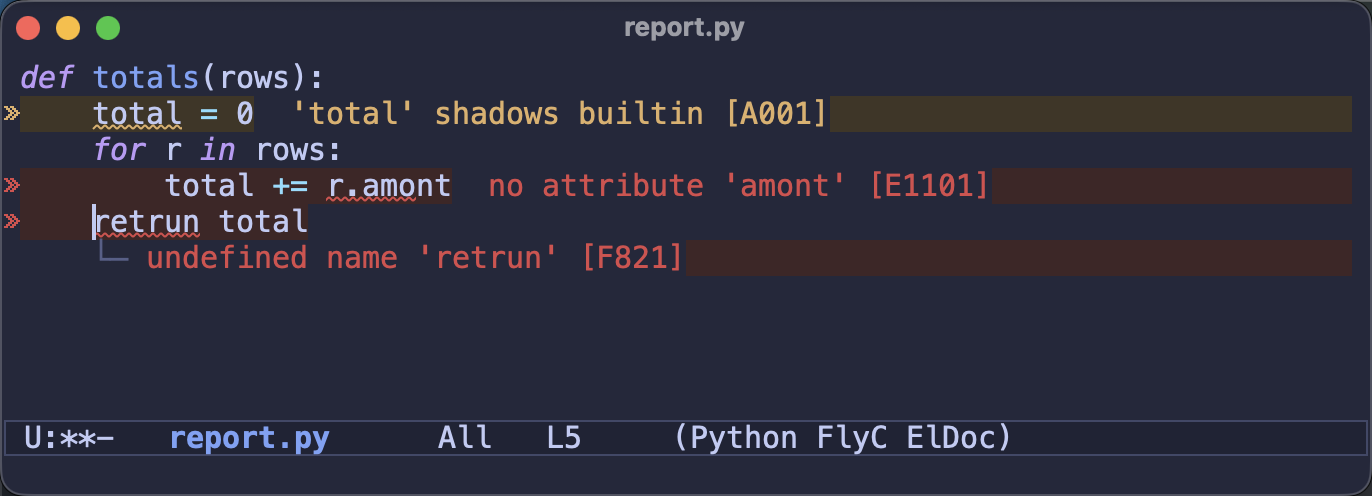
Turn on flycheck-annotate-mode and you get it. There are two layouts - a
compact eol message after the line, and a roomy below layout that lays the
full messages out on their own lines underneath, with connectors pointing at the
offending column. By default the line at point gets the roomy treatment while
the rest stay compact, so the error you’re working on is spelled out in full
without every other line shouting for attention. There’s also an Error Lens-style
whole-line background tint and a right-aligned sideline style if that’s your
thing - the manual has a shot of each.
Turn it on everywhere with the global mode:
(global-flycheck-annotate-mode 1)
;; optional: the Error Lens-style whole-line tint
(setq flycheck-annotate-background t)
A word on the name, since it’s a funny little story. I’d have loved to call this
flycheck-inline-mode, but that name was taken by the (now deprecated)
flycheck-inline package. “Diagnostics” was the other obvious choice, except
Flycheck has always called them errors, not diagnostics - flycheck-error, the
error list, flycheck-checkers - and I didn’t want to introduce a second
vocabulary for the same thing. So flycheck-annotate-mode it is. Naming things
is (still) hard.
Native LSP support, no client required
And to top things off: Flycheck can now talk to a language server directly -
no Eglot, no lsp-mode, no full LSP client at all.
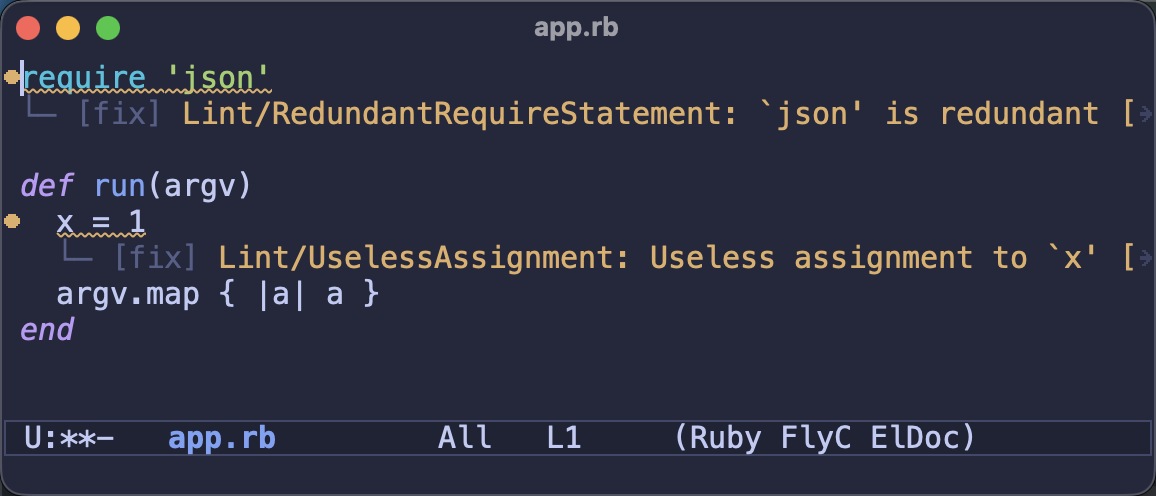
Here’s the itch this scratches. A growing number of linters ship their own LSP
server - RuboCop, Ruff, Biome, Harper and friends - and a traditional command
checker spawns the linter afresh on every check, paying its startup cost over
and over (anyone who’s waited on rubocop loading a big project knows the
feeling). The linter’s own LSP server stays resident and lints incrementally
instead, so checks are much snappier - and you get that without running a full
language server and client just to see some diagnostics.
Enable global-flycheck-lsp-mode and it works out of the box for RuboCop (Ruby),
Ruff (Python), Biome (JavaScript, TypeScript, JSON, CSS) and Harper (Markdown
prose). Each server is only started if its program is installed, so turning the
mode on globally is safe. Want a different one? It’s a one-liner:
;; Standard instead of RuboCop for Ruby
(setf (alist-get 'ruby-mode flycheck-lsp-servers) '("standardrb" "--lsp"))
The whole thing is built on Emacs’ own jsonrpc library, so there’s no new
dependency. And where the server offers them - RuboCop’s autocorrects, Ruff’s and
Biome’s quickfixes - those show up as Flycheck fixes too. It’s meant for the
diagnostics-only case; when you want a full language server with completion and
hover, run it through Eglot and use flycheck-eglot-mode. The manual has a
table to help you pick.
Project-wide diagnostics
Flycheck has always been a resolutely buffer-local affair: it checks the file
you’re looking at and shows you those errors. That’s great right up until you want
the bigger picture - every problem across the files you have open, plus the
cross-file errors that checkers like tsc, cargo check and mypy genuinely
know about but the per-buffer view quietly throws away.
Press P in the error list and it flips to a project-wide scope: errors
aggregated across every open Flycheck buffer, with those cross-file diagnostics
finally given somewhere to live. It’s the closest Flycheck has come to a “problems”
panel, and it’s quickly become one of my favourite things to actually use day to
day.
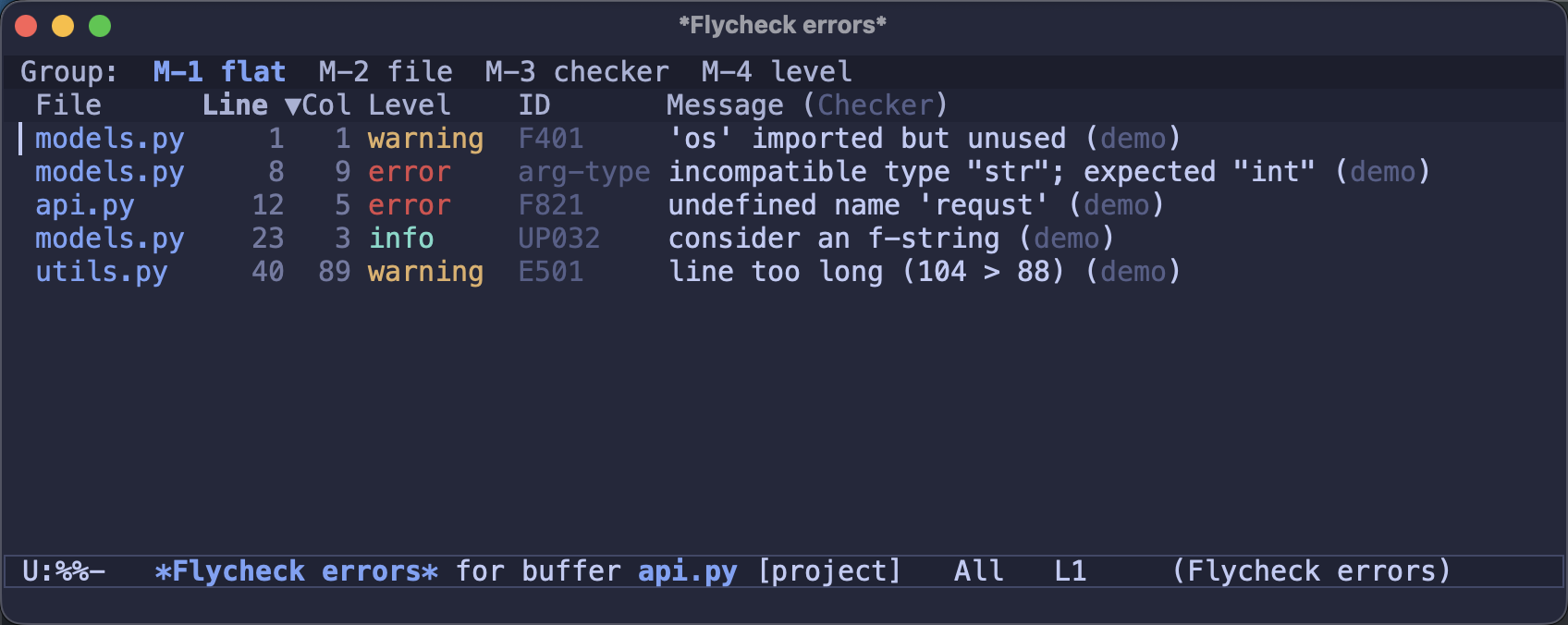
Notice the models.py type error in there: it was reported while checking
api.py, and the old per-buffer view would have dropped it on the floor. The
[project] tag in the mode line tells you you’re looking at the whole project
rather than a single file.
Checking remote files over TRAMP
This one is simple to describe and was honestly overdue: Flycheck now runs checkers over TRAMP. Open a file on a remote host and the checker runs there, on the remote machine, against the real environment - where before it simply refused to run at all. If you edit code on servers or inside containers over TRAMP, this alone might be worth the upgrade.
And plenty more
The three headliners above lean on a lot of supporting work that landed in the same release. The highlights:
- Flycheck can apply fixes now.
C-c ! f(flycheck-fix-error-at-point) applies the machine-applicable fix a checker suggested,C-c ! Fapplies every fix in the buffer at once as a single undoable change, and fixable errors get a distinct fringe indicator - a little “fix available” lightbulb.eslint --fix,cargo clippy’s suggestions,ruff,shellcheckand any SARIF-based checker carry these fixes, which Flycheck used to parse and throw away. - The error list got a serious overhaul: group errors by file, checker or level (and combine those dimensions), collapse the groups, and drive it all with the mouse via a strip at the top.
- Errors can carry secondary locations - the earlier definition behind a
redefinition, the borrow behind a Rust lifetime error. Jump to them with
C-c ! j, and they show up after the message inline and in the error list. - A running check is interrupted when a newer one starts (unless it’s already made real progress), so a slow checker no longer makes Flycheck feel sluggish, and the error list no longer rescans all its rows on every cursor move.
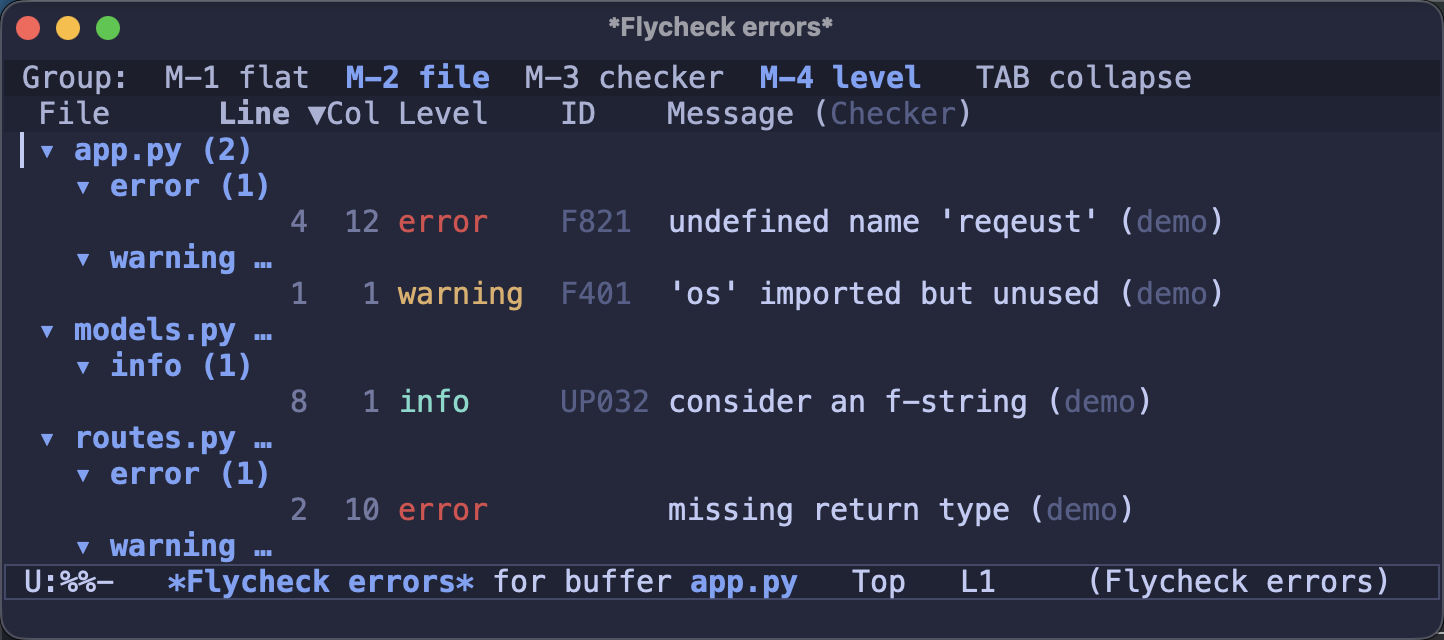
There’s more in the changelog, but that’s the shape of it.
Putting it all together
If you want the full modern setup - on-the-fly checking everywhere, inline
diagnostics, and your LSP server’s diagnostics flowing through Flycheck - here’s
a use-package block that turns it all on:
(use-package flycheck
  :ensure t
  :hook ((after-init . global-flycheck-mode)
         ;; Show diagnostics inline, next to the code (Error Lens style)
         (after-init . global-flycheck-annotate-mode))
  :config
  ;; Report Eglot's LSP diagnostics through Flycheck
  (global-flycheck-eglot-mode 1))
Prefer to skip Eglot and read diagnostics straight from a linter’s own LSP
server (RuboCop, Ruff, Biome, Harper)? Swap that last line for
(global-flycheck-lsp-mode 1) instead. Reach for the native checker when all
you want is diagnostics, and the Eglot bridge when you also want a full language
server’s completion and hover.
Upgrading
Most setups will just keep working. The one thing to watch: the built-in
flycheck-eglot-mode reuses the names of the old third-party flycheck-eglot
package, so if you have that installed, uninstall it before relying on the
built-in mode - otherwise the two define the same commands and clash.
A word on funding
Let me get a little uncomfortably candid here. In the couple of years I’ve been maintaining Flycheck, its OpenCollective has taken in less than $300 - total. Individual donations haven’t exactly moved the needle either. I’m not saying this to guilt anyone; it’s just the everyday reality of open source. Popular projects are a lot of work, and the usual reward is the quiet satisfaction of using something you helped make a bit better.
Still, if Flycheck saves you time - especially if it does so at work - please consider chipping in through OpenCollective, GitHub Sponsors, or any of the other options linked from the README. Even a small recurring amount, multiplied across the people who lean on this thing every day, would make a real difference to how much time I can put into it.
Closing thoughts
Even the smallest person can change the course of the future.
– Galadriel
When I took over Flycheck, my motivation was simple: keep the project alive, and keep the competition in this corner of Emacs going. For a long stretch that meant little more than keeping the lights on. This release is the first time in a while it’s genuinely moved forward in a big way, and I’m proud of where it landed - modern diagnostics UX, first-class LSP support in two flavours, project-wide diagnostics, and fixes, all while staying true to the checker model people love it for. Call it the return of the Jedi. I hope you’ll agree I’ve been at least modestly successful at what I set out to do.
Huge thanks to everyone who tested, reported and nudged this along. Give
flycheck-annotate-mode and flycheck-lsp-mode a spin and let me know what you
think.
Keep hacking!
0 Comments
Log in to join the conversation.No comments yet. Be the first to share your thoughts.