
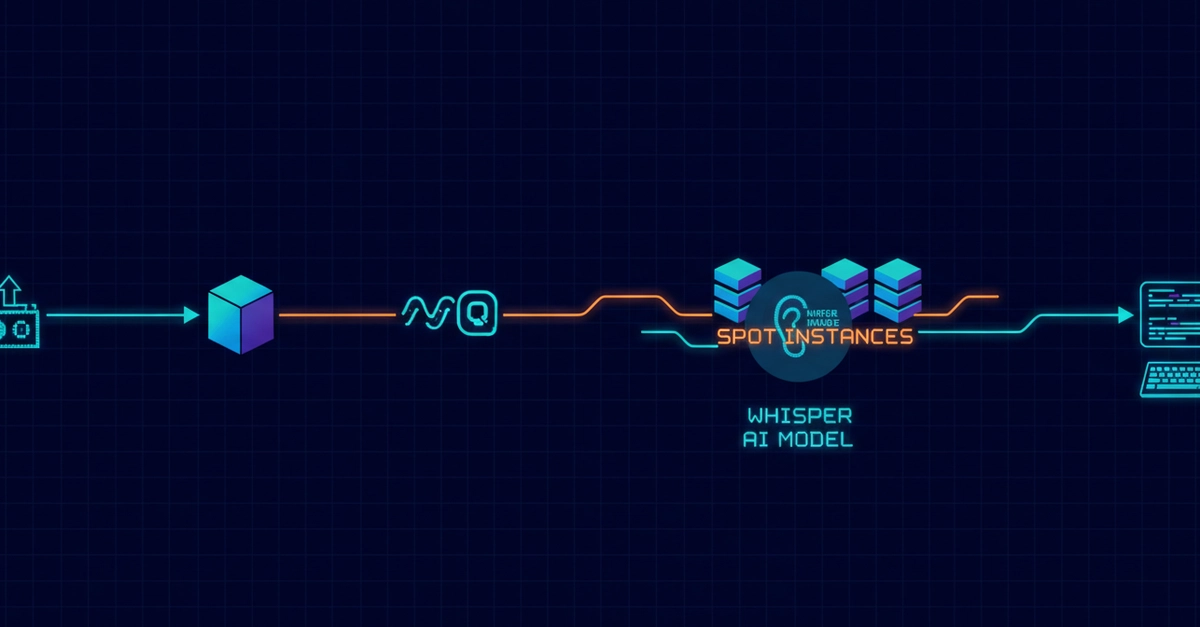
A deep dive into building a cost-optimized, self-hosted AI transcription pipeline on AWS - using Spot Instances, SQS queue-based autoscaling, and Whisper Large-v3 Turbo - that beats the OpenAI Whisper API on price.
Most teams building on top of speech-to-text quietly accept the API bill. I didn't. When a side project started costing me $180/month in transcription API fees, I rebuilt the entire pipeline on AWS and got my processing cost below $0.10/hour - cheaper than the OpenAI Whisper API itself.
This post walks through the architecture, the trade-offs, and the specific decisions that made it work. Everything here powers StrikeScribe, the AI transcription platform I built as a solo founder, so these numbers come from real production workloads, not a benchmark toy.
If you're building anything on top of Whisper, Deepgram, AssemblyAI, or the OpenAI audio API, this is the arbitrage most people miss.
The problem: managed transcription APIs don't scale on cost
Managed APIs are fantastic for getting started. You send audio, you get text. But the pricing model punishes volume:
- OpenAI Whisper API: ~$0.36/hour (at $0.006/min)
- Otter, Fireflies, and similar: subscription tiers that cap your hours and charge steep overages
- AssemblyAI / Deepgram: competitive, but still per-minute billing that grows linearly with usage
The moment you're processing hundreds of hours a month — meetings, podcasts, research calls, IoT audio streams — that linear cost curve becomes the dominant line item. You're paying a margin on GPU compute you could rent directly.
The insight: the underlying model (Whisper) is open source. You're paying for someone else's convenience layer. If you can run the inference yourself efficiently, the economics flip.
The architecture
Here's the high-level pipeline:
Upload → S3 → SQS Queue → Autoscaling Worker Group (GPU Spot Instances)
   → Whisper Large-v3 Turbo → Pyannote (diarization) → Postgres → Client
Enter fullscreen mode Exit fullscreen mode
Let me break down the parts that actually matter for cost.
1. Whisper Large-v3 Turbo for the quality/speed sweet spot
Whisper Large-v3 Turbo gives you near-Large-v3 accuracy at a fraction of the inference time. For a cost-sensitive pipeline, inference speed is cost, because you're paying for GPU-seconds. Turbo dramatically cuts the seconds-per-audio-hour ratio.
For faster throughput, I run it via faster-whisper (CTranslate2 backend), which is significantly more memory- and compute-efficient than the reference implementation:
from faster_whisper import WhisperModel

# int8_float16 keeps VRAM low while preserving accuracy
model = WhisperModel(
    "large-v3",
    device="cuda",
    compute_type="int8_float16",
)

segments, info = model.transcribe(
    "audio.wav",
    beam_size=5,
    vad_filter=True,           # skip silence, save compute
    vad_parameters={"min_silence_duration_ms": 500},
)

for segment in segments:
    print(f"[{segment.start:.2f} -> {segment.end:.2f}] {segment.text}")
Enter fullscreen mode Exit fullscreen mode
Two cheap wins here:
-
vad_filter=True— voice activity detection skips silent regions entirely. Real-world recordings (meetings, calls) are full of dead air. This alone cut my compute meaningfully. -
int8_float16quantization — lets you run Large-v3 on cheaper GPUs with less VRAM without a noticeable accuracy hit for most audio.
2. SQS + queue-depth autoscaling
The naive approach is one always-on GPU instance. That's the expensive approach — you pay for idle time.
Instead, I decouple upload from processing with an SQS queue. A lightweight Node.js controller polls the queue depth and scales the worker fleet based on backlog:
import { SQSClient, GetQueueAttributesCommand } from "@aws-sdk/client-sqs";
import { AutoScalingClient, SetDesiredCapacityCommand } from "@aws-sdk/client-auto-scaling";

const sqs = new SQSClient({ region: "us-east-1" });
const asg = new AutoScalingClient({ region: "us-east-1" });

async function scaleWorkers() {
  const { Attributes } = await sqs.send(
    new GetQueueAttributesCommand({
      QueueUrl: process.env.QUEUE_URL,
      AttributeNames: ["ApproximateNumberOfMessages"],
    })
  );

  const backlog = parseInt(Attributes.ApproximateNumberOfMessages, 10);

  // one worker per N queued jobs, capped to control spend
  const desired = Math.min(Math.ceil(backlog / 5), MAX_WORKERS);

  await asg.send(
    new SetDesiredCapacityCommand({
      AutoScalingGroupName: process.env.ASG_NAME,
      DesiredCapacity: desired,
    })
  );
}
Enter fullscreen mode Exit fullscreen mode
When the queue is empty, the fleet scales to zero GPU workers. You pay for GPU time only when there's audio to process. That's the single biggest structural cost lever.
3. Spot Instances (and surviving interruptions)
GPU Spot Instances are 60–90% cheaper than on-demand. The catch: AWS can reclaim them with a 2-minute warning. For a stateless batch workload like transcription, this is a perfect fit — if you handle interruptions gracefully.
The worker listens for the Spot interruption notice and requeues its in-flight job so nothing is lost:
// Poll the instance metadata endpoint for the interruption signal
async function checkForInterruption() {
  try {
    const res = await fetch(
      "http://169.254.169.254/latest/meta-data/spot/instance-action",
      { signal: AbortSignal.timeout(1000) }
    );
    if (res.status === 200) {
      // Reclaim imminent — put the current job back on the queue
      await requeueCurrentJob();
      await gracefulShutdown();
    }
  } catch {
    // 404 = not interrupted, carry on
  }
}

setInterval(checkForInterruption, 5000);
Enter fullscreen mode Exit fullscreen mode
Because jobs are idempotent and queue-backed, an interrupted job simply gets picked up by another worker. No lost work, no manual recovery. This resilience is what makes Spot viable for production, not just for hobby batch jobs.
4. Diarization with Pyannote
Raw transcript is only half the value — knowing who said what is what turns a wall of text into usable meeting notes. Pyannote handles speaker diarization:
from pyannote.audio import Pipeline

pipeline = Pipeline.from_pretrained(
    "pyannote/speaker-diarization-3.1",
    use_auth_token=HF_TOKEN,
)

diarization = pipeline("audio.wav")

for turn, _, speaker in diarization.itertracks(yield_label=True):
    print(f"{speaker}: {turn.start:.1f}s - {turn.end:.1f}s")
Enter fullscreen mode Exit fullscreen mode
You then align diarization segments with Whisper's timestamps to attribute each line to a speaker. It adds compute, but it's the difference between "a transcript" and "meeting intelligence."
The results
Running this pipeline in production:
- Processing cost: below $0.10/hour of audio — beating the OpenAI Whisper API
- One stress test: 216 hours of audio (from 9 Raspberry Pi devices recording 24/7) processed for under $3 total
- Overall infrastructure cost reduction of ~60% versus the naive always-on / managed-API baseline
The compounding effect of the four levers — Turbo model, VAD silence-skipping, scale-to-zero autoscaling, and Spot pricing — is multiplicative, not additive. Each one alone helps; stacked, they change the entire unit economics.
When you should NOT self-host
To be fair, this isn't free lunch. Self-hosting made sense for me because:
- Volume was high enough that API fees dwarfed engineering time
- The workload is batch, not real-time (Spot + queue latency is fine)
- I was comfortable owning AWS infra, GPU drivers, and model updates
If you're doing low volume, need sub-second live captioning, or don't want to babysit infrastructure, a managed API is genuinely the right call. The break-even point is usually somewhere in the low hundreds of hours per month.
Takeaways
The arbitrage model — find what competitors overprice, then build it cheaper on primitives you control — is very real in AI infrastructure right now. A huge amount of "AI product" pricing is just margin on top of GPU compute and open models.
If you're processing meaningful audio volume, the stack that worked for me was:
-
faster-whisper+ Large-v3 Turbo withint8_float16and VAD - SQS queue-depth autoscaling that scales to zero
- GPU Spot Instances with interruption-safe, idempotent jobs
- Pyannote for diarization to add real product value
I baked all of this into StrikeScribe — upload audio or video, get a searchable transcript plus structured AI insights, no signup and no meeting bot required. If you want to see the output side of this pipeline in action, that's the easiest way.
Happy to answer architecture questions in the comments — especially around Spot interruption handling and diarization alignment, which are the two things people usually get stuck on.
0 Comments
Log in to join the conversation.No comments yet. Be the first to share your thoughts.