


Built for OpenAI Build Week
Aether Canvas

What I Built
I built a workspace that reads your files and decides what it should be.
An actual desktop app where you drop PDFs, spreadsheets, documents, notes, and images onto an infinite canvas, and it reads all of them, works out what connects them, and generates an interactive workspace shaped by what it found. Different files produce a different workspace. That's the whole point.

Here's the observation it started from. A folder is a container. It holds your files and it has never once understood them. Every piece of software we use to organize knowledge throws away the two most useful signals we give it: what's actually inside the documents, and how we chose to arrange them.
So I tried to build the opposite. Something where both of those signals are the input.
It's called Aether Canvas. You drop files anywhere on the canvas. It reads what's inside them, discovers the relationships across formats, and builds a view around that context. Ask a question against the entire workspace and every answer traces back to the file and location it came from. Local-first, so the workspace never leaves your machine.
Demo
Why it's a desktop app and not a web demo
Aether is local-first by design. Your files stay on your machine, the workspace index is written to local storage, and nothing gets uploaded to a server to be processed and held.
A hosted demo would mean the opposite of that. So instead of a link that borrows your files, there's an installer that runs on yours.
Try It
You don't have to build it. There's a signed installer — v1.0.0, Windows x64, no build step and no keys to paste in.
Download Aether Canvas for Windows
Prefer to build from sourceInstall it, drag a folder onto the empty canvas, and wait for the edges to appear. Then ask it something you'd normally have to open six files to answer.
git clone https://github.com/abbasmir12/aether-canvas
cd aether-canvas
npm install
npm run dev
Enter fullscreen mode Exit fullscreen mode
Code
 abbasmir12
/
aether-canvas
abbasmir12
/
aether-canvas
A generative desktop where dropping files onto a spatial canvas builds living, AI-powered workspaces — powered by GPT-5.6. Space is the prompt.

Aether Canvas
Space is the prompt.
A generative desktop where grouping ordinary files creates the mini-app you need
OpenAI Build Week 2026 · Apps for Your Life · Built with Codex + GPT-5.6
Watch the demo · Devpost · See the product · Run Aether · GPT-5.6 · Build story

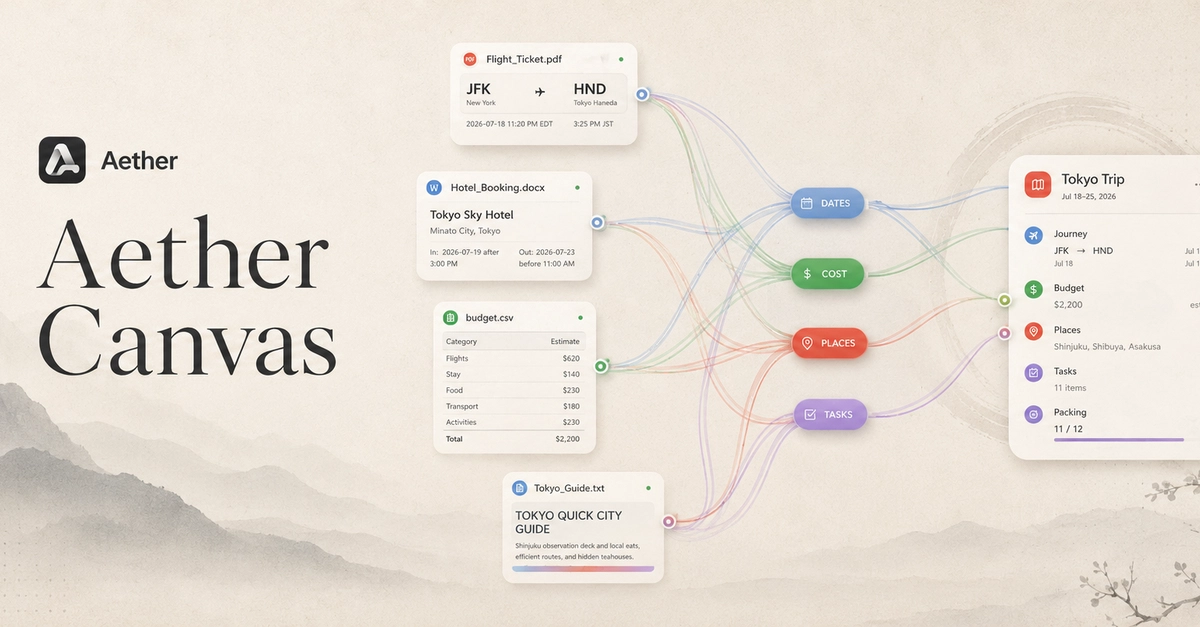
Five source files, four semantic streams, one GPT-generated interactive workspace—captured from the running Electron app.
Five files in. One living workspace out.
A normal folder sees filenames. Aether sees the trip, project, course, budget, or plan they describe together.
CONCEPTUAL WORKFLOW · CLICK A CHAPTER
A hand-drawn explanation of the idea, not a screenshot of the application. Select any panel to inspect the real files, architecture, or product evidence behind it.
How I Built It
The input surface is a blank canvas
There is no import wizard.
No project setup, no schema to define, no tagging step, no folder structure to mirror. You drag files onto empty space and put them where they feel like they belong. That gesture is the only configuration the app asks for.
Position is information. When you put two files side by side, you mean something by it. Every tool I've used throws that signal away the moment you close the window.
Five stages, not one prompt
I didn't want this to feel like "point an LLM at a folder and get a summary." So I split the work the way you'd actually split it.
01 — The Drop
Files land on an infinite canvas. Any format, any arrangement, no setup.
02 — The Read
GPT-5.6 extracts what each file actually contains. Not filenames, not metadata. The claims, figures, dates, and entities inside.
03 — The Relate
Cross-format relationship discovery. A date in a PDF resolving a blank cell in a spreadsheet. A name tying a paragraph to a row.
04 — The Render
The workspace view is derived, not templated. Trip, knowledge map, or operational board — whichever the content actually supports.
05 — The Answer
Query the whole workspace at once. Every response carries the file and location it came from.
The hard part was not the canvas
My first version linked anything that shared a keyword.
Every node connected to every other node.
Technically correct. Completely useless.
The real problem is deciding when two files are actually related versus merely similar. That distinction is the entire difference between a workspace and a hairball.
What worked was making the model justify each edge before it could draw one. A relationship has to name the specific thing it's built on, this date, this figure, this entity, and that evidence has to resolve to a location in both files. If it can't point at both ends, the edge doesn't exist.
Similarity alone was demoted to a weak signal that affects layout suggestions but never draws a line. Shared topic is not a relationship. Two papers about the same subject that never touch each other's claims are just two papers.
The rules the relationship engine runs on"An edge must cite a specific shared element and resolve it to a location in both source files. Thematic overlap is not sufficient."
"Never infer a fact that appears in neither document in order to justify a connection."
"Contradiction is a first-class relationship. Two sources disagreeing is more useful than two sources agreeing, and must never be collapsed into consensus."
"Confidence must be surfaced, not hidden. A weak edge is drawn weakly or not at all — never drawn as certain."
"Spatial proximity raises the prior on a relationship. It never creates one on its own."
Same app, three different workspaces
A travel folder
Boarding passes, a hotel confirmation, a messy notes file, a budget sheet. Dates reconciled across all four, costs rolled up, each location linked back to the document that confirmed it. Ask what's actually booked versus still tentative.
Research material
Twenty papers, three sets of notes, a screenshot of a diagram you can no longer place. Where the authors agree, where they contradict each other, which claim came from which page. Ask which of them disagree on methodology.
Project documents
Specs, a status deck, an email thread, a tracker. The actual state of the project rendered as a view instead of a directory listing that tells you nothing. Ask what's blocked and who owns it.
Local-first, and that shaped everything
Nothing about your workspace is stored on my infrastructure, because there is no infrastructure.
The canvas state, the extracted content, the relationship graph, and the generated views are all written to local storage on your machine. Electron with React and TypeScript for the shell, React Flow for the canvas, Codex for the build loop.
That constraint made a few decisions for me. Indexing has to be incremental, because there's no cluster to brute-force a re-scan. The graph has to be cheap to hold in memory. And every answer has to cite a local file path, which turned out to be the feature people trust most.
No upload step
Files are read where they already are.
No server-side index
The graph lives next to your files.
Traceable by default
Every answer resolves to a path and a location inside it.
What I Want To Know
Does it hold at scale
I'm not convinced folders are the ceiling of how we work with our own information. I'm also not convinced a canvas is the answer — it might just be a prettier mess once you pass a few hundred files.
Where would you break it
The most useful comment isn't "cool project." It's the file collection you think would turn this into an unreadable web of edges. Tell me what you'd drop on it first, and where you think it falls apart.
I'd genuinely value the feedback, I've been staring at this thing alone for long enough that I've stopped being able to see it clearly. Tell me what's wrong with it in the comments, and if you try the build, tell me what broke.
And if you think the idea is actually worth something, star ⭐ the repo. That's the honest signal, and it's the thing that decides whether this stays a Build Week project or becomes something I keep going.
Drop your files in. See what they were trying to tell you.
Download Aether Canvas for Windows
Source, architecture notes, and issues → github.com/abbasmir12/aether-canvas
0 Comments
Log in to join the conversation.No comments yet. Be the first to share your thoughts.