
Memory & State For AI Agents
Building an AI agent can be tricky. Keeping it on track over a six-month deployment is incredibly hard.
LLMs are stateless by design. Every call starts from scratch, with no memory of what came before. Early agent developers worked around this by dumping the entire conversation history into the context window and hoping for the best.
By now, we know that approach breaks down fast. Latency spikes, and the model’s ability to actually use what’s in context degrades: relevant facts get buried, and when two versions of a fact are both in the window, there’s no guarantee it picks the current one. Token costs balloon too, though prompt caching has softened that blow for stable prefixes. The fix isn’t a bigger context window; it’s treating memory and state as deliberate architectural decisions, not afterthoughts.
Before getting into the patterns, it’s worth being precise about what those two terms mean, because they’re easy to conflate.
State is a snapshot. It’s everything the agent currently knows about a task right now: what step it’s on, what the last tool call returned, what variables it’s tracking. Think of it as a whiteboard. It gets updated constantly as the task progresses, and when the session ends it’s gone, unless you deliberately persist it, which is what Pattern 2 is about.
Memory is the mechanism that carries information across a boundary: the next turn, the next session, or a completely separate agent running later. Working memory is the shortest-horizon case (turn to turn); semantic and episodic memory span sessions.
The two interact in a specific cycle. At the start of a task, the agent reads from memory to build its initial state: loading relevant facts, applicable behavioral rules, and records of past failures on similar tasks. During the task, the agent updates state continuously as it works. As the task progresses and concludes, it writes select pieces of that state back to memory so the next turn or session can benefit from what just happened. Memory feeds into state; state feeds back into memory.
This distinction matters because the failure modes are different. A broken state means the agent loses track of what it’s doing mid-task. Broken memory means the agent can’t learn, can’t personalize, and treats every interaction like a blank slate. Both failures are common in production systems, and they require different fixes.
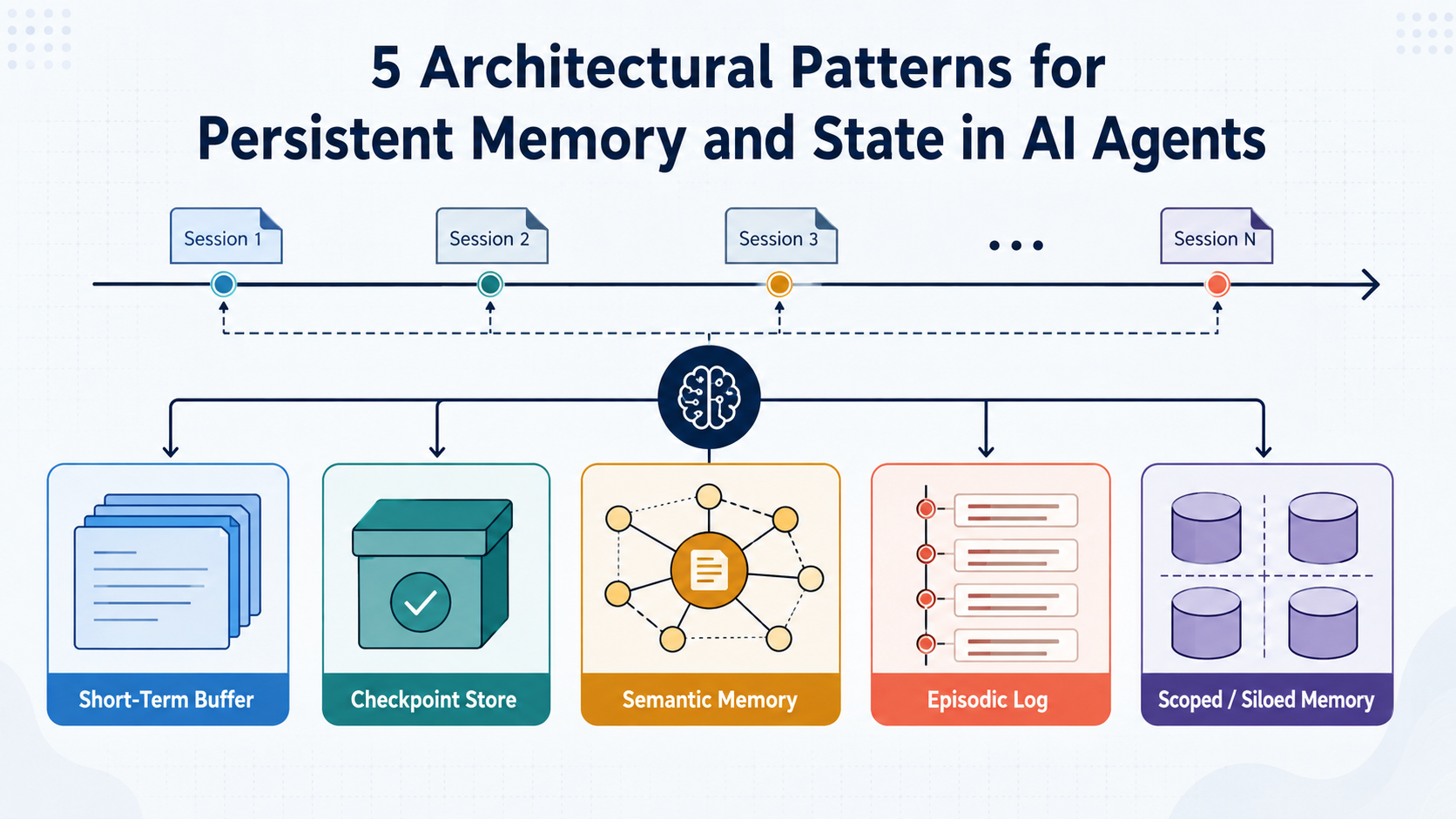
The five patterns below address both: Patterns 1 and 2 manage state; 3 and 4 build the memory layer that persists across sessions; and 5 constrains both.
1. The In-Context Working Buffer (Short-Term Execution)
The Concept
Working memory holds the ephemeral state of the current session: the active prompt, recent conversational turns, and live tool outputs. Think of it as the agent’s short-term scratch space, flushed when the session ends.
How It Works
Rather than letting the message list grow indefinitely, the working buffer acts as a sliding window. The agent writes immediate reasoning steps to a scratchpad. As the buffer approaches a token limit, a summarization process compresses older turns into a dense background summary, keeping the logical conclusions and dropping the raw tool outputs. When the task wraps up, the buffer is flushed: anything worth keeping gets extracted to long-term stores, and the rest is discarded.
Worth noting: that mid-conversation summarization may rewrite the prompt prefix, which invalidates the KV cache and creates a latency spike on the very next call. It’s a real tradeoff to design around.
When To Use It
Every agent needs this. It’s the baseline for handling multi-step reasoning within a session.
2. Execution Checkpointing (Fault Tolerance & Pausing)
Once you have a strategy for managing what the agent holds in memory during a session, the next question is what happens when that session is interrupted.
The Concept
Long-running tasks fail. An agent might time out, hit a rate limit, or pause waiting for a human to approve an action. Checkpointing saves the agent’s workflow state to a database so execution can resume exactly where it stopped, without re-running work that already completed.
How It Works
Graph-based frameworks model workflows as nodes and edges. After each step, the framework persists the workflow state, including variables, history, and current position, to a durable store like PostgreSQL or SQLite. If the agent crashes, it reloads the last checkpoint and picks up from there.
One thing practitioners regularly get burned by: resumption doesn’t give you exactly-once semantics. If a node partially executed before crashing (say it sent an email or wrote a database row), it may execute again on resume. Side-effecting nodes need to be idempotent. Also keep in mind that open file handles and client objects can’t be checkpointed, which limits what you can safely put in state.
When To Use It
Essential for human-in-the-loop systems, regulated workflows where actions need approval, and any long-horizon task susceptible to network failures.
3. Semantic Memory (Cross-Session Knowledge)
Checkpointing handles continuity within a task. But what about knowledge that needs to survive across entirely separate sessions?
The Concept
Semantic memory is what the agent knows: facts, user preferences, and domain knowledge that persist across independent sessions.
How It Works
Facts are extracted asynchronously and stored in an external database, usually a vector store with metadata filtering, sometimes paired with a knowledge graph where relationship traversal genuinely matters. When a query comes in, the system retrieves the most relevant facts and injects them into the prompt before the model sees it. Note that extraction may cost an additional LLM call or more, depending on architecture, and often one per turn.
One conflict to design around: if a user mentions “I use Postgres” in March and “we migrated to Snowflake” in July, both facts end up in the store. Retrieval might surface either one. Fact invalidation, through recency weighting, supersession logic, or TTLs, is what actually solves the stale fact problem raised at the top.
Also worth calling out explicitly: credentials and secrets are not semantic memory. Don’t store API keys in a retrievable store. A prompt injection or an over-eager retrieval could emit them in a model response. Secrets belong in a secrets manager, where the agent gets a credential handle it never sees the value of.
The inverse risk matters too: untrusted content (a scraped page, a user message, a tool output) extracted into semantic memory as a “fact” can persistently steer the agent in the wrong direction. Because there’s no prompt equivalent of parameterization, no hard separation between instructions and content, provenance tagging does the work instead: track where a fact came from and scope its influence accordingly.
When To Use It
Personal assistants, coding copilots, or enterprise agents that need to recall a user’s preferred code style, architectural guidelines, or database schema conventions across sessions.
4. Episodic Event Logs (Historical Reflection)
Semantic memory stores what the agent knows; episodic memory stores what the agent did.
The Concept
Episodic memory acts as a chronological ledger of the agent’s execution trajectory: Goal, Plan, Tool Calls, Outcome.
How It Works
When a workflow finishes, a background process logs this full trajectory. Before the agent tackles a similar task, it queries this log. If it previously failed a database query due to a syntax error, the episodic memory surfaces that context so the agent doesn’t repeat the mistake.
One caveat: retrieved failure traces are advisory, not constraints. The model can ignore them. There’s also a poisoning risk: if a one-off environmental failure gets logged as a strategy failure, you’re persistently teaching the agent the wrong lesson. Log with that in mind.
When To Use It
Autonomous coding agents, data engineering pipelines, and planning systems that need to learn from past mistakes without human intervention.
5. Multi-Scope Segregation (Enterprise Privacy)
Once memory persists, the question is who can see it. The moment your system serves more than one user, memory has to be siloed.
The Concept
Memory isn’t a single shared bucket. A fact learned while helping User A must never surface for User B.
How It Works
Every memory write gets tagged with identity scopes: user_id, session_id, org_id. Retrieval strictly filters based on the active user’s auth token. Where possible, enforce this at the storage layer, through per-tenant namespaces or row-level security, rather than relying solely on application-layer query filters. A forgotten WHERE clause fails open; storage-layer isolation fails closed.
This is a prerequisite for data privacy compliance, not the finish line. The harder problem is deletion: when a user exercises their right to erasure, you need to delete not just their raw data but also the embeddings, summaries, and extracted facts derived from it.
When To Use It
Any SaaS product, multi-tenant system, or enterprise deployment where data boundaries must be enforced.
Summary
One thing none of these patterns cover on their own is growth bounds. Over a six-month deployment (the framing this article opened with), semantic and episodic stores will accumulate near-duplicates, outdated entries, and noise. Retrieval quality degrades as stores fill up, and cost scales with them. TTLs, consolidation jobs, and pruning policies aren’t optional polish; they’re part of operating memory at scale.
The context window is not a database. When you decouple memory into distinct components, short-term buffers for execution, episodic logs for experience, and semantic stores for facts, you get systems that actually learn, stay within data boundaries, and hold up in production.
0 Comments
Log in to join the conversation.No comments yet. Be the first to share your thoughts.