
You wrap a slow loop in an async function. You await a Promise. You expect the page to stay smooth.
Instead the tab freezes. Scroll stops. Clicks queue up. The spinner never moves.
Promises did not break. They solved a different problem than the one you had.
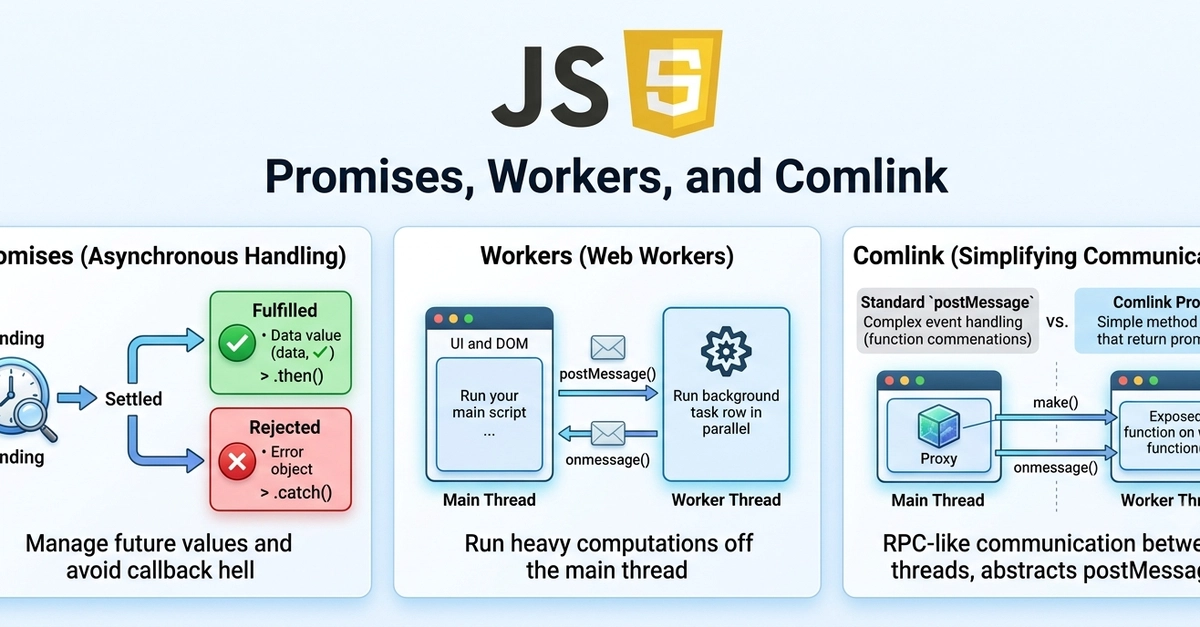
Promises help you wait. They do not move CPU work off the main thread. Web Workers do.
This article builds that idea in order:
- Why
asyncstill freezes the UI - How a worker fixes it with
postMessage - How Comlink, SharedArrayBuffer, and worker pools fit when the app grows
We reuse one example the whole way: crunch a large array of numbers (think pixels or analytics rows) without locking the page.
Runnable examples (this GitHub repo)
Every major step has a small project you can clone and run. They live in examples/. See the repo README.md for install commands.
git clone https://github.com/mrajaeim/Advanced-JS-Execution.git
cd Advanced-JS-Execution/examples/02-raw-web-worker
npm install
npm run dev
Enter fullscreen mode Exit fullscreen mode
The snippets below are shortened for reading. Prefer the GitHub projects when you want the full UI (status text, Ping button, Vite setup).
The Problem
Many developers assume:
If the code uses
async/await/ Promises, the UI stays smooth.
That is only true for waiting (network, timers, disk). It is false for computing on the main thread.
async function processOnMainThread(numbers) {
  await Promise.resolve(); // yields once, then...

  let total = 0;
  for (let i = 0; i < numbers.length; i++) {
    total += Math.sqrt(numbers[i] * numbers[i] + 1);
  }
  return total; // ...this still owns the main thread
}

button.addEventListener('click', async () => {
  status.textContent = 'Working...';
  const numbers = Array.from({ length: 8_000_000 }, (_, i) => i);
  const total = await processOnMainThread(numbers);
  status.textContent = `Done: ${total}`;
});
Enter fullscreen mode Exit fullscreen mode
Expected: status updates, page stays clickable, then "Done".
Actual: UI freezes until the loop finishes. Try it in examples/01-main-thread-freeze. Click Run, then Ping UI. Pings stall.
await Promise.resolve() only delayed the freeze by one microtask. The math never left the main thread.
Why It Happens
Promises resume on the same thread
A Promise means "a value later." When it settles, .then / await continue as microtasks on the same main thread.
MAIN THREAD
sync code → await (wait for I/O) → more sync code HERE
Enter fullscreen mode Exit fullscreen mode
Good for fetch. Bad for a multi-second CPU loop.
The main thread has one call stack
While that stack runs your loop, the browser cannot reliably handle clicks, DOM updates, or smooth animation.
Workers are a second JavaScript thread
A Web Worker has its own call stack and event loop. It cannot touch the DOM. You talk with messages.
MAIN THREAD                         WORKER THREAD
UI, DOM, clicks                     heavy CPU work
     │ postMessage(data)                  │
     └──────────────────────────────────► │
     │                                    │ compute
     │ ◄──────────────────────────────────┘
       onmessage(result)
Enter fullscreen mode Exit fullscreen mode
| Approach | Where the loop runs | UI during work |
|---|---|---|
await + loop on main |
Main call stack | Frozen |
Worker + postMessage
|
Worker call stack | Responsive |
The main thread can still use a Promise to wait for the worker's reply. That Promise is waiting for a message. The heavy work already ran elsewhere.
How to Confirm It (Before You Fix It)
Ask of each line: wait or compute?
await Promise.resolve(); // WAIT (cheap)
for (...) { ... }        // COMPUTE on main (expensive)
Enter fullscreen mode Exit fullscreen mode
If the expensive part is compute, a Promise alone will not help.
In Chrome DevTools Performance, record a click. A long main-thread task that lines up with your loop is the smoking gun.
Better Solution: Move the Loop to a Worker
Use a Promise for waiting. Use a Web Worker for heavy computing.
Pattern:
- Keep UI on the main thread
- Put the loop in
worker.js - Send data with
postMessage - Wrap the reply in a Promise so UI code can
await
Full runnable app: examples/02-raw-web-worker.
worker.js
self.onmessage = (event) => {
  const numbers = event.data;
  let total = 0;
  for (let i = 0; i < numbers.length; i++) {
    total += Math.sqrt(numbers[i] * numbers[i] + 1);
  }
  self.postMessage(total);
};
Enter fullscreen mode Exit fullscreen mode
main.js
function processInWorker(numbers) {
  return new Promise((resolve, reject) => {
    const worker = new Worker(new URL('./worker.js', import.meta.url));

    worker.onmessage = (event) => {
      resolve(event.data);
      worker.terminate();
    };
    worker.onerror = (error) => {
      reject(error);
      worker.terminate();
    };

    worker.postMessage(numbers);
  });
}

button.addEventListener('click', async () => {
  status.textContent = 'Working...';
  const numbers = Array.from({ length: 8_000_000 }, (_, i) => i);
  const total = await processInWorker(numbers);
  status.textContent = `Done: ${total}`;
});
Enter fullscreen mode Exit fullscreen mode
Expected: "Working..." stays visible, Ping UI keeps counting, then "Done" appears.
What each piece does
| Piece | Role |
|---|---|
new Worker(...) |
Starts a second JS thread (no DOM access) |
postMessage(numbers) |
Sends a clone of the data; main continues immediately |
Worker's onmessage
|
Runs the loop on the worker stack |
processInWorker's Promise |
Only waits for the reply, does not run the math |
MAIN                                   WORKER
click → status = "Working..."
postMessage(numbers) ───────────────► receive array
await (main free for clicks)            run loop
onmessage ←────────────────────────── postMessage(total)
status = "Done..."
Enter fullscreen mode Exit fullscreen mode
Chunking the loop with setTimeout(0) on the main thread can soften small freezes. For large jobs it gets messy (progress, cancellation, slower total time). A worker is the clearer architecture.
Next Step: Comlink (RPC-style Workers)
Raw postMessage turns into a homemade protocol (type, payload, request IDs, error shapes). That gets noisy when the worker has many methods.
Comlink is a thin RPC layer on top of workers:
- Worker exposes an API object
- Main thread wraps the worker
- You call
await api.calculate(data)like a normal async module
Under the hood it still uses messages. The mental model does not change: wait with Promises, compute on a worker.
Runnable project: examples/03-comlink-worker.
Worker
import { expose } from 'comlink';

function calculate(numbers) {
  let total = 0;
  for (let i = 0; i < numbers.length; i++) {
    total += Math.sqrt(numbers[i] * numbers[i] + 1);
  }
  return total;
}

expose({ calculate });
Enter fullscreen mode Exit fullscreen mode
Main
import { wrap } from 'comlink';

const worker = new Worker(new URL('./worker.js', import.meta.url), {
  type: 'module',
});
const api = wrap(worker);

const total = await api.calculate(numbers);
Enter fullscreen mode Exit fullscreen mode
| Style | Call site | Who routes replies |
|---|---|---|
Raw postMessage
|
{ type, payload } |
You |
| Comlink | await api.calculate(data) |
Comlink |
Use raw messaging for one tiny job with zero dependencies. Use Comlink when the worker becomes a real API (image pipelines, inference helpers, multi-method tools).
Comlink also supports transferables, typed APIs, and SharedArrayBuffer-friendly flows.
When Copying Data Is the Bottleneck: SharedArrayBuffer
postMessage clones or transfers data. For huge frames or tensors shared by several workers, that traffic can dominate cost.
A SharedArrayBuffer is memory more than one thread can see at once. Workers mutate it in place. You still need careful partitioning or Atomics so threads do not corrupt each other.
Main (UI)
   │ Comlink (start job / progress / done)
Worker pool
   │ SharedArrayBuffer (pixels, tensors)
WASM / SIMD kernels
Enter fullscreen mode Exit fullscreen mode
Runnable project (Vite sets COOP/COEP): examples/04-shared-array-buffer.
const buffer = new SharedArrayBuffer(length * Float32Array.BYTES_PER_ELEMENT);
await api.processShared(buffer, start, end); // mutates in place
Enter fullscreen mode Exit fullscreen mode
Requirements:
- Cross-origin isolation headers (
COOP: same-origin,COEP: require-corp) - A race strategy (split ranges, single writer, or Atomics)
- Prefer this only after profiling shows cloning/transfer is the problem
Start with Comlink + normal messages or transferables. Add SharedArrayBuffer when memory movement is the cost.
Pools: Many Jobs, Not One Worker Per Click
Creating a worker has startup cost. If the UI fires many jobs, use a pool.
Browser (workerpool):
import workerpool from 'workerpool';

const pool = workerpool.pool(new URL('./heavy.worker.js', import.meta.url).href);
const result = await pool.exec('calculate', [data]);
Enter fullscreen mode Exit fullscreen mode
Node (Piscina):
import Piscina from 'piscina';

const pool = new Piscina({
  filename: new URL('./worker.mjs', import.meta.url).href,
});
const result = await pool.run(payload);
Enter fullscreen mode Exit fullscreen mode
Pick a stack by scenario
| Scenario | Stack |
|---|---|
| React / Vite UI, readable worker API | Comlink (+ workerpool if many jobs) |
| Browser AI / vision / big frames | Comlink or workerpool + WASM/ONNX, SharedArrayBuffer if needed |
| Node images, PDFs, compression, ML | Piscina |
Approximate library snapshot (numbers change over time):
| Package | Best at |
|---|---|
| Comlink |
await worker.method() ergonomics in the browser |
| workerpool | Queue + N workers (browser or Node) |
| Piscina | Production Node worker pool |
Warnings Worth Knowing
- No DOM in workers. Compute there, update React/DOM on the main thread.
-
Huge clones stall the main thread too. Prefer transferables for big
ArrayBuffers:worker.postMessage(buffer, [buffer]). -
Match worker type to how you load it (
classicvs{ type: 'module' }). -
Wire
worker.onerror(and pool errors) or failures look like hung Promises. -
Browser Workers ≠ Node
worker_threads. Same idea, different APIs and libraries.
When to Use What
| Situation | Use |
|---|---|
| Waiting on network, timers, IndexedDB | Promises / async
|
| Short work between awaits | Stay on the main thread |
| Large CPU work, UI must stay live | Web Worker |
| Worker grows into many methods | Comlink |
| Many concurrent jobs | workerpool (browser) or Piscina (Node) |
| Huge shared frames/tensors | SharedArrayBuffer after measuring |
| I/O-bound or tiny work | Do not add a worker |
Conclusion
async does not equal "runs in parallel." It equals "can wait without busy-waiting on this thread."
A Web Worker is the tool that runs heavy JavaScript somewhere else while the UI thread stays free. Wrap the reply in a Promise so your app code stays readable.
Then climb only as far as you need:
- Raw
postMessage(example 02) - Comlink (example 03)
- A pool (examples 05 / 06)
- SharedArrayBuffer (example 04) when memory movement is the bottleneck
Clone the repo, run 01 next to 02, and click Ping UI in both. That comparison teaches the architecture faster than any diagram.
What was the first job you tried to "fix" with async/await that still froze the tab?
0 Comments
Log in to join the conversation.No comments yet. Be the first to share your thoughts.