
_Note: AWS Blocks is currently in preview and the API is subject to change. _
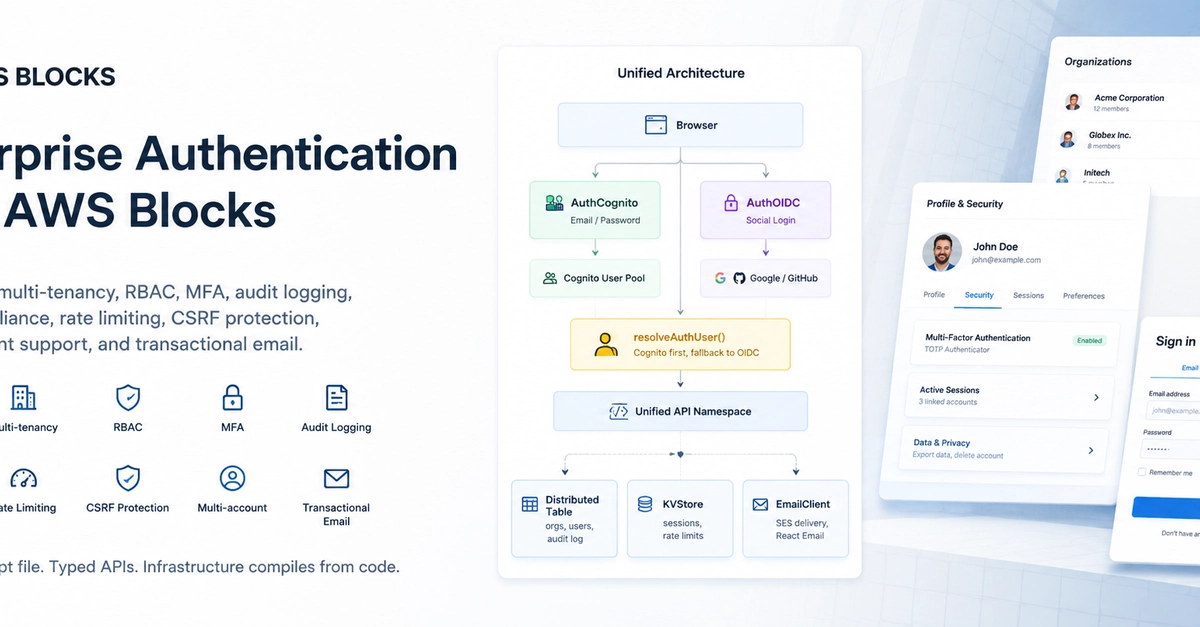
A login form is not authentication. Federation, multi-tenancy, RBAC, MFA, audit logging, GDPR compliance, rate limiting, CSRF protection, multi-account support, and transactional email -- that is authentication.
Most teams build auth incrementally. Add social login, then realize you need MFA. Add MFA, then discover you need per-tenant roles. Add roles, then panic about GDPR. Each layer is bolted on, each integration point is hand-rolled, each new requirement means rewriting the last thing you built.
AWS Blocks takes the opposite approach. The Building Blocks provide all of it, wired together from day one. One TypeScript file. Typed APIs. Infrastructure compiles from code.
This article walks through a complete enterprise auth system -- the architecture, the code, and the patterns that make it work. A reference implementation accompanies this article at github.com/saddam-azad/aws-blocks-auth.
Architecture Overview
The full system in one sketch:
Browser
  │
  ├─── email/password ──→ AuthCognito ──→ Cognito User Pool
  │                         │
  │                    session cookie (auth_*)
  │                         │
  └─── social login ───→ AuthOIDC ─────→ Google / GitHub
                            │
                       session cookie (oidc_*_session)
                            │
                      ┌─────┴─────┐
                      │  resolve   │  ← tries Cognito first,
                      │   Auth     │     falls back to OIDC
                      │   User()   │
                      └─────┬─────┘
                            │
                     Unified API Namespace
                            │
               ┌────────────┼────────────┐
               │            │            │
        DistributedTable  KVStore    EmailClient
          (orgs, users,   (sessions,  (SES delivery,
           audit log)     rate limits) React Email)
Enter fullscreen mode Exit fullscreen mode
Two separate Building Blocks, two separate session stores, one unified API layer. The frontend does not know or care which provider authenticated the user.
| Concern | AWS Blocks |
|---|---|
| Federation | AuthCognito + AuthOIDC |
| Multi-tenancy | DistributedTable + __org cookie |
| RBAC | Inline role checks + Pinia computed props |
| MFA | Cognito state machine (SMS/TOTP/Email) |
| Audit logging | DistributedTable with TTL |
| CSRF |
requireSameSite() + SameSite cookies |
| Rate limiting | KVStore-based sliding window |
| GDPR | Consent, export, cascade delete |
| Multi-account | Session group KVStore |
| Transactional email | EmailClient + React Email |
Prerequisites
AWS Blocks installed. Nuxt 4 SPA (the reference uses Nuxt, but the backend patterns are framework-agnostic). Node.js and bun.
Local dev works without an AWS account. No credentials required. No deployment required.
blocksapp/
├── aws-blocks/
│   ├── index.ts           # All backend logic (~1300 lines)
│   ├── index.handler.ts   # Lambda entry point
│   └── index.cdk.ts       # CDK infrastructure
├── app/
│   ├── stores/            # Pinia stores (auth, org, accounts)
│   ├── composables/       # Stateless helpers
│   ├── middleware/         # Route guards
│   ├── layouts/            # 5 layouts
│   ├── pages/              # File-based routing
│   └── plugins/            # Auth bootstrap + CSRF
├── emails/                 # React Email templates
└── server/middleware/       # Security headers
Enter fullscreen mode Exit fullscreen mode
| File | Purpose |
|---|---|
aws-blocks/index.ts |
All backend logic |
app/stores/auth.ts |
Unified auth store |
app/stores/org.ts |
Org + RBAC store |
app/stores/accounts.ts |
Multi-account store |
emails/*.tsx |
React Email templates |
server/middleware/security.ts |
Security headers |
Local Development Setup
Most auth systems require a deployed Cognito User Pool, registered OAuth apps, and real SMS delivery before you can run a single npm run dev.
AWS Blocks inverts that. Social login works locally without real OAuth credentials. Cognito verification codes print to the console. Set your env vars and the real providers kick in automatically.
Social Login -- Env-Based Switching
const socialAuth = new AuthOIDC(scope, 'oidc', {
  providers: [
    process.env.GOOGLE_CLIENT_ID
      ? google({ clientId: () => googleClientId.get(), clientSecret: () => googleClientSecret.get() })
      : stubIdp({ name: 'google' }),
    process.env.GITHUB_CLIENT_ID
      ? github({ clientId: () => githubClientId.get(), clientSecret: () => githubClientSecret.get() })
      : stubIdp({ name: 'github' }),
  ],
});
Enter fullscreen mode Exit fullscreen mode
When env vars are absent, stubIdp() handles the OAuth flow in-process. Real PKCE, real token exchange, real session cookie -- just a deterministic local user instead of a human.
When you set GOOGLE_CLIENT_ID and GOOGLE_CLIENT_SECRET, the real Google provider activates. No code changes. No restart required.
Cognito Mock -- Console Delivery
const auth = new AuthCognito(scope, 'cognito', {
  signInWith: ['email'],
  mfa: 'optional',
  mfaTypes: ['SMS', 'TOTP', 'EMAIL'],
  groups: ['users', 'admins'],
  ...(process.env.BLOCKS_SANDBOX !== 'true' && {
    codeDelivery: async (destination, code, purpose) => {
      console.log(`\n📧 ${purpose} code for ${destination}: ${code}\n`);
    },
  }),
});
Enter fullscreen mode Exit fullscreen mode
In local mode, verification and MFA codes print to the terminal. No AWS SES or SNS needed. Set BLOCKS_SANDBOX=true and real delivery kicks in.
The codeDelivery callback is the bridge between local dev and production. It intercepts Cognito's verification flow and gives you the code where you can see it.
Dev Scripts
| Script | What it does |
|---|---|
bun run dev |
Start backend + frontend with hot reload |
bun run sandbox |
Deploy to AWS sandbox (real resources) |
bun run email:dev |
Preview email templates locally |
bun run test:e2e |
Run end-to-end tests |
The dev script starts the Blocks dev server on port 4100 and the Nuxt frontend on port 3100. Hot reload works for both backend and frontend simultaneously.
The Federation Layer
Cognito handles email/password and MFA well. OIDC handles social login well. No single tool does both well.
The naive approach gives you two login flows, two session stores, and two user objects. The frontend has to know which provider authenticated the user. Every API method has to branch on provider type.
AWS Blocks solves this with a single function.
The Core Pattern
Here is the simplest version:
async function resolveAuthUser(context: any) {
  try {
    return await auth.requireAuth(context);
  } catch {
    return await socialAuth.requireAuth(context);
  }
}
Enter fullscreen mode Exit fullscreen mode
That works. But the frontend has to check both providers on every request. The key is the authType short-circuit:
async function resolveAuthUser(context: any, authType?: 'cognito' | 'oidc') {
  if (authType === 'oidc') return await socialAuth.requireAuth(context);
  if (authType === 'cognito') return await auth.requireAuth(context);
  try {
    return await auth.requireAuth(context);
  } catch {
    return await socialAuth.requireAuth(context);
  }
}
Enter fullscreen mode Exit fullscreen mode
When authType is known -- from the activeAuthType cookie -- it short-circuits to the right provider. Otherwise it tries Cognito first and falls back to OIDC.
Wiring It In
Every API method calls resolveAuthUser() instead of calling either block directly:
export const api = new ApiNamespace(scope, 'api', (context) => ({
  async getProfile() {
    const user = await resolveAuthUser(context);
    return { username: user.username, email: user.email };
  },
  async adminOnly() {
    const user = await auth.requireRole(context, 'admins');
    return { message: `Welcome, admin ${user.username}` };
  },
}));
Enter fullscreen mode Exit fullscreen mode
The frontend never branches on provider type in API calls. It calls api.getProfile() and gets a consistent user object back.
The Cookie Strategy
Three cookies work together:
| Cookie | Purpose | Set by |
|---|---|---|
auth_* / oidc_*_session
|
Opaque session pointer (HMAC-signed) | AuthCognito / AuthOIDC |
__group |
Browser group ID for multi-account | Application code |
activeAuthType |
'cognito' or 'oidc'
|
Application code |
Notice something important.
activeAuthType is a plain JS-readable cookie. No crypto, no HMAC, no server-side lookup. It carries no sensitive data. It just tells init() which provider to check first and signOut() which provider to call.
Dynamic Cookie Security
Cookie security attributes are computed dynamically per request:
function cookieAttrs(context: any) {
  const sec = buildCookieSecurityAttrs({
    crossDomain: process.env.BLOCKS_SANDBOX === 'true',
    isLocalhost: isLoopbackRequest(context),
  });
  return `Path=/; HttpOnly; ${sec}`;
}
Enter fullscreen mode Exit fullscreen mode
| Environment | SameSite | Secure | Partitioned |
|---|---|---|---|
| Local dev (HTTP) | Lax | no | no |
| Production (HTTPS) | Lax | yes | no |
| Cross-domain | None | yes | yes |
One function. Three environments. No manual configuration. buildCookieSecurityAttrs from @aws-blocks/auth-common/cookies handles the distinction automatically.
Multi-Tenancy and Organization Management
Organizations are the tenant boundary. All data queries are scoped to the active org via the __org cookie.
The Data Model
Three DistributedTables with GSIs for lookups:
const orgs = new DistributedTable(scope, 'orgs', {
  schema: orgSchema,
  key: { partitionKey: 'orgId' },
  indexes: {
    bySlug: { partitionKey: 'slug' },
    byCreatedBy: { partitionKey: 'createdBy', sortKey: 'createdAt' },
  },
});
Enter fullscreen mode Exit fullscreen mode
| Table | Schema | Key GSIs |
|---|---|---|
orgs |
orgId, name, slug, createdAt, createdBy | bySlug, byCreatedBy |
orgMemberships |
orgId, userId, role, joinedAt, invitedBy | byUser |
orgInvitations |
orgId, email, role, invitedBy, invitedAt, token, expiresAt | byToken, byEmail |
The role field is an enum: owner > admin > member. The hierarchy is enforced inline in API methods.
Role Enforcement
Each org API method checks the caller's role directly:
async updateMemberRole(orgId: string, userId: string, role: string) {
  requireSameSite(context);
  const user = await resolveAuthUser(context);
  const membership = await orgMemberships.get({ orgId, userId: user.username });
  if (!membership || membership.role !== 'owner') {
    throw Object.assign(new Error('Only the owner can change roles'), { status: 403 });
  }
  // ...
}
Enter fullscreen mode Exit fullscreen mode
There is no middleware for RBAC. There is no decorator. There is no reflection. Each method reads the membership, checks the role, and throws if the caller lacks permission. It is verbose. It is clear. It is hard to get wrong.
The Invitation Flow
Invite by email, accept via token-based link:
- Owner or admin calls
inviteToOrg(orgId, email, role) - Backend validates role hierarchy, creates invitation with 7-day expiry, sends email
- Invitee clicks link in email, lands on
/accept-invite?token=... - Login or signup, then auto-accept and redirect to org page
Rate-limited to 10 invitations per minute per user. Resend and cancel supported.
Frontend RBAC
The Pinia org store exposes computed properties:
const currentRole = computed(() => currentOrgData.value?.role ?? null)
const isMember = computed(() => currentRole.value !== null)
const isOwner = computed(() => currentRole.value === 'owner')
const isAdmin = computed(() => currentRole.value === 'owner' || currentRole.value === 'admin')
Enter fullscreen mode Exit fullscreen mode
Pages use v-if for conditional rendering:
<UButton v-if="org.isAdmin" label="Invite" />
<UButton v-if="org.isOwner" label="Delete Org" color="error" />
Enter fullscreen mode Exit fullscreen mode
No provider-specific logic in templates. No role-checking utility functions. Just computed properties and v-if.
Multi-Account Session Switching
Each auth block issues one session cookie per sign-in. Users with work and personal accounts need to switch without logging out.
The Session Group Pattern
A __group cookie identifies the browser. Each login registers a session in the group with its full auth cookie string and authType:
const sessionGroups = new KVStore<{
  sessions: Array<{
    sessionId: string;
    username: string;
    linkedAt: number;
    cookie: string;
    authType: 'cognito' | 'oidc';
  }>;
  activeSessionId: string;
}>(scope, 'session-groups', {});
Enter fullscreen mode Exit fullscreen mode
The Flows
Register: after sign-in, the frontend calls registerSession(authType). Stores the session ID and provider type in the group. Caps at 3 linked accounts per browser.
Switch: switchSession(targetSessionId) swaps the cookie via Set-Cookie headers using cookieAttrs(). Returns { success, username, authType }. Hard page refresh destroys all Pinia state and reinitializes with the new cookie.
Unlink: removes a session from the group. Blocks unlinking the active session.
Sign-out: removes current session from the group. Only signs out the active provider.
The authType per session is critical. It tells the frontend which provider to call signOut() on.
Quick-Switch from the Login Page
Users can switch accounts from the login page without re-authenticating:
const sessions = await api.getGroupSessions();
// User clicks a session button
const result = await api.quickSwitchSession(sessionId);
setCookie('activeAuthType', result.authType);
window.location.href = '/dashboard';
Enter fullscreen mode Exit fullscreen mode
The login page shows linked accounts with a one-click switch. No credential re-entry. No OAuth redirect.
Security Infrastructure
CSRF, rate limiting, audit logging, and input validation -- wired into every mutating API method. Not optional. Not configurable. Always on.
CSRF Protection
function requireSameSite(context: any) {
  const customHeader = context.request.headers.get('x-requested-with');
  if (customHeader) return;
  const origin = context.request.headers.get('origin');
  const referer = context.request.headers.get('referer');
  if (!origin && !referer) return;
}
Enter fullscreen mode Exit fullscreen mode
Cross-origin JavaScript cannot set custom headers without CORS preflight. Requiring the x-requested-with header provides CSRF protection. SameSite cookies are the primary defense. This is defense-in-depth.
The header is injected by a Nuxt client plugin on every fetch:
// plugins/request-guard.client.ts
$fetch.defaults.headers['x-requested-with'] = 'XMLHttpRequest';
Enter fullscreen mode Exit fullscreen mode
Rate Limiting
KVStore-based sliding window:
async function checkRateLimit(
  scope: string, identifier: string,
  maxAttempts: number, windowMs: number
) {
  const key = `${scope}:${identifier}`;
  const now = Date.now();
  const existing = await rateLimits.get(key);

  if (!existing || now > existing.expiresAt) {
    await rateLimits.put(key, { count: 1, expiresAt: now + windowMs });
    return { allowed: true };
  }
  if (existing.count >= maxAttempts) {
    return { allowed: false, retryAfterMs: existing.expiresAt - now };
  }
  await rateLimits.put(key, { count: existing.count + 1, expiresAt: existing.expiresAt });
  return { allowed: true };
}
Enter fullscreen mode Exit fullscreen mode
Currently wired into inviteToOrg at 10 requests per minute per user. Expandable to sign-in, password reset, and account deletion.
Audit Logging
Every important mutation writes an audit event:
async function recordAuditEvent(
  eventType: string, userId: string, context: any,
  opts?: { targetUserId?: string; orgId?: string; metadata?: Record<string, unknown> }
) {
  const eventId = Date.now().toString(36) + crypto.randomBytes(8).toString('hex');
  const ip = context.request.headers.get('x-forwarded-for') || 'unknown';
  await auditLog.put({
    eventId, timestamp: Date.now(), eventType, userId,
    targetUserId: opts?.targetUserId, orgId: opts?.orgId,
    ip, metadata: opts?.metadata,
    expiresAt: Math.floor(Date.now() / 1000) + 90 * 24 * 60 * 60,
  });
}
Enter fullscreen mode Exit fullscreen mode
90-day TTL. Queryable by user, org, and date range. Called from 15+ API methods including session management, org operations, GDPR actions, and auth events.
Input Validation
Zod schemas on every API method input:
const parsedEmail = z.string().email().parse(email);
const parsedName = z.string().min(1).max(100).parse(name);
const parsedOrgId = z.string().uuid().parse(orgId);
Enter fullscreen mode Exit fullscreen mode
Invalid inputs throw before any business logic runs. No SQL injection, no malformed data, no surprises.
Security Headers
Server middleware sets headers on every response:
res.setHeader('X-Content-Type-Options', 'nosniff')
res.setHeader('X-Frame-Options', 'DENY')
res.setHeader('X-XSS-Protection', '1; mode=block')
res.setHeader('Referrer-Policy', 'strict-origin-when-cross-origin')
if (process.env.NODE_ENV === 'production') {
  res.setHeader('Strict-Transport-Security', 'max-age=63072000; includeSubDomains; preload')
  res.setHeader('Content-Security-Policy', "default-src 'self'; ...")
}
Enter fullscreen mode Exit fullscreen mode
HSTS and CSP are only applied in production. Local dev runs without them to avoid breaking hot-reload.
Compliance and GDPR
Privacy is a first-class concern. Consent recording, data export, and account deletion are built into the API layer.
Consent Recording
async recordConsent(consentType: string, granted: boolean) {
  requireSameSite(context);
  const user = await resolveAuthUser(context);
  const existing = await userConsents.get(user.username) || [];
  existing.push({ consentType, granted, timestamp: Date.now(), ip: '...' });
  await userConsents.put(user.username, existing);
  await recordAuditEvent('consent_' + (granted ? 'granted' : 'revoked'), user.username, context);
  return { success: true };
}
Enter fullscreen mode Exit fullscreen mode
Consent is stored per user with timestamp and IP. The audit log captures the event. The frontend shows a ConsentCheckbox on signup with links to the privacy policy.
Data Export
async exportUserData() {
  const user = await resolveAuthUser(context);
  return {
    profile: await users.get({ userId: user.username }),
    consents: await userConsents.get(user.username) || [],
    memberships: await orgMemberships.query('byUser', { userId: user.username }),
    auditEvents: await auditLog.query('byUser', { userId: user.username }),
  };
}
Enter fullscreen mode Exit fullscreen mode
One call returns everything. Profile, consents, memberships, audit events. The user can download it, review it, or send it to a regulator.
Account Deletion
Cascade delete across all stores:
async deleteAccount() {
  requireSameSite(context);
  const user = await resolveAuthUser(context);
  const memberships = await orgMemberships.query('byUser', { userId: user.username });
  for (const m of memberships) {
    await orgMemberships.delete({ orgId: m.orgId, userId: user.username });
  }
  await userConsents.delete(user.username);
  await auth.deleteUser(context);
  await recordAuditEvent('account_deleted', user.username, context);
  return { success: true };
}
Enter fullscreen mode Exit fullscreen mode
Remove from all orgs. Remove from all sessions. Remove consents. Delete the Cognito user. Record the event. The frontend requires typing "DELETE" to confirm.
Transactional Email
Branded, responsive emails delivered through Amazon SES. Templates built with React Email. Rendered to HTML on the server, sent via the EmailClient block.
The Setup
Five templates in emails/:
| Template | Trigger | Content |
|---|---|---|
ConfirmationEmail |
Sign-up | Verification code |
PasswordResetEmail |
Password reset | Reset code |
OrgInvitationEmail |
Org invite | Accept button + org name |
NewSignInEmail |
Sign-in | Timestamp + IP + warning |
PasswordChangedEmail |
Password change | Timestamp + IP + warning |
Lazy Initialization
let _emailClient: EmailClient | null = null;
async function getEmailClient(): Promise<EmailClient> {
  if (!_emailClient) {
    const from = await emailFromAddress.get();
    const replyTo = await emailReplyToAddress.get();
    _emailClient = new EmailClient(scope, 'email', {
      fromAddress: from,
      replyTo: replyTo ? [replyTo] : undefined,
    });
  }
  return _emailClient;
}
Enter fullscreen mode Exit fullscreen mode
The from and reply-to addresses are stored as AppSetting values. The client initializes once and reuses across requests.
Template Example
The org invitation template:
export function OrgInvitationEmail({ orgName, inviterEmail, inviteUrl }: OrgInvitationEmailProps) {
  return (
    <Html lang="en">
      <Head />
      <Preview>You've been invited to {orgName}</Preview>
      <Body style={main}>
        <Container style={container}>
          <Heading style={h1}>You've been invited</Heading>
          <Text style={text}>
            <strong>{inviterEmail}</strong> has invited you to join <strong>{orgName}</strong>.
          </Text>
          <div style={buttonContainer}>
            <Button href={inviteUrl} style={button}>Accept Invitation</Button>
          </div>
          <Text style={footer}>This invitation expires in 7 days.</Text>
        </Container>
      </Body>
    </Html>
  );
}
Enter fullscreen mode Exit fullscreen mode
Sending
async function doSendInvitationEmail(email: string, orgName: string, inviterEmail: string, token: string) {
  const inviteUrl = `${process.env.APP_URL || 'http://localhost:3000'}/accept-invite?token=${token}`;
  const html = await render(React.createElement(OrgInvitationEmail, { orgName, inviterEmail, inviteUrl }));
  const client = await getEmailClient();
  await client.send({
    to: email,
    subject: `You've been invited to ${orgName}`,
    body: `${inviterEmail} has invited you to join ${orgName}. Accept: ${inviteUrl}`,
    html,
  });
}
Enter fullscreen mode Exit fullscreen mode
The body field is a plain-text fallback for email clients that do not render HTML. The html field is the React Email output.
Security Notifications
Auth events trigger automatic emails:
async recordAuthEvent(eventType: string) {
  const user = await resolveAuthUser(context);
  await recordAuditEvent(parsedType, user.username, context);

  if (parsedType === 'sign_in' || parsedType === 'password_changed') {
    const attributes = await auth.fetchUserAttributes(context);
    if (attributes.email) {
      const html = await render(React.createElement(NewSignInEmail, {
        email: attributes.email, timestamp, ip
      }));
      await client.send({ to: attributes.email, subject: '...', body: '...', html });
    }
  }
  return { success: true };
}
Enter fullscreen mode Exit fullscreen mode
Sign-in notifications include the timestamp and IP address. Password change notifications include the same. Both display a red warning if the action was unauthorized.
Failures are silently caught. Auth operations are never blocked by email issues.
Local Email Preview
Run bun run email:dev to start the React Email dev server. Templates render in the browser with live hot-reload. No SES credentials needed. No email sent.
The Frontend Architecture
Three Pinia stores, three middleware files, and the principle that the frontend never touches auth infrastructure.
The Three Stores
auth.ts -- unified auth. Wraps Cognito and OIDC behind a single interface. init() reads the activeAuthType cookie and checks the correct provider first. signOut() only signs out the active provider.
async function init() {
  const activeType = getCookie('activeAuthType');
  if (activeType === 'oidc') {
    if (await socialAuthApi.checkAuth()) { user = await socialAuthApi.getCurrentUser(); return; }
    if (await authApi.checkAuth()) { user = await authApi.getCurrentUser(); return; }
  } else {
    if (await authApi.checkAuth()) { user = await authApi.getCurrentUser(); return; }
    if (await socialAuthApi.checkAuth()) { user = await socialAuthApi.getCurrentUser(); return; }
  }
  user = null;
}
Enter fullscreen mode Exit fullscreen mode
org.ts -- organizations, members, roles. Exposes isOwner, isAdmin, isMember computed properties. checkOrgAccess() gates /org/* routes.
accounts.ts -- multi-account. loadAccounts(), registerSession(), switchAccount(), unlinkAccount(). The switchAccount() method returns the API result so the frontend can set the activeAuthType cookie before redirect.
The Middleware Chain
auth.global.ts  (every route, org membership check for /org/*)
  └→ admin.ts    (Cognito group check for /admin/*)
  └→ guest.ts    (redirect authenticated users away from auth pages)
Enter fullscreen mode Exit fullscreen mode
auth.global.ts runs on every route. It calls auth.init(), checks authentication, and calls orgStore.checkOrgAccess() for /org/* routes. Named middleware only adds additional checks on top.
Deduplication
A module-level inflight promise prevents concurrent init() calls. When multiple components mount simultaneously and all call init(), only one RPC fires. The others wait for the same promise.
let inflight: Promise<void> | null = null;
async function init() {
  if (inflight) return inflight;
  inflight = (async () => {
    // ... check providers, set user
  })().finally(()
0 Comments
Log in to join the conversation.No comments yet. Be the first to share your thoughts.