
A common request to a coding agent is only one line:
Generate unit tests.
That request leaves important questions open. Which code needs tests? Which test framework does the project use? Where should the tests go? How does the build find them? What should the tests check?
The agent can learn from the repository, write the tests, and prove that they work.
This is why we built
code-testing-generator.
It is an open-source, polyglot agent for unit-test generation. You can find it
in the
dotnet-test plugin
in dotnet/skills.
The agent writes unit tests. It isolates the code under test and mocks external services and other outside dependencies.
Integration, end-to-end, browser, and performance tests are outside its current scope.
It does more than make the tests pass. It checks the assertions, the requested scenarios, and whether the repository’s normal test run finds the new tests.
What happens after the prompt
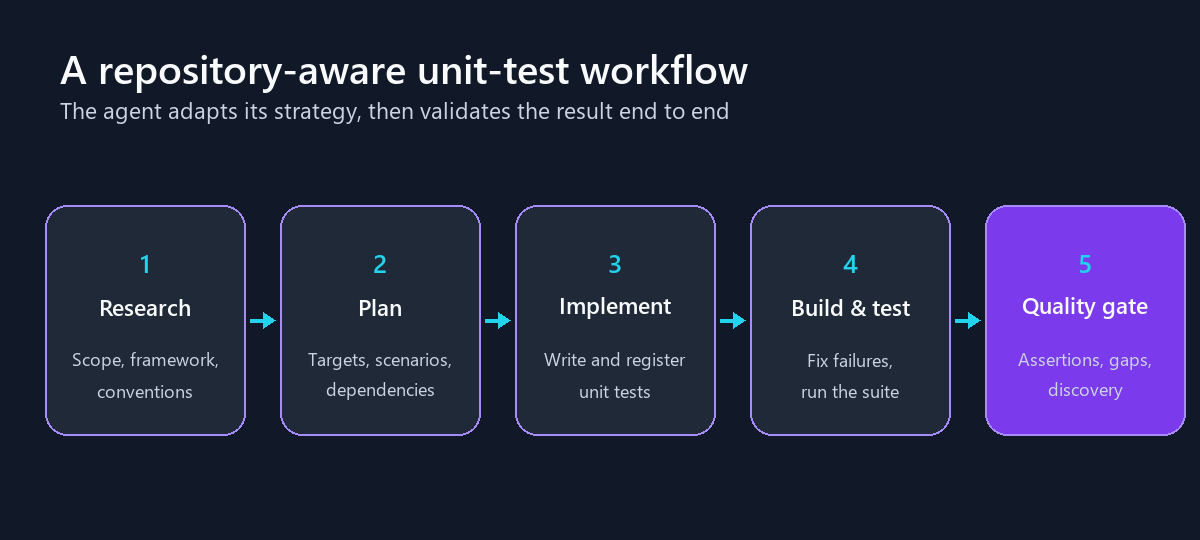
The agent does not start writing tests immediately. It learns from the repository first, then plans, writes, and checks the tests.
First, learn from the repository
The agent searches the repository for the code that needs tests. It detects the language and test framework. It also looks for existing tests that show where new tests belong and how they should look.
It also finds the correct commands to build and run the tests.
This prevents a common problem. A new test project can build and pass on its own but never run in continuous integration (CI) because it was not added to the solution or the repository’s test command. The agent checks how the repository discovers tests and confirms that the new tests appear there.
Next, choose the right amount of work
A single method does not need a large plan. A whole solution does.
The agent chooses from three paths:
- Direct: Read the relevant code, write the tests, and validate the result.
- Single pass: Research and plan once, then implement that plan.
- Iterative: Repeat the cycle to cover a large request or reach a coverage goal.
Then, plan and write the tests
For larger tasks, the agent lists the code that needs tests. It starts with simple code and then moves to code with more dependencies. It maps each behavior to a test file.
The plan follows the request. A request for one module should not change every test project in the repository.
The agent follows the local conventions and runs the tests as it works. If the generated code does not compile, it fixes it. If an assertion is wrong, it reads the source and corrects the test.
It does not change production code during test generation. It also avoids unit tests that call external URLs, open ports, or depend on exact timing.
Finally, check that the tests are useful
A test can pass but provide little or no added value. For example, it may only check that a result is not null. It may test the wrong method. It may even pass if the method always returns a default value.
The agent checks for these problems before it finishes:
- It considers small code changes that should make the tests fail. This is a lightweight form of mutation testing.
- It looks for weak or missing assertions.
- It checks that every requested scenario has a matching test.
- It builds the full workspace and runs the full test suite.
- It confirms that the repository’s test command can find the new tests.
This workflow turns a short prompt into a tested result.
What we measured
In our latest benchmark, the agent completed 140 of 152 tasks. Stock Copilot, which used the same tool without our plugin, completed 120 with the same model. That is a 92.1% completion rate versus 78.9%, with 63% fewer failures.
The biggest gains came from prompts like the one at the start of this post. We call these vague prompts because they leave most decisions to the agent.
Vague prompts show why the workflow matters
Vague prompts produced the clearest result. The agent passed 79 of 89 tasks, compared with 59 for stock Copilot. Failures fell from 30 to 10.
We used our internal unit-testing benchmark. It contains 152 tasks from real repositories. Some prompts are detailed. Others are vague and leave most decisions to the agent.
We compared four setups: stock GitHub Copilot, stock Claude Code, our agent in GitHub Copilot, and our agent in Claude Code. The results below focus on the GitHub Copilot comparison unless we say otherwise. Both Copilot setups used the same model and prompts.
A task passed only when:
- The repository built.
- All tests passed.
- The agent added at least one test.
- The agent did not remove any existing tests.
The full breakdown shows that detailed prompts were tied:
| Prompt type | Specialized agent | Stock Copilot |
|---|---|---|
| Vague prompts, 89 tasks | 79 (88.8%) | 59 (66.3%) |
| Detailed prompts, 63 tasks | 61 (96.8%) | 61 (96.8%) |
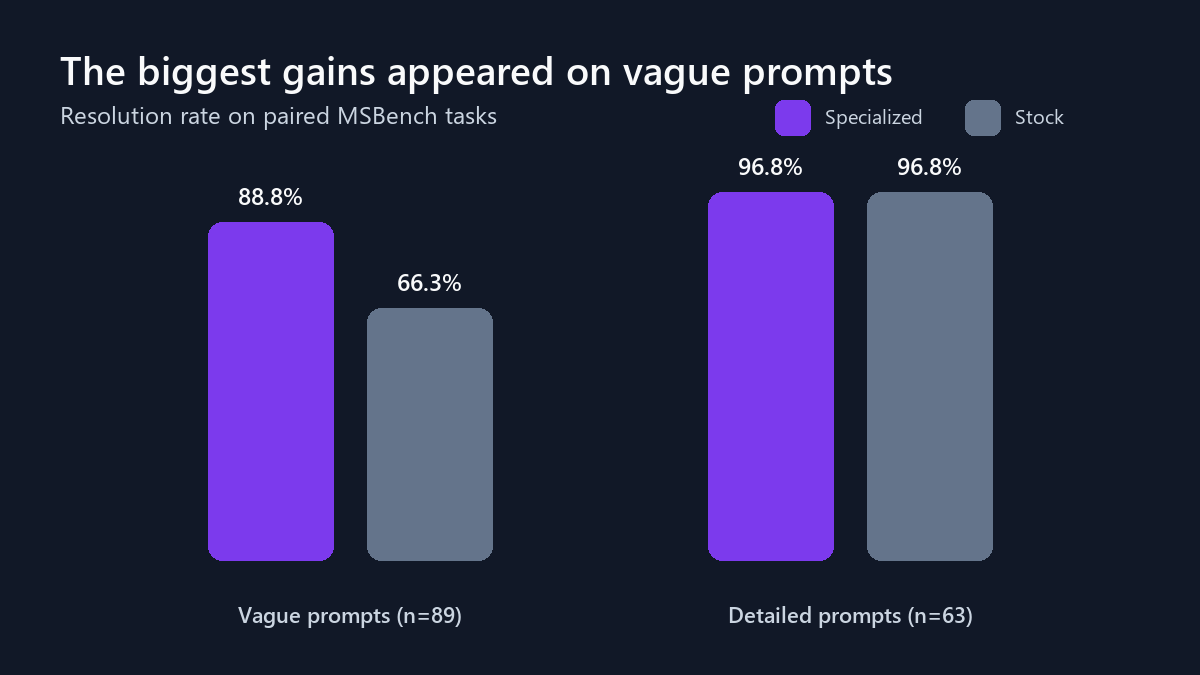
That is 67% fewer failures on vague prompts. All 20 net gains came from these tasks. This matches the goal of the agent: do the research that the developer did not put in the prompt.
The same pattern appeared when the prompt pointed to a code change. The benchmark has 15 tasks that ask for tests for a specific diff. The agent passed all 15. Stock Copilot passed none.
More successful results, not simply more tests
Both setups ran the same 152 tasks. This lets us compare each result directly.
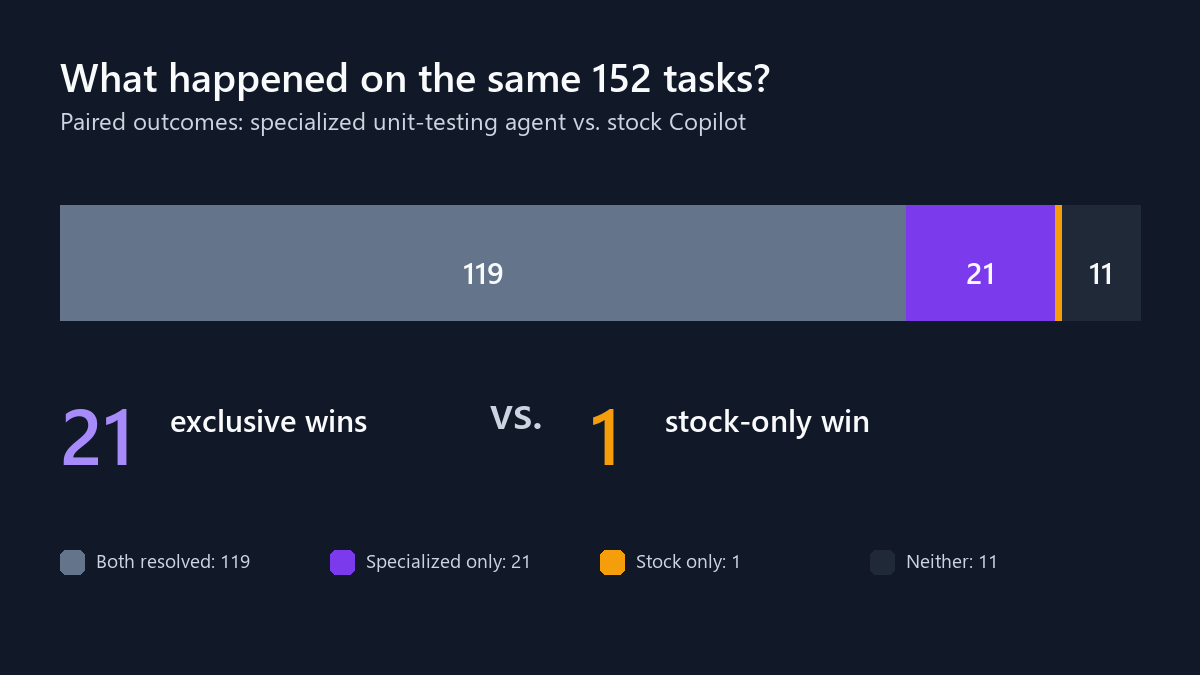
- Both passed 119 tasks.
- Only the specialized agent passed 21 tasks.
- Only stock Copilot passed one task.
- Both failed 11 tasks.
| Metric | Specialized agent | Stock Copilot |
|---|---|---|
| Tasks completed | 140/152 (92.1%) | 120/152 (78.9%) |
| Solutions building | 148 | 145 |
| Final test suites passing | 149 | 147 |
| Tests generated | 6,963 | 7,129 |
| Average final line coverage | 72.4% | 72.2% |
| Average final branch coverage | 49.8% | 49.1% |
| Average task time | 359 seconds | 380 seconds |
The specialized agent generated 2.3% fewer tests, with effectively the same average coverage. It also completed more tasks and was about 5.5% faster on average. The gain came from reliability, not from producing more tests.
The benefit extends across models and languages
The benchmark contains 45 .NET tasks. They cover several repositories and different task sizes. We ran the same comparison with three models:
| Model | Specialized agent | Stock Copilot | Failure reduction |
|---|---|---|---|
| Claude Opus 4.8 | 43/45 (95.6%) | 35/45 (77.8%) | 80% |
| GPT-5.5 | 41/45 (91.1%) | 36/45 (80.0%) | 56% |
| Claude Haiku 4.5 | 34/45 (75.6%) | 25/45 (55.6%) | 45% |
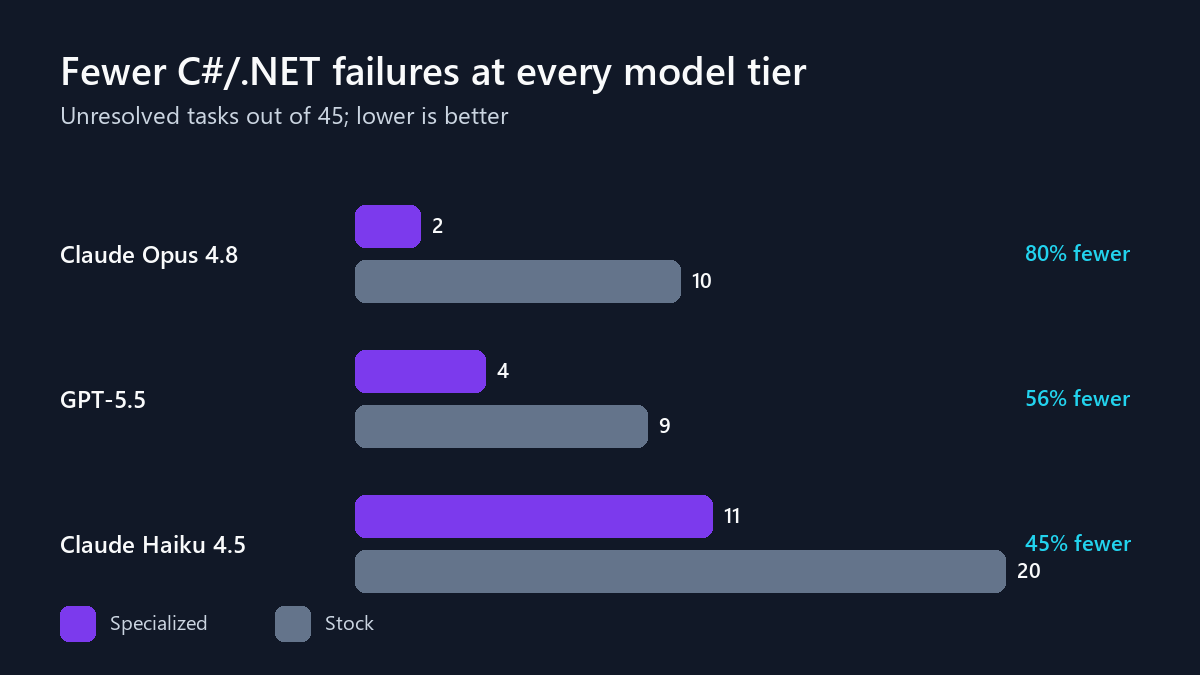
The workflow helped every model. With Opus, it added eight wins with no losses. With Haiku, it completed nine more C# tasks than stock Haiku.
The result also suggests that a strong workflow can lift a mid-tier model close to the best result. Across all 152 tasks, specialized GPT-5.5 reached 90.1%. That was within two points of specialized Opus and more than 11 points above stock Opus.
The agent includes guidance for .NET, Python, TypeScript, JavaScript, Java, Go, Ruby, Rust, Swift, Kotlin, PowerShell, and C++. It learns each repository’s conventions instead of applying C# patterns everywhere.
Beyond .NET, the same Opus run covered several of these languages:
| Language | Specialized agent | Stock Copilot |
|---|---|---|
| Python, 15 tasks | 13 (86.7%) | 6 (40.0%) |
| Go, 15 tasks | 15 (100%) | 10 (66.7%) |
| PowerShell, 10 tasks | 7 (70.0%) | 8 (80.0%) |
The agent passed every Go task and more than doubled the Python completion rate. It also passed five Go and five Python tasks that targeted a specific code change.
The result was not better in every language. Stock Copilot passed one more PowerShell task. These groups are also small, so we see them as useful signals, not promises for every repository.
A second, harder benchmark
We also tested the workflow on 44 unit-test tasks from SWE Atlas. This benchmark checks requirements and uses code changes to see whether the tests can catch bugs.
| Metric | Specialized agent | Stock Copilot |
|---|---|---|
| Tasks completed | 16/44 (36.4%) | 12/44 (27.3%) |
| Wins by only one setup | 4 | 0 |
| Passing generated tests | 550 | 493 |
| Tests that caught injected bugs | 360 | 316 |
The specialized agent completed four more tasks, with no stock-only wins.
The completion rates are much lower than in our internal benchmark. SWE Atlas is hard, and there is still a lot to improve.
What we learned and what comes next
The clearest gain was reliability. The agent was more likely to deliver unit tests that built, passed, and matched the request. The difference was largest when the prompt was vague or linked to a code change.
Once both setups produced a valid result, neither led every quality measure. Stock Copilot scored slightly higher on assertions and coverage. The specialized agent scored slightly higher on test hygiene, such as clean structure and avoiding slow or fragile patterns.
These groups contain different tasks. The specialized group includes harder tasks that stock Copilot did not complete, so this is not a direct quality ranking. We see these results as guidance for the next improvements: deeper assertions and error-path tests while keeping strong test hygiene.
Efficiency remained close after accounting for completed tasks. The agent used about 3.2% more recorded tokens per completed task. These counts include cached input, so they do not directly represent cost.
These results cover unit tests only. We are exploring where the same workflow could help with other types of testing, but we have no committed plans to announce.
Try the agent
The agent, skills, and language guidance are open source in
dotnet/skills.
You can use the plugin in GitHub Copilot CLI. It is also available in Visual Studio Code and VS Code Insiders through plugin support, which is still in preview. We are also working on support for Visual Studio.
Add the marketplace and install the plugin in GitHub Copilot CLI:
/plugin marketplace add dotnet/skills
/plugin install dotnet-test@dotnet-agent-skills
Restart the CLI. Select code-testing-generator from the list of agents. Then
try the prompt from the start of this post:
Generate unit tests.Review the plan, the tests, and the final checks. You can also ask for tests for one function, one module, or a specific coverage goal.
Good tests are not only generated. They are planned, built, run, and checked. That is the trust loop we are building.
0 Comments
Log in to join the conversation.No comments yet. Be the first to share your thoughts.