
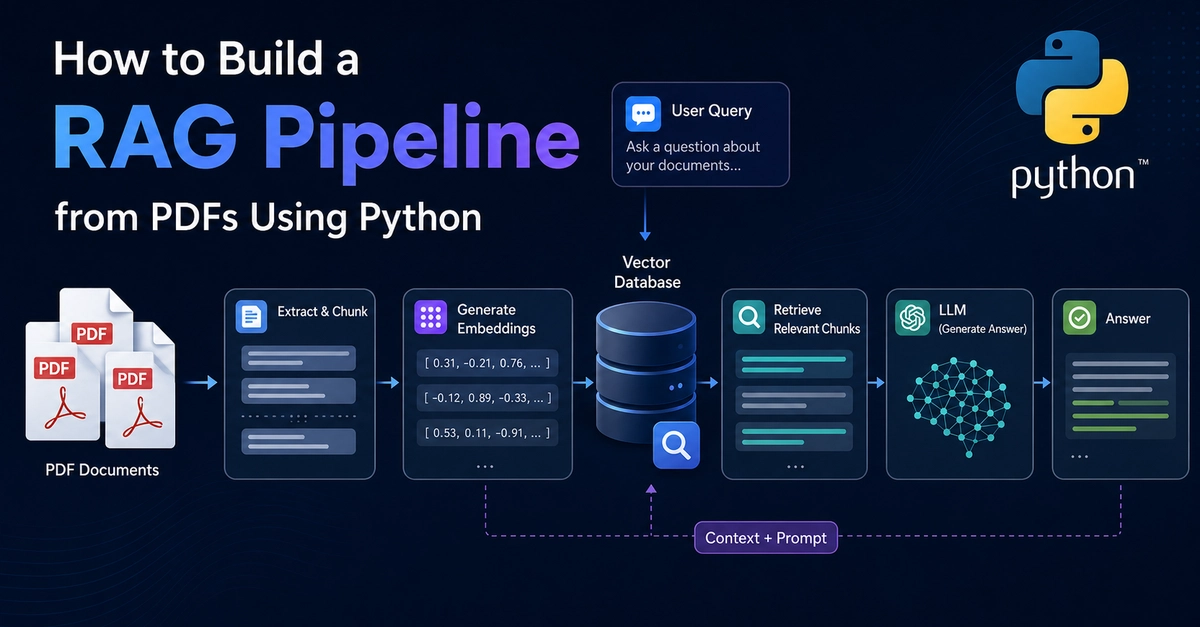
How to Build a RAG Pipeline from PDFs Using Python
Most RAG pipelines don't fail at retrieval. They don't fail at the model either.
They fail at ingestion — the moment a messy PDF gets dumped straight into a text splitter and comes out the other side as noise.
TL;DR
- Feeding raw PDF text into a chunker is where most RAG pipelines quietly break: tables split mid-row, headings disappear, chunks lose their context.
- The fix isn't a better chunking algorithm. It's converting the PDF into clean, structured Markdown before you chunk anything.
- Nutrient's Python SDK (
nutrient_dws) turns a PDF into Markdown in one call, preserving headings, lists, and tables — so your chunker can split on structure instead of guessing at character counts. - Below: a full Python walkthrough — PDF → Markdown → heading-aware chunks → ready for embeddings.
What actually breaks in a naive RAG pipeline
The typical first version of a RAG pipeline looks like this: extract raw text with a generic PDF library, split it every N characters, embed each chunk, done.
It works on a clean text file. It falls apart on a real PDF:
- A table gets flattened into a single line of numbers with no column boundaries — the chunk that gets retrieved is unreadable
- A heading ends up alone at the bottom of one chunk, with its content starting the next one — retrieval finds the content but the model never sees what section it belongs to
- Multi-column layouts get merged out of order, so a chunk contains half of one paragraph and half of an unrelated one
None of this shows up in a demo with three test PDFs. It shows up in production, on document #47, and it looks like a "retrieval quality" problem when it's actually an ingestion problem.
The fix: structure before chunking
A RAG pipeline that holds up in production treats ingestion as its own stage — not a one-liner before the real work starts.
The order that actually works is: extract structure, then chunk on structure, then embed. Chunk boundaries should follow headings and paragraph breaks the document already has, not an arbitrary character count that cuts through them.
Architecture
PDF
 │
 ▼
Python SDK (nutrient_dws) — mode="text", output_format="markdown"
 │
 ▼
Clean Markdown (headings, lists, tables preserved)
 │
 ▼
Heading-aware chunker (splits on headings, then paragraph breaks)
 │
 ▼
Embedding model
 │
 ▼
Vector store
Enter fullscreen mode Exit fullscreen mode
The chunker is the piece most tutorials skip past. It's also the piece that determines whether your retrieved chunks make sense to the model or arrive as disconnected fragments.
Implementation: PDF to Markdown with the Python SDK
Nutrient's official Python client, nutrient_dws, wraps document parsing in a simple async call. For born-digital PDFs, mode="text" is the fastest and cheapest path — 1 credit per page:
import asyncio
from nutrient_dws import NutrientClient

client = NutrientClient(
    api_key="your_processor_key",
    extract_api_key="your_extract_key",
)


async def pdf_to_markdown(path: str) -> str:
    response = await client.parse(path, mode="text", output_format="markdown")
    return response["output"]["markdown"]
Enter fullscreen mode Exit fullscreen mode
That's the entire extraction step. The output preserves headings, lists, and tables as real Markdown syntax — not a flat text dump:
# Employee Handbook

## Time Off Policy

Full-time employees accrue 1.5 days of PTO per month...

| Tenure | Annual PTO |
|--------|-----------|
| 0–2 years | 15 days |
| 3–5 years | 20 days |
Enter fullscreen mode Exit fullscreen mode
If your source documents are scanned rather than born-digital, switch to mode="structure" so OCR runs before the Markdown conversion.
Implementation: chunking on structure, not character count
Once you have Markdown, split on headings first — so no chunk ever straddles a section boundary — then fall back to paragraph breaks for sections that are still too long:
import re


def chunk_markdown(markdown: str, max_chars: int = 1500) -> list[str]:
    # Split on Markdown headings so a chunk never crosses a section boundary
    sections = re.split(r"(?=^#{1,3} )", markdown, flags=re.MULTILINE)

    chunks = []
    for section in sections:
        if not section.strip():
            continue
        if len(section) <= max_chars:
            chunks.append(section.strip())
            continue
        # Long section: split further on paragraph breaks
        paragraphs = section.split("\n\n")
        buffer = ""
        for para in paragraphs:
            if len(buffer) + len(para) > max_chars and buffer:
                chunks.append(buffer.strip())
                buffer = ""
            buffer += para + "\n\n"
        if buffer.strip():
            chunks.append(buffer.strip())
    return chunks
Enter fullscreen mode Exit fullscreen mode
Putting both pieces together:
async def main():
    markdown = await pdf_to_markdown("company_handbook.pdf")
    chunks = chunk_markdown(markdown)
    print(f"Generated {len(chunks)} chunks")
    # Next: embed each chunk and upsert into your vector store of choice


if __name__ == "__main__":
    asyncio.run(main())
Enter fullscreen mode Exit fullscreen mode
Every chunk that comes out of this now maps to a real section of the document — a heading and the content underneath it, or a table with its rows intact — instead of an arbitrary character window.
When you need more than Markdown
Markdown chunking covers most RAG ingestion. But some documents need the model to answer questions that depend on exact table structure — "what was the Q3 number in the third row" — where flattening a table into Markdown text still loses precision.
For those cases, request spatial JSON output instead of Markdown from the same parse() call, or use mode="understand" for documents with complex layouts, key-value regions, or handwriting. Spatial output gives you row/column-indexed table cells with bounding boxes and confidence scores — useful when you need to validate or cite the exact source location, not just retrieve a paragraph.
Pros and cons
Pros
- One SDK call replaces a generic PDF parser plus custom table/heading recovery logic
- Markdown output is chunker-friendly out of the box — headings and tables survive
- Switching to
mode="structure"handles scanned PDFs without a separate OCR step - Same client can return spatial JSON for documents needing exact structure, not just clean text
Cons
- Markdown and spatial JSON are separate outputs from the same request — decide upfront which one a document needs
-
mode="text"assumes a born-digital PDF; scanned documents needmode="structure", which costs more and runs slower - The chunker above is heading-aware but simple — documents with deeply nested headings may need a more sophisticated splitter
Best for: teams building RAG pipelines from real-world PDFs — internal knowledge bases, policy documents, technical manuals — where retrieval quality depends on chunks that actually correspond to a coherent section of the source document.
Key takeaways
- Ingestion, not retrieval, is where most RAG pipelines from PDFs actually break.
- Converting to structured Markdown before chunking means your splitter works with real section boundaries instead of guessing at character counts.
-
nutrient_dws'sparse()call handles this in one step for born-digital PDFs, withmode="structure"as the fallback for scans.
FAQs
❓ Do I need a separate OCR step before this pipeline?
✅ No. Switching mode="text" to mode="structure" runs OCR as part of the same parse() call for scanned or image-based PDFs — no separate pipeline to maintain.
❓ Why not just chunk by a fixed character count?
✅ Fixed-length chunking ignores document structure — a chunk can start mid-table or split a heading from its content, which hurts both retrieval relevance and what the model can make sense of once a chunk is retrieved.
❓ Can I get both Markdown and spatial JSON from one request?
✅ No — they're separate output formats on the same parse() call. If a document needs both (Markdown for RAG, spatial JSON for exact table validation), send two requests.
❓ What if my documents have deeply nested headings or unusual structure?
✅ The chunker in this walkthrough handles up to three heading levels (#, ##, ###). For more complex documents, you can extend the regex or add a maximum nesting depth before falling back to paragraph-level splitting.
❓ Is mode="text" accurate enough for documents with some tables?
✅ For simple tables in born-digital PDFs, yes — they convert to Markdown table syntax correctly. For scanned tables or documents where table accuracy is critical, use mode="structure" or mode="understand" instead.
Nutrient Data Extraction API
Turn PDFs into clean Markdown or spatial JSON — one Python SDK, born-digital or scanned.
→ Get started freeKevin Meneses González
Technical content for fintech and API companies — articles, tutorials, and video.
0 Comments
Log in to join the conversation.No comments yet. Be the first to share your thoughts.