
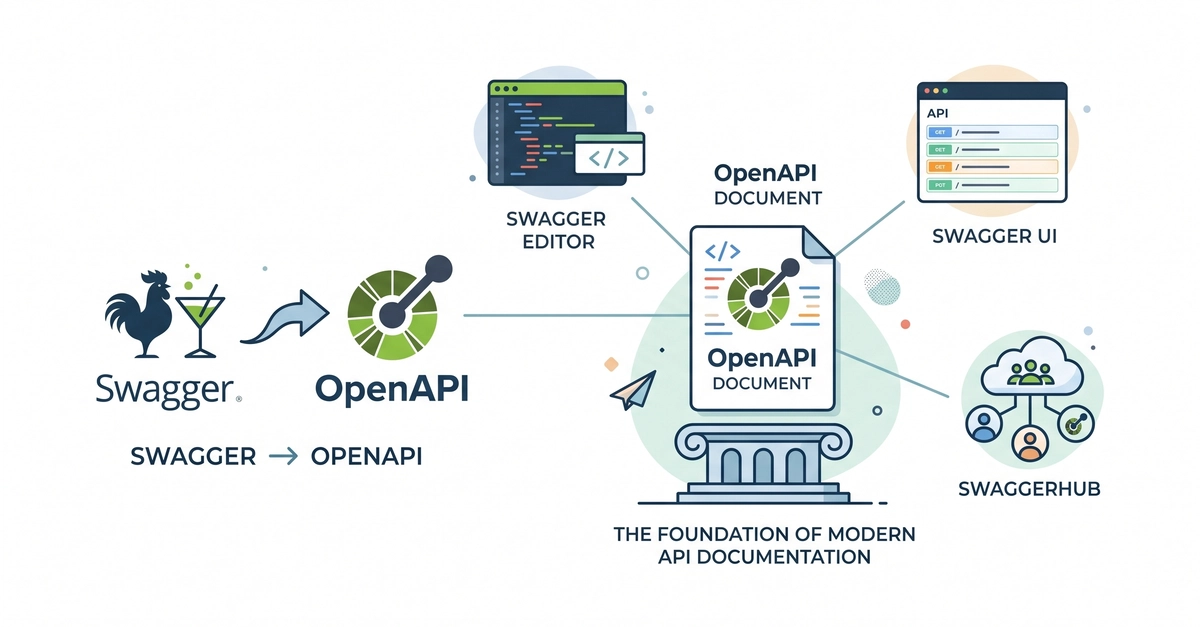
When I first started working with APIs, "Swagger" was almost synonymous with API documentation.
If someone asked where the API docs were, the answer was usually "check Swagger." If someone wanted to understand an endpoint, they opened Swagger UI. Even today, many developers still refer to any OpenAPI-based documentation as "Swagger."
But API development has changed a lot over the last few years.
Writing an OpenAPI specification is only one part of the workflow. Modern development teams also need automated testing, mock servers, environment management, collaboration, CI/CD integration, version control, and increasingly, AI-assisted development.
Because of that, many developers eventually begin looking for alternatives. Not because Swagger has become obsolete, but because their projects have outgrown a documentation-first workflow.
In this article, I'll walk through ten of the best Swagger alternatives in 2026. Some are complete API lifecycle platforms, others focus on documentation or API governance, and a few excel at testing and collaboration. The right choice ultimately depends on how your team builds and maintains APIs.
What Is Swagger?

Before looking at alternatives, it's helpful to clarify what "Swagger" actually means today.
Originally, Swagger referred to the Swagger Specification, which later evolved into the OpenAPI Specification (OAS) the industry standard for describing REST APIs.
Today, the Swagger ecosystem includes several tools, including:
- Swagger UI
- Swagger Editor
- SwaggerHub
These tools are excellent for designing APIs, editing OpenAPI files, and generating interactive documentation.
However, modern API development often requires capabilities beyond specification editing, including testing, mocking, collaboration, automation, and lifecycle management.
That's where many alternative platforms come in.
Why Developers Look Beyond Swagger

Swagger remains one of the most widely used API technologies, but development teams often need additional capabilities.
Some common reasons include:
- Automated API testing
- Mock servers for frontend development
- Environment management
- Team collaboration
- API versioning
- CI/CD integration
- API lifecycle management
- Better support for design, testing, and documentation in one platform
Rather than combining several separate tools, many teams now prefer platforms that cover more of the API lifecycle.
What Makes a Good Swagger Alternative?

For this list, I considered several factors that matter in real-world API development.
API Design
Support for creating and maintaining API specifications.
Documentation
Interactive documentation that is easy to publish and maintain.
Testing
Built-in request testing and automated validation.
Collaboration
Features that help multiple developers work together.
OpenAPI Compatibility
Support for importing and exporting OpenAPI definitions.
Automation
CI/CD integration and workflow automation.
Developer Experience
An intuitive interface and efficient workflow.
10 Best Swagger Alternatives in 2026
1. Apidog

What it is
Apidog is an all-in-one API development platform that combines API design, debugging, testing, documentation, mocking, automation, and collaboration in a single workspace. Instead of switching between separate tools throughout the API lifecycle, developers can handle everything from designing an endpoint to publishing documentation in one platform.
When to use it
Apidog is well suited for teams building APIs from scratch or organizations looking to replace multiple disconnected tools with a single workflow. For example, a startup developing a SaaS platform can use Apidog to design its API, generate interactive documentation for frontend developers, create mock endpoints before the backend is complete, and automate API tests before deployment.
It's also a practical choice for teams migrating from Swagger or OpenAPI-based workflows since existing API definitions can be imported directly.
Key Features
- API design with OpenAPI support
- Interactive API documentation
- Automated testing
- Mock servers
- Environment management
- Team collaboration
- Import and export in multiple formats
- API debugging
- CI/CD integration
- Apidog CLI
Why it stands out
One feature that separates Apidog from many alternatives is Apidog CLI. Developers can automate API testing, validate schemas, manage API resources, and integrate documentation workflows directly into their terminal or CI/CD pipeline. This is especially useful for teams adopting automation or AI-assisted coding workflows.
2. Postman

What it is
Postman has grown from a simple REST client into one of the most widely used API platforms. It provides tools for testing APIs, managing collections, documenting endpoints, monitoring APIs, and collaborating with teammates.
When to use it
Postman is an excellent choice for developers who frequently work with third-party APIs or build integrations between multiple services. For example, if you're integrating Stripe payments, GitHub APIs, and Slack webhooks into one application, Postman makes it easy to organize requests into collections, share them with your team, and automate regression tests.
It's particularly useful during active development when APIs change frequently and multiple developers need access to the same request collections.
Key Features
- API testing
- Collections
- Documentation
- Mock servers
- Monitoring
- Environment variables
- Automated testing
- Team workspaces
- API governance
Why it stands out
Postman's biggest strength is its ecosystem. Many API providers publish official Postman collections, allowing developers to import ready-made requests and start testing immediately without manually recreating every endpoint.
3. SwaggerHub

What it is
SwaggerHub builds on the OpenAPI Specification and focuses on collaborative API design. It provides a centralized environment for creating, editing, and managing OpenAPI definitions while keeping documentation synchronized with the specification.
When to use it
SwaggerHub is a strong option for organizations that have standardized on OpenAPI and want a structured API-first development process. Large engineering teams can collaborate on specifications before implementation begins, reducing inconsistencies across services.
For example, a company building dozens of microservices can use SwaggerHub to ensure every API follows the same design standards before developers start writing code.
Key Features
- OpenAPI editing
- Interactive documentation
- Collaboration
- Version control
- API governance
- Code generation
- Design reviews
- Integrations
Why it stands out
SwaggerHub remains one of the strongest choices for teams committed to OpenAPI-first development and wanting tight control over API specifications throughout the design process.
4. Stoplight

What it is
Stoplight is an API design and governance platform that emphasizes consistency across large API ecosystems. It combines visual API design, documentation, mocking, and governance into a collaborative environment.
When to use it
Stoplight works well for organizations managing multiple APIs across different teams. For example, an enterprise with separate authentication, billing, and analytics APIs can use governance rules to ensure naming conventions, security requirements, and documentation remain consistent across every service.
Key Features
- API design
- Visual editor
- Documentation
- Mock servers
- API governance
- Linting
- OpenAPI support
- Collaboration
Why it stands out
Its governance capabilities make it attractive for organizations where maintaining API consistency is just as important as building the APIs themselves.
5. Redocly

What it is
Redocly focuses on creating polished API documentation directly from OpenAPI specifications. It also includes governance features that help teams maintain high-quality API definitions.
When to use it
If your organization publishes public APIs for customers or partners, developer experience becomes critical. Redocly helps produce documentation that is clean, searchable, and easy to navigate.
For example, a SaaS company offering developer APIs can use Redocly to publish professional documentation that reduces onboarding time and support requests.
Key Features
- OpenAPI documentation
- API linting
- Documentation portals
- Versioning
- Search
- CLI support
- Governance
- CI/CD integration
Why it stands out
Redocly is widely recognized for producing some of the best-looking API documentation while still supporting automated documentation workflows.
6. Insomnia

What it is
Insomnia is a lightweight API client that supports REST, GraphQL, gRPC, and other modern API protocols. It provides a clean interface for testing APIs without overwhelming users with unnecessary complexity.
When to use it
Insomnia is ideal for individual developers or small teams who primarily need a fast API testing tool. For example, a backend developer debugging authentication endpoints or experimenting with GraphQL queries can work efficiently without navigating a large collaboration platform.
Key Features
- REST support
- GraphQL
- gRPC
- Environment management
- Request collections
- API testing
- Plugin support
- Git synchronization
Why it stands out
Its clean interface and protocol support make it popular among developers who want a focused API client rather than a complete enterprise platform.
7. Bruno

What it is
Bruno is an open-source API client designed around a Git-first workflow. Instead of storing API collections in the cloud, Bruno saves them as plain text files that can be committed directly into source control.
When to use it
Bruno is a great choice for teams that want API collections to live alongside application code. For example, an engineering team can review API request changes through normal Git pull requests, making collaboration more transparent and reducing dependency on cloud-hosted workspaces.
Key Features
- Local-first workflow
- Git integration
- REST APIs
- Environment variables
- API testing
- Collections
- Open source
- Lightweight interface
Why it stands out
Its Git-native philosophy makes Bruno especially appealing to developers who prefer owning their API collections and keeping everything under version control.
8. Scalar

What it is
Scalar is a modern API documentation platform focused on delivering an exceptional developer experience. It transforms OpenAPI specifications into attractive, interactive documentation with minimal configuration.
When to use it
Scalar is well suited for companies building developer-facing APIs where documentation is part of the product experience. For example, a fintech startup providing APIs to external developers can use Scalar to create documentation that's easy to navigate and visually appealing.
Key Features
- OpenAPI support
- Interactive documentation
- Custom themes
- Search
- Responsive design
- API references
- Easy embedding
- Modern interface
Why it stands out
Scalar emphasizes readability and user experience, making it an excellent option for organizations that want documentation to leave a strong first impression.
9. ReadMe

What it is
ReadMe is more than an API documentation tool it's a complete developer portal platform that combines documentation, onboarding guides, changelogs, and usage analytics.
When to use it
ReadMe is ideal for organizations with external developer communities. For example, if your company offers APIs to customers or partners, ReadMe helps create a central hub where developers can learn about the API, explore endpoints, and stay informed about new releases.
Key Features
- Interactive API documentation
- Developer portals
- Changelogs
- API explorer
- Analytics
- Versioning
- Search
- Custom branding
Why it stands out
Its combination of documentation and developer engagement tools makes it particularly valuable for companies treating APIs as products.
10. Hoppscotch

What it is
Hoppscotch is a fast, open-source API client that supports REST, GraphQL, WebSocket, and several other protocols. Its lightweight design makes it popular among developers who want quick access to API testing without installing large desktop applications.
When to use it
Hoppscotch is a great option for developers who frequently switch between projects or need a simple tool for experimenting with APIs. For example, a freelance developer testing client APIs or a student learning REST concepts can start making requests within minutes.
Key Features
- REST support
- GraphQL
- WebSocket
- Environment variables
- Authentication
- Collections
- API testing
- Open source
Why it stands out
Hoppscotch delivers an impressive set of API testing capabilities while remaining lightweight and accessible, making it an excellent choice for developers who value speed and simplicity.
How to Choose the Right Swagger Alternative
Every team has different priorities, so there isn't a single "best" replacement.
If your focus is API documentation, Redocly, Scalar, and ReadMe provide polished documentation experiences.
If API testing is your primary concern, Postman, Bruno, Insomnia, and Hoppscotch are excellent choices.
Teams that prioritize OpenAPI governance may find SwaggerHub or Stoplight to be a better fit.
If you're looking for an all-in-one API lifecycle platform that combines API design, documentation, testing, mocking, collaboration, automation, and terminal-based workflows, Apidog is a compelling option. Its support for OpenAPI imports also makes migrating existing Swagger projects relatively straightforward.
Ultimately, the best choice depends on your team's workflow, collaboration needs, and how much of the API lifecycle you want to manage from a single platform.
Tips for Migrating from Swagger
If you're planning to move from a Swagger-based workflow to another platform, the transition is usually easier than many developers expect.
Here are a few best practices:
- Export your existing OpenAPI specification before migrating.
- Verify that the new platform supports OpenAPI imports.
- Review authentication settings and environment variables.
- Recreate automated tests if needed.
- Validate generated documentation after importing.
- Integrate documentation and testing into your CI/CD pipeline where possible.
Taking time to review these areas helps ensure a smoother migration and reduces the chance of breaking existing API workflows.
Final Thoughts
Swagger helped shape modern API development and remains an important part of the API ecosystem. The OpenAPI Specification continues to be the foundation for countless tools and workflows used by developers around the world.
Choosing a Swagger alternative isn't about replacing OpenAPI it's about finding a platform that better supports the way your team builds, tests, documents, and maintains APIs today.
Whether you're looking for a lightweight API client, a documentation-focused platform, or a complete API lifecycle solution, there are plenty of excellent options available. By evaluating your team's workflow rather than simply comparing feature lists, you'll be in a much better position to choose a tool that scales with your projects well beyond 2026.
0 Comments
Log in to join the conversation.No comments yet. Be the first to share your thoughts.