


So, you decided to build a headless WordPress site with a modern frontend framework like Next.js or Astro. It sounds like a great developer experience—until you run into the two notorious roadblocks:
-
CORS Hell: You spin up your local dev server at
http://localhost:4321orhttp://localhost:3000, run a fetch request, and... boom. Your browser console is flooded with red CORS policy errors. - Sluggish REST API: Standard WordPress REST API or WPGraphQL boots up the entire WordPress core and queries MySQL on every single request. Response times hover around 300ms to 1s, slowing down your builds and lagging your dynamic server-side fetches.
What if you could turn WordPress into a static JSON generator, serve your API payloads instantly without database queries, and manage CORS headers directly from the admin panel with zero server config?
Here is a look at how to achieve this in under 1 minute using the open-source Static JSON Export & CORS Whitelist plugin.
Alternative Titles Considered
- How to solve WordPress CORS issues in 1 minute with Astro / Next.js
- Bypass WordPress Database: How to Fetch Static JSON with Zero-Config CORS (Chosen)
- The Clean Way to Headless WordPress: Static JSON + Zero-SDK Plugin
How It Works: Static JSON vs. Dynamic Database Queries
In a traditional headless setup, your frontend queries the database on every hit:
[Traditional REST API]
Frontend Fetch ──> Boot WordPress ──> Run MySQL Queries ──> Format JSON ──> Return Payloads (200-500ms)
Enter fullscreen mode Exit fullscreen mode
With the static JSON export architecture, the database is bypassed:
[Static JSON Export]
Content Updated ──> Write Static JSON files in Background
Frontend Fetch  ──> WordPress REST Endpoint  ──> Directly Load JSON file ──> Return Payloads (30-50ms)
Enter fullscreen mode Exit fullscreen mode
Because the JSON is pre-rendered upon publishing, the database query count is zero when serving the feed, drastically reducing server load during traffic spikes.
1-Minute WordPress Setup
- Search for and install Static JSON Export & CORS Whitelist from the official WordPress Plugin Directory.
- Open the JSON Export CORS settings page in your dashboard.
- In the CORS Allowed Origins list, add your development URLs (e.g.,
http://localhost:4321orhttp://localhost:3000). - In the JSON Feeds Settings, add a new feed named
postsfor theposttype, and click Save Settings.
The plugin immediately exports your posts to a static JSON file. You will get two clean endpoints:
-
Feed Index:
https://your-wp.com/wp-json/sjec/v1/feed?name=posts -
Single Post Details:
https://your-wp.com/wp-json/sjec/v1/post?feed=posts&slug=hello-world
Connecting Your Frontend
Here is how simple it is to consume this clean, CORS-enabled static JSON feed in Astro and Next.js.
Example A: Astro (Static Site Generation)
Astro's static-first approach is a perfect match for static JSON feeds.
---
// src/pages/index.astro
interface Post {
  id: number;
  title: string;
  slug: string;
  excerpt: string;
  date: string;
}

// Fetch the static JSON feed (no DB queries executed on WP)
const response = await fetch('https://your-wordpress-site.com/wp-json/sjec/v1/feed?name=posts');
if (!response.ok) {
  throw new Error('Failed to fetch posts');
}
const posts: Post[] = await response.json();
---

<html lang="en">
  <head>
    <meta charset="utf-8" />
    <title>Fast Headless Astro Blog</title>
  </head>
  <body class="max-w-3xl mx-auto py-12 px-4 bg-slate-50 text-slate-800">
    <header class="mb-12">
      <h1 class="text-4xl font-extrabold">Lightning-Fast Headless Blog</h1>
      <p class="text-slate-500 mt-2">Bypassing WordPress database queries using pre-generated static JSON feeds.</p>
    </header>

    <main class="space-y-6">
      {posts.map((post) => (
        <article class="p-6 bg-white rounded-lg shadow-sm border border-slate-100 hover:shadow-md transition">
          <h2 class="text-2xl font-bold text-indigo-600 hover:underline">
            <a href={`/blog/${post.slug}`}>{post.title}</a>
          </h2>
          <p class="text-slate-600 mt-3" set:html={post.excerpt} />
          <time class="text-xs text-slate-400 block mt-4">
            Published: {new Date(post.date).toLocaleDateString()}
          </time>
        </article>
      ))}
    </main>
  </body>
</html>
Enter fullscreen mode Exit fullscreen mode
Example B: Next.js (App Router - Incremental Static Regeneration)
Next.js will automatically cache the static JSON file and serve it with high efficiency.
// app/blog/page.tsx
export const revalidate = 600; // Cache for 10 minutes

interface WordPressPost {
  id: number;
  title: string;
  slug: string;
  excerpt: string;
  date: string;
}

export default async function BlogIndexPage() {
  const res = await fetch('https://your-wordpress-site.com/wp-json/sjec/v1/feed?name=posts', {
    next: { revalidate: 600 }
  });

  if (!res.ok) {
    throw new Error('Failed to fetch static feed');
  }

  const posts: WordPressPost[] = await res.json();

  return (
    <div className="max-w-4xl mx-auto py-12 px-6">
      <h1 className="text-3xl font-bold mb-8">Next.js + Static JSON Feeds</h1>
      <div className="space-y-6">
        {posts.map((post) => (
          <div key={post.id} className="p-6 bg-white border border-slate-200 rounded-lg shadow-sm">
            <h2 className="text-2xl font-bold">
              <a href={`/blog/${post.slug}`} className="text-blue-600 hover:text-blue-800 hover:underline">
                {post.title}
              </a>
            </h2>
            <div
              className="text-slate-600 mt-2"
              dangerouslySetInnerHTML={{ __html: post.excerpt }}
            />
            <span className="text-xs text-slate-400 mt-4 block">
              Published: {new Date(post.date).toLocaleDateString()}
            </span>
          </div>
        ))}
      </div>
    </div>
  );
}
Enter fullscreen mode Exit fullscreen mode
Performance Benchmark
We compared the responsiveness of fetching standard WP REST API against this plugin under local environments:
| Routing / Method | Avg. Response Time | Database Load | Notes |
|---|---|---|---|
| Standard WP REST API | ~320 ms | High (boots WP + queries MySQL) | Slow, crashes under load |
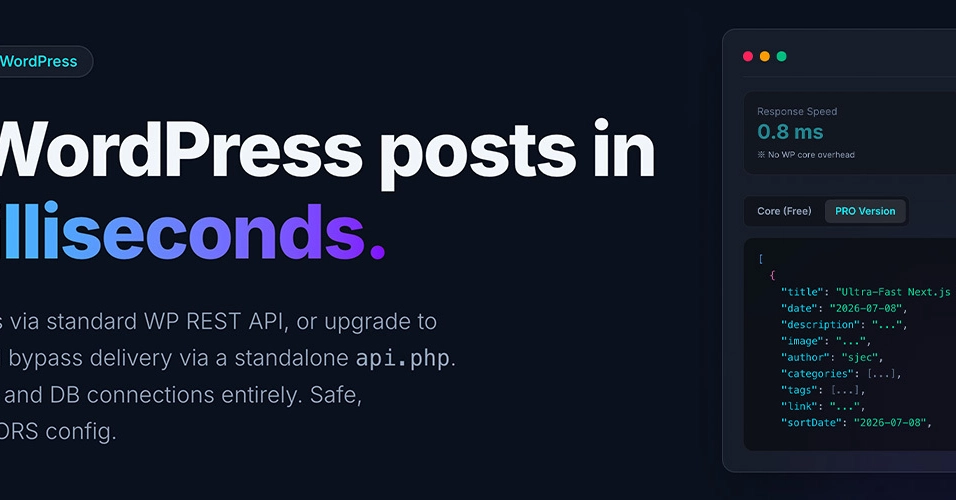
| This Plugin (Free Version) | ~35 ms | Zero (0) | Serves saved JSON via WP REST |
| This Plugin (PRO Version) | <1 ms | Zero (0) | Bypasses WP Core entirely via standalone api.php
|
Even the free version cuts response latency by ~90% and eliminates DB queries completely, ensuring your hosting server remains stable.
🧼 100% Clean: No Tracking SDKs, No Bloat
Many free plugins in the WordPress directory contain third-party marketing SDKs like Freemius to collect user tracking data. This often bloats your admin dashboard with intrusive upgrade banners.
To respect developer environments, the free version of this plugin is built completely SDK-free:
- No trackers or dynamic external scripts.
- No invasive upgrade notices or marketing popups.
- Lightweight codebase that complies 100% with WordPress.org submission guidelines.
If you ever need high-performance features for scale (like Standalone api.php endpoints, multiple custom feeds, or Webhook auto-triggers), you can purchase and download the PRO version separately.
Next Steps
To try this setup in 60 seconds, check out:
- 🌐 WordPress Plugin: Static JSON Export & CORS Whitelist on WordPress.org
- 🚀 Ready-to-use Boilerplate: Astro Headless WordPress Starter Template on GitHub
Have you built a headless WordPress site? What solutions did you use to solve CORS and speed up API responses? Let's discuss in the comments!
0 Comments
Log in to join the conversation.No comments yet. Be the first to share your thoughts.