
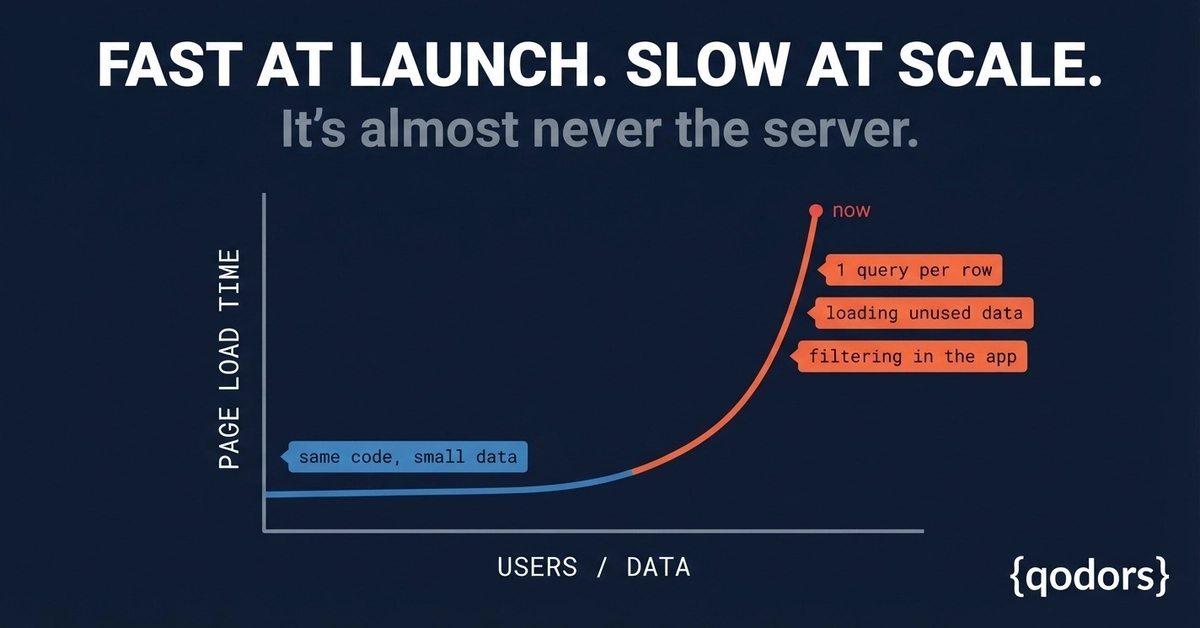
A page that feels instant with a few users can become painfully slow when your business grows. The code hasn’t changed. The server hasn’t changed. The database hasn’t suddenly become bad.
The difference is scale.
More users. More records. More requests. More data moving through the same code paths.
Most performance problems don’t appear when you build the feature. They appear months later when real customers start using it with real data. A page that loaded in milliseconds during development can take seconds in production because the application was never tested against realistic conditions.
The problem is usually not the server.
It is how the application talks to the database.
The Scale Problem Hides in Normal Code
Performance bugs are dangerous because they often look like clean, simple code.
A developer writes a query that works perfectly:
var orders = await _db.Orders.ToListAsync();
Enter fullscreen mode Exit fullscreen mode
The page loads quickly. The feature works. Everyone moves on.
But what happens when the table grows from 100 records to 100,000?
The same query now pulls thousands of rows, transfers unnecessary data, and forces the application to process information it does not need.
The code was correct.
The assumption was wrong.
Small data hides expensive decisions.
Problem #1: One Query Per Row
One of the most common scaling issues is making the database work repeatedly inside a loop.
Example:
var customers = await _db.Customers.ToListAsync();
foreach (var customer in customers)
{
   Console.WriteLine(customer.Orders.Count);
}
Enter fullscreen mode Exit fullscreen mode
At first glance, this looks harmless.
Load customers. Loop through them. Read their orders.
But if related data is not loaded properly, the application may execute:
One query to load customers
One additional query for every customer’s orders
With 10 customers, that might be 11 queries.
With 10,000 customers, it becomes 10,001 queries.
This is the N+1 query problem.
The database is not slow because one query is expensive. It is slow because the application keeps asking the database the same type of question again and again.
The fix is to load related data intentionally.
Using Include:
var customers = await _db.Customers
    .Include(c => c.Orders)
    .ToListAsync();
Enter fullscreen mode Exit fullscreen mode
Now the required data is loaded together instead of creating hundreds or thousands of database trips.
One well-planned query is usually better than thousands of small ones.
Problem #2: Loading Data You Never Use
Another common mistake is loading everything because it feels easier.
Example:
var users = await _db.Users.ToListAsync();
Enter fullscreen mode Exit fullscreen mode
But the page only displays:
User name
Email
Status
The database returns:
Profile information
Address details
Metadata
Large text fields
Other unnecessary columns
The query works, but the application is moving more data than required.
As data grows, this becomes expensive.
A better approach is projection:
var users = await _db.Users
   .Select(u => new
   {
      u.Name,
      u.Email,
      u.Status
  })
      .ToListAsync();
Enter fullscreen mode Exit fullscreen mode
Now the database returns only what the page needs.
Less data means:
Faster queries
Less memory usage
Faster responses
Better scalability
Performance improvements often come from removing unnecessary work, not adding more infrastructure.
Problem #3: Filtering Data Inside the Application
Enter fullscreen mode Exit fullscreen mode
A common scaling mistake is pulling large amounts of data into the application and filtering afterward.
Example:
var orders = await _db.Orders.ToListAsync();
var completedOrders = orders
 .Where(o => o.Status == "Completed");
Enter fullscreen mode Exit fullscreen mode
The application downloads every order first.
Then it filters.
The database already knows how to filter efficiently, so the work should happen there.
Better:
var completedOrders = await _db.Orders
  .Where(o => o.Status == "Completed")
    .ToListAsync();
Enter fullscreen mode Exit fullscreen mode
Now the database only returns the required records.
The difference becomes massive as data grows.
Filtering 100 records feels the same.
Filtering 10 million records is a completely different problem.
Why It Works in Development but Fails in Production
Most performance problems survive because development environments do not represent real usage.
A developer tests with:
50 customers
100 orders
Few users
Production has:
Thousands of customers
Millions of records
Hundreds of simultaneous users
The code behaves differently because the environment changed.
The application was not slow.
The workload became real.
This is why performance testing with realistic data matters.
A query that looks fine with sample data can become the biggest bottleneck after months of growth.
How to Find These Problems Before Users Do
Performance issues are invisible if you only look at application code.
You need visibility into what is happening behind the scenes.
**
Monitor Database Queries**
Check:
Number of queries per request
Query execution time
Duplicate queries
Large data transfers
If one page load creates hundreds of similar queries, investigate.
Measure Real Page Performance
Do not only test the homepage.
Test:
Large dashboards
Search pages
Reports
Customer history pages
Admin panels
These are usually where scaling problems appear first.
Test With Production-Like Data
A small database gives false confidence.
Create test environments with:
Realistic record counts
Multiple users
Large relationships
Heavy usage scenarios
The goal is to discover problems before customers do.
Our Take
At Qodors, when an application becomes slow after growth, the first question is not always “Do we need a bigger server?”
Often, the better question is:
“Are we making the database do unnecessary work?”
A slow application is frequently the result of small decisions:
Querying inside loops
Loading unused information
Filtering after fetching everything
Each decision looks harmless during development.
Together, they create serious performance problems at scale.
The solution is not always more hardware.
It is better data access patterns.
Build applications that are designed for the data you will have tomorrow, not only the data you have today.
Quick Checklist
Check for queries running inside loops
Load only the fields your page needs
Filter data in the database, not the application
Monitor query count per page request
Test with realistic production-sized data
Measure performance before users report problems
Fast applications are not created by accident.
They are built by making intentional decisions about how code, databases, and users interact.
DotNet #CSharp #Backend Development #Performance |#Database #QodorsEdge
Written by the team at Qodors — we find and fix application performance problems for a living. → www.qodors.com
0 Comments
Log in to join the conversation.No comments yet. Be the first to share your thoughts.