

Next.js API routes vs route handlers is one of those migrations that looks trivial in the docs but bites you on caching semantics and runtime defaults. Both surface HTTP endpoints inside a Next.js project, but they sit in fundamentally different mental models — one is a Node.js request/response wrapper, the other is built on the Web Fetch API and plays by App Router rules.
What each one actually is
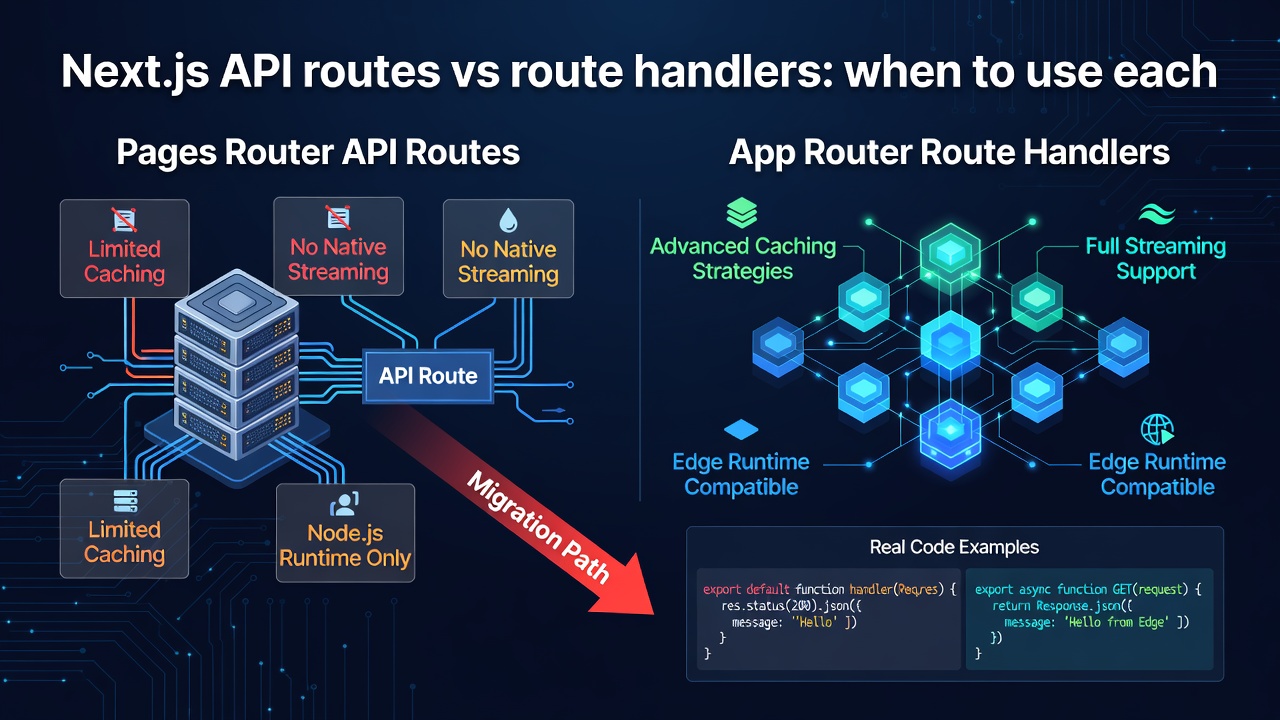
Pages Router API routes live at pages/api/**/*.ts. They receive a NextApiRequest (a thin wrapper over Node's IncomingMessage) and a NextApiResponse. The runtime is always Node.js. They are never statically analysed for caching by the framework — every request hits your serverless function.
App Router route handlers live at app/**/route.ts. They receive a standard Request and return a standard Response. Because they are Web-standard, they can run on the Node.js runtime, the Edge runtime, or be statically evaluated at build time if the framework determines the response is constant.
Side-by-side feature table
| Feature | Pages API route | App Router route handler |
|---|---|---|
| File location | pages/api/slug.ts |
app/api/slug/route.ts |
| Request type | NextApiRequest |
Request (Web Fetch) |
| Response type | NextApiResponse |
Response (Web Fetch) |
| Edge runtime | No | Yes (export const runtime = 'edge') |
| Static caching | Never | Yes — GET handlers can be statically cached |
| Streaming response | Manual chunked encoding | Native ReadableStream / streamText
|
| Middleware cookies | req.cookies |
cookies() from next/headers
|
| Draft mode | req.preview |
draftMode() from next/headers
|
| Route segment config | Not available |
dynamic, revalidate, runtime exports |
| Colocation with page | No | Yes — same directory as page.tsx |
The same endpoint written both ways
Here is a JSON endpoint that returns a list of posts from a Sanity CDN query. First, the Pages Router version:
// pages/api/posts.ts
import type { NextApiRequest, NextApiResponse } from 'next'
import { client } from '@/sanity/client'

type Post = { _id: string; title: string; slug: string }

export default async function handler(
  req: NextApiRequest,
  res: NextApiResponse<Post[]>
) {
  if (req.method !== 'GET') {
    res.status(405).end()
    return
  }

  const posts = await client.fetch<Post[]>(
    `*[_type == "post"]{ _id, title, "slug": slug.current }`
  )

  // Manual cache header — framework does nothing for you here
  res.setHeader('Cache-Control', 's-maxage=60, stale-while-revalidate=300')
  res.status(200).json(posts)
}
Enter fullscreen mode Exit fullscreen mode
Now the App Router route handler doing the same job, with ISR-style revalidation baked in:
// app/api/posts/route.ts
import { NextResponse } from 'next/server'
import { client } from '@/sanity/client'

export const revalidate = 60 // ISR: revalidate every 60 seconds

type Post = { _id: string; title: string; slug: string }

export async function GET() {
  const posts = await client.fetch<Post[]>(
    `*[_type == "post"]{ _id, title, "slug": slug.current }`,
    {},
    { next: { revalidate: 60 } } // Sanity fetch cache tag
  )

  return NextResponse.json(posts)
}

export async function POST(request: Request) {
  const body = await request.json()
  // handle webhook or form submission
  return new Response(null, { status: 204 })
}
Enter fullscreen mode Exit fullscreen mode
The route handler version is shorter and the caching is declarative. The revalidate export tells the Next.js data cache layer to treat this GET response like an ISR page — no manual Cache-Control header arithmetic needed.
Caching semantics: where people get burned
The App Router's data cache wraps fetch() calls automatically. If your route handler calls fetch() — including via the Sanity client, which uses fetch internally — and you have not opted out with { cache: 'no-store' }, Next.js may cache the response indefinitely in development you will never notice this because the cache is bypassed, but in production a GET /api/posts that you expected to be live will serve stale data from the build.
The safe defaults:
- Set
export const dynamic = 'force-dynamic'if the endpoint must never be cached (think auth-gated data, cart totals). - Set
export const revalidate = Nfor ISR-style background refresh. - Omit both if the response is truly static and you want it baked at build time.
Pages API routes have no framework-level caching. You either set Cache-Control yourself or you get no caching. That simplicity is also why they're still fine for low-traffic internal tooling — no surprises.
Streaming
Streaming from a Pages API route is painful. You drop down to res.write() / res.flush() and manage chunked transfer encoding by hand. It works, but it is not something you want to maintain.
Route handlers get first-class streaming through the Web Streams API:
// app/api/stream/route.ts
export const runtime = 'edge'

export async function GET() {
  const stream = new ReadableStream({
    async start(controller) {
      for (const chunk of ['one', 'two', 'three']) {
        controller.enqueue(new TextEncoder().encode(chunk + '\n'))
        await new Promise(r => setTimeout(r, 200))
      }
      controller.close()
    },
  })

  return new Response(stream, {
    headers: { 'Content-Type': 'text/plain; charset=utf-8' },
  })
}
Enter fullscreen mode Exit fullscreen mode
This is how AI text-generation endpoints (OpenAI, Vercel AI SDK's streamText) work in App Router projects. That pattern is simply not portable to the Pages Router.
Edge runtime
Exporting export const runtime = 'edge' from a route handler moves execution to Vercel's edge network (or any compatible edge provider). Cold starts drop from hundreds of milliseconds to low single digits. The trade-off: no Node.js APIs, no fs, no native modules. If your handler only calls external APIs or reads from environment variables, edge is a free performance win.
Pages API routes cannot run at the edge — the experimental-edge option was removed before it reached stable.
Migration path
There is no breaking change in moving from Pages to App Router for API endpoints. Both can coexist in the same project during a migration. The mechanical steps:
- Create
app/api/<same-path>/route.ts. - Replace
NextApiRequest/NextApiResponsewithRequest/Response. - Replace
req.method === 'POST'branching with named exports (GET,POST,PATCH,DELETE). - Replace
req.cookiesandres.setHeaderwithcookies()fromnext/headersandNextResponsehelpers. - Decide on caching intent and add
dynamicorrevalidateexport. - Delete the old
pages/apifile.
The one gotcha: middleware that reads req.nextUrl and rewrites to /api/... paths will keep working because the URL shape is identical. But if your middleware checks req.page.name (a Pages Router internal), that property does not exist in App Router middleware.
When to stay on Pages API routes
- You are deep in a Pages Router codebase with no near-term App Router migration budget.
- You need a quick internal endpoint and do not want to think about caching semantics.
- You rely on a Node.js library that cannot run at the edge and the Pages Router handler is already tested.
When to use route handlers
- Any new Next.js project started on the App Router.
- You need edge runtime for low-latency endpoints.
- You want ISR caching for API responses (common with Sanity webhooks + on-demand revalidation).
- You are building a streaming endpoint for AI, live data, or server-sent events.
- You want to colocate a form action handler next to its page without a separate
/apipath.
The Web Fetch API surface is more verbose in some places — constructing headers manually, parsing formData() — but you get standards compliance in return, which means the same code runs on Deno, Cloudflare Workers, and any edge runtime that implements WinterCG. That portability matters more the longer a codebase lives.
0 Comments
Log in to join the conversation.No comments yet. Be the first to share your thoughts.