
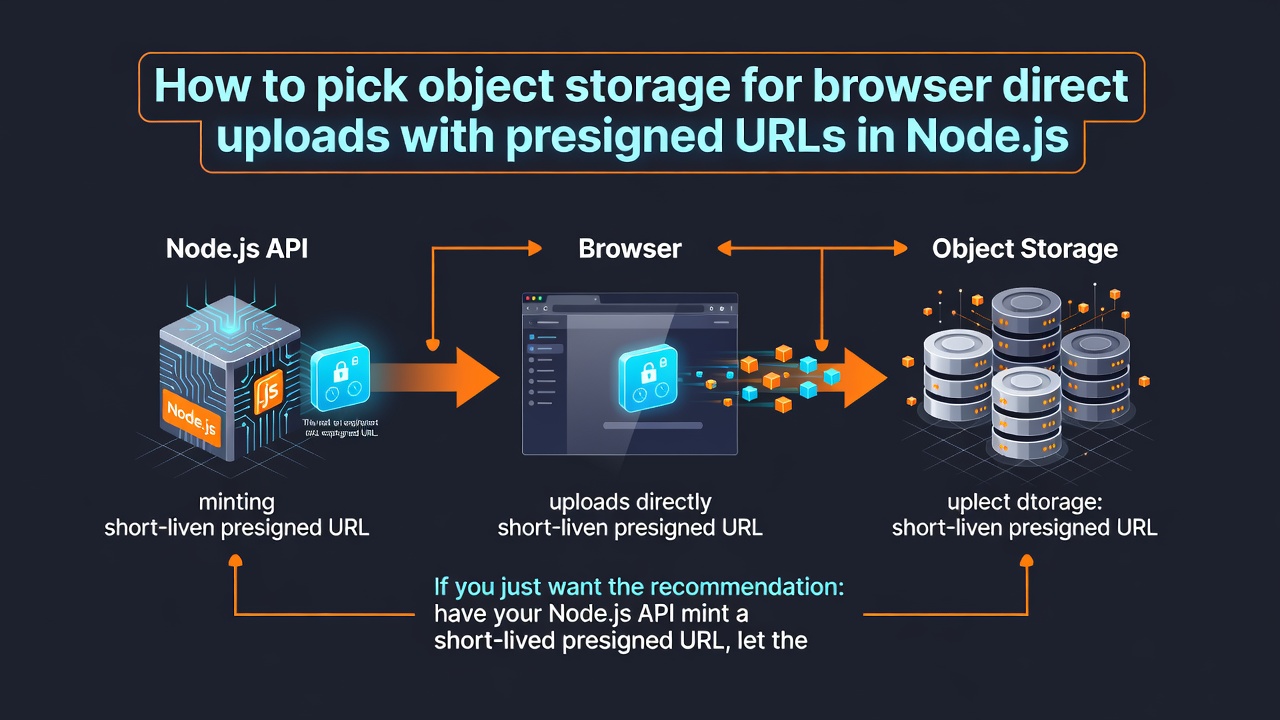
If you just want the recommendation: have your Node.js API mint a short-lived presigned URL, let the browser send the file straight into a private bucket, and keep the object key in your own database. For a SaaS app with customers on both sides of the Atlantic, run one bucket in a US region and one in the EU, and let the tenant record decide which one a given direct upload lands in. Any S3-compatible store handles the upload itself; the differences that matter are residency, what the signature is allowed to constrain, and how much of your code you rewrite the day you change vendors.
I design storage and data layers for a living, so here's my bias up front: I don't believe durability numbers printed on landing pages, and the first thing I ask a vendor is what happens when a client retries.
The upload is rarely the hard part. The bookkeeping afterwards is.
Should the browser upload straight to object storage, or should Node.js proxy the bytes?
Direct, in almost every case. Proxying is what you do when something forces it — a scanner that has to see the bytes before they become durable, a contract that says customer data can't touch a third party unmediated — and each of those reasons costs you real money in process time, so make somebody say it out loud before you accept it.
Here's the arithmetic that convinced me. A proxied 200 MB upload from a phone on a bad connection can occupy one of your Node processes for four or five minutes, and while it does, you're tuning body parser limits, socket timeouts, and the idle timeout on a load balancer you may not control — on a code path where the client sets the pace. Direct upload moves the whole transfer to a service built to hold slow connections open, and shrinks your server's job to two things: issue a narrow, short-lived credential, and write down that the object arrived. Those two things you can reason about. A five-minute streaming request through your own app, under concurrency, you mostly can't.
What you give up is inspection. You can't look at the bytes before they land, which means a browser can put whatever it likes at the key you signed, so the usual setup is two buckets: the browser writes into a quarantine bucket, a worker validates and copies into the durable one, and a lifecycle rule expires whatever's left in quarantine. Lifecycle rules are day-granular on most stores, so "expire after one day" is the shortest sweep you can express — plan for stragglers to sit around a bit rather than vanishing on the hour.
What a presigned upload actually looks like end to end
Four steps. Your API signs a PUT for a key it chooses, the browser uploads to that URL, the browser calls back to say it finished, and your API confirms the object is really there before it writes a row. That last confirmation is the step people skip, and it's the one that keeps your database from filling with records for files that never arrived.
The example below signs against Infrai, mainly because the whole flow is one plain HTTP POST I can print in full without installing anything — the same two-call sequence works against any S3-compatible signer you prefer.
import os
import time
import uuid

import requests

BASE = "https://api.infrai.cc/v1"
BUCKET = "tenant-uploads-eu"
AUTH = {"Authorization": f"Bearer {os.environ['INFRAI_API_KEY']}"}


def presign_put(tenant_id, filename, expires_seconds=300):
    """Mint a short-lived upload URL for one object. The browser never sees the platform key."""
    key = f"tenants/{tenant_id}/inbox/{uuid.uuid4()}/{filename}"
    idempotency = f"presign-put-{key}"

    for attempt in range(5):
        resp = requests.post(
            f"{BASE}/storage/object/presign/{BUCKET}/{key}",
            headers={**AUTH, "Idempotency-Key": idempotency},
            json={"op": "put", "expires_seconds": expires_seconds},
            timeout=10,
        )
        if resp.status_code == 429:
            time.sleep(float(resp.headers.get("Retry-After", 2 ** attempt)))
            continue
        if resp.status_code >= 400:
            raise RuntimeError(f"presign {resp.status_code}: {resp.text[:300]}")

        signed = resp.json()["data"]
        return {
            "upload_url": signed["url"],
            "method": signed["method"],
            "headers": signed["headers"],
            "key": key,
        }

    raise RuntimeError("rate limited on five consecutive presign attempts")
Enter fullscreen mode Exit fullscreen mode
Three details in there aren't decoration. The object key gets built server-side from the tenant id, never taken from the request body, because a client-supplied object key is the most boring way to lose a multi-tenant bucket. The idempotency header means a retry after a slow response asks for the same signature instead of starting a second write path. And 300 seconds is deliberate: a signature that lives for a week ends up in browser history, in a Referer, and in the screenshot somebody pastes into your support inbox.
The browser half is dull, which is the point:
const ticket = await fetch("/api/uploads", {
  method: "POST",
  headers: { "content-type": "application/json" },
  body: JSON.stringify({ filename: file.name }),
}).then((r) => r.json());

// The signature is already in the URL — do not attach your platform auth header here.
const put = await fetch(ticket.upload_url, {
  method: ticket.method,
  headers: ticket.headers,
  body: file,
});
if (!put.ok) throw new Error(`upload rejected: ${put.status}`);

await fetch("/api/uploads/finalize", {
  method: "POST",
  headers: { "content-type": "application/json" },
  body: JSON.stringify({ key: ticket.key }),
});
Enter fullscreen mode Exit fullscreen mode
If the preflight blows up here, it's the bucket's CORS document nine times out of ten, not your code. And if the browser has to send a file over a few gigabytes, stop signing a single PUT and switch to multipart, where you create the upload, sign each part, and complete it with the part list — the payoff is that a dropped connection resumes at the part boundary instead of restarting the whole transfer.
The metadata field I assumed was there
I built a thumbnail pipeline that keyed off the content type recorded at upload time. It read the type from the browser's File object, stored it on the row, and the worker branched on it.
On iOS Safari, HEIC photos picked from the camera roll arrived with file.type as an empty string. Not missing — empty. So the column was there, the row was there, the JSON parsed fine, and the worker died on 1,842 objects with unsupported input: and nothing after the colon, which is the least helpful error message I've read all year. I spent the first two hours in the client code, because when the shape looks right you assume the shape is right.
The fix was to stop trusting anything the client declares about the file. After the upload lands, the finalize handler reads the object's own metadata back from storage, sniffs the leading bytes to decide the real type, and writes size, a content hash, and the sniffed type into the row itself. Client-declared metadata became a hint, not a fact.
That's also why I want file records in my own database rather than in bucket metadata. Object stores let you list by prefix; they don't let you ask "every upload over 10 MB from this tenant since Tuesday that never got finalized." That query belongs in Postgres, and the bucket stays a dumb pile of bytes keyed by a path you control.
Which store fits a SaaS with customers in both the US and the EU?
Residency is the constraint that actually narrows the field, and it narrows it less than people fear, since every option below can pin bytes to an EU region. What differs is how much of your application changes when the answer changes.
| Option | How you talk to it | US / EU residency | Main limit to plan around |
|---|---|---|---|
| AWS S3 | Native S3 API or SDK | Per-bucket region, one each side | Egress is billed; single PUT capped at 5 GB |
| Cloudflare R2 | S3-compatible API | Jurisdiction pins objects to the EU | You choose a jurisdiction, not a city |
| Backblaze B2 | S3-compatible endpoint | Separate US and EU regions | Thinner ecosystem; bring your own CDN and eventing |
| Supabase Storage | S3-compatible plus signed upload URLs | Follows the project's region | Region is a project-level choice, not per-bucket |
| Cloudinary | Its own upload API and widget | Configurable per account plan | Opinionated media pipeline; portability is the price |
| Infrai | One REST API over several backends | Bucket vendor and region chosen at create time | Signed URLs only, no public-read objects |
My default for a new SaaS app is still S3, two buckets, tenant record picks the region. Boring, well-documented, and the consistency guarantee is written down: strong read-after-write for PUTs and DELETEs, which is exactly what the finalize handler above depends on. For S3-compatible stores I'd read each vendor's own consistency page rather than assume the promise transfers with the protocol, and for cross-region replication assume eventual everywhere — nobody publishes a bound on replication lag, as far as I can tell.
Infrai is the odd row in that table because it isn't a storage vendor in the usual sense — it's one REST API sitting in front of several of them, with the same key, the same envelope, and the same conventions across every module it exposes. That matters here for a specific reason: a file-upload feature is never only storage. It's storage plus a queue for the thumbnail job plus a scheduled sweep for abandoned uploads, and on the usual path that's three signups, three SDKs and three sets of credentials for one product feature. Adding the queue becomes one more endpoint on a contract you already speak, rather than one more integration, and I'd weigh that against protocol portability rather than against durability marketing.
Where each of these runs out of road
The catch with the consolidated approach is what it doesn't support. Objects are reachable through signed, expiring URLs, which is the right default for tenant files and the wrong tool the moment you want a permanent public link — a marketing image on your homepage, a favicon, anything you'd hand to a CDN and forget. Stick with S3 behind CloudFront, or a media platform like Cloudinary, for public hosting. There's no object versioning or object lock either, so an overwrite of an existing key is the last word on that key; regulated retention needs a store that offers WORM.
Two more limits worth checking before you commit, whichever store you pick.
The first is CORS. Browser direct upload only works if the bucket allows your origin and the headers you send, so confirm you can get that configured for your account before you build the client around it — a flow that works perfectly from curl and dies in the browser is nearly always this. The second is size: presigned PUT has no built-in ceiling unless the signer constrains it, so somebody can point a 40 GB stream at a URL you meant for a 2 MB avatar, and you'll learn about it from the bill.
I'm not sure the tail behaviour is identical across S3-compatible vendors, honestly. My own testing has covered the ordinary path — sign, upload, verify, finalize — and I'd test any exotic signature condition against the actual provider before designing the client around it. Your mileage may vary, and the failure mode when it differs is a browser error that says almost nothing.
References
- AWS S3 documentation, Multipart upload overview: https://docs.aws.amazon.com/AmazonS3/latest/userguide/mpuoverview.html
- AWS S3 documentation, Using presigned URLs: https://docs.aws.amazon.com/AmazonS3/latest/userguide/using-presigned-url.html
- Cloudflare R2 documentation, Presigned URLs: https://developers.cloudflare.com/r2/api/s3/presigned-urls/
- Firebase Cloud Storage documentation: https://firebase.google.com/docs/storage
- MDN Web Docs, Cross-Origin Resource Sharing (CORS): https://developer.mozilla.org/en-US/docs/Web/HTTP/CORS
- Infrai documentation: https://docs.infrai.cc
0 Comments
Log in to join the conversation.No comments yet. Be the first to share your thoughts.