

A vulnerability in macOS allows an attacker to silently replace the main executable of any application downloaded from the web without requiring elevated privileges. As a result, trusted applications can be made to execute attacker-controlled code without triggering security warnings when relaunched. Apple assessed the reported behaviour as not requiring a security fix.
Affected Platforms#
- macOS Tahoe 26.0.0 – 26.5.2
- macOS Golden Gate 27 beta 1, 2, 3, and 4
- Earlier versions of macOS are likely affected as well, but have not been tested.
Summary#
macOS provides several safeguards to prevent applications and scripts from tampering with other installed applications. In this post, we show a bug in macOS that allows an attacker to:
- Silently replace an application’s main executable under
/Contents/MacOS/without triggering an authorization prompt. - Relaunch the modified application normally, without displaying any security warnings.
- Impersonate the trusted application in system permission prompts to request access to Keychain secrets and files protected by Transparency, Consent, and Control (TCC), including those inside
~/Desktopand~/Documents.
The attack requires only code execution as the current user, and does not require elevated privileges.
Summary for Non-Technical Readers#
We found a macOS security issue that Apple looked into but decided not to fix. If you run a malicious app or script on your Mac, an attacker could:
- Secretly replace trusted apps you already have installed from the web with malicious versions.
- Request permissions to access private data on behalf of those trusted apps, including files in places you expect to be private, such as your Desktop or Documents folders, or your Keychain.
Replacing a trusted app requires neither your Mac’s password nor any special approval, and it can happen entirely in the background. Accessing protected data still requires your approval, but the macOS system prompts show the trusted app’s name and icon, making the requests appear to come from the real app.
Background#
macOS Application Bundles#
On macOS, apps are distributed as application bundles, which are directory structures that appear as a single .app file in Finder. An application bundle contains the app’s executable, resources such as icons and artwork, embedded frameworks and libraries, and metadata. Apple’s documentation describes the bundle format in more detail.
When a user downloads an app from the Internet and launches it for the first time, macOS verifies its code signature and notarization and applies Gatekeeper policies to determine whether the app is trusted to run.

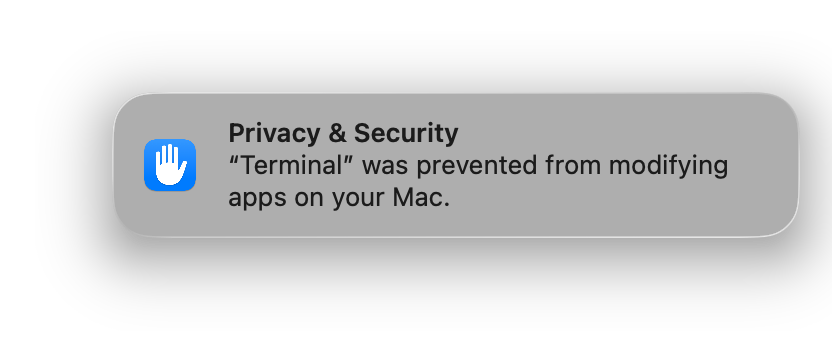
After the app is installed (for example, by dragging it into /Applications) and opened, macOS also protects the contents of its bundle. Other applications and scripts, even those running with administrator privileges, cannot modify files inside it. macOS blocks any such attempt and alerts the user that it prevented the modification.
Archive and Restore#
We accidentally discovered a scenario in which any application or script running with the current user’s privileges can silently replace the main executable of an application bundle and launch the modified application without triggering a code-signature or security warning.
The issue is reproducible when:
- The app was downloaded from the web rather than installed through the Mac App Store. App Store apps are owned by root, while apps downloaded from the web are typically owned by the current user.
- The app has already been launched at least once, allowing Gatekeeper to complete its initial verification.
- The attacker already has code execution as the current user, for example through a malicious app or downloaded script.
We’ll use Signal as an example. To be clear, this is not a Signal vulnerability. Signal is simply a convenient demonstration target because it is widely trusted and distributed outside the Mac App Store. The same behaviour affects other apps downloaded from the web, including Brave Browser, Cursor, Mullvad Browser, Proton Mail, Slack, Visual Studio Code, Xcode, and many others.
After installing Signal and launching it once, macOS prevents subsequent modifications to its application bundle. You can verify this by running:
% touch /Applications/Signal.app/Contents/MacOS/Signal
touch: /Applications/Signal.app/Contents/MacOS/Signal: Operation not permitted
Even with sudo, you still cannot modify the application’s main executable:
% sudo touch /Applications/Signal.app/Contents/MacOS/Signal
touch: /Applications/Signal.app/Contents/MacOS/Signal: Operation not permitted
However, archiving the application bundle with tar, deleting the original, and extracting the archive back into /Applications changes this behaviour:
% cd /Applications/
% tar cf .Signal.tar Signal.app
% rm -rf Signal.app
% tar xf .Signal.tar -C /Applications
The restored app launches normally, despite being a different copy of the original bundle. What’s surprising is that its contents can be modified without triggering an authorization prompt:
% touch /Applications/Signal.app/Contents/MacOS/Signal
%
It works!
At this point, replacing the app’s main executable is straightforward. The modified app continues to launch, and macOS displays neither a Gatekeeper warning nor any indication that its bundle has been altered. Here’s a minimal example that uses Swift to compile a dummy executable and then replaces Signal’s main executable with it:
# Write a minimal Swift program that shows a window
cat << EOF > /tmp/dummy.swift
import Cocoa

let app = NSApplication.shared
let window = NSWindow(
    contentRect: NSRect(x: 0, y: 0, width: 400, height: 200),
    styleMask: [.titled, .closable, .miniaturizable, .resizable],
    backing: .buffered,
    defer: false
)
window.center()
window.title = "Hi! I'm Signal!"
window.makeKeyAndOrderFront(nil)
app.activate(ignoringOtherApps: true)
app.run()
EOF

# Compile it as a command-line macOS executable
swiftc -framework Cocoa /tmp/dummy.swift -o /tmp/dummy

# Replace the main Signal executable with the dummy binary
cp /tmp/dummy /Applications/Signal.app/Contents/MacOS/Signal

# Launch the now-modified app (should display a window, not real Signal)
open /Applications/Signal.app
This behaviour is consistent with how macOS code signing protects application bundles. The bundle’s resources are sealed by hashes stored in the _CodeSignature/CodeResources file, while the main executable carries its own embedded code signature. Because the archive-and-restore process leaves the bundle resources unchanged, their hashes continue to validate successfully.
The replaced executable, however, is ad hoc signed, and macOS permits ad hoc signed executables to run. As a result, the modified application bundle launches successfully even though its original executable has been replaced.
What appears inconsistent is that macOS continues to recognize the modified bundle as the same trusted app — though not entirely, since the replacement executable still triggers Keychain and TCC prompts, as discussed in the next section. Once the original developer-signed executable has been replaced with an ad hoc signed one, we would expect macOS to treat the bundle as a different app and require it to establish trust again.
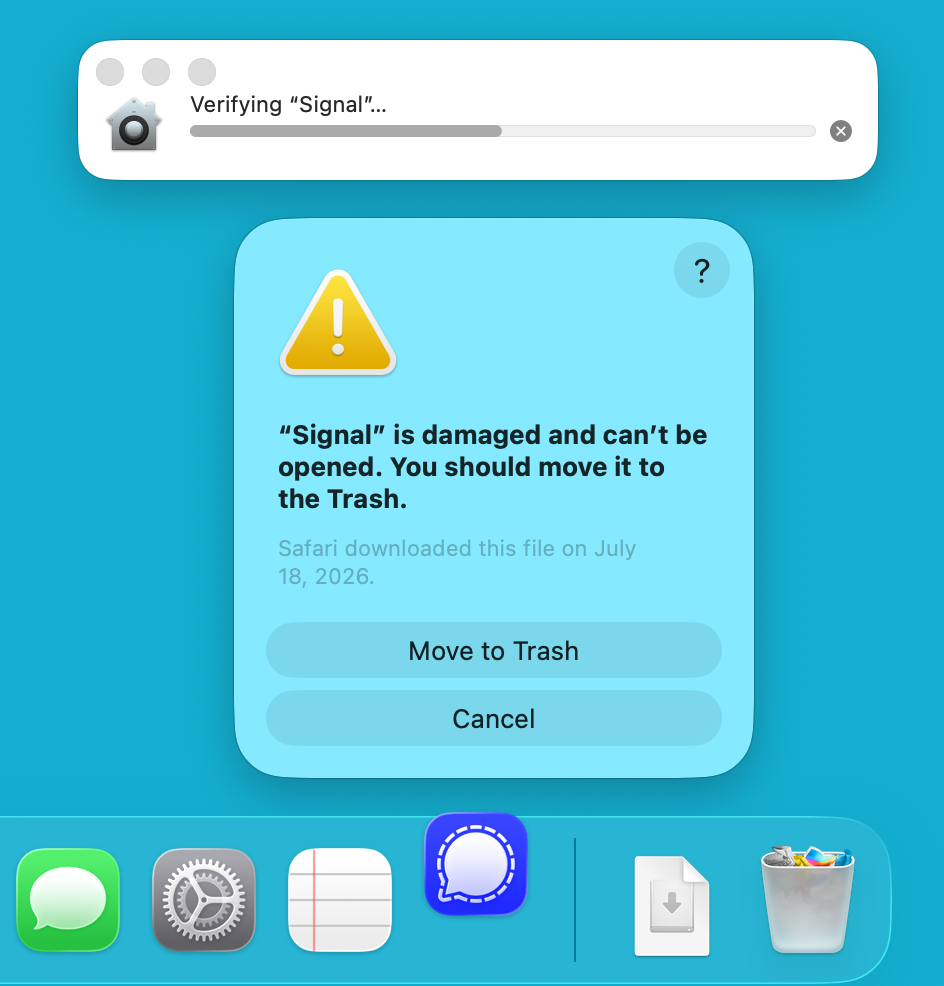
This explains why the app must first be launched successfully. If its main executable is replaced before the first launch, initial validation fails and macOS reports that the app is damaged and should be moved to the Trash. If the executable is replaced after the first launch, however, the modified bundle continues to launch under the original app’s identity.
A Proof-of-Concept Attack#
With these building blocks, we can create a simple proof of concept that archives the application bundle, restores it, replaces its main executable, and launches the modified app.
The replacement executable is ad hoc signed, so it does not inherit the original app’s code-signing identity or previously granted permissions. Attempts to access Keychain items or files protected by TCC still trigger macOS authorization prompts.
For this demonstration, the replacement executable attempts to:
- Access Signal’s Keychain item that stores its encryption key.
- Access the TCC-protected
~/Desktopand~/Documentsfolders. - After collecting the targeted secrets, terminate itself and relaunch the original Signal executable to make the compromise less noticeable.
Although macOS correctly asks the user to approve access, the prompts are misleading. Because the replacement executable resides inside Signal.app, they display Signal’s name and icon and appear to come from the real app.
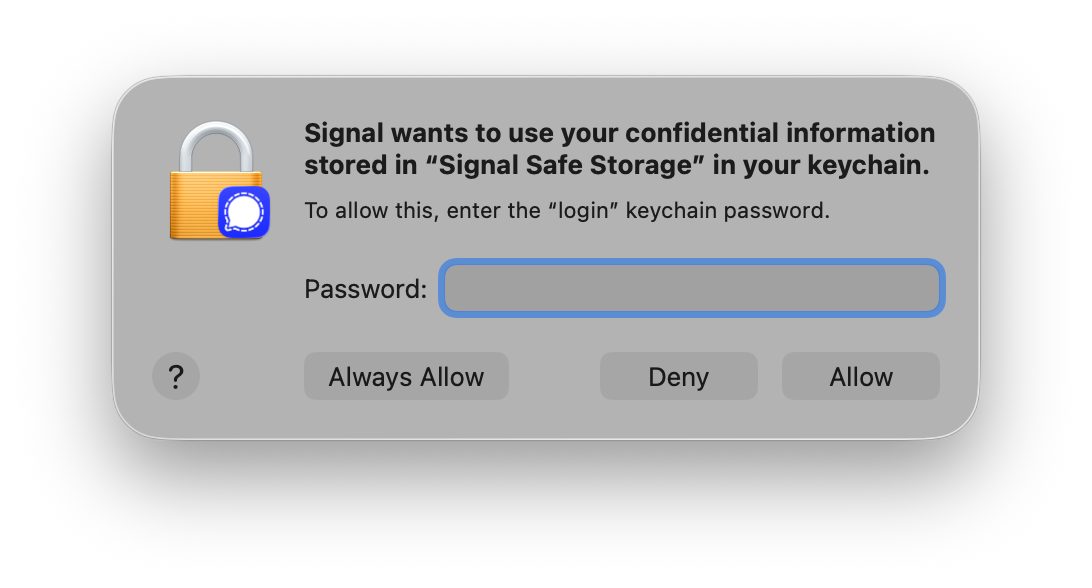
A user who trusts Signal may approve these requests, believing they came from the original app. Once approved, the replacement executable gains access to the requested resources despite being ad hoc signed and unrelated to Signal’s developer.
When the modified Signal executable requests access to the Desktop folder, macOS displays this prompt:
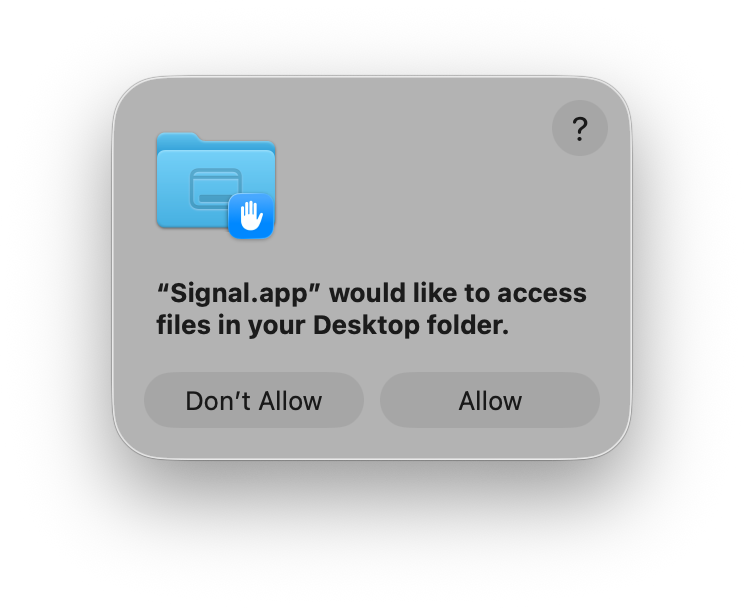
For comparison, a request from Terminal produces the same macOS authorization prompt:
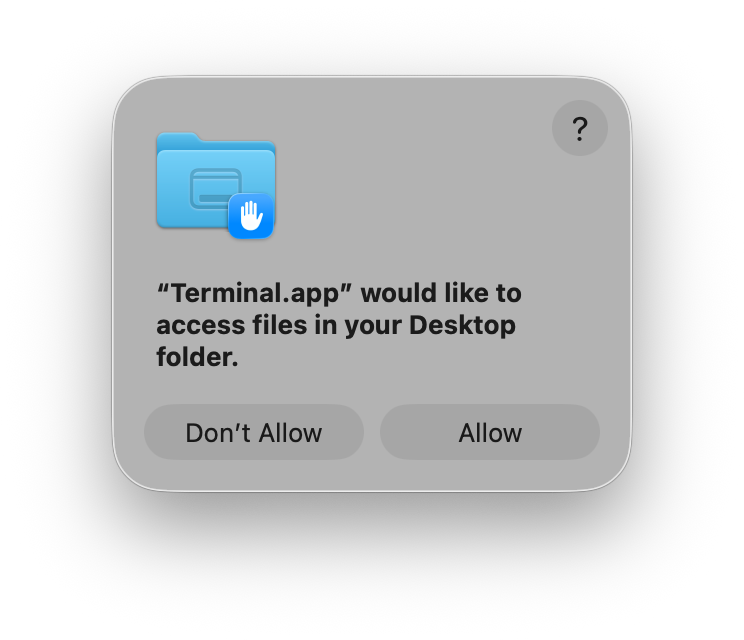
This proof of concept does not bypass TCC, Keychain protections, or code signing. It instead exploits the user’s trust in an installed app: since the prompts are genuine macOS system prompts, they’re visually indistinguishable from ones generated by the real app.
Here is the proof of concept in action. To make each step easier to follow, the replacement executable displays a window with buttons that trigger individual actions. A real attack could perform these actions automatically in the background, without displaying an interface.
Apple’s Assessment#
Apple concluded that the reported behaviour does not constitute a security issue for the following reasons:
- The proof of concept replaces the entire application bundle rather than modifying an existing signed executable.
- The attack requires code execution as the current user and only affects applications owned by that user.
- The replacement executable does not inherit the original application’s entitlements or previously granted TCC permissions, requiring the user to approve new authorization prompts.
- Apple considers convincing a user to approve these prompts to be a matter of social engineering rather than a bypass of TCC or other security mechanisms.
- Gatekeeper is designed to evaluate downloaded applications before their first launch and is not intended to protect files already owned and modified by the current user.
Based on these findings, Apple determined that neither Gatekeeper nor TCC was bypassed and that the report did not require a security fix.
Discussion#
This behaviour does not bypass Gatekeeper or TCC. It does, however, let an attacker silently replace the main executable of a trusted app and exploit that trust through authentic but misleading system prompts. Revalidating modified application bundles or identifying the requesting executable’s code-signing identity in authorization prompts would make the attack far less effective.
- Revalidate an application’s code signature before launch when its bundle has changed. The brief validation process macOS displays after the modification suggests it has already detected the change.
- Improve authorization prompts by displaying the code-signing identity (developer or Team ID) of the executable requesting access, not just the application’s name and icon.
Demos & Videos#
Video: Replacing Signal’s Main Executable#
Report Timeline#
| Date | Event |
|---|---|
| June 4, 2026 | Mysk submits report to Apple. |
| June 9, 2026 | Apple requests more information. |
| June 11, 2026 | Mysk sends the proof-of-concept source code. |
| July 13, 2026 | Mysk asks for an update and discusses possible disclosures to Proton, Signal, Brave, and Mullvad. |
| July 14, 2026 | Apple responds: “We’ve taken an initial pass at reproducing this report.” |
| July 14, 2026 | Apple closes the report. |
0 Comments
Log in to join the conversation.No comments yet. Be the first to share your thoughts.