
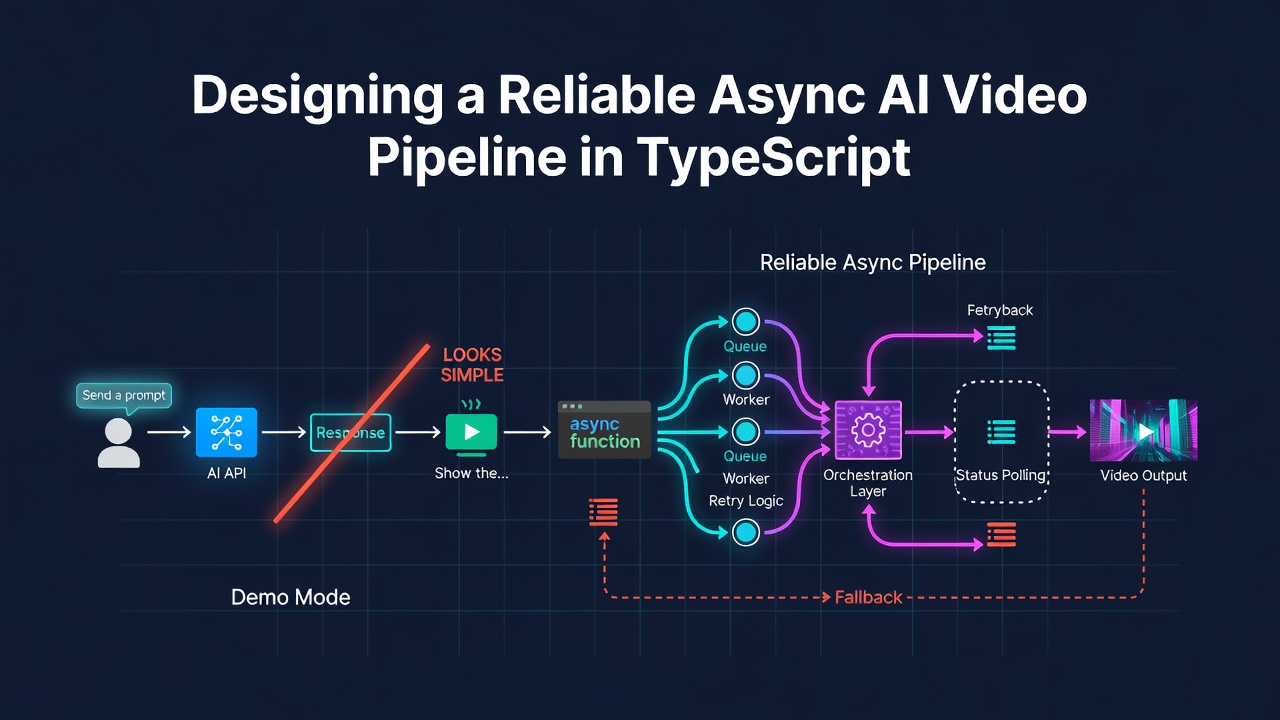
在示範中呼叫 AI 影片 API 看起來很簡單:
- 傳送提示。
- 等待回應。
- 顯示影片。
在正式環境中,模型很少會在原始 HTTP 請求中直接回傳影片。它會建立一個遠端工作、給你一個外部任務 ID、經過供應商特定的狀態,最後才回傳媒體 URL 或錯誤。你的應用程式必須在這個過程中,維持使用者狀態、計費狀態、審核狀態與供應商狀態的一致性。
本文提供一個與供應商無關的參考架構,適用於像 MICT 這類 AI 影像與短影片工作區的產品。程式碼範例僅供說明,並非 MICT 實際上線版本的逐字描述。真正有用的部分不在於某個特定的 API 呼叫,而是在於呼叫周圍的邊界。
真實工作流程是一個狀態機
可靠的生成請求所包含的階段,遠多於「載入中」與「完成」:
request
  -> authenticate
  -> validate model settings
  -> moderate input
  -> calculate cost
  -> create and persist local task
  -> reserve or deduct credits
  -> create provider task
  -> attach external task ID
  -> poll provider
  -> normalize provider state
  -> moderate output
  -> complete or fail
  -> refund when required
Enter fullscreen mode Exit fullscreen mode
將其視為明確的狀態機,能讓每一個層級擁有共同的詞彙。通常只需要一套精簡的內部集合:
type GenerationStatus =
  | "running"
  | "processing"
  | "completed"
  | "failed";
Enter fullscreen mode Exit fullscreen mode
供應商可以在邊界保留自己的詞彙:
function mapProviderState(state: string): GenerationStatus {
  switch (state) {
    case "waiting":
    case "queuing":
      return "running";
    case "generating":
      return "processing";
    case "success":
      return "completed";
    case "fail":
      return "failed";
    default:
      return "running";
  }
}
Enter fullscreen mode Exit fullscreen mode
重要的設計選擇是:產品的其他部分永遠不必對每個供應商的用詞進行分支判斷。轉接器只需處理一次。
將本地與外部任務 ID 分開
在呼叫供應商之前,先建立並儲存自己的任務。
const taskId = createLocalTaskId();

await persistGeneration({
  taskId,
  userId,
  status: "running",
});

const externalTask = await provider.createTask(providerModel, input);

await attachExternalTaskId({
  taskId,
  externalTaskId: externalTask.id,
});
Enter fullscreen mode Exit fullscreen mode
本地 ID 屬於你的產品。請用於:
- 授權檢查;
- 生成歷史;
- 點數交易;
- 支援參考;
- 分析;
- 冪等性。
外部 ID 屬於供應商。僅在查詢或取消遠端工作時使用。
當供應商更換、某個供應商暫時被替換,或是支援工單指向一個從未收到外部任務 ID 的本地工作時,這種區分就顯得重要。
在金錢移動前驗證設定
不同的影片模型接受不同的模式、時長、解析度、長寬比、輸出數量與音訊設定的組合。不要讓客戶端自行發明這些組合。
將功能保存在伺服器端的模型設定中:
type ModelConfig = {
  modes: Array<"t2v" | "i2v">;
  durations: number[];
  resolutions: string[];
  aspectRatios: string[];
  calculateCredits(input: {
    duration: number;
    resolution: string;
    outputCount: number;
  }): number;
};
Enter fullscreen mode Exit fullscreen mode
然後在審核、計費或提交給供應商之前,拒絕不支援的值:
if (!config.modes.includes(mode)) {
  throw new RequestError("Unsupported generation mode");
}

if (!config.resolutions.includes(resolution)) {
  throw new RequestError("Unsupported resolution");
}
Enter fullscreen mode Exit fullscreen mode
客戶端驗證有助於提供回饋;伺服器端驗證則是保護你的帳單與資料的邊界。
將審核放在生成之前
輸入審核應在建立供應商任務與扣款之前進行。
const moderation = await moderateRequest({
  userId,
  model,
  mode,
  prompt,
  imageUrl,
});

if (!moderation.allowed) {
  return {
    ok: false,
    code: moderation.code,
    creditsCharged: false,
  };
}
Enter fullscreen mode Exit fullscreen mode
這樣可以避免為違反你自身政策的請求支付上游供應商費用,也讓 UI 能區分政策決策與技術性失敗。
輸出審核是另一道關卡。供應商可能成功生成媒體,但你的應用程式不應釋出。輸出必須通過這道關卡,才可成為 completed。
provider success
  -> extract result URL
  -> moderate result
  -> completed

provider success
  -> extract result URL
  -> output blocked
  -> failed with a policy-safe message
Enter fullscreen mode Exit fullscreen mode
不要將輸入審核、供應商政策錯誤與輸出審核合併成單一的「生成失敗」提示。它們有不同的重試規則與支援路徑。
讓點數操作具備冪等性
AI 生成產品中最具破壞性的錯誤,通常是財務狀態錯誤:
- 供應商拒絕請求,但點數仍被扣除;
- 輪詢執行兩次,退款也執行兩次;
- 在供應商任務開始後,資料庫寫入失敗;
- 瀏覽器在網路逾時後重試請求。
每一次扣款都應有穩定的來源鍵:
await decreaseCredits({
  userId,
  amount: creditCost,
  sourceType: "generation_charge",
  sourceId: taskId,
});
Enter fullscreen mode Exit fullscreen mode
退款應引用相同的來源:
await refundCreditsBySource({
  sourceType: "generation_charge",
  sourceId: taskId,
  transactionType: "refund",
});
Enter fullscreen mode Exit fullscreen mode
資料庫應針對相關來源或交易鍵強制唯一性。應用程式層級的 if (!refunded) 檢查有幫助,但不足以應對並行輪詢。
你至少需要兩條退款路徑:
- 供應商任務無法建立。
- 供應商接受任務,但後續到達終端失敗。
try {
  const external = await provider.createTask(modelId, input);
  await attachExternalTaskId({ taskId, externalTaskId: external.id });
} catch (error) {
  await refundByGenerationSource(taskId);
  throw error;
}
Enter fullscreen mode Exit fullscreen mode
輪詢期間的終端失敗:
if (status === "failed") {
  await refundByGenerationSource(taskId);
  await markGenerationFailed(taskId, publicErrorMessage);
}
Enter fullscreen mode Exit fullscreen mode
當退款具備冪等性時,重複輪詢就不再那麼令人擔憂。
輪詢應該是無聊的
WebSocket 可以改善感知回應性,但對於需要數秒或數分鐘的供應商工作,輪詢通常是最穩健的第一實作。
狀態端點應:
- 驗證請求;
- 載入本地生成;
- 驗證該生成屬於使用者;
- 若為本地終端狀態,立即回傳;
- 僅對非終端工作查詢供應商;
- 正規化結果;
- 更新本地狀態;
- 回傳小型且穩定的回應。
type StatusResponse = {
  status: GenerationStatus;
  progress?: number;
  resultUrl?: string;
  errorCode?: string;
  errorMessage?: string;
};
Enter fullscreen mode Exit fullscreen mode
客戶端不需要供應商的原始酬載。原始酬載會洩漏實作細節,並使前端行為依賴不穩定的第三方結構。
合理的瀏覽器迴圈如下:
async function waitForGeneration(taskId: string) {
  while (true) {
    const result = await getStatus(taskId);

    if (result.status === "completed") return result;
    if (result.status === "failed") throw new Error(result.errorMessage);

    await delay(5000);
  }
}
Enter fullscreen mode Exit fullscreen mode
正式環境的程式碼還應在元件卸載時停止輪詢、在隱藏分頁中暫停或減速,並套用最長的客戶端等待時間。即使瀏覽器停止詢問,工作仍可在伺服器上繼續。
防禦性地解析供應商結果
即使是同一個供應商,不同模型也可能回傳不同的結果形狀:
{ "resultUrls": ["https://..."] }
Enter fullscreen mode Exit fullscreen mode
{ "video_url": "https://..." }
Enter fullscreen mode Exit fullscreen mode
{ "output": [{ "url": "https://..." }] }
Enter fullscreen mode Exit fullscreen mode
將結果提取保留在轉接器內,並僅接受非空字串:
function extractResultUrl(raw: string): string | undefined {
  const result = JSON.parse(raw);
  const candidates = [
    result.resultUrls?.[0],
    result.urls?.[0],
    result.output?.[0]?.url,
    result.videoUrl,
    result.video_url,
  ];

  return candidates.find(
    (value): value is string =>
      typeof value === "string" && value.length > 0
  );
}
Enter fullscreen mode Exit fullscreen mode
供應商回傳 success 但沒有可用的結果 URL,並不是完整的使用者體驗。請將工作保持為非終端,或移至清楚診斷的失敗路徑。
不要讓晚到的成功覆蓋失敗
非同步系統可能產生不自然的順序:
- 工作顯示成功;
- 輸出審核開始;
- 另一個程序將生成標記為失敗;
- 晚到的更新嘗試將其標記為完成。
使用條件式更新:
update generations
set status = 'completed', result_url = $1
where task_id = $2
  and status <> 'failed';
Enter fullscreen mode Exit fullscreen mode
若更新影響零列,請重新載入目前狀態並回傳該狀態。終端安全決策應優先於晚到的成功事件。
保留錯誤類別
使用者需要針對不同錯誤採取不同行動:
| 錯誤類別 | 使用者行動 |
|---|---|
| 點數不足 | 新增點數或選擇較便宜的設定 |
| 供應商無法使用 | 稍後重試 |
| 輸入政策封鎖 | 修改請求 |
| 供應商政策封鎖 | 修改請求 |
| 輸出政策封鎖 | 僅在決策顯然錯誤時聯絡支援 |
| 未知技術性失敗 | 重試或帶任務 ID 聯絡支援 |
回傳穩定的錯誤代碼,並另外維護使用者安全的訊息:
throw new RequestError(
  "We could not start this generation right now.",
  "provider_unavailable",
  { creditsCharged: false }
);
Enter fullscreen mode Exit fullscreen mode
不要在瀏覽器中暴露上游帳戶餘額、內部模型路由或原始政策訊息。
應該測試什麼
僅有快樂路徑的影片是不夠的。請測試狀態轉移:
- 無效模型設定不扣點數;
- 輸入審核拒絕不扣點數;
- 供應商建立失敗退款一次;
- 供應商終端失敗退款一次;
- 重複狀態輪詢不重複退款;
- 一位使用者無法讀取另一位使用者的任務;
- 供應商成功但無 URL 不成為完成;
- 輸出審核失敗不能被晚到的成功覆蓋;
- 本地終端狀態不再查詢供應商;
- 未知供應商狀態保持可恢復。
最佳的測試針對不變量:
one accepted generation <= one charge
one failed charged generation <= one refund
completed => usable result URL
failed-by-policy => result URL is not released
task owner => only user allowed to read status
Enter fullscreen mode Exit fullscreen mode
更廣泛的教訓
AI 影片介面是一個附加創意 UI 的分散式系統。模型呼叫只是其中一步。當驗證、授權、計費、輪詢、審核與失敗恢復每一步都有明確邊界時,產品才值得信賴。
從小型內部狀態機開始。將供應商詞彙保留在邊界。為每一次扣款提供穩定的來源。讓退款具備冪等性。將審核視為生命週期的一部分,而非預檢核取方塊。然後讓輪詢有意地保持無聊。
這個基礎不如生成示範耀眼,但它才是讓示範成為產品的關鍵。
揭露聲明:本文為 MICT 準備,文中僅作為此架構的產品背景提及一次。AI 工具協助撰寫與編輯;程式碼、論點與最終文字均於刊登前經過審核。
0 Comments
Log in to join the conversation.No comments yet. Be the first to share your thoughts.