
Guest post in collaboration with Company 3 Director of New Technology, Phil Wortas, and Senior New Technology Engineer, Matthew Galloway
Introduction
Company 3 provides specialized services for the entertainment industry, including post-production services, visual effects, and color grading for feature films, commercials, and television content. Their teams collaborate globally to Increase workflow efficiency and expand their roster of diverse movie-making talent.
Company 3’s New Technology team uses Amazon EC2 Image Builder to vend Amazon Machine Images (AMIs) and container images for compute environments where artists create and render content. Image Builder is a fully managed AWS service that helps you automate the creation, management, and deployment of customized, secure, and up-to-date server images. Company 3 also uses the AWS Cloud Development Kit (CDK) to scale the creation of consistent Image Builder components and recipes.
At scale, the respective concepts of versioning between Image Builder resources and CDK infrastructure as code made it challenging to reuse prior components and recipes, and update existing references with new version numbers over time. This challenge led to creative workarounds, collaborative problem-solving with AWS, and ultimately, product improvements that benefit the entire AWS community.
This blog follows their journey from manual version management, through creative workarounds, to native EC2 Image Builder features that solved the problem for good. Along the way, we’ll show how auto-versioning and CDK L2 constructs can simplify your own image pipelines.
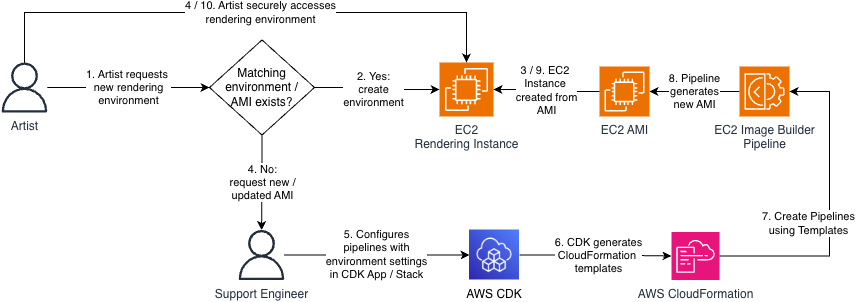
Figure 1: Personas and process flow
The Challenge: When Infrastructure-as-Code Gets Complicated
While Image Builder has historically supported semantic versioning for Components and Recipes, there was no mechanism to automatically detect version changes or update existing references to the latest version of a component using the CDK. This is because Image Builder only supported Layer 1 (L1) CDK constructs. Layer 1 constructs map directly to CloudFormation resources and their corresponding service APIs, but do not provide features that create a layer of abstraction above those foundational create / update / delete operations.
Version changes to Components and Recipes are a frequent occurrence because these resources are immutable; every change to them requires a new version. Version numbers are a part of these resource’s Amazon Resource Name (ARN), so changes must be propagated throughout the associated CDK code to correctly reference the latest version of each resource.
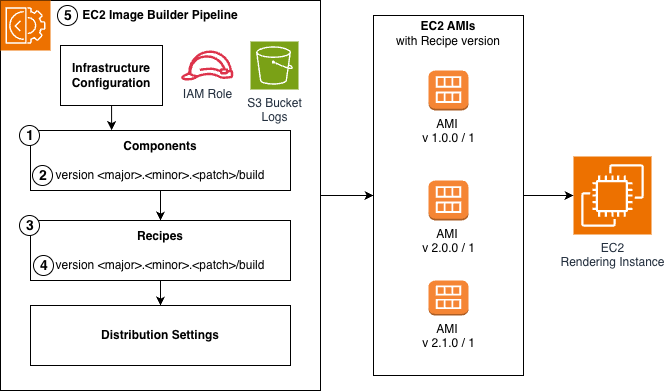
Figure 2: EC2 Image Builder Anatomy and Version Propagation
Figure 1, Step 5 represents a Platform Engineer having to update an existing Component. Figure 2 shows the required changes broken out by each of the comprising Image Builder resources:
- Update the Component configuration
- Increment the Component version
- Update the Recipe with the new Component version ARN
- Increment the Recipe version
- Update the Recipe version ARN in the Pipeline.
Manual version propagation across dozens of components via this multi-step process was error prone, wasn’t scalable, and created a risk of deployment failures and version churn due to version mismatches.
The team needed to prevent unnecessary update requests to Image Builder when components didn’t change but the recipes they were associated with did, orchestrate version propagations when the versions did need to change, and track component versions as they deployed updates across their infrastructure.
Short-term Workaround: Using Hashes to Identify Changes
Faced with these limitations, the customer’s engineering team got creative. Their first approach involved appending MD5 hashes to component names. This allowed them to track changes and force CDK updates and version increments when content changed, while preventing unnecessary update calls when the content of the component didn’t change but the rest of the resources in the CDK Stack did.
However, this approach had drawbacks. Component names became unwieldy and difficult to maintain. More importantly, the hash-based naming convention didn’t align with semantic versioning best practices that the rest of their infrastructure followed. The team knew they needed a better solution long-term.
Long-term Automation: Collaboration with AWS
Working with their AWS Solutions Architect and EC2 Image Builder Developer Support, Company 3 developed a more elegant solution using CDK Custom Resources. This approach eliminated hash-based naming and automated the propagation of version updates, but it came with technical debt.
The version increments themselves were still manual, and the solution required custom resources to create and maintain the suite of resources being deployed. The mesh of custom resources required specialized knowledge to maintain, which made it difficult to onboard new team members, and distracted engineers from focus on core business value of delivering the right studio environments to artists.
Managed Abstraction: AWS Launches Product Improvements
EC2 Image Builder auto-versioning
In November 2025, EC2 Image Builder introduced native auto-versioning capabilities that transformed how teams manage Component versions.
Components with the same name and semantic version now auto-increment build versions (eliminating steps 2-4 from Figure 2 when developers use ‘x’ as a wildcard placeholder (e.g., 1.2.x). Additionally, Pipelines can resolve to the highest available version of Components and Recipes, which ensures they are using the latest compatible versions without manual updates, eliminating step 5.
These enhancements eliminated the version propagation burden entirely, allowing Company 3 developers to focus only on the substantive changes to Components requested by Artists and Support Engineers.
CDK Layer 2 Constructs
The second major improvement came with comprehensive Layer 2 (L2) constructs for EC2 Image Builder (RFC 0789). L2 Constructs provide a layer of abstraction that default to best practice configuration, automatic least-privilege IAM Role and Policy provisioning, and convenience methods that make it easier to create and link to other AWS resources. These constructs transformed the developer experience and alleviated the need for custom resources. The EC2 Image Builder L2 Construct is currently in alpha stabilization phase, and sourcing customer feedback and adoption before migrating to the core CDK library per the CDK contribution process.
Before the L2 construct release, orchestrating an Image Builder Pipeline took over 50 lines of code, and required manual least-privilege IAM role creation, instance profile setup, and Pipeline configuration across 6 separate CloudFormation resources.
// Using L1 constructs
const instanceProfileRole = new iam.Role(stack, 'EC2InstanceProfileForImageBuilderRole', {
  assumedBy: iam.ServicePrincipal.fromStaticServicePrincipleName('ec2.amazonaws.com'),
  managedPolicies: [
    iam.ManagedPolicy.fromAwsManagedPolicyName('AmazonSSMManagedInstanceCore'),
    iam.ManagedPolicy.fromAwsManagedPolicyName('EC2InstanceProfileForImageBuilder'),
  ],
});

const instanceProfile = new iam.InstanceProfile(stack, 'EC2InstanceProfileForImageBuilder', {
  role: instanceProfileRole,
});

const bucket = new s3.Bucket(stack, 'ImageBuilderLoggingBucket', {
 bucketName: `ec2imagebuilder-logs-${stack.region}-${stack.account}`,
  enforceSSL: true,
});

const l1InfrastructureConfiguration = new imagebuilder.CfnInfrastructureConfiguration(stack, 'L1InfrastructureConfiguration', {
  name: 'l1-infrastructure-configuration',
  instanceProfileName: instanceProfile.instanceProfileName,
  instanceMetadataOptions: { httpTokens: 'required' },
  logging: {
    s3Bucket: bucket.bucketName,
    s3KeyPrefix: 'imagebuilder-logging',
  },
});
const l1ImageRecipe = new imagebuilder.CfnImageRecipe(stack, 'L1ImageRecipe', {
name: 'l1-image-recipe',
version: '1.0.0',
parentImage: `arn:${stack.partition}:imagebuilder:${stack.region}:aws:image/amazon-linux-2023-x86/x.x.x`,
components: [
{
componentArn: `arn:${stack.partition}:imagebuilder:${stack.region}:aws:component/update-linux/x.x.x`,
},
],
});
const l1ImagePipeline = new imagebuilder.CfnImagePipeline(stack, 'L1ImagePipeline', {
name: 'l1-image-pipeline',
imageRecipeArn: l1ImageRecipe.attrArn,
infrastructureConfigurationArn: l1InfrastructureConfiguration.attrArn,
});Using the ImagePipeline L2 construct allows the developer to provision a Pipeline in fewer than 10 lines of code while leveraging best practice configuration the construct sets by default.
// Equivalent, using L2 constructs
const l2ImagePipeline = new imagebuilder.ImagePipeline(stack, 'L2ImagePipeline', {
  recipe: new imagebuilder.ImageRecipe(stack, 'L2ImageRecipe', {
    baseImage: imagebuilder.AwsManagedImage.amazonLinux2023(stack, 'AL2023'),
    components: [
      {
        component: imagebuilder.AwsManagedComponent.updateOS(stack, 'UpdateOS', {
          platform: imagebuilder.Platform.Linux,
        }),
      },
    ],
  }),
});
The Impact: From Workarounds to Best Practices
For Company 3, these improvements meant they could retire their custom constructs entirely. The L2 constructs provided everything their custom solution did, plus additional capabilities.
The EC2 Image Builder service manages the complexity of version updates by default, and they gained enhanced security through AWS-managed secure defaults like IMDSv2 requirements and least-privileged IAM roles.
Perhaps most importantly, new team members can understand the infrastructure code in minutes rather than hours, dramatically accelerating onboarding.
Conclusion
The impact extends far beyond one customer. Every AWS user working with EC2 Image Builder and CDK now benefits from simplified workflows, automatic version management, and security best practices by default. What started as one team’s challenge became a catalyst for improvements that make everyone’s work easier and more secure. The evolution of EC2 Image Builder’s CDK support demonstrates AWS’s commitment to listening to customers and continuously improving the developer experience.
For teams currently managing EC2 Image Builder Pipelines manually or with L1 CDK constructs or with custom solutions, the path forward offers significant benefits. Explore how you can use EC2 Image Builder, its new auto-versioning capabilities, and its CDK L2 Constructs to automate your complex AMI Pipeline provisioning architecture via these resources:
EC2 Image Builder Documentation
EC2 Image Builder Auto-versioning Documentation
CDK L2 Constructs for EC2 Image Builder (currently in alpha stabilization)
EC2 Image Builder CDK Sample GitHub Repository
0 Comments
Log in to join the conversation.No comments yet. Be the first to share your thoughts.