
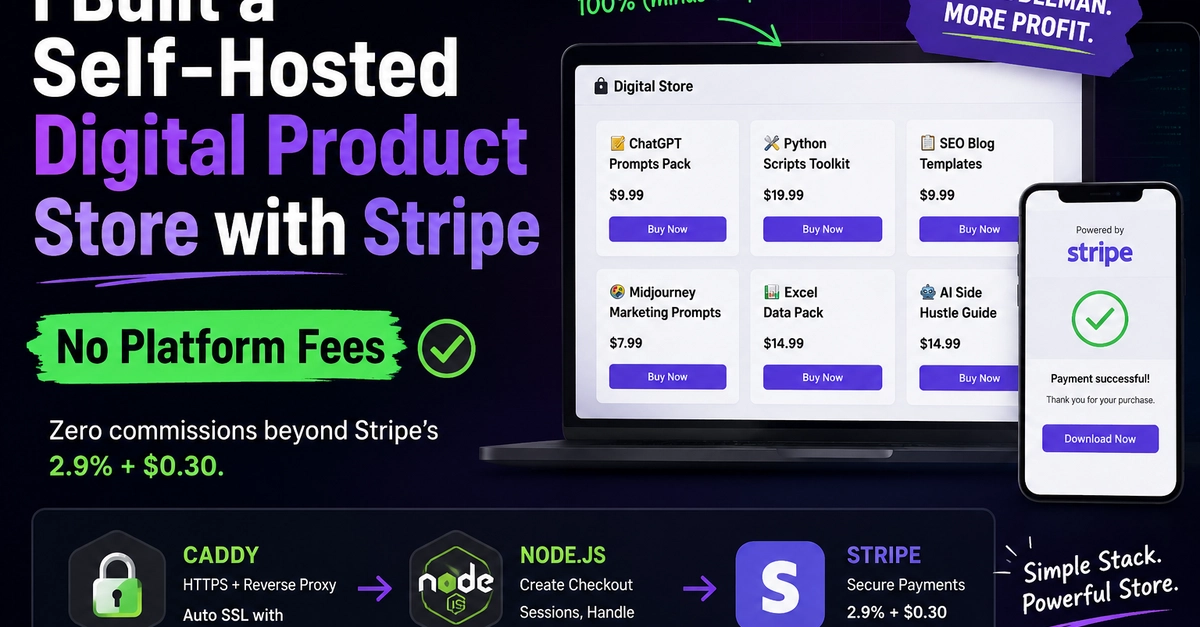
The Problem: Every Platform Takes a Cut
I wanted to sell digital products online. I looked at the usual suspects:
- Gumroad — 10% flat fee
- Lemon Squeezy — 5% + $0.50 + Stripe fees
- Etsy — 6.5% + $0.20 listing fee
- Shopify — $29/month + payment fees
On a $10 product, you lose $1-3 to platform fees before Stripe even touches it. For a small operation, that adds up fast.
What if you could skip the middleman entirely?
The Stack: Dead Simple
Caddy (HTTPS + reverse proxy) → Node.js (API) → Stripe (payments)
Enter fullscreen mode Exit fullscreen mode
That's it. Three components, zero platform fees beyond Stripe's standard 2.9% + $0.30.
Here's what each piece does:
| Component | Role | Cost |
|---|---|---|
| Caddy | Web server, auto HTTPS (Let's Encrypt), reverse proxy | Free |
| Node.js | Backend: create Checkout Sessions, handle webhooks, deliver files | Free |
| Stripe | Payment processing | 2.9% + $0.30 per transaction |
How It Works
The flow is surprisingly simple:
-
User clicks "Buy Now" → Frontend calls
/api/checkoutwith a price ID - Backend creates a Stripe Checkout Session → Returns a Stripe-hosted payment URL
- User pays on Stripe's page → PCI compliant, we never touch card data
- Stripe sends webhook → Backend records the sale
- User gets redirected to download page → File delivered instantly with a time-limited token
The entire checkout-to-delivery flow takes about 30 seconds.
The Code: Checkout Endpoint
Here's the core of the backend — a single endpoint that creates a Stripe Checkout Session:
async function createCheckout(priceId, res) {
    const token = crypto.randomBytes(16).toString('hex');

    const session = await stripeAPI('checkout/sessions', 'POST', {
        'mode': 'payment',
        'line_items[0][price]': priceId,
        'line_items[0][quantity]': '1',
        'success_url': `https://your-domain.com/download?token=${token}`,
        'cancel_url': `https://your-domain.com/`,
    });

    if (session.url) {
        // Store token → priceId mapping for download
        downloadTokens.set(token, { priceId, expires: Date.now() + 3600000 });
        res.writeHead(200, { 'Content-Type': 'application/json' });
        res.end(JSON.stringify({ url: session.url }));
    }
}
Enter fullscreen mode Exit fullscreen mode
Key details:
- Token-based delivery: A random token is generated and mapped to the purchased product. The download link expires in 1 hour.
- No customer data stored: We only store the token → product mapping. Stripe handles all customer info.
-
Stripe-hosted checkout: The payment page lives on
checkout.stripe.com, so we're automatically PCI compliant.
The Frontend: No Framework Needed
The store page is vanilla HTML + CSS + JavaScript. Products are defined as a simple array:
const products = [
    { name: "ChatGPT Prompts Pack", price: "$9.99", priceId: "price_xxx", icon: "📝" },
    { name: "Python Scripts Toolkit", price: "$19.99", priceId: "price_xxx", icon: "🔧" },
    { name: "SEO Blog Templates", price: "$9.99", priceId: "price_xxx", icon: "📋" },
    { name: "Midjourney Marketing Prompts", price: "$7.99", priceId: "price_xxx", icon: "🎨" },
    { name: "Excel Data Pack", price: "$14.99", priceId: "price_xxx", icon: "📊" },
    { name: "AI Side Hustle Guide", price: "$14.99", priceId: "price_xxx", icon: "🤖" },
];
Enter fullscreen mode Exit fullscreen mode
Each "Buy Now" button calls the checkout API:
async function checkout(priceId) {
    const res = await fetch('/api/checkout', {
        method: 'POST',
        headers: { 'Content-Type': 'application/json' },
        body: JSON.stringify({ priceId })
    });
    const { url } = await res.json();
    window.location.href = url;  // Redirect to Stripe
}
Enter fullscreen mode Exit fullscreen mode
No React, no build step, no npm dependencies for the frontend. It just works.
Caddy Configuration
Caddy handles HTTPS automatically and proxies API requests to Node.js:
shop.liyw.top {
    handle /api/* {
        reverse_proxy localhost:3000
    }
    handle /admin {
        reverse_proxy localhost:3000
    }
    handle /download {
        reverse_proxy localhost:3000
    }
    handle {
        root * /usr/share/caddy
        file_server
    }
}
Enter fullscreen mode Exit fullscreen mode
That's the entire Caddyfile. Caddy automatically:
- Obtains and renews Let's Encrypt certificates
- Redirects HTTP → HTTPS
- Serves static files
- Proxies API calls to Node.js
Analytics Dashboard (Bonus)
I added a lightweight admin dashboard at /admin that tracks:
- Page views & unique visitors
- Checkout attempts
- Completed sales & total revenue
- Per-product stats
- Recent activity log
Data is stored in a simple JSON file — no database needed. The dashboard auto-refreshes every 30 seconds and is password-protected.
What I'm Selling (With Free Samples)
I created 6 digital products. Here's a free sample from each:
1. ChatGPT Prompts Pack ($9.99)
Prompt: Blog Post Outline Generator
---
I need a blog post about [TOPIC] targeting [AUDIENCE]. Create a detailed outline with:
- A compelling headline (give 3 options)
- Introduction hook (2-3 sentences that grab attention)
- 5-7 main sections with subpoints
- Key statistics or data points to include
- A conclusion with a clear call-to-action
- 3 meta description options for SEO
Enter fullscreen mode Exit fullscreen mode
Full pack: 103 prompts across 7 categories
2. Python Automation Toolkit ($19.99)
# Bulk Email Sender — one of 20 scripts included
import yagmail, pandas as pd, time

def send_bulk_emails():
    df = pd.read_csv('recipients.csv')
    yag = yagmail.SMTP('[email protected]', 'app_password')
    for _, row in df.iterrows():
        yag.send(to=row['email'], subject=f"Hi {row['name']}",
                 contents=f"Hello {row['name']}...")
        time.sleep(2)  # Rate limit
Enter fullscreen mode Exit fullscreen mode
Full toolkit: 20 scripts with error handling & usage examples
3. SEO Blog Post Templates ($9.99)
Template: Step-by-Step Tutorial
- H1: How to [Task] in [Number] Easy Steps (Complete Guide)
- Meta: Learn how to [task] with this step-by-step guide.
- Structure: Intro → Prerequisites → Steps → Pro Tips → FAQ
- Target: 1,500-2,000 words
Enter fullscreen mode Exit fullscreen mode
Full pack: 50 templates across 9 content categories
4. Midjourney Marketing Prompts ($7.99)
Instagram Carousel Hero:
minimalist product showcase layout, floating product on soft
gradient background, clean sans-serif text placeholder,
luxury brand aesthetic, soft studio lighting,
--ar 4:5 --s 750 --style raw
Enter fullscreen mode Exit fullscreen mode
Full pack: 111 prompts across 10 marketing categories
5. Excel Data Analysis Templates ($14.99)
Revenue Dashboard KPIs:
Total Revenue:    =SUM(B:B)
Avg Monthly:      =AVERAGE(B:B)
Best Month:       =MAX(B:B)
MoM Growth:       =(B2-B1)/B1
YTD Margin:       =SUM(D:D)/SUM(B:B)
Enter fullscreen mode Exit fullscreen mode
Full pack: 8 templates with formulas & conditional formatting
6. AI Side Hustle Guide ($14.99)
35 proven ways to make money with AI, including:
- Quick starts ($0 investment): Prompt selling, freelance writing, social media content
- Technical: Automation scripts, micro-SaaS, chatbot building
- Creative: eBooks, graphic design, video scripts
- Passive: Digital products, courses, Notion templates
Full guide: 35 chapters with step-by-step instructions & earnings estimates
The Full Setup Cost
| Item | Cost |
|---|---|
| Domain (subdomain of existing) | $0 |
| VPS (Tencent Cloud) | ~$5/month |
| Caddy | Free |
| Node.js | Free |
| Stripe | 2.9% + $0.30 per sale |
| Total fixed cost | ~$5/month |
Compare to Shopify ($29/month) or Gumroad (10% per sale) — for small volumes, self-hosting wins by a mile.
Lessons From Failed Approaches
I didn't start here. It took several dead ends:
| Platform | Why It Failed |
|---|---|
| Fiverr | Anti-bot detection made automation impossible; received scam inquiries |
| Gumroad | Blocked by the Great Firewall (I'm based in China) |
| Lemon Squeezy | Stripe KYC doesn't support China merchants — identity verification is real, can't be bypassed |
| PayPal | Account permanently banned, can't re-register |
The key insight: if you're in a restricted region, self-hosting is often the only viable path. Platform-dependent approaches will eventually hit a wall.
Try It Yourself
The full source code is on GitHub: github.com/rug-lizi/digital-products-store
You'll need:
- A server with ports 80 & 443 open
- A domain pointing to your server
- A Stripe account with charges enabled
- Node.js 18+
Setup takes about 30 minutes if you have the prerequisites.
If you found this useful, check out the store at shop.liyw.top — all 6 products are available for instant download after purchase.
0 Comments
Log in to join the conversation.No comments yet. Be the first to share your thoughts.