
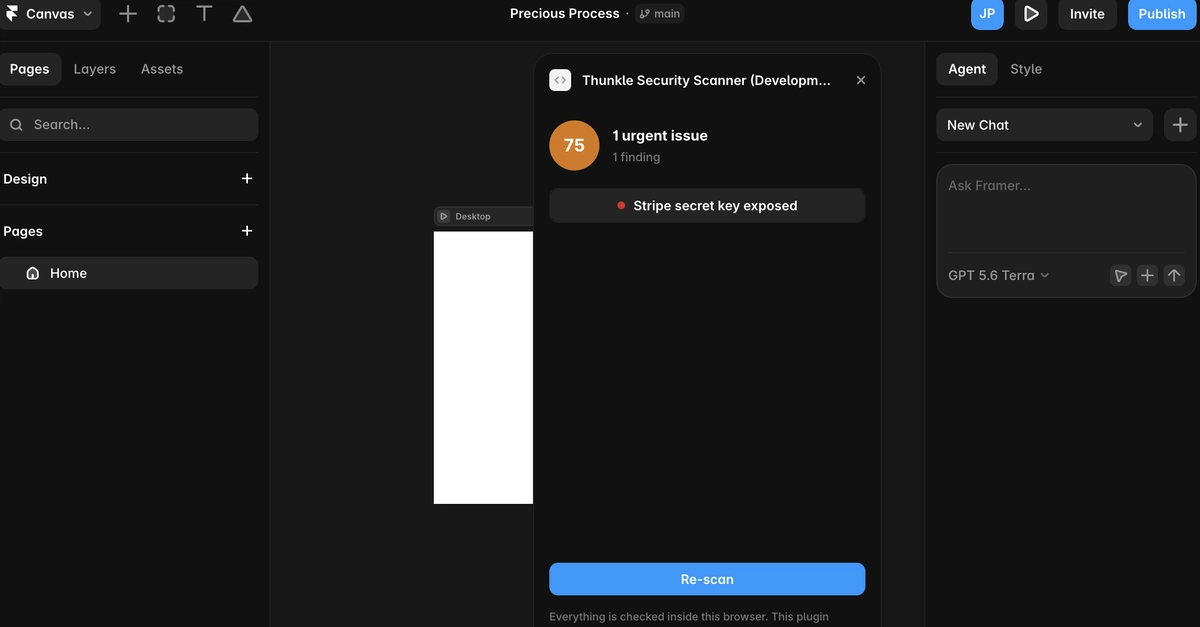
Most of a Framer site is not code. The parts that are, are code components, and that is where the risk collects. A component that calls an API needs a key. A component that needs a library sometimes imports it from a URL. A component rendering content from elsewhere has to decide how much it trusts that content.
I built a free plugin that reads them and reports what it finds. Here is what it looks for, and the parts that were harder than expected.
First, the thing that caught me out
Framer has two things called code:
-
Code components, the
.tsxfiles under Assets - Custom code, the named scripts under Settings with a placement dropdown
Same risk. A key in either ships to the browser. A plugin can only read the first.
The API has getCustomCode(), which sounds like it returns the project's custom code:
type CustomCodeLocation = "headStart" | "headEnd" | "bodyStart" | "bodyEnd"
type CustomCode = Record<CustomCodeLocation, {
    disabled: boolean
    html: string | null
}>
Enter fullscreen mode Exit fullscreen mode
It returns whatever your own plugin put there. I confirmed it by pasting a script into the Code panel of a real project, saving, and printing the counts:
headStart: 0 chars
headEnd:   0 chars      ← script visibly sitting in Settings → Code
bodyStart: 0 chars
bodyEnd:   0 chars

codeFiles: 1
  Test.tsx: 830 chars   ← Assets → Code, readable
Enter fullscreen mode Exit fullscreen mode
The docs say a plugin can detect custom code "set by your plugin", which read carefully is the entire answer. I went through every read method on the API, roughly fifty, and nothing returns user-authored custom code or site settings.
So the scanner reads what it can:
const files = await framer.getCodeFiles()

for (const file of files) {
    console.log(file.name, file.content.length)  // Test.tsx 830
}
Enter fullscreen mode Exit fullscreen mode
subscribeToCodeFiles and subscribeToRedirects let the panel re-scan as the user edits.
Credentials in components
The most common real finding, for an ordinary reason: standing up a server to hold a key is a bigger job than the component that needs it, so the key goes in the file and stays there.
Fifteen formats, weighted toward what people reach for when a component calls a model: OpenAI, Anthropic, Groq, Replicate, Hugging Face, Perplexity, alongside Stripe, AWS, Supabase, GitHub, SendGrid, Slack, Twilio, Resend and Convex.
The check that decides whether anyone trusts the tool.
Supabase issues two keys. Both are JWTs, both are long, and side by side you cannot tell them apart. The anon key belongs in the browser and is protected by row-level security. The service_role key bypasses RLS entirely.
One field in the payload separates them, so decode rather than pattern match:
function supabaseJwtRole(token: string): string | null {
    const parts = token.split(".")
    if (parts.length !== 3) return null
    try {
        const payload = JSON.parse(
            atob(parts[1].replace(/-/g, "+").replace(/_/g, "/"))
        ) as { role?: unknown }
        return typeof payload.role === "string" ? payload.role : null
    } catch {
        return null
    }
}
Enter fullscreen mode Exit fullscreen mode
service_role is critical. anon is not reported at all. Same for Firebase browser keys and Stripe publishable keys, which exist to ship in a page.
A scanner that flags those has not found anything. It has taught its user that its output is noise, and the next thing they skip will be real.
Modules imported from a URL
Framer lets a component import straight from a URL. Useful, mostly fine, and it means whoever controls that host controls part of your site. If the file changes tomorrow, your site runs the new version.
Two cases get flagged: anything over plain http, and anything from a host that is not a recognised package CDN. esm.sh, jsDelivr, unpkg and Skypack stay quiet since that is normal practice. An unrecognised domain is worth a look, especially on a site someone else built.
Content turned into code
Three worth knowing about:
-
dangerouslySetInnerHTML, where any part of the HTML coming from a URL parameter or CMS field means someone can run scripts on your site -
evalandnew Function, which run whatever string they are handed - reading a key or token out of
location.searchorlocation.hash, which leaks it into browser history, referrer headers and analytics
Redirects
Not components, but the other thing nobody re-reads. When a redirect's destination page is deleted, Framer nulls the target:
interface Redirect {
    id: string
    from: string
    to: string | null   // null = destination page was deleted
    expandToAllLocales: boolean
}
Enter fullscreen mode Exit fullscreen mode
That is a broken redirect with no indication in the UI. Chains, loops and duplicate sources all fall out of the same array.
The bug I shipped into my own first draft
Before publishing I ran the patterns against strings that are not secrets. Four of six benign inputs came back flagged:
FALSE POSITIVE  git commit SHA in a comment    -> "Twilio API key exposed"
FALSE POSITIVE  cache-busting hash in a URL    -> "Twilio API key exposed"
FALSE POSITIVE  css class name                 -> "OpenAI API key exposed"
FALSE POSITIVE  hyphenated word chain          -> "OpenAI API key exposed"
Enter fullscreen mode Exit fullscreen mode
A Twilio key identifier is SK plus 32 hex characters, which is also every other git hash. And I had allowed hyphens in the OpenAI pattern, so sk-spinner-container-large-variant qualified.
Two guards. Require a match to mix character classes:
function looksHighEntropy(value: string): boolean {
    const classes = [/[A-Z]/, /[a-z]/, /[0-9]/].filter(re => re.test(value))
    return classes.length >= 2
}
Enter fullscreen mode Exit fullscreen mode
And for formats shape-identical to ordinary text, require supporting context before reporting at all:
{
    id: "twilio-key",
    pattern: /\bSK[0-9a-fA-F]{32}\b/g,
    requiresContext: /twilio/i,   // no Twilio in the file, no finding
}
Enter fullscreen mode Exit fullscreen mode
Zero false positives afterwards, every real key still caught.
Not a lesson about regexes. One confident wrong finding costs more trust than ten correct ones earn, and the only way to know which you have written is to test against things that are fine.
Limits worth stating out loud
- No custom code. A clean scan does not mean a clean site. Check the Settings panel yourself.
- No published HTML. No API for the rendered site, and you cannot fetch it cross-origin from the plugin iframe.
- No proof a tracker fired before consent. That needs a browser watching the network on the live page. From inside the editor you can only infer, so the tool says "no consent signal found" rather than asserting a violation.
The plugin
Free, no account, no tiers: Thunkle Security Scanner on the Framer Marketplace.
Runs entirely in the browser, zero network requests, small static bundle so you can verify that in devtools rather than take my word for it.
I write more of this at thunkle.ai, where I audit and fix apps built with AI tools.
0 Comments
Log in to join the conversation.No comments yet. Be the first to share your thoughts.