
Development IntelliJ IntelliJ Platform News Plugins

When IntelliJ IDEA 2026.1 arrived, creating a new IntelliJ Platform plugin became simpler. It replaced the old IDE plugin generator and the IntelliJ Platform Plugin Template with the new web-API-based IDE plugin generator, which combines the best parts of the previous approaches. The new IDE plugin generator is intended to reduce maintenance overhead and provide a smoother, more consistent experience for all plugin developers. This blog post explains the reasons behind the change and offers some context about our plans for the future.
Plugin creation before the generator
Before the new generator, there were two recommended approaches to creating IntelliJ Platform plugins:
- IDE plugin generator – working offline in the IDE
- IntelliJ Platform Plugin Template on GitHub
IDE plugin generator
The IDE plugin generator was available after installing the Plugin DevKit plugin in IntelliJ IDEA 2025.3 and older. You just had to go to File | New | Project… and select the IDE Plugin item in the Generators section of the New Project dialog. Subsequent steps in the wizard allowed you to select the plugin type (regular plugin or theme), and, if the Plugin type was selected, provide additional dependencies, like the LSP, Database Tools and SQL, and language plugins.
IntelliJ Platform Plugin Template
The GitHub template approach allowed you to create a plugin with preconfigured GitHub Workflows covering typical use cases. It also included issue templates and Dependabot configuration.
Challenges with the previous solutions
Supporting two separate approaches to plugin creation doubled maintenance costs. Every platform release or change in the default plugin setup required us to update templates in two places.
The IDE plugin generator was a part of the Plugin DevKit plugin, and any change to the generator required a new release of the plugin. Even if we updated it and released it quickly, users didn’t always update right away. Sometimes they would keep older IDE and Plugin DevKit versions without getting the newest template versions.
On top of that, the two approaches differed in functionality. For example, the IDE plugin generator offered a way to select additional dependencies, which was missing in the GitHub template. On the other hand, the template provided GitHub integration, while the IDE plugin generator did not.
Last but not least, developers were confused as to why there were two entry points for plugin creation. This could cause them to spend unnecessary time learning the differences between the approaches and deciding which one to use for their project.
We solved these problems with a single unified entry point to plugin creation.
The new IDE plugin generator
Popular frameworks provide web APIs for project generation, for example Spring Initializr or the Quarkus project generator. They allow you to generate projects from a web browser, but also directly from JetBrains IDEs, which use these APIs for project creation.
We implemented a similar approach for plugin creation, resulting in the IntelliJ Platform Plugin Generator.
Key benefits
The new IDE plugin generator brings the following benefits:
- Consistency: Templates are maintained in a single place, making the plugins created from them consistent.
- Up-to-date templates: IDE users will get updated templates directly from the API, without having to update the Plugin DevKit plugin.
- Unified workflow: A single entry point streamlines plugin creation.
The new generator is the best of both worlds, combining features from the two old approaches:
| Feature | Old IDE plugin generator | IntelliJ Platform Plugin Template | New IDE plugin generator |
| IDE access | ✅ | ❌ | ✅ |
| Browser access | ❌ | ✅ | ✅ |
| Plugin dependency selection | ✅ | ❌ | ✅ |
| GitHub integration | ❌ | ✅ | ✅ |
The new generator can be accessed via two clients:
- IntelliJ IDEA versions 2026.1 and newer (requires having the Plugin DevKit plugin installed).
- The web UI: https://plugins.jetbrains.com/generator
IDE client
The IDE client is available in the same place and is almost identical to the previous standalone version. In the new version, when you open the IDE Plugin generator, you will notice a slight UI change on the first page:
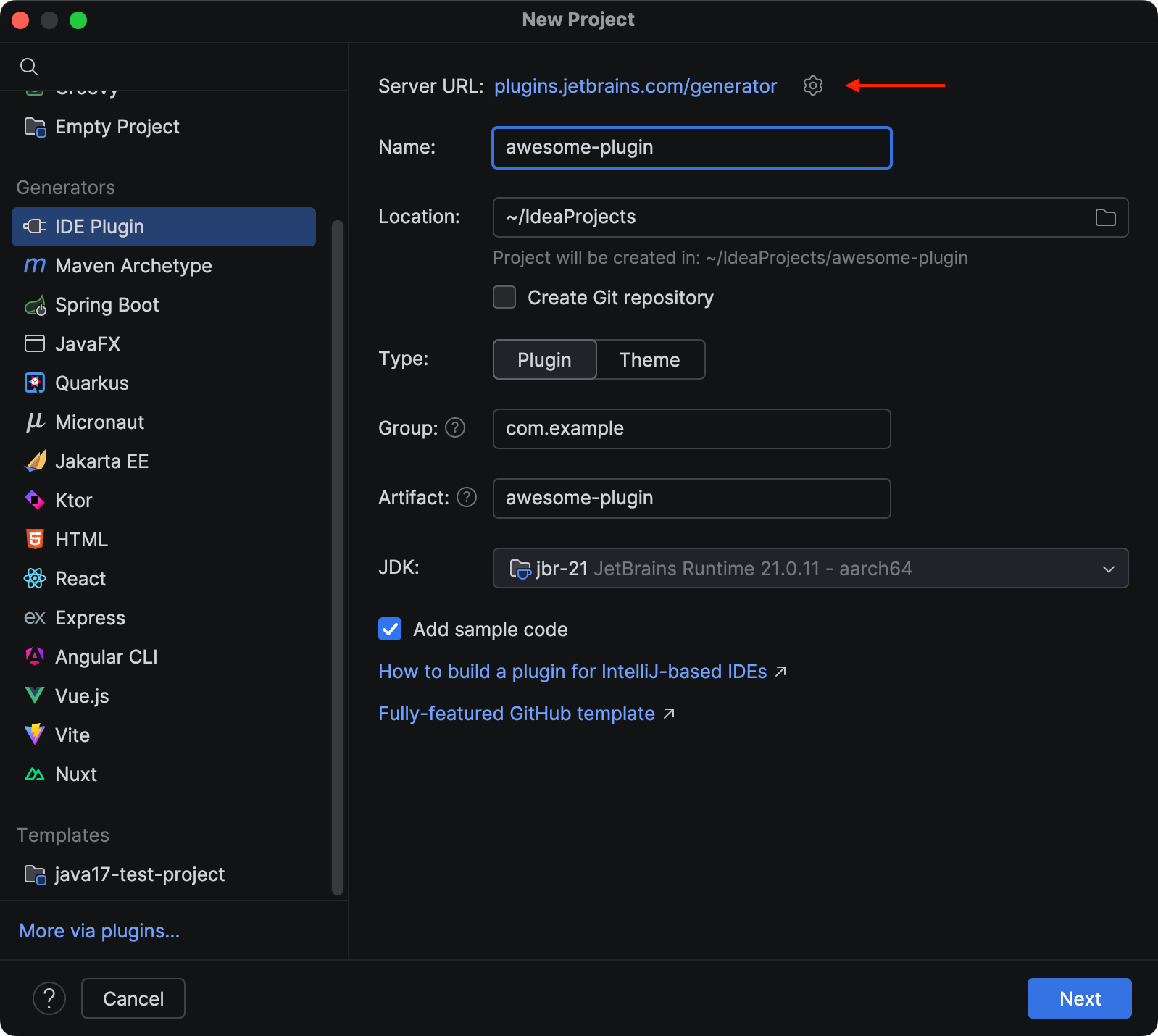
The Server URL field contains the URL of of the API that is used to generate plugins. Clicking it will open the web UI page in the default system browser.
The second page is very similar to the previous generator:
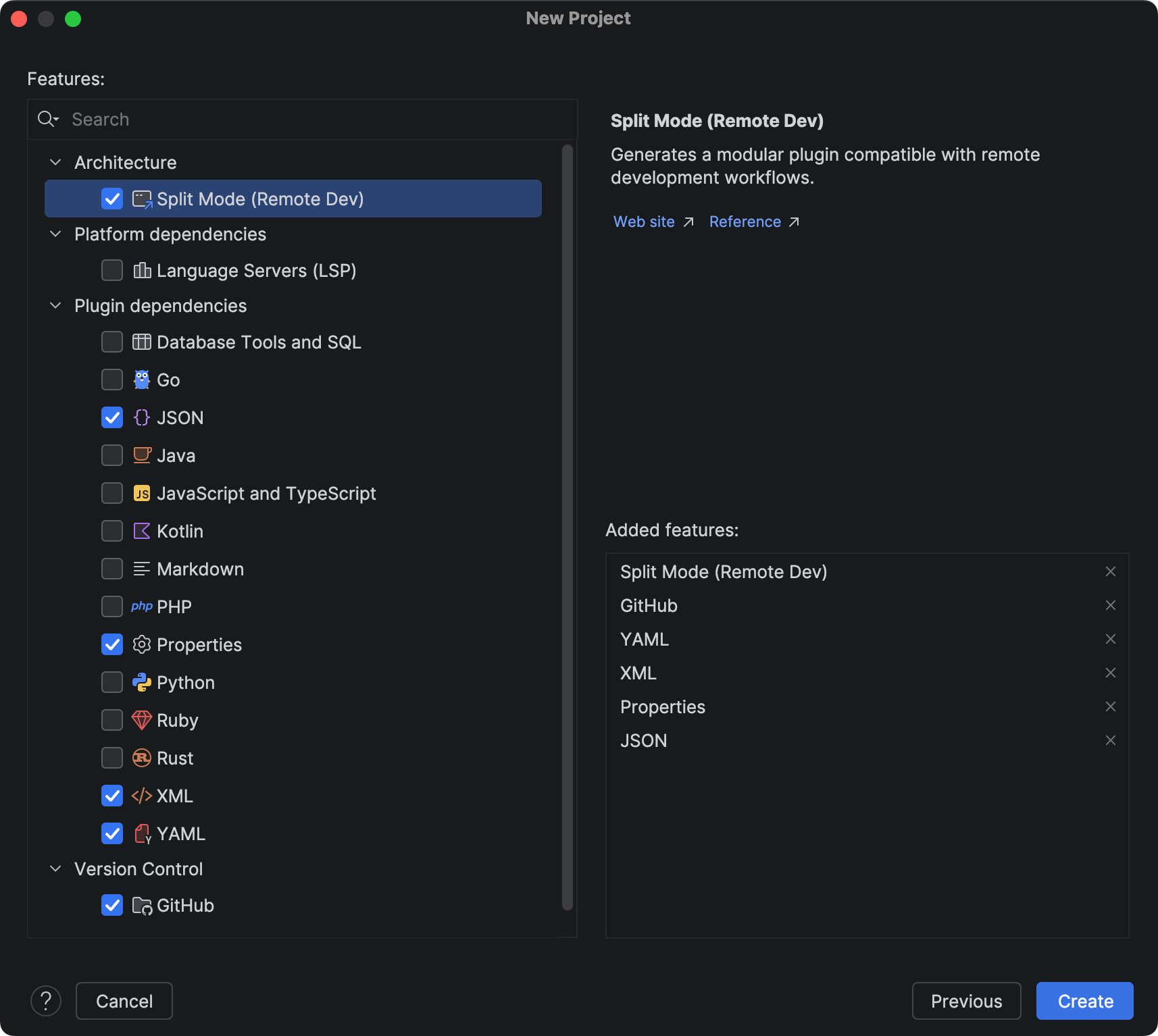
In addition to previously available dependencies, it contains:
- The Split Mode (Remote Dev) feature under the Architecture group. Checking it will generate a plugin that’s ready for remote development scenarios. See the Split Mode (Remote Development) section in the SDK docs for more information.
- The GitHub feature under the Version Control group. It includes workflows, issue templates, and Dependabot configuration, all available in the IntelliJ Platform GitHub Template. Information about connecting the created project to a GitHub repository is described in the generated README.md file.
Web UI
The web UI allows you to generate and download plugins outside the IDE. It provides the same features as the IDE client and has a straightforward UI:
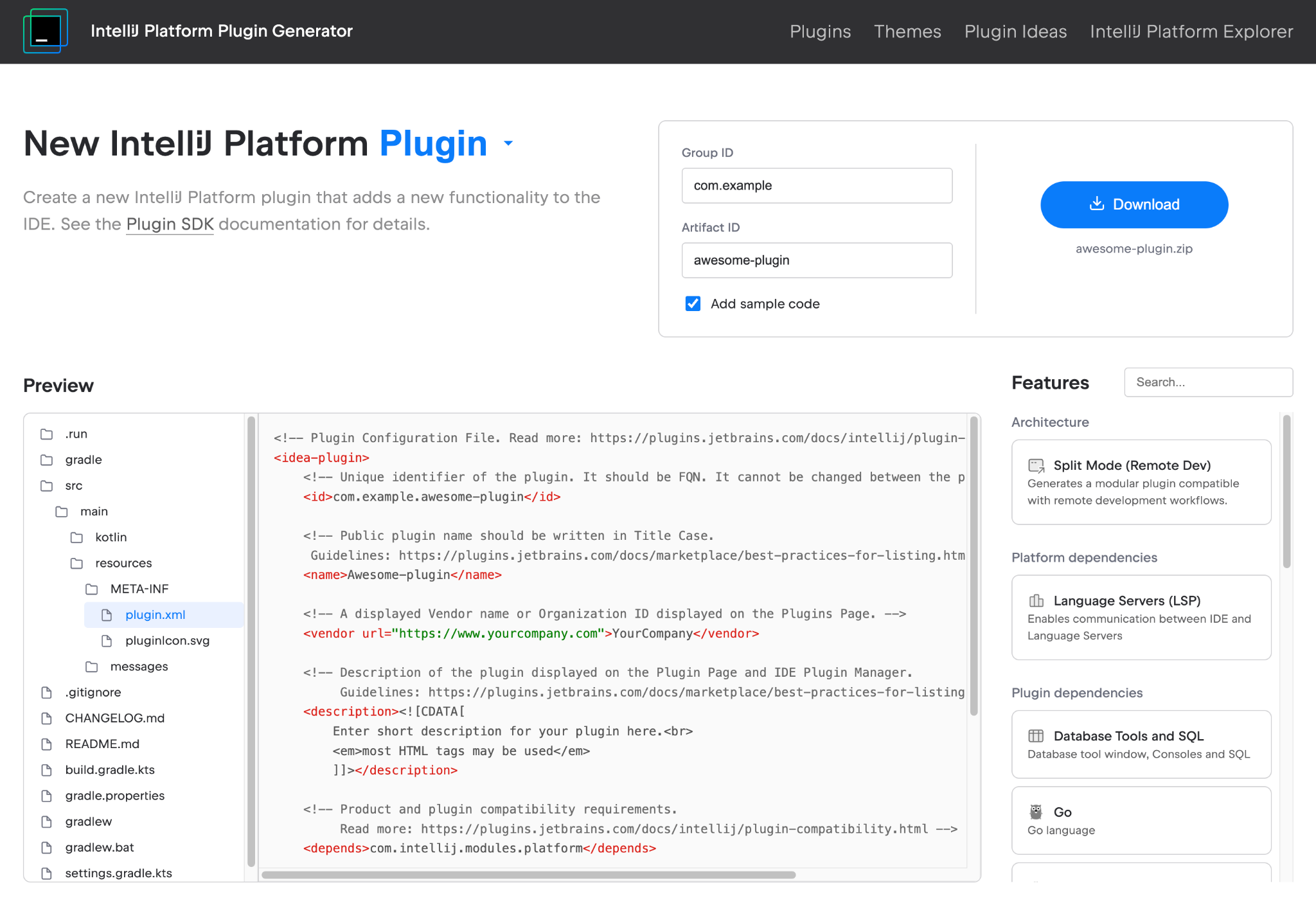
In the header, select the plugin type: plugin or theme. Then, select the features you want to include in the generated project. The Preview area allows you to browse project files, which can help you understand how selected features affect the output. Once you’ve provided all the necessary information and selected the options you need, click the Download button to generate and download the plugin project. Now you can open it in your IDE.
Plans
We’re planning to continue expanding the IDE plugin generator by introducing new features gradually, for example, UI integration tests or a Qodana setup for reporting plugin issues locally or on CI/CD servers.
Try out the new generator and let us know what you think in the comments section or on the JetBrains Platform forum. What missing features would you like to see added?
Subscribe to JetBrains Platform updates
0 Comments
Log in to join the conversation.No comments yet. Be the first to share your thoughts.