
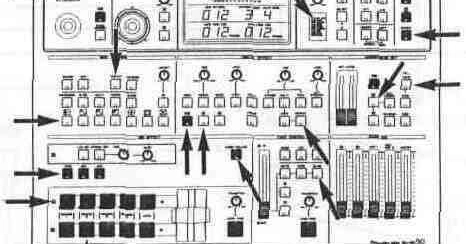
In which a 1990s two-bus video mixer is reduced to a reducer, and the operating manual turns out to be a test suite.

The Panasonic WJ-MX50 was a desktop digital A/V mixer sold in the early 1990s for wedding videographers, cable-access studios, and anyone else doing A/B-roll editing on S-VHS decks. Two buses, four sources, 287 wipe patterns, a chroma keyer, a downstream keyer, eight event memories, and a joystick. The whole thing was defined by a 40-page operating manual that is unusually precise about behavior: which button blinks when, which effect excludes which, how many frames an auto-fade may take (0 to 510, in steps of 2 — not 1, not 5).
That is what Panasonic sold it for. It is not what we used it for. Well into the 2000s, this thing was on stage with us in techno clubs, doing VJ duty for hours at a stretch. Two of its four channels were fed by computers running VJ software; the others carried digital video players and stills, depending on the club setup. The computers generated the material, but the MX50 is where the performance happened. Used that way, it stops being an editing appliance and becomes an instrument: the lever is played, not set; the joystick throws a mosaic block around the screen in time with the kick; Auto Take with the transition control at minimum is a percussion button. It is a profoundly interactive way to do visuals — interactive enough that people watching us work the panel regularly mistook us for the DJs, or for a live act. Nobody mistakes a laptop VJ for anything.
So when I set out to reproduce the unit in a browser, the question was never whether it could be made to look like an MX50. The question was whether it could be made to behave like one — block for block, blink for blink — because an instrument lives in its behavior, and twenty-year-old muscle memory is an unforgiving reviewer. The manual served as the specification of record; my hands served as the acceptance test. The result is web-mx-50: vanilla TypeScript, WebGPU for the video path, Web Audio for the mixer, no framework, no bundler, and about 5,700 lines of source. This article describes the parts of the exercise that turned out to be interesting. The artwork is not one of them.
The manual is the program
The first job was not code. It was reading the manual until it stopped being a manual and started being a data structure. The MX50's feature set looks sprawling, but it decomposes cleanly, because the hardware itself was built from blocks wired in a fixed order:
Source -> bus assignment -> Colour Correction -> Digital Effect
       -> Mix/Wipe -> Downstream Key -> Fade -> Program Out
Enter fullscreen mode Exit fullscreen mode
That order is not an implementation detail; it is observable behavior. The downstream key sits after the effects, which is why a title stays sharp over a mosaic. The fade sits last, which is why you can fade the video out and leave the title standing. So the first architectural decision was to make the block order structural: the renderer is a sequence of passes in exactly that order, and no code path can reorder them. The signal graph is written down once, in one module, and everything else reads it.
The second observation was that nearly all of the manual's fussy details are state transitions, not pixels. "Press A once, the LED blinks and CHROMA is active; press again, the LED goes solid and the RGB joystick is added; press a third time, correction is off." "If Matte is selected on a bus and you press that bus's direct-out button, the unit outputs the blinking substitute source instead." "Still switches off automatically when Strobe is engaged, but Trail may run on top of Still." None of that needs a GPU to verify. It needs a state machine and someone patient enough to transcribe the manual into scenarios.
One value, one reducer
The entire panel — both buses, the matte generator, the wipe pattern selection, the DSK sliders, the fade enables, all eight event memories — is a single plain JSON-serializable value. Every change goes through one pure reducer as a typed command. No classes, no observables, no GPU handles or HTMLVideoElement references inside the state; device bindings are referenced by id and resolved outside the store.
This is not a fashionable choice so much as a forced one, and the hardware forced it twice. First, the MX50 has Event Memory: eight snapshots of the complete panel, storable and recallable at the press of a button. If your state is one plain value, Event Memory is structuredClone and an array of eight slots. If your state is scattered across component instances, Event Memory is a research project. Second, the unit holds its settings across power cycles (about a week on the internal backup, says the manual), which maps to schema-versioned browser storage — again trivial if the state is one value, and miserable otherwise.
The same store made the control layer thin. The original unit had a GPI contact input and an RS-422 port for an edit controller. The browser equivalent is a mapping layer that normalizes keyboard, gamepad, MIDI, and a small automation API onto the same command vocabulary the front panel uses. A MIDI fader and the on-screen lever end up as the same command with a different origin, which is exactly how the hardware treated its own remote protocol. This layer is also where the instrument angle survives translation: a screen full of widgets is not something you can play with your eyes on the crowd, but a MIDI controller with a real crossfader is, and mapping one onto the MX50's command set takes a table, not a subsystem.
Cucumber, of all things
The behavioral spine of the project is 536 Gherkin scenarios (3,921 steps) in 26 .feature files, one per hardware block, each scenario ground-truthed against a section of the manual. Alongside them run 208 conventional unit tests. All of it executes headlessly against the real domain code — no GPU, no DOM, no browser.
I am aware that Cucumber has a reputation, mostly earned, as a ceremony generator for enterprise projects where nobody reads the features. Here it did honest work, for one reason: the source material was already written in Gherkin's register. The manual says things like "When the SELECT button is pressed, the color indicated on the Matte Color Indicator changes from lower to upper. The Black will be selected after the Color Bar." That is a scenario. You transcribe it, wire the steps to the reducer, and now a forty-page document from 1992 fails your build when you get the matte cycling order wrong. When behavior and code disagree, the feature file wins until a scenario is deliberately changed — a policy that sounds bureaucratic and in practice meant the manual kept catching me.
The wipe engine benefited most from this. The MX50's 287 wipe patterns are not a list; they are a small algebra. Seven pattern families, each cycling four variants, times a set of stackable modifiers (Compression, Slide, Multi, Pairing, Blinds), with a legality table for which combinations exist and a numbering scheme where pattern n and pattern n+128 are the same wipe reversed. Numbers above 255 exist on the panel but cannot be addressed over RS-422, and the external edit controller could only call 01–99, with 99 meaning "whatever is currently set up" — an escape hatch I have come to admire. All of that is pure arithmetic and table lookups, implemented in one GPU-free module and specified exhaustively in Gherkin. The shader consumes its output; it does not reimplement it.
The GPU part
The wipe shader treats each family as an analytic signed distance field f(uv, progress, variant). The A/B mask is smoothstep(-w, +w, f); the Soft button sets the feather width w; the Border button draws a colored band where |f| is small, with the color computed CPU-side as the complement of the current matte color, exactly as the manual specifies. Reverse mirrors a coordinate, Aspect scales one axis for the square family, Multi tiles the coordinate space, Pairing mirrors it before evaluation. One shader, one uniform block, seven fields.
Two decisions here deserve a note because they are where fidelity was deliberately bent.
The first: no NTSC. The real unit sampled 8-bit component video at 4:1:1 and juggled interlaced fields; its Frame button traded vertical resolution against interlace flicker. Browser sources arrive as progressive full-resolution RGBA frames on a compositor clock. Emulating chroma subsampling, field parity, and genlock drift would mean synthesizing artifacts the input never had — fiction, not emulation. So the working representation is linear-light RGBA with sRGB output, the compositing math is done in linear space (do this, or your wipe edges gamma-darken), and the Frame button's behavior is documented as moot. The substrate was deferred; the behavior was not.
The second: the frame synchronizer, the MX50's headline feature in 1992, is not built, because the problem it solved no longer exists. What survives from that silicon is its side effect — per-bus frame memory — which is what Still, Strobe, Multi, and Trail actually consume. Those four effects share one GPU frame-store per bus, and because they share it, the hardware's odd exclusion rules (Still and Strobe are mutually exclusive; Trail rides on Still) fall out of the design rather than being bolted on. It is pleasant when the original engineers' constraints explain your own.
Timing, or why 300 frames is 300 frames
Auto Take and Auto Fade run 0–510 frames in 2-frame steps, pausable mid-flight. In a club this is not a convenience feature; it is how you land a transition on a phrase boundary — dial the frame count once, then fire it on the one. A transition whose duration wobbles with the display refresh rate would be useless for that. And if you drive it from requestAnimationFrame deltas, that is what you get: a 300-frame fade takes a different wall time on a 60 Hz and a 144 Hz monitor, and your tests need a browser besides. Instead there is a fixed-timestep logical clock: an accumulator converts real elapsed time into whole video-frame ticks, all time-dependent logic reads ticks only, and the present loop uses the sub-tick fraction purely for interpolation. Tests step the clock directly. A 300-frame fade is 300 ticks everywhere, which is the kind of sentence you want to be able to write about a mixer.
What I would tell you if you tried this
Pick an artifact with a good manual. The MX50 succeeded here because Panasonic's technical writers in 1992 specified blinking LEDs and frame counts; a vaguer manual would have left me inventing behavior and calling it fidelity. Transcribe first, code second — the feature files were worth more than any framework. Keep the state in one dumb value; every hardware feature that looked hard (event memory, persistence, external control) became easy for that one reason. And decide early, in writing, which parts of the past you are not bringing along. There are sixteen architecture decision records in the repository, and the two most useful ones are the ones that say "no."
The domain model is complete and verified. The deferred remainder — mostly rendered-pixel verification and browser-only surfaces — is inventoried with a file and line number for each item, which is as close as a proof of concept gets to a clean desk.
The code is at github.com/sebs/webgpu-mx-50 The manual, as ever, is the authority — though the manual never once anticipated a smoke machine.
Status and what comes next
- The prototype source is published.
- Next: a web component, so the mixer can be dropped into any website.
- A demo setup with Source A/B, preview, and program-out channels.
- A UI reproducing the original panel layout.
- Multi-tab and multi-window operation.
- Further exploration of the mixer in a website context as a tool for visual art.
0 Comments
Log in to join the conversation.No comments yet. Be the first to share your thoughts.