
There is a bug in KDE's bug tracker that is almost as old as some of our
contributors: bug 342056,
"Ridiculously slow file copy (multiple small files)", reported by Alexander
Nestorov back in 2014. The report is blunt: copying a 15 GB folder of roughly 3
million small files took 5 to 10 hours in KDE, versus about 20 minutes with
rsync. One commenter summed up the mood:
I generally use cp and rsync instead of dolphin for anything more than a few files.
That bug has been stuck in my head for a while, so this post is about finally
fixing it. I have been working on KIO's copy path, and I want to walk
through where the time was going, some history that explains why, and show
numbers across KIO versions including a plain cp for reference.
At with any optimization, let's measure first:
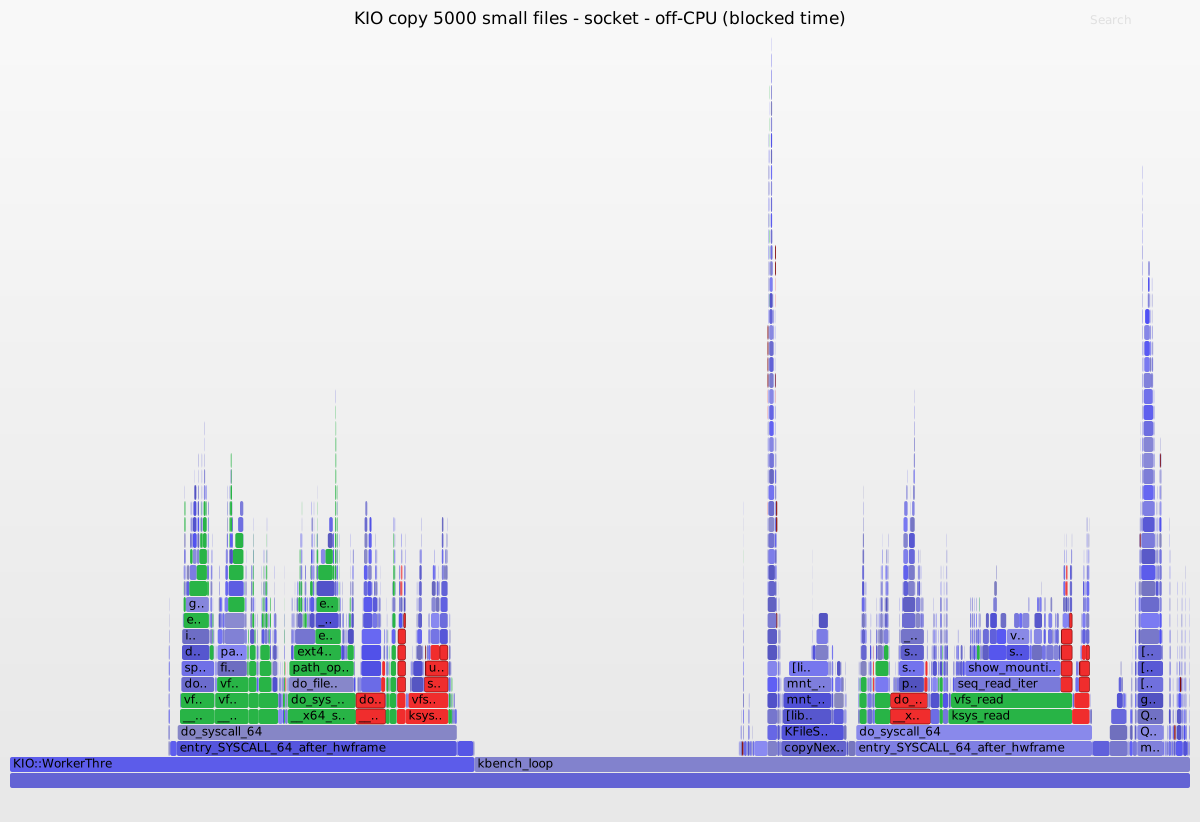
Where a KIO 6.28 copy of 5000 small files spends its blocking time, and there
is no single hotspot. Each file blocks in a burst of short syscalls: reading the
mount table (/proc/self/mountinfo), opening the source and destination, and
round-tripping a command to the worker over an internal socket. The socket
round-trips, the send and receive plus the waits for each reply, are the frames
highlighted in red, about 15% of the blocking here, spread as thin slivers
across both threads because every one of the thousands of files pays them. The
frames in green are the real filesystem work the copy cannot avoid: the statx
and openat calls, copy_file_range moving the bytes, and the ext4 metadata
updates beneath them. That per-file storm, not any single call, is what the rest
of this post discusses.
(Off-CPU flame graph from sched:sched_switch, weighted by number of blocking
switches; click to open the full SVG.)
A little history
KIO is the layer behind almost every file operation in KDE software, from Dolphin's copy
and paste to the network transparency that lets you open sftp:// or smb://
URLs as if they were local. Its design goes back to the KDE 2 days, around the
year 2000. Back then the answer to "how do I do I/O without freezing the UI" was
not a thread but a separate process: a worker (we used to call them kioslaves)
is launched for a protocol and talks to the application over a socket. This
predates usable threading on Linux (Native POSIX Thread
Library only landed
in Linux 2.6 in 2003), so processes plus socket IPC was the portable, robust
choice, and it still is for network protocols today: if an smb:// worker
crashes, your file manager does not go down with it.
The flip side is cost. Every request and its reply are serialized and sent over
that socket, with an event-loop hop on each side. For file:// that overhead
buys you nothing, because there is no untrusted network on the other end, just
the local disk.
In 2022 David Faure changed that: Implement running KIO workers in-process
using a thread landed in Frameworks 5.95. Since then the file worker runs on a thread inside
the application instead of as a separate process (other protocols stay
out-of-process for robustness). That removed process launch and context-switch
cost.
No socket between the thread and the app (6.29)
There was still a catch that had been hiding in plain sight: even in-process, the worker thread and the application talked to each other over a socketpair, serializing every command as if they were separate processes. Once the thread was used, that socket was pure overhead.
That's the red highlight in the first flamegraph.
So in-process workers now use a real in-memory transport instead of a loopback
socket. A new ThreadConnectionBackend handles commands, and for reads the actual
data buffer, straight to the peer thread, with no serialization and no syscall,
which makes in-process file reads zero-copy. This is the biggest single jump in
the numbers below, and it has landed on master for 6.29
(kio!2279).
Next: batching the copy and the stat (under review)
The changes above make each command cheap. The remaining cost is that there are
still so many of them: copying N files is N separate file_copy jobs, each one
going through the job scheduler and taking its own round-trip to the worker. For
many small files that fixed per-file cost, not the data, is what dominates.
CopyJob can dispatch a whole batch of plain local-to-local files to the worker
in one command, and the worker copies them (using copy_file_range,
and reflink on filesystems like Btrfs or XFS that support it). Each file still
gets its progress signal, its byte accounting, its undo entry, and anything
the worker cannot do blindly — an existing destination, an unreadable source, a
rename or skip decision — is handed back to the normal per-file path. The gate is
conservative on purpose so a hung mount can never freeze the batch
(kio!2282).
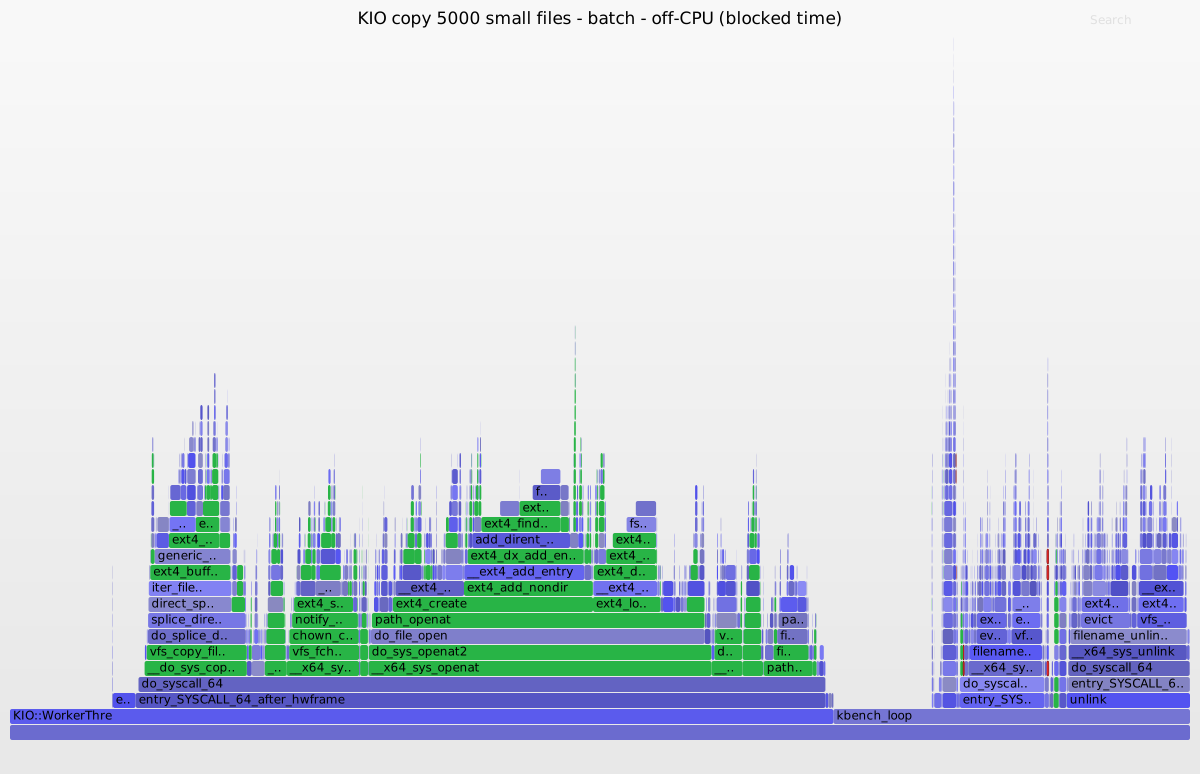
The same copy on 6.29 with batch-copy: the red socket round-trips are gone. Two
things removed them: the in-memory transport from the previous section (no
socketpair at all) and batch-copy folding a whole run of files into one command
instead of one round-trip each. What is left is real filesystem work: the green
frames are the copy itself, copy_file_range moving the bytes, the openat and
statx calls, and the ext4 metadata beneath them. The wide plateau that is not
green is the benchmark loop deleting each pass's files before the next run
(unlink), which is teardown rather than part of the copy.
Before copying, CopyJob stats every source, which is another per-file
round-trip. The follow-up batches the stat phase over the same in-process lane.
This is the batch-copy-stat column below.
Both of these are under review and targeted at a release after 6.29, so treat their columns in the table as a preview of what is coming rather than something you can install today.
Numbers
Methodology: a 13th-gen Intel Core i7-1365U laptop, everything built
RelWithDebInfo without any sanitizer, copying onto a real ext4 volume (so no
reflink shortcut, copy_file_range moves real bytes). Each KIO version supplies
both its own libKIOCore and its own kio_file worker. Times are the median of
5 runs (3 for the large set) after a discarded warm-up, so caches are warm and
equal for every version. cp -r --preserve=mode,timestamps is included as the
floor, since that is what the bug reporter reached for instead of Dolphin.
5000 files of 4 KB each (the many-small-files case from the bug):
| Version | Median time |
|---|---|
cp -r (coreutils) | 81 ms |
| KIO 6.28.0 | 1616 ms |
| KIO 6.29-dev (master) | 396 ms |
| KIO 6.29-dev + batch-copy | 88 ms |
| KIO 6.29-dev + batch-copy-stat | 93 ms |
1000 files of 5 MB each (bulk data, where the copy is I/O-bound):
| Version | Median time |
|---|---|
cp -r (coreutils) | 1312 ms |
| KIO 6.28.0 | 1997 ms |
| KIO 6.29-dev (master) | 1687 ms |
| KIO 6.29-dev + batch-copy | 1506 ms |
| KIO 6.29-dev + batch-copy-stat | 1454 ms |
The small-files case is the story. KIO 6.28 was about 20x slower than cp,
which is exactly the ratio the 2014 report complained about. Removing the socket
for in-process workers, together with no longer probing the destination
filesystem once per file, takes it from about 1.6 s to 0.4 s (roughly 4x).
Batching the copy takes it to 88 ms, essentially cp speed and about 18x faster
than 6.28. That "I use cp instead of dolphin" line finally has an answer.
The large-file case was already well covered before any of this work, and the
table shows it: the copy is bound by moving the bytes, so even KIO 6.28 stayed
close to cp there, and the per-file optimizations barely move the number
(batch-copy lands within about 15% of cp). That is the whole reason this
effort targets many small files instead, where the fixed per-file cost, not the
data, is what dominates.
batch-copy and batch-copy-stat come out tied here: the benchmark copies a single
directory, so its entries arrive in one listing and batch-stat has nothing to
batch. It helps the other case, copying a large selection of individual files
that would otherwise be one stat round-trip each. Since it removes the
round-trip and not the stat call, the win is largest when stats are cheap, not
when the disk is slow. Read the two as equal on this test.
And cp will almost certainly stay a little ahead, by design: KIO does more
than copy the bytes. It reports per-file progress, can be paused and cancelled,
keeps an undo record, preserves permissions and timestamps, resolves conflicts,
and tells any open file manager what changed so its view refreshes. That work is
not free, and the goal was never to beat cp, only to make the local case fast
enough that reaching for cp instead of Dolphin stops being the obvious choice.
Caveats and what is next
These are laptop numbers on one ext4 disk with warm caches, meant to compare versions, not to be absolute. On Btrfs or XFS the batch path reflinks instead of copying, which changes the large-file picture entirely. The batch fast path only engages for plain local-to-local copies on a responsive filesystem; anything else (network, FAT/NTFS, conflicts needing a dialog) falls back to the existing per-file path, unchanged.
Thanks to David Faure for the in-process worker threads that made all of this possible, to Frank Reininghaus for the earlier listing fixes, and to Alexander Nestorov for a bug report that aged well enough to still be worth closing.
That's all, folks.
0 Comments
Log in to join the conversation.No comments yet. Be the first to share your thoughts.