
现代 Web 开发已经变得极其强大,但也越来越复杂。
许多项目在写第一个页面之前就安装了数百兆字节的依赖。框架、打包工具、路由器、模板系统、CSS 工具和运行时库都解决了重要问题,但同时也引入了额外的复杂性。
我想要一种不同的方式。
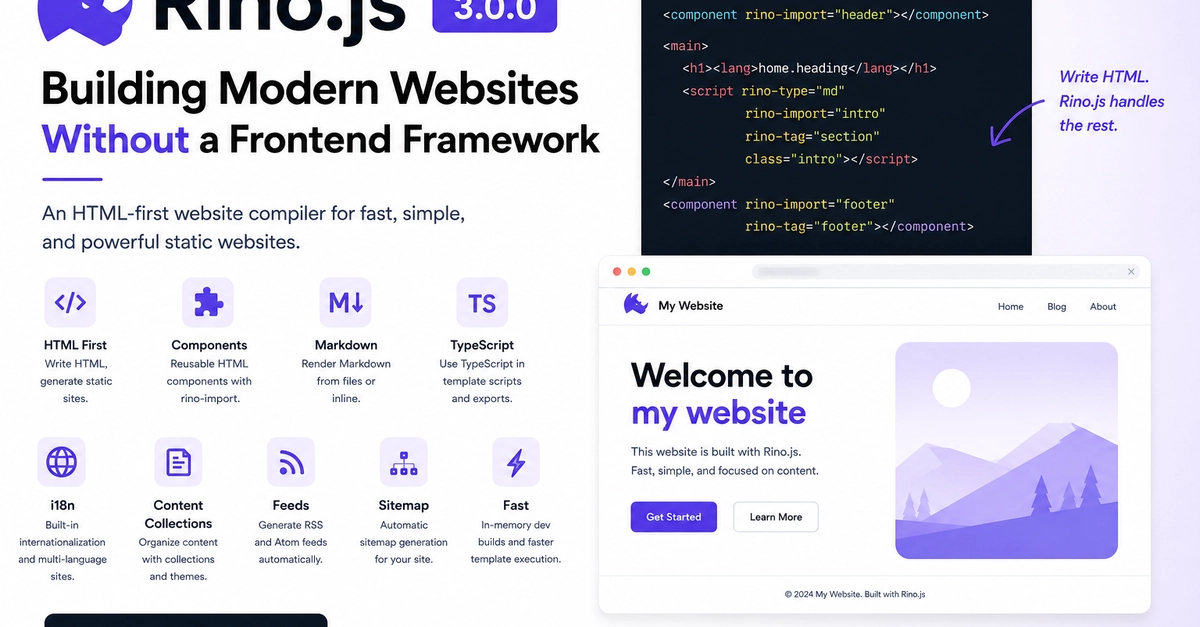
我希望从普通的 HTML 开始构建网站,同时仍能提供开发者如今期望的特性:
- 可复用组件
- Markdown 支持
- TypeScript
- CSS 和 JavaScript 打包
- 国际化 (i18n)
- 内容集合
- RSS/Atom 订阅源
- 站点地图生成
- 快速开发构建
这个想法最终变成了 Rino.js。
什么是 Rino.js?
Rino.js 是一款以 HTML 为优先的网站编译器,用于构建静态网站、文档、博客、作品集、企业网站以及其他内容驱动的项目。
Rino.js 没有引入自定义模板语言,也没有要求使用前端框架,而是将 HTML 作为主要语言。页面保持为有效的 HTML,同时通过少量构建时约定添加额外功能。
目标很简单:
编写 HTML,生成优化后的静态网站。
为什么选择 HTML First?
HTML 已经存在数十年,但现代 Web 开发通常将其视为由其他语言生成的内容。
Rino.js 采取了相反的做法。
无需在 JSX 或其他模板语言中编写组件,组件本身就是 HTML 文件。
<component rino-import="header"></component>
Enter fullscreen mode Exit fullscreen mode
仅此而已。
编译器会在构建过程中替换该组件,生成不含运行时依赖的纯静态 HTML。
开始使用 Rino.js
Rino.js 提供了一条命令,用于创建默认项目。
npm create rino@latest
Enter fullscreen mode Exit fullscreen mode
项目结构
一个典型的 Rino.js 项目通常如下所示:
my-site/
  rino-config.js
  dev.js
  generate.js
  feed.js
  sitemap.js
  backoffice.js
  pages/
    index.html
    about.html
  components/
    header.html
    footer.html
  public/
    images/
      photo.webp
  scripts/
    export/
      app.js
      dashboard.ts
  styles/
    export/
      site.css
  mds/
    intro.md
  contents/
    en/
      blog/
        1-first-post.md
  content-theme/
    en/
      content.html
      content-list.html
  i18n/
    en/
      index.json
    ko/
      index.json
Enter fullscreen mode Exit fullscreen mode
只需包含你需要的文件夹。对于小型静态站点,pages/、components/、public/、scripts/export/ 和 styles/export/ 可能就足够了。
配置
项目配置位于 rino-config.js。
export default {
  dist: "./dist",
  port: 3000,
  site: {
    url: "https://example.com",
  },
  sitemap: ["https://example.com/custom-page"],
  i18n: {
    defaultLocale: "en",
    locales: ["en", "ko"],
  },
};
Enter fullscreen mode Exit fullscreen mode
dist 控制输出文件夹,port 控制开发服务器,site.url 用于站点地图和订阅源,sitemap 添加额外 URL,i18n 控制本地化页面生成。
页面
pages/ 中的文件会成为输出中的 HTML 文件。
pages/index.html        -> dist/index.html
pages/about.html        -> dist/about.html
pages/blog/index.html   -> dist/blog/index.html
Enter fullscreen mode Exit fullscreen mode
页面是普通的 HTML,可包含可选的 Rino 语法:
<!doctype html>
<html>
  <head>
    <title><lang>site.title</lang></title>
    <link rel="stylesheet" href="/styles/site.css" />
    <script src="/scripts/app.js"></script>
  </head>
  <body>
    <component rino-import="header"></component>

    <main>
      <h1><lang>home.heading</lang></h1>
      <script rino-type="md" rino-import="intro" rino-tag="section"></script>
    </main>

    <component rino-import="footer" rino-tag="footer"></component>
  </body>
</html>
Enter fullscreen mode Exit fullscreen mode
组件
组件位于 components/ 中。使用 <component> 可在页面或其他组件中渲染它。
<component rino-import="header"></component>
Enter fullscreen mode Exit fullscreen mode
这会加载:
components/header.html
Enter fullscreen mode Exit fullscreen mode
支持嵌套组件路径:
<component rino-import="layout/sidebar"></component>
Enter fullscreen mode Exit fullscreen mode
这会加载:
components/layout/sidebar.html
Enter fullscreen mode Exit fullscreen mode
当你想将组件输出包裹在一个元素中并向该包裹元素传递属性时,请使用 rino-tag。
<component
  rino-import="button"
  rino-tag="button"
  type="button"
  class="button"
  onclick="alert('Hello')"
></component>
Enter fullscreen mode Exit fullscreen mode
如果 components/button.html 包含:
Click me
Enter fullscreen mode Exit fullscreen mode
生成的 HTML 将变为:
<button type="button" class="button" onclick="alert('Hello')">Click me</button>
Enter fullscreen mode Exit fullscreen mode
在版本 3 中,请使用 rino-import。旧的 rino-path 语法不再受支持。
Markdown
Rino.js 可以渲染来自 mds/ 的 Markdown 片段。
mds/intro.md
Enter fullscreen mode Exit fullscreen mode
<script rino-type="md" rino-import="intro" rino-tag="section" class="intro"></script>
Enter fullscreen mode Exit fullscreen mode
这会在 <section> 内渲染 mds/intro.md。
你也可以内联编写 Markdown:
<script rino-type="markdown" rino-tag="article" type="text/markdown">
  ## Hello from Markdown

  This content is rendered during the build.
</script>
Enter fullscreen mode Exit fullscreen mode
支持的 Markdown 类型有 md 和 markdown。
模板脚本
模板脚本在生成期间运行。它们通过 console.log 将 HTML 输出到生成的页面中。
JavaScript 模板脚本:
<script rino-type="js" type="text/javascript">
  console.log("<ul>");
  for (const item of ["Home", "Blog", "About"]) {
    console.log(`<li>${item}</li>`);
  }
  console.log("</ul>");
</script>
Enter fullscreen mode Exit fullscreen mode
TypeScript 模板脚本:
<script rino-type="ts" type="text/typescript">
  const message: string = "Generated with TypeScript";
  console.log(`<p>${message}</p>`);
</script>
Enter fullscreen mode Exit fullscreen mode
模板脚本可以使用 Node.js 导入:
<script rino-type="js" type="text/javascript">
  import os from "os";
  console.log(`<p>Built on ${os.type()}</p>`);
</script>
Enter fullscreen mode Exit fullscreen mode
在版本 3 中,模板执行速度更快,因为 Rino.js 会复用一个隔离的子进程运行器,而不是为每个模板脚本标签创建新进程。
浏览器脚本
浏览器脚本是普通的浏览器 JavaScript。请将源文件放在 scripts/export/ 中。
scripts/export/app.js -> dist/scripts/app.js
scripts/export/app.ts -> dist/scripts/app.js
Enter fullscreen mode Exit fullscreen mode
从 HTML 中引用生成的文件:
<script src="/scripts/app.js"></script>
Enter fullscreen mode Exit fullscreen mode
JavaScript 示例:
document.querySelector("button")?.addEventListener("click", () => {
  console.log("Clicked");
});
Enter fullscreen mode Exit fullscreen mode
TypeScript 示例:
const button = document.querySelector<HTMLButtonElement>("button");

button?.addEventListener("click", () => {
  console.log("Clicked with TypeScript");
});
Enter fullscreen mode Exit fullscreen mode
Rino.js 会打包脚本并压缩输出。压缩有助于减小文件体积。
CSS
将 CSS 文件放在 styles/export/ 中。
styles/export/site.css -> dist/styles/site.css
Enter fullscreen mode Exit fullscreen mode
@import "../theme.css";

body {
  font-family: system-ui, sans-serif;
}
Enter fullscreen mode Exit fullscreen mode
引用生成的 CSS:
<link rel="stylesheet" href="/styles/site.css" />
Enter fullscreen mode Exit fullscreen mode
Rino.js 会解析本地 CSS 导入、跳过循环导入、跳过 URL 导入,并压缩 CSS 输出。
公共资源
public/ 中的文件会被复制到输出根目录。
public/favicon.ico       -> dist/favicon.ico
public/images/photo.webp -> dist/images/photo.webp
Enter fullscreen mode Exit fullscreen mode
使用根相对路径:
<img src="/images/photo.webp" alt="Photo" />
<link rel="icon" href="/favicon.ico" />
Enter fullscreen mode Exit fullscreen mode
内联样式、JavaScript 和 TypeScript 导出
rino-export 允许页面或组件将相关的 CSS 和 JavaScript 保持在 HTML 附近,同时仍生成外部文件。
导出的标签会从最终 HTML 中移除,并写入生成的资源。
CSS 导出
<section class="callout">
  <h2>Hello</h2>
</section>

<style rino-export="/site.css">
  .callout {
    border: 1px solid #ddd;
    padding: 1rem;
  }
</style>
Enter fullscreen mode Exit fullscreen mode
这会写入:
dist/styles/site.css
Enter fullscreen mode Exit fullscreen mode
JavaScript 导出
<script rino-export="/site.js">
  console.log("Exported browser script");

  window.openMenu = function () {
    document.body.classList.toggle("menu-open");
  };
</script>
Enter fullscreen mode Exit fullscreen mode
这会写入:
dist/scripts/site.js
Enter fullscreen mode Exit fullscreen mode
TypeScript 导出
<script rino-export="/site.ts" type="text/typescript">
  const message: string = "Exported TypeScript";
  console.log(message);
</script>
Enter fullscreen mode Exit fullscreen mode
这会写入 JavaScript:
dist/scripts/site.js
Enter fullscreen mode Exit fullscreen mode
如果 bundle 之外的代码需要调用函数,请将其附加到 window。
<script rino-export="/site.ts" type="text/typescript">
  (window as any).testExportTypescript = function (): void {
    console.log("Called from outside");
  };
</script>
Enter fullscreen mode Exit fullscreen mode
然后从 HTML 中调用它:
<button onclick="window.testExportTypescript()">Run</button>
Enter fullscreen mode Exit fullscreen mode
多个标签可以导出到同一文件。Rino.js 会追加唯一的块,并忽略完全相同的块。
i18n
在页面和组件中使用 <lang> 标签:
<h1><lang>name</lang></h1>
<p><lang>body.hero.copy</lang></p>
<p><lang>items[0].title</lang></p>
Enter fullscreen mode Exit fullscreen mode
在 i18n/{locale}/ 中创建匹配的 JSON 文件。
pages/index.html
i18n/en/index.json
i18n/ko/index.json
Enter fullscreen mode Exit fullscreen mode
i18n/en/index.json 示例:
{
  "name": "Rino.js",
  "body": {
    "hero": {
      "copy": "Simple static websites from HTML."
    }
  },
  "items": [
    {
      "title": "First item"
    }
  ]
}
Enter fullscreen mode Exit fullscreen mode
默认语言环境会在普通页面路径下生成。其他语言环境会生成在各自的语言前缀下,例如 /ko/index.html。
缺失的键会保留在 HTML 中,而不会中断构建。若要保留字面的语言标签,请转义它:
\<lang>name\</lang>
Enter fullscreen mode Exit fullscreen mode
内容集合
Rino.js 可以构建 Markdown 内容集合,例如博客。
contents/en/blog/1-first-post.md
Enter fullscreen mode Exit fullscreen mode
Markdown 内容可以在 HTML 注释中以 JSON 元数据开头:
<!--
{
  "title": "Welcome to the Blog",
  "time": "2026-07-29T00:00:00.000Z",
  "description": "The first post on our Rino.js blog."
}
-->

# Hello World

This is the first post.
Enter fullscreen mode Exit fullscreen mode
这会生成:
dist/contents/en/blog/1-first-post.html
Enter fullscreen mode Exit fullscreen mode
匹配的模板位于:
content-theme/en/content.html
Enter fullscreen mode Exit fullscreen mode
内容模板示例:
<!doctype html>
<html lang="en">
  <head>
    <title>{{ content.title }}</title>
  </head>
  <body>
    <main>
      <h1>{{ content.title }}</h1>
      <p>{{ content.time }}</p>
      <article>{{ content.body }}</article>
    </main>
  </body>
</html>
Enter fullscreen mode Exit fullscreen mode
你可以访问元数据和生成的字段:
{{ content.title }}
{{ content.description }}
{{ content.body }}
{{ content.urlPath }}
{{ content.nearby[0].title }}
Enter fullscreen mode Exit fullscreen mode
对于循环,请使用模板脚本:
<script rino-type="js" type="text/javascript">
  const args = process.argv;
  const content = JSON.parse(args[args.length - 1]);

  console.log("<ul>");
  for (const post of content.nearby || []) {
    console.log(`<li><a href="${post.link}">${post.title}</a></li>`);
  }
  console.log("</ul>");
</script>
Enter fullscreen mode Exit fullscreen mode
内容列表
内容列表模板与内容模板相邻:
content-theme/en/content-list.html
Enter fullscreen mode Exit fullscreen mode
Rino.js 会为每个分类创建分页列表页:
dist/contents-list/en/blog/blog-1.html
Enter fullscreen mode Exit fullscreen mode
示例:
<ol>
  <script rino-type="js" type="text/javascript">
    const args = process.argv;
    const data = JSON.parse(args[args.length - 1]);

    for (const item of data.contentList) {
      console.log(`<li><a href="${item.link}">${item.title}</a></li>`);
    }
  </script>
</ol>
Enter fullscreen mode Exit fullscreen mode
可用数据包括:
{{ contentList[0].title }}
{{ pagination.prevLink }}
{{ pagination.nextLink }}
Enter fullscreen mode Exit fullscreen mode
通常,模板脚本是渲染数组的更好选择。
站点地图和订阅源
Rino.js 可以从页面、本地化页面、内容页面和额外配置 URL 生成站点地图。
import { generateProjectSitemapFile } from "rinojs";
import config from "./rino-config.js";

await generateProjectSitemapFile(process.cwd(), config);
Enter fullscreen mode Exit fullscreen mode
它还可以从 contents/ 生成 RSS 和 Atom 订阅源。
import { generateProjectFeedFiles } from "rinojs";
import config from "./rino-config.js";

await generateProjectFeedFiles(process.cwd(), config);
Enter fullscreen mode Exit fullscreen mode
典型输出:
dist/sitemap.xml
dist/rss.xml
dist/atom.xml
dist/rss-en.xml
dist/atom-en.xml
Enter fullscreen mode Exit fullscreen mode
我的目标
我不想再构建另一个前端框架,而是想探索纯 HTML 在轻量级编译器的帮助下能走多远。
最终的结果是一个以 HTML 为核心的工作流,同时在需要时添加实用的构建时功能。
版本 3 是一个重要的里程碑,但这只是开始。未来版本还有很多想法,我期待基于真实使用情况继续改进这个项目。
0 Comments
Log in to join the conversation.No comments yet. Be the first to share your thoughts.