
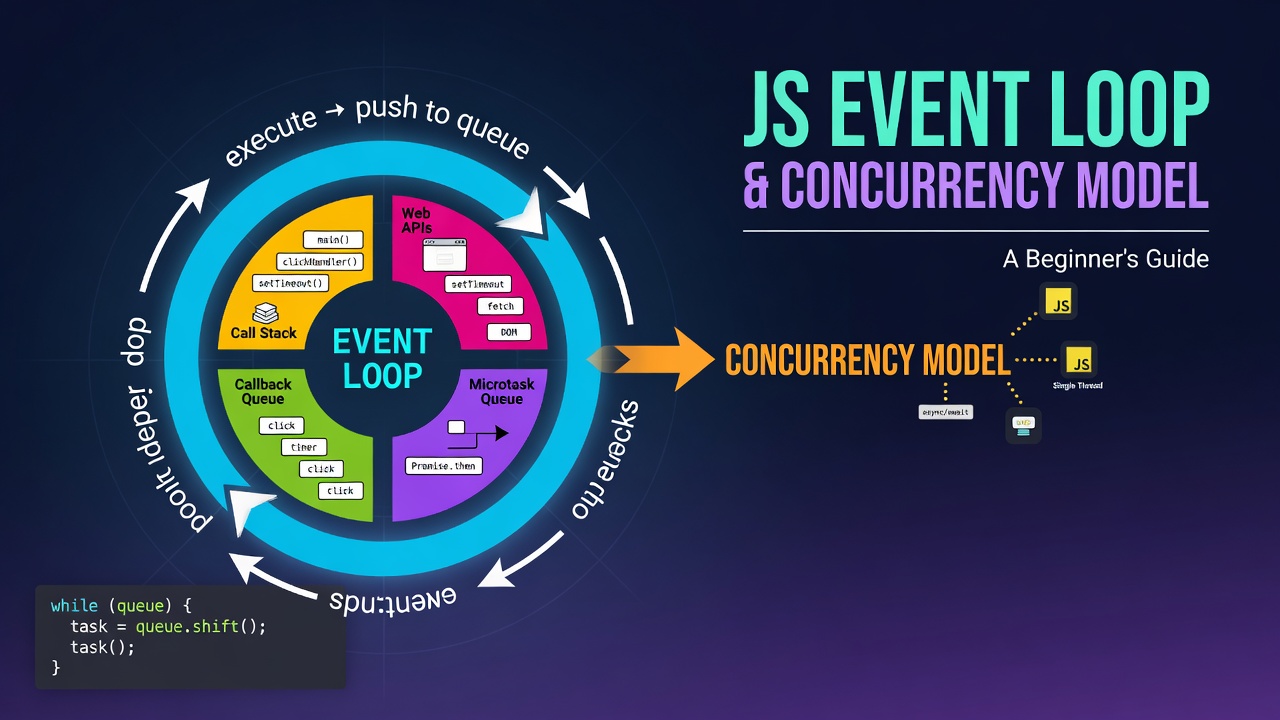
🚀 JavaScript Event Loop & Concurrency Model: A Beginner's Guide
"JavaScript is single-threaded, yet it can handle timers, API requests, user interactions, and asynchronous tasks without freezing the application. How is that possible? The answer lies in the Event Loop and JavaScript's Concurrency Model."
When I first started learning JavaScript, one question always confused me:
If JavaScript can execute only one task at a time, how does it perform multiple tasks like API calls, timers, and user interactions simultaneously?
The answer is JavaScript's Event Loop and Concurrency Model.
In this article, we'll understand how JavaScript manages asynchronous operations behind the scenes using simple explanations, diagrams, and practical examples.
📚 What You'll Learn
- What is JavaScript's Concurrency Model?
- Why JavaScript is Single-Threaded
- Call Stack
- Web APIs / Node APIs
- Callback Queue (Macrotask Queue)
- Microtask Queue
- Event Loop
-
setTimeout()vs Promises - Cooperative Concurrency
- Concurrency vs Parallelism
Let's begin!
🧵 JavaScript is Single-Threaded
JavaScript executes code using a single thread, meaning it can perform only one operation at a time.
Imagine a chef working alone in a kitchen.
If the chef starts cooking one dish, they cannot cook another dish until the first one is finished.
Similarly, JavaScript executes one statement at a time.
Example:
console.log("Task 1");
console.log("Task 2");
console.log("Task 3");
Enter fullscreen mode Exit fullscreen mode
Output
Task 1
Task 2
Task 3
Enter fullscreen mode Exit fullscreen mode
Everything runs sequentially.
🤔 Then How Does JavaScript Handle Multiple Tasks?
Modern applications need to:
- Fetch data from servers
- Wait for timers
- Read files
- Handle button clicks
- Play videos
If JavaScript waited for every operation to finish before continuing, web pages would freeze.
Instead, JavaScript uses a Concurrency Model.
⚙️ What is the Concurrency Model?
The Concurrency Model allows JavaScript to manage multiple tasks efficiently without executing them simultaneously on the main thread.
JavaScript delegates time-consuming operations to the browser (Web APIs) or Node.js (Node APIs). While those operations run outside the JavaScript engine, the main thread continues executing other code.
When the asynchronous task finishes, its callback is queued and executed later by the Event Loop.
🧱 Call Stack
What is the Call Stack?
The Call Stack is a data structure that keeps track of function execution.
It follows the LIFO (Last In, First Out) principle.
Whenever a function is called:
- It is pushed onto the stack.
- When it finishes, it is popped off.
Example
function first() {
    console.log("First");
}

function second() {
    first();
    console.log("Second");
}

second();
Enter fullscreen mode Exit fullscreen mode
Output
First
Second
Enter fullscreen mode Exit fullscreen mode
Execution
Call Stack

↓

second()

↓

first()

↓

console.log()

↓

first() removed

↓

console.log()

↓

second() removed
Enter fullscreen mode Exit fullscreen mode
🌐 Web APIs / Node APIs
JavaScript itself cannot perform operations like timers or network requests.
These features are provided by the environment.
Browser Web APIs
- setTimeout()
- setInterval()
- fetch()
- DOM Events
- localStorage
- Geolocation
Node.js APIs
- File System (fs)
- HTTP Server
- Streams
- Timers
- Process APIs
These APIs perform asynchronous work while JavaScript continues executing other code.
Example
console.log("Start");

setTimeout(() => {
    console.log("Timer Completed");
}, 2000);

console.log("End");
Enter fullscreen mode Exit fullscreen mode
Output
Start
End
Timer Completed
Enter fullscreen mode Exit fullscreen mode
Notice that JavaScript doesn't wait for two seconds.
📥 Callback Queue (Macrotask Queue)
Once an asynchronous operation completes, its callback is placed inside the Callback Queue (also called the Macrotask Queue).
Examples of Macrotasks
- setTimeout()
- setInterval()
- DOM Events
- setImmediate() (Node.js)
Example
console.log("Start");

setTimeout(() => {
    console.log("Timeout");
}, 0);

console.log("End");
Enter fullscreen mode Exit fullscreen mode
Output
Start
End
Timeout
Enter fullscreen mode Exit fullscreen mode
Even though the timer delay is 0 milliseconds, the callback executes only after the Call Stack becomes empty.
⚡ Microtask Queue
The Microtask Queue stores higher-priority asynchronous tasks.
Examples include:
- Promise.then()
- Promise.catch()
- Promise.finally()
- queueMicrotask()
Microtasks always execute before macrotasks.
Example
console.log("Start");

Promise.resolve().then(() => {
    console.log("Promise");
});

console.log("End");
Enter fullscreen mode Exit fullscreen mode
Output
Start
End
Promise
Enter fullscreen mode Exit fullscreen mode
🔄 Event Loop
What is the Event Loop?
The Event Loop is a scheduler.
Its job is to continuously monitor the Call Stack.
Whenever the Call Stack becomes empty, it checks:
- Microtask Queue
- Callback Queue
The Event Loop first executes all microtasks.
Only after the Microtask Queue is empty does it execute one macrotask.
Event Loop Workflow
JavaScript Code
        │
        ▼
   Call Stack
        │
        ▼
Async Operation
        │
        ▼
Web APIs / Node APIs
        │
        ▼
 ┌──────────────────┐
 │ Microtask Queue  │
 │ Promise.then()   │
 │ queueMicrotask() │
 └──────────────────┘
 ┌──────────────────┐
 │ Callback Queue   │
 │ setTimeout()     │
 │ DOM Events       │
 └──────────────────┘
        │
        ▼
    Event Loop
        │
        ▼
    Call Stack
Enter fullscreen mode Exit fullscreen mode
🆚 setTimeout() vs Promises
One of the most common interview questions is the execution order of setTimeout() and Promises.
Example
console.log("Start");

setTimeout(() => {
    console.log("setTimeout");
}, 0);

Promise.resolve().then(() => {
    console.log("Promise");
});

console.log("End");
Enter fullscreen mode Exit fullscreen mode
Output
Start
End
Promise
setTimeout
Enter fullscreen mode Exit fullscreen mode
Why Does Promise Execute First?
Let's understand the execution step by step.
Step 1
console.log("Start");
Enter fullscreen mode Exit fullscreen mode
Output
Start
Enter fullscreen mode Exit fullscreen mode
Step 2
setTimeout(...)
Enter fullscreen mode Exit fullscreen mode
The timer is registered with the Web API.
Step 3
Promise.resolve().then(...)
Enter fullscreen mode Exit fullscreen mode
The callback is placed inside the Microtask Queue.
Step 4
console.log("End");
Enter fullscreen mode Exit fullscreen mode
Output
End
Enter fullscreen mode Exit fullscreen mode
Step 5
The Call Stack becomes empty.
The Event Loop checks the Microtask Queue first.
Output
Promise
Enter fullscreen mode Exit fullscreen mode
Step 6
After all microtasks finish, the Event Loop executes the Callback Queue.
Output
setTimeout
Enter fullscreen mode Exit fullscreen mode
🤝 Cooperative Concurrency
JavaScript uses cooperative concurrency.
This means:
- Only one piece of JavaScript code executes at a time.
- Tasks voluntarily yield control after they finish.
- No task interrupts another task.
Example
console.log("Task 1");

setTimeout(() => {
    console.log("Task 2");
}, 0);

console.log("Task 3");
Enter fullscreen mode Exit fullscreen mode
Output
Task 1
Task 3
Task 2
Enter fullscreen mode Exit fullscreen mode
⚡ Concurrency vs Parallelism
Many beginners think these terms mean the same thing, but they are different.
Concurrency
Managing multiple tasks by switching between them efficiently.
Example:
A chef preparing multiple dishes by moving between them.
Parallelism
Executing multiple tasks at the exact same time using multiple workers or CPU cores.
Example:
Three chefs cooking three different dishes simultaneously.
JavaScript and Parallelism
JavaScript's main thread is not parallel.
However, true parallelism can be achieved using:
- Web Workers (Browser)
- Worker Threads (Node.js)
These create separate threads for CPU-intensive work.
📊 Microtask Queue vs Callback Queue
| Feature | Microtask Queue | Callback Queue |
|---|---|---|
| Priority | Higher | Lower |
| Examples | Promise.then(), catch(), finally(), queueMicrotask() | setTimeout(), setInterval(), DOM Events |
| Execution | Runs immediately after Call Stack is empty | Runs after all Microtasks finish |
📝 Key Takeaways
- JavaScript is single-threaded.
- The Call Stack executes synchronous code.
- Web APIs and Node APIs handle asynchronous operations.
- Completed asynchronous callbacks are placed into queues.
- Microtask Queue has higher priority than the Callback Queue.
- The Event Loop continuously checks the Call Stack and schedules tasks.
-
Promises always execute before
setTimeout()callbacks because microtasks are processed first. - JavaScript achieves concurrency through the Event Loop, while true parallelism requires Web Workers or Worker Threads.
🎯 Conclusion
Understanding the Event Loop and JavaScript's Concurrency Model is essential for writing efficient asynchronous code. Concepts like the Call Stack, Web APIs, task queues, and the Event Loop explain why JavaScript can remain responsive even while handling timers, network requests, and user interactions.
Once you understand these fundamentals, topics like async/await, API calls, and modern frameworks such as React and Node.js become much easier to learn because they all build on the same asynchronous execution model.
0 Comments
Log in to join the conversation.No comments yet. Be the first to share your thoughts.