
For quite some time, Meetecho has been the official tool for remote participation at IETF meetings. While this includes a plethora of different tools to support all the different features that are required in IETF meeting sessions (e.g., Zulip integration, slide sharing, queue management, polls, etc.), the core of the remote participation functionality is rooted in its WebRTC capabilities, which is powered by our open source Janus WebRTC Server. A few years ago I shared a high level overview (at the MBONED working group too) on how we use the different features Janus provides to scale all of this for thousands of participants and streams.
The IETF is also where MoQ is currently being designed and standardized, though, so, considering the WebRTC-to-MoQ gatewaying we’ve been working on recently, this got us thinking: why not try and stream the MoQ session via MoQ as well, rather than just WebRTC? This would not strictly speaking be a first, as Jordi Cenzano had already streamed a MoQ session via MoQ at IETF 120, using moq-encoder-player and moxygen. At the time, though, Jordi had to setup different captures for audio and video, while we wanted to automatically make available, via MoQ, the same exact media we would capture via WebRTC, which was an intriguing challenge.
If you’re curious about whether it worked out or not, and how, just keep reading!
How is WebRTC used at IETF meetings?
Before we jump to how MoQ was used, it may be helpful to first do a step back to the basics.
IETF meetings are hybrid events, meaning that while there are of course a lot of attendees that meet in person in the same room as in all regular conferences, there are many attending remotely as well, whether just to follow the event or to make presentations and/or engage in conversations with the other attendees, local and remote. This means that a real-time communication technology is needed to effectively “bridge” those local and remote attendees, and WebRTC is a perfect way to take care of that.
Within the context of an IETF meeting sessions, this happens quite often. More precisely, there are usually up to 8 tracks in parallel, divided in multiple slots during the day (usually 4). This allows many IETF working groups (usually about 150) to meet over the course of a week and discuss the latest drafts and related efforts. In order to understand how we employ WebRTC in that context, we can focus on a single meeting session (i.e., a single working group meeting), as that’s the scope of each group and session. The same thing is then replicated in parallel for each track, and so scaled accordingly.
When it comes to a specific meeting session, we handle audio and video separately:
- audio is mixed (MCU approach), and bidirectional communication is handled by the Janus AudioBridge plugin;
- video is only relayed (SFU approach), and ingestion is handled by the Janus VideoRoom plugin;
- for both media, the Janus Streaming plugin makes the feature scalable (more on that in a minute).
To better understand how all those plugins work together, let’s focus on audio first.
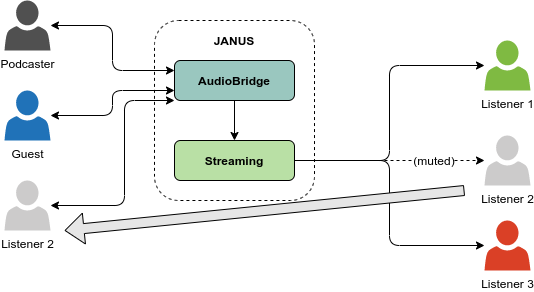
In a nutshell, the AudioBridge plugin acts as our audio mixer, which means it’s where active participants connect to contribute their audio, and get an N-1 mix of the other participants contextually. That doesn’t mean all participants in the room will get the audio directly from the AudioBridge, though: in fact, the way the AudioBridge plugin works, every connected participant gets a separate mix, which means there’s a separate encoder for each of them. This works nicely, but doesn’t scale well when there are hundreds of participants in a room. As such, attendees that are currently muted, and so are not contributing to the mix, are indeed in the room, but in a suspended state, and actually get the audio mix via the Streaming plugin instead, which acts as a “reflector” of the current main mix of all active participants. This is what the first diagram below summarizes, with a couple of active participants talking to each other via the AudioBridge directly, and everyone else consuming the same conversation via the Streaming plugin.

Sessions are always dynamic, though, meaning that the set of active contributors may change at any time. Someone who was just receiving media before may have to be able to contribute audio at a certain point (e.g., to make a presentation or ask a question), which means they need to be able to change their role dynamically. The second diagram shows how that works, with one of the attendees temporarily muting the Streaming feed (in order not to hear themselves speaking in the main mix), and “resuming” their participation in the AudioBridge for the active conversation part. When they’re done talking, they can suspend their AudioBridge participation again, and switch back to the lightweight Streaming mix.
The last diagram is meant to clarify that there isn’t just a single Streaming instance per each AudioBridge room, but there will actually often be more than one. This is to ensure that, no matter how wide the audience is, the mix will be able to reach them all by just leveraving more distribution instances.

Video follows a different approach, considering it’s SFU- and not MCU-based, but uses the Streaming plugin pretty much the same way for distribution as well. Namely, considering video isn’t mixed but simply relayed, this means that each video stream that is ingested in the VideoRoom plugin must be independently distributed via the Streaming plugin using a separate mountpoint: all attendees will as a consequence be able to selectively choose which video streams in the room to subscribe to (ideally all of them, under normal circumstances) and display them accordingly.
The diagram below shows exactly that, while again clarifying that there will often be multiple Streaming nodes helping with the distribution of all the available streams to a potentially wide audience. Of course, considering that, unlike audio, video isn’t mixed, there can be multiple video streams actve at the same time, all independently served via separate Streaming mountpoints.

In a nutshell, and with a few simplifications, this is how we can scale a single session to many participants, by decoupling the ingestion and distribution process for both audio and video. By leveraging multiple Janus instances and distributing the related Janus plugins accordingly, this allows us to seamlessly scale multiple sessions running at the same time (like the 8 parallel tracks I mentioned initially).
This simple overview also provides us with a better understanding of how we can get access to the different media streams in a session. As such, wow that we know a bit more about the streaming architecture, how can we bring MoQ into the picture?
An additional consumer: the Janus MoQ plugin
We’ve seen how the platform can deal with both active and passive attendees using slightly different patterns, and how the Streaming plugin can help distribute WebRTC media to the latter quite easily without weighing on the ingest components. This means that, if we want to re-stream the existing WebRTC streams via MoQ as well, and do it dynamically, all we need to do is basically adding a separate “hidden” subscriber that can receive those WebRTC feeds, in order to handle them accordingly.
This is indeed exactly what I talked about recently can help with. In fact, in that blog post (and the CommCon presentation I first presented this at) I described my efforts on performing WebRTC-to-MoQ and MoQ-to-WebRTC gatewaying, thanks to a new dedicated plugin in Janus leveraging the imquic library. In this specific instance, we were only interested in the WebRTC-to-MoQ part (we wanted attendees to be able to watch the session via MoQ, but not actively contribute back), which allowed us to focus on a single scenario specifically.
We explained how audio and video are handled differently in the platform. Audio is always mixed, no matter how many active participants there are, while video streams are separate, and can come and go at any time. This meant we could treat audio as a more or less static feed, while for video we needed some way to dynamically intercept streams appearing and disappearing at any time. One way or the other, though, the base concept was simple: we needed a separate Janus instance, one equipped with the MoQ plugin, to be able to receive WebRTC media from the Janus instances powering the IETF meeting, in order to then restream those streams via MoQ as well. The diagram below provides a basic visual representation of how that works for a single stream.

Considering the different nature of the media, and to simplify the integration as much as possible, we decided to rely entirely on Janus signalling for the job, rather than going through the orchestration APIs that coordinate the multiple Janus instances powering the meeting. In a nutshell, this meant a couple of things:
- we needed a simple orchestrator component, that could monitor resources of interest on the IETF Janus instances, in order to create WebRTC connections with the Janus+MoQ instance;
- we could refer to a static Streaming plugin mountpoint instance, for bringing audio to MoQ;
- we could monitor a specific VideoRoom room, to detect when publishers became active or went away, in order to publish/unpublish on the MoQ side dynamically as well.
With many available Janus instances, this also meant a bit of additional static configuration as well (considering we wanted to bridge a single session, rather than the whole IETF meeting), but apart from that, it was a quite straightforward process, as the heavy lifting was the actual WebRTC-to-MoQ media gatewaying, and that had already been dealt with. While the previous diagram sketched a high level perspective on how WebRTC streams between two Janus instances are turned into MoQ, the diagram below summarizes how this orchestrator specifically manages the different media and events, and how that results in MoQ interactions between the Janus instance hosting the MoQ plugin and the imquic relay.

As shown in the diagram above, the Janus MoQ plugin doesn’t use PUBLISH when a WebRTC stream needs to be gatewayed, but only sends a PUBLISH_NAMESPACE, in order to react to incoming SUBSCRIBE requests only when there will be someone interested in the media. Contextually, a catalog is prepared as well, out of the media negotiated on the WebRTC side.
In order to ensure subscribers can be notified dynamically about feeds appearing in the session (whether audio or video), a specific namespace prefix is used: subscribers can send a SUBSCRIBE_NAMESPACE for that prefix (e.g., ietf126-moq in our case), while the orchestrator instructs the Janus MoQ plugin to advertize namespaces under that umbrella (e.g., ietf126-moq-audio). The diagram below shows how a subscriber can be notified about a new audio stream appearing in the session, and how they react to the event.

We can see the subscriber sending a SUBSCRIBE_NAMESPACE to monitor the namespace prefix associated with the session. At a certain point, an audio stream appears (the orchestrator had the Janus+MoQ plugin instance subscribe to the Streaming plugin mountpoint, and create a new MoQ publisher contextually), as evinced by the NAMESPACE event the relay sends the subscriber: NAMESPACE only contains the suffix of the new publisher context, in this case audio. Since the subscriber doesn’t know if any track is available from this new publisher, and of what kind, they send a SUBSCRIBE for the catalog track, as specified in the MSF draft. In this specific case, this is the first subscriber for that track, so the relay sends it upstream to the original publisher (the Janus MoQ plugin), which accepts the subscription and sends the catalog data (a JSON string) as a MoQ object. The subscriber, at this point, has all the info they need to subscribe to the actual media stream (the mixed audio stream in this case), and decode/play the incoming media objects.
In case the subscriber is NOT the first subscriber, though (e.g., a new subscriber joining later on), there’s a slightly different workflow we need to follow. In fact, while the notification followed by the catalog subscription will work exactly the same way, if we stop there the subscriber will not receive the JSON string associated with the catalog, as that object has been served already, and so is not live content anymore. Luckily, though, MoQ provides a way to let subscribers know the state of the media at the moment they issue a subscription: specifically, the relay can provide info on the last object they say as a Largest Object parameter. As such, the subscriber can check if the parameter is set: if it is, it means that catalog data was previously sent, and is available for fetching. As such, issuing a FETCH for that specific object will ensure the subscriber receives the catalog data anyway, and can proceed with the media subscriptions.

Now, all the examples we’ve seen so far involved the audio stream, but the setup of video works pretty much the same way. Any time a new WebRTC video stream is turned into a MoQ publisher (e.g., because a remote user published their video in Meetecho), a PUBLISH_NAMESPACE will be sent to the subscriber all the same, and the same catalog request will be performed first to discover the video track to subscribe to. What changes as far as video is concerned is how the media subscription is handled after that, due to how audio and video themselves differ.
Specifically, audio objects are sent using the OBJECT_DATAGRAM delivery, and they can be independently decoded no matter which object is received first. This means that, even when joining mid-stream, subscribers will get audio data they can decode and play pretty much right away. Video works differently, instead: in fact, video encoding typically envisages group of frames, where the first frame is a “keyframe” (a complete picture independent of all previous frames, as far as encoding is concerned), while all other frames that follow in the same group will be “differences” from that keyframe. A keyframe is sent on a regular basis, to provide a safe starting point for the decoder. This means that normally, if a user joins mid-stream, the first video object they’ll receive may not be a keyframe at all, and so be a frame the user cannot decode until the next keyframe is received, which could only happen after a few seconds, if not more. This is a well known aspect of video encoding, in real-time media, and different technologies handle this in different ways: in WebRTC, for instance, it’s common to use RTCP PLI messages as a feedback mechanism by which subscribers can proactively ask a video publisher to generate a new keyframe as soon as possible, independently of how often keyframes are regularly produced by the endpoint.
MoQ does have a few ways to address the same requirement (including simply sending a FETCH to catch-up, like we do for catalog), but things are made a bit more complex than how we usually handle this in WebRTC. In fact, while MoQ has something similar to RTCP PLI in DYNAMIC_GROUPS / NEW_GROUP_REQUEST, as we’ve seen from the diagrams involving audio before the source publisher (our Janus instance with the MoQ plugin) is involved in a subscription only when the very first subscriber shows up, as the relay passes the SUBSCRIBE to Janus in that case: all other subscriptions for the same content are then handled by the relay directly, without involving Janus any more. This means that, in case we get a new subscriber for a video stream that already exists, we don’t have an immediate way to let the Janus MoQ plugin (the source publisher) know that we need a new keyframe from the upstream publisher (the WebRTC user) via a NEW_GROUP_REQUEST. The diagram below shows how we decided to handle that with the help of the relay.

We basically follow one of the suggested guidelines in the MoQ transport draft, and use a combination of filters and dynamic groups support. In a nutshell, when the Janus MoQ plugin receives a subscription for a video track, it adds a DYNAMIC_GROUPS property to the REQUEST_OK: this signals to the relay that the publisher supports generating new groups programmatically. At this point, when a subscriber joins mid-stream and discovers the video track via NAMESPACE and catalog as we’ve seen before, they also add a NextGroupStart filter type: by this filter, the subscriber is basically asking the relay to only start sending objects when a new group starts, as they need a keyframe to start decoding from. The relay, at this point, could either wait for the publisher to send the next keyframe in a new group (which could take a few seconds), or try to trigger a new one sooner than that. Since the relay knows the publisher supports dynamic groups, what it can do is send a REQUEST_UPDATE upstream with a NEW_GROUP_REQUEST, to do exactly that. The Janus MoQ plugin supports the parameter, and so when it receives the NEW_GROUP_REQUEST for a specific subscription, it finds the matching WebRTC user (the one actually feeding the media) and sends an RTCP PLI there to try and ask for a keyframe. The end result, if all works as expected, is that the WebRTC user will react to that PLI by generating a keyframe right away, which in turn means a new group will be created contextually on the MoQ side.
This may look a bit convoluted, but does work nicely in the context of our WebRTC-to-MoQ gatewaying. As an alternative we could have simply relied on FETCH, to basically ask the relay for all frames starting from the latest keyframe up to the bleeding edge, but considering many seconds could pass between a keyframe and the next, this could lead to a considerable spike of video traffic on the subscriber side (to receive many seconds of video data at once). Going for pro-active feedback like WebRTC does felt like a more efficient way of dealing with the requirement, at least in the context of this experiment.
MoQ audio and video in the browser
So far we have generically talked about MoQ subscribers talking to a relay, and how they rely on catalogs to figure out track names, whether the tracks are audio or video, the associated codecs and so on. Originally, I started using native subscribers for the task, implemented on top of my imquic library: I explained in other posts why I usually start that way, as it’s basically easier for me to deal with MoQ (and media) in a native application, than it is in a browser. In fact, while browsers are basically the ideal MoQ participant (using WebTransport and WebCodecs), we cannot rely on the media stack browsers make available out of the box for WebRTC, and we have to write one from scratch, with all the pain and misery that this brings.
That said, I knew I wanted web access to this experiment, in order to make it as easy as possible for people interested in checking it out to join the session and follow it via MoQ. Other proof-of-concepts I worked on in the meantime, like the MoQ push-to-talk demo, proved quite helpful in that regards, as they gave me some precious foundation to start from.
In order to implement a passive MoQ endpoint in a browser, you basically need two things:
- a MoQ stack, to deal with the signalling and the media transport;
- a media stack, to decode and render the live media received via MoQ.
The first part, exactly as in the PTT demo, I decided to handle via Moqtail, and specifically via the moqtail-ts library, which is a very efficient and easy-to-use open source project, made available by our friends at the Ozyegin University. This provided me with a very easy way to deal with the MoQ messaging in the browser, leveraging a WebTransport connection with my imquic relay.
The second part, instead, took some more effort, as while Moqtail did provide me with audio and video objects as they arrived, it was then up to me to do something with them, namely decoding them and presenting them in the web page somehow. I had already tinkered with live audio in the push-to-talk demo, but I hadn’t tackled video yet, which meant I did have some work ahead of me before it would be in a usable state.
The very first functionally complete demo, eventually, did handle audio and video in real-time, but with a few caveats. For audio, I basically copied what I had already done in the PTT demo, which meant borrowing what I had learned from Marco at CommCon: decoding audio with WebCodecs, and scheduling the playback of the individual audio chunks at a specific time using AudioContext, based on the audio object timestamp and the time of the first audio frame playback. For video, the process was simpler, as after decoding the video frames with WebCodecs, I could leverage MediaStreamTrackProcessor to basically feed the decoded video chunks to a specific MediaStreamTrack, to then render automatically in an HTML5 video element. This was again something I had learned from Marco’s presentation, so I have to thank him for that too!
The end result, in a very basic initial UI, was something like the screenshot you can see below: all the boxes you see came from a specific Meetecho session we were all in, where the orchestrator had, as designed, bridged the audio mix and all the video streams to MoQ as well.

NOTE WELL: I had to manually add Simon’s picture to the screenshot, as when he learned we had done a first experiment without him he was not happy about it 😀
The UI was quite ugly, but we were happy with the result nevertheless, especially because all feeds were correctly appearing/disappearing when they should, and we could indeed hear/see everything we could hear/see on the WebRTC side as well. MoQ media was a bit delayed compared to the WebRTC counterpart, but that was expected: in fact, in order to be able to properly gateway video frames sent over WebRTC via MoQ, Janus needs to collect all RTP packets the frame may be “spread” on, in order to reconstruct the whole frame, which is what MoQ objects need. To do this properly and account for potential jitter or out-of-order delivery on the WebRTC side, the MoQ plugin in Janus implements a buffer that waits about 200ms before attempting a frame reconstruction. 200ms is probably a too conservative choice, but for an experiment it seemed ok, and the end result is not too bad either.
That said, apart from the considerations above, as I anticipated there were a few caveats, and things we needed to fix. Apart from how ugly the UI looked, audio was not always very smooth (we could often hear a few pops or artifacts), for instance, and CPU usage was a bit higher than we hoped, especially when there were multiple videos involved. The obvious cause was the naive approach we had used for audio/video decoding and rendering, as while we were mostly doing the right things, we were doing them on the main UI thread of the browser, which is most definitely not how you should do things.
The fix for that was to basically move audio and video processing to dedicated workers, with the addition of a few additional tweaks. For audio, for instance, besides relying on a worker we also dropped the playback of individual and separate audio chunks, and moved to a single buffer to feed the AudioContext instead: this allowed us to basically have a simple playback buffer to absorb jitter and delays in the audio delivery, and get a much smoother audio playback as part of the process. For video, moving every video feed to a dedicated worker helper make everything much smoother, and free the UI thread from all the work it had to perform before.
As such, we were at a point where the basics worked, and worked reasonably well, at least for an experiment. Now it was the moment to check if there was anything else to make the demo more appealing, if we wanted to actually use it during the upcoming IETF meeting.
What about screensharing and slides?
Getting the audio mix and the individual video streams to be consumable via MoQ was a great milestone, but it wasn’t enough for an IETF meeting session. In fact, within the context of an IETF meeting session, the actual presentation is quite important as well, which means the slides the attendees are talking about. We felt that, for a more or less complete experiment, we needed to somehow carry those via MoQ as well.
At IETF meetings, there are a two different ways to share a presentation:
- using pre-shared slide decks, which are basically PDF presentations converted to images, where the presenter just sends triggers about what the current slide is, and other attendees are notified to retrieve and display it;
- using WebRTC screen-sharing, e.g., of a PowerPoint window or a screen.
In the vast majority of cases, the former is what is used for presentations. In fact, when chairs receive presentations in advance from participants, they will upload them on the datatracker as part of the meeting materials, and Meetecho is configured to automatically import them and make them available during the session. This means that it’s very easy for chairs to then retrieve those pre-loaded decks when the session starts, and the media is very lightweight as well for all parts involved, considering it just involves small text-based triggers and HTTP GETs for images. There are a few instances where “regular” screensharing can happen as well, though, e.g., for slides that were not available in advance, or whenever live content is more important (like discussing Github issues for a draft).
As anticipated, Meetecho supports both, which means both should be somehow reflected on the MoQ side as well. For screensharing, this was actually trivial: screensharing is, after all, just WebRTC video, and we gateway-ed that already. The only thing we needed to take into account was a way to notify the MoQ subscriber the nature of a new video feed: screensharing would need to be presented in a different way than regular video, for instance, which means the UI layout would also need to dynamically adapt as a consequence.
Pre-shared slide decks were a little trickier, considering those don’t use WebRTC at all, but go out-of-band through the Meetecho signalling channel. I decided to try and channel those events via MoQ as well, in order to use a single channel for all the media involved in the session as far as MoQ was concerned. The idea was simple:
- monitor presentations being started/stopped, using the related Meetecho API;
- for presentations being started, use
PUBLISHto pro-actively start a new MoQ publisher and a new track; - for every slide change trigger (JSON text), relay the trigger as a MoQ object on the track;
- when the presentations stop, send a
PUBLISH_DONEto get rid of the track.
This is summarized in the diagram below.

As you can see, the process is quite straigthtforward. Subscribers, besides using SUBSCRIBE_NAMESPACE to dynamically discover audio and video publishers (as we’ve seen before), also use SUBSCRIBE_TRACKS on a nested namespace to be notified dynamically about new pre-shared presentations as well. There were a couple of reasons we chose to use a different approach for presentations, rather than just relying on the existing SUBSCRIBE_NAMESPACE: first of all, for slides we don’t really need a catalog, since we know objects are going to be simple JSON objects serialized as text strings as there are no different media codecs involved; and besides, this gave us the opportunity to experiment with both of the main MoQ subscription models within the context of the same application, for some more coverage of the MoQ fundamentals.
Note that it’s worth mentioning that, while I refer to
SUBSCRIBE_TRACKSin both the diagram and the description above, the actual demo usedSUBSCRIBE_NAMESPACEwith subscribe options limited to an interest inPUBLISH: that’s because Moqtail, the library we used on the web side, at the time of writing only supported version 16 of the draft, whereSUBSCRIBE_TRACKSdidn’t exist yet butSUBSCRIBE_NAMESPACEprovided a functionally equivalent feature.
Long story short, we updated the UI to dynamically change the layout when a presentation appeared (whether as a pre-loaded deck or as a screenshare). As part of that effort, we also updated the UI to make it “prettier” than the ugly demo I had started from. After a bit of stress-testing of the instance, to see how many streams we could handle (we’d be using my imquic relay for the job, after all, which is not really optimized for performance yet), we were finally ready to run the experiment. All we needed to do was wait for the IETF meeting in Vienna, and for the multiple (three!!) MoQ sessions that would be hosted there.
IETF time… action!
At the IETF 126 meeting in Vienna, three different sessions of MoQ were scheduled: one on Monday, one on Thursday and a final one on Friday. Before that, though, there would be the IETF Hackathon, which I regularly attend as it’s always a nice opportunity to catch up with other IETF-ers working on MoQ, and perform interop tests among our implementations. This edition made no exception, as many of us met there and worked together over the course of a couple of days to do exactly that. The photo below was taken by Mike English, our MoQ Interop Czar!

I took advantage of this venue to give a sneek peek of the WebRTC-to-MoQ demo, where the Meetecho room being “translated” to MoQ was a test session hosted on the same infrastructure. The demo seemed to work nicely and was well received, which of course I was very happy about, as so far we had only tested it internally.
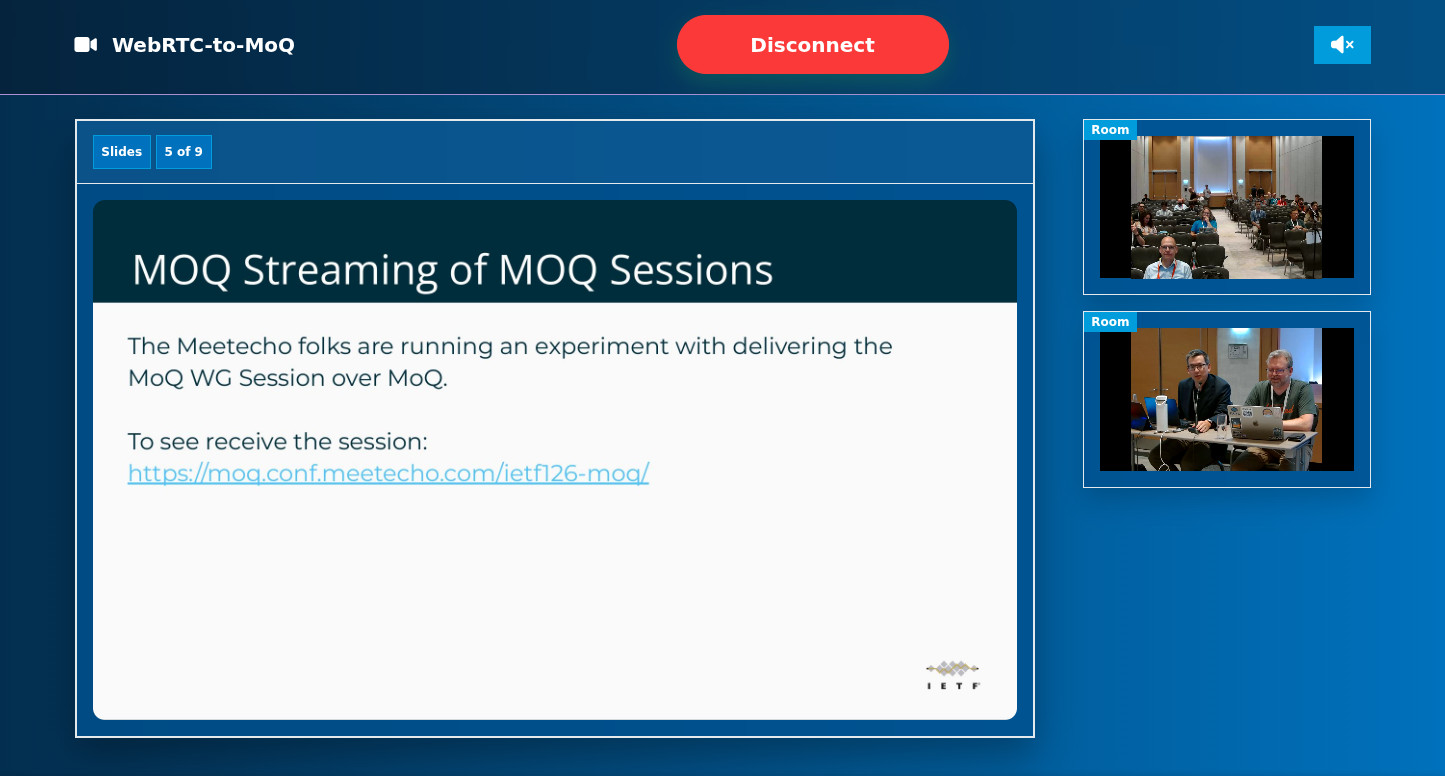
On Monday, it was time to finally see the experiment in action for good. We had notified chairs and ADs about the experiment in advance, in order to make sure it would be ok for us to run it during the session in the first place, and so the chairs advertised the link to attend the MoQ session with MoQ on their introductory slides. The two screenshots below show the same scene from two different perspectives: the first is the regular WebRTC-based Meetecho client, while the second shows the same media (slides and video streams) server via MoQ instead, using our new UI.


As you can see, apart from all the extra functionality available in the WebRTC-based client that we didn’t port to MoQ (e.g., slides, list of attendees, etc.), the main content we cared about, namely slides and video streams (in this case just the cameras we deploy and control ourselves to capture main speakers and audience) were exactly the same. The audio stream worked nicely too, as expected.
Video from remote participants was automatically ported to MoQ as well, as you can see in the screenshots below, which again show the two different endpoints.


The first session went on without hiccups, as about 20 people had accessed the page to follow the session via MoQ. Most importantly, we received some love from Jordi, which I was very grateful for, considering that, as anticipated, he had been the very first to stream a MoQ session with MoQ a couple of years ago, and his amazing work on moq-encoder-player had been precious for my MoQ tinkerings!

Jordi also had some very good feedback on audio/video synchronization, which was serviceable for the use case we presented, but could definitely be improved before it could be used in more professional broadcasting scenarios. He made a good point, especially considering that our demo code doesn’t currently handle A/V synchronization at all: while timestamp information (derived from the original RTP headers) is provided as part of the LOC properties that accompany each packet, we currently don’t really make use of it, if not as some additional information that we pass to WebCodecs when processing frames to decode. Once frames are decoded, they’re simply rendered as soon as possible: audio frames are added to the buffer for smoother playback, while video frames are passed to the MediaStreamTrackProcessor as soon as they’re ready.
Without bothering you too much with the details, the other two sessions went on smoothlessly as well (with more or less the same number of subscribers), and sometimes involving even more video streams than before, whenever multiple remote participants chimed in the conversation.


Overall, the feedback we got seemed to confirm that the experiment worked really well, with one in particular really catching my attention…

Does this mean we’re the first to stream MoQ at 30 thousands feet? Unless someone proves otherwise, I’ll definitely keep this record 😀
What’s next?
As we mentioned, the experiment went really well, and we were very happy about the result. We got good feedback and questions, after the fact, about how things were implemented, and where things could be improved. This blog post is indeed an attempt to provide more context on how it was born in the first place, and how we implemented it in practice.
There are indeed some places where the demo could be improved. We already mentioned Jordi’s notes on A/V synchronization, for instance, which could be tricky since in practice, considering we use different backends for audio and video (and MCU vs SFU), those media aren’t exactly synchronized at the source either. That said, better synchronization of the received media using the LOC timestamps we receive is definitely something that should be done. One other interesting note is that the demo was limited to Chrome/Chromium based browsers, for the simple fact that video support was based on MediaStreamTrackProcessor, which is only available there. As Kota, the main force behind Moqtopus, pointed out, switching to something like canvas would break that constraint, possibly at the expense of some CPU usage. Suhas also wondered why we used SUBSCRIBE_NAMESPACE for audio and video, especially for media that comes and goes frequently: switching to SUBSCRIBE_TRACKS and PUBLISH could be an option there too (rather than just for slides, as we did), but we felt that for this initial experiment it could have complicated things (e.g., in the need of handling incoming catalog and media track tracks at the same time, and managing them in the right order).
All that said, this experiment gave us some interesting results, that we’ll definitely get back to in the future. Whether we’ll repeat this experiment at the next IETF, and/or expand it to other sessions (or maybe more features that we skipped here), we’re not sure yet, but at least we now know it can be done. Paraphrasing what the chairs said during the session, “since we’re streaming MoQ with MoQ, does this mean we’re done?” 😀
That’s all, folks!
I hope you appreciated this write-up on how we tried to eat our own dog food, and stream all MoQ sessions with MoQ, piggy-backing on the existing WebRTC infrastructure. I was definitely excited when the day came to actually stream the sessions and see if it all actually worked as we planned them to, and I think we can be happy about the final outcome, especially if you consider the experimental nature of the prototype. If you have any feedback or question about all this, please do feel free to reach out!

I’m getting older but, unlike whisky, I’m not getting any better
0 Comments
Log in to join the conversation.No comments yet. Be the first to share your thoughts.