
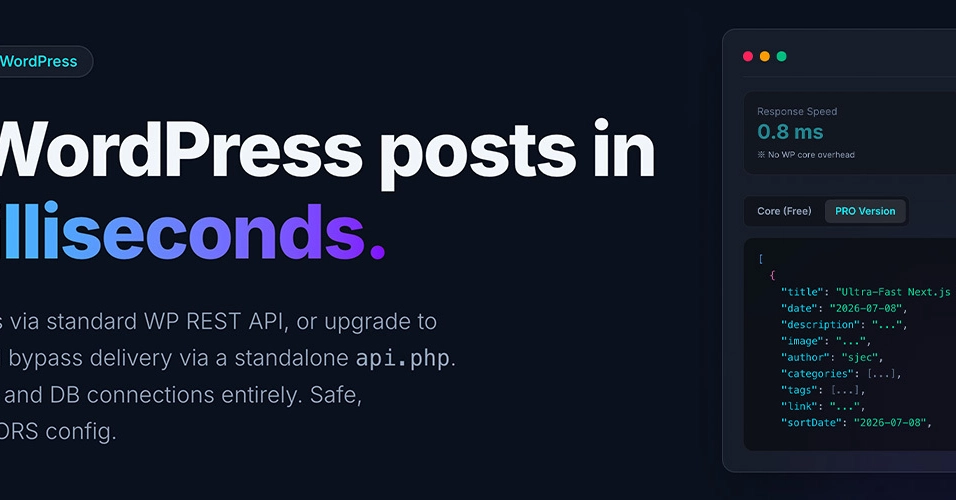


你決定用 Next.js 或 Astro 這類現代前端框架建置無頭 WordPress 站點。聽起來是很好的開發體驗——直到你遇到兩個惡名昭彰的障礙:
-
CORS 地獄:你在
http://localhost:4321或http://localhost:3000啟動本機開發伺服器,發出 fetch 請求,然後……轟!你的瀏覽器主控台瞬間被紅色 CORS 政策錯誤淹沒。 - 遲緩的 REST API:標準的 WordPress REST API 或 WPGraphQL 每次請求都會啟動整個 WordPress 核心並查詢 MySQL。回應時間徘徊在 300ms 至 1s 之間,拖慢建置速度,也讓動態伺服端擷取變得緩慢。
如果你能把 WordPress 變成靜態 JSON 產生器、即時提供 API 酬載而不需資料庫查詢,並直接從管理後台管理 CORS 標頭,零伺服器設定,會如何?
以下是使用開源外掛 Static JSON Export & CORS Whitelist 在 1 分鐘內完成的方法。
曾考慮的其他標題
- How to solve WordPress CORS issues in 1 minute with Astro / Next.js
- Bypass WordPress Database: How to Fetch Static JSON with Zero-Config CORS(已選)
- The Clean Way to Headless WordPress: Static JSON + Zero-SDK Plugin
原理說明:靜態 JSON 與動態資料庫查詢的比較
在傳統無頭架構中,前端每次請求都會查詢資料庫:
[Traditional REST API]
Frontend Fetch ──> Boot WordPress ──> Run MySQL Queries ──> Format JSON ──> Return Payloads (200-500ms)
Enter fullscreen mode Exit fullscreen mode
使用靜態 JSON 匯出架構,資料庫將被繞過:
[Static JSON Export]
Content Updated ──> Write Static JSON files in Background
Frontend Fetch  ──> WordPress REST Endpoint  ──> Directly Load JSON file ──> Return Payloads (30-50ms)
Enter fullscreen mode Exit fullscreen mode
由於 JSON 會在發布時預先渲染,因此在提供供稿時資料庫查詢次數為 零,大幅降低流量高峰時的伺服器負載。
1 分鐘 WordPress 設定
- 在官方 WordPress 外掛目錄搜尋並安裝 Static JSON Export & CORS Whitelist。
- 在儀表板中開啟 JSON Export CORS 設定頁面。
- 在 CORS Allowed Origins 清單中,加入你的開發網址(例如
http://localhost:4321或http://localhost:3000)。 - 在 JSON Feeds Settings 中,新增一個名為
posts的供稿,對應post內容類型,然後點擊 Save Settings。
外掛會立即將你的文章匯出為靜態 JSON 檔案。你將獲得兩個乾淨的端點:
-
供稿索引:
https://your-wp.com/wp-json/sjec/v1/feed?name=posts -
單篇文章細節:
https://your-wp.com/wp-json/sjec/v1/post?feed=posts&slug=hello-world
連接前端
以下是在 Astro 與 Next.js 中使用這個乾淨、已啟用 CORS 的靜態 JSON 供稿的簡單範例。
範例 A:Astro(靜態站點產生)
Astro 以靜態為優先的做法,與靜態 JSON 供稿完美契合。
---
// src/pages/index.astro
interface Post {
  id: number;
  title: string;
  slug: string;
  excerpt: string;
  date: string;
}

// Fetch the static JSON feed (no DB queries executed on WP)
const response = await fetch('https://your-wordpress-site.com/wp-json/sjec/v1/feed?name=posts');
if (!response.ok) {
  throw new Error('Failed to fetch posts');
}
const posts: Post[] = await response.json();
---

<html lang="en">
  <head>
    <meta charset="utf-8" />
    <title>Fast Headless Astro Blog</title>
  </head>
  <body class="max-w-3xl mx-auto py-12 px-4 bg-slate-50 text-slate-800">
    <header class="mb-12">
      <h1 class="text-4xl font-extrabold">Lightning-Fast Headless Blog</h1>
      <p class="text-slate-500 mt-2">Bypassing WordPress database queries using pre-generated static JSON feeds.</p>
    </header>

    <main class="space-y-6">
      {posts.map((post) => (
        <article class="p-6 bg-white rounded-lg shadow-sm border border-slate-100 hover:shadow-md transition">
          <h2 class="text-2xl font-bold text-indigo-600 hover:underline">
            <a href={`/blog/${post.slug}`}>{post.title}</a>
          </h2>
          <p class="text-slate-600 mt-3" set:html={post.excerpt} />
          <time class="text-xs text-slate-400 block mt-4">
            Published: {new Date(post.date).toLocaleDateString()}
          </time>
        </article>
      ))}
    </main>
  </body>
</html>
Enter fullscreen mode Exit fullscreen mode
範例 B:Next.js(App Router - 增量靜態再生)
Next.js 會自動快取靜態 JSON 檔案並以高效率提供。
// app/blog/page.tsx
export const revalidate = 600; // Cache for 10 minutes

interface WordPressPost {
  id: number;
  title: string;
  slug: string;
  excerpt: string;
  date: string;
}

export default async function BlogIndexPage() {
  const res = await fetch('https://your-wordpress-site.com/wp-json/sjec/v1/feed?name=posts', {
    next: { revalidate: 600 }
  });

  if (!res.ok) {
    throw new Error('Failed to fetch static feed');
  }

  const posts: WordPressPost[] = await res.json();

  return (
    <div className="max-w-4xl mx-auto py-12 px-6">
      <h1 className="text-3xl font-bold mb-8">Next.js + Static JSON Feeds</h1>
      <div className="space-y-6">
        {posts.map((post) => (
          <div key={post.id} className="p-6 bg-white border border-slate-200 rounded-lg shadow-sm">
            <h2 className="text-2xl font-bold">
              <a href={`/blog/${post.slug}`} className="text-blue-600 hover:text-blue-800 hover:underline">
                {post.title}
              </a>
            </h2>
            <div
              className="text-slate-600 mt-2"
              dangerouslySetInnerHTML={{ __html: post.excerpt }}
            />
            <span className="text-xs text-slate-400 mt-4 block">
              Published: {new Date(post.date).toLocaleDateString()}
            </span>
          </div>
        ))}
      </div>
    </div>
  );
}
Enter fullscreen mode Exit fullscreen mode
效能基準測試
我們在本地環境下比較了標準 WP REST API 與此外掛的回應速度:
| 路由 / 方法 | 平均回應時間 | 資料庫負載 | 備註 |
|---|---|---|---|
| Standard WP REST API | ~320 ms | 高(啟動 WP + 查詢 MySQL) | 速度慢,在負載下容易崩潰 |
| This Plugin (Free Version) | ~35 ms | 零 (0) | 透過 WP REST 提供已儲存的 JSON |
| This Plugin (PRO Version) | <1 ms | 零 (0) | 透過獨立的 api.php 完全繞過 WP Core |
即使是免費版本,也能將回應延遲降低約 90%,並完全消除資料庫查詢,確保你的主機伺服器保持穩定。
🧼 100% 乾淨:無追蹤 SDK、無臃腫
WordPress 目錄中的許多免費外掛都包含第三方行銷 SDK(如 Freemius)來收集使用者追蹤資料。這通常會在管理後台塞滿惱人的升級橫幅。
為了尊重開發環境,此外掛的免費版本完全不含 SDK:
- 無追蹤器或動態外部腳本。
- 無侵入式升級通知或行銷彈窗。
- 輕量級程式碼庫,100% 符合 WordPress.org 提交規範。
若你日後需要高效能功能(如獨立的 api.php 端點、多個自訂供稿或 Webhook 自動觸發),可以另外購買並下載 PRO 版本。
後續步驟
若要在 60 秒內嘗試此設定,請查看:
- 🌐 WordPress 外掛:Static JSON Export & CORS Whitelist on WordPress.org
- 🚀 即用樣板:Astro Headless WordPress Starter Template on GitHub
你是否曾建置無頭 WordPress 站點?你用了什麼方法解決 CORS 並加速 API 回應?歡迎在留言區討論!
0 Comments
Log in to join the conversation.No comments yet. Be the first to share your thoughts.